# What is RoadRunner?
RoadRunner is a high-performance PHP application server and process manager, designed with extensibility in mind through its utilization of plugins. Developed in Go, RoadRunner operates by running your application in the form of workers, where each worker represents an individual process, ensuring isolation and independence in their operation.
It is designed to be a central processor for PHP applications, helping developers create faster, more responsive, and robust applications with ease.

## How it works
RoadRunner efficiently manages a collection of PHP processes, referred to as workers, and routes incoming requests from various plugins to these workers. This communication is done through the [goridge](https://github.com/roadrunner-server/goridge) protocol, enabling your PHP application to handle requests and send responses back to clients.

The following plugins are designed to run workers and handle specific types of requests:
* [**HTTP**](/docs/http/http) - Processes incoming HTTP requests from clients and forwards them to the PHP application.
* [**Jobs**](/docs/queues-and-jobs/overview-queues) - Handles queued tasks received from queue brokers and sends them to a consumer PHP application for processing.
* [**Centrifuge**](/docs/plugins/centrifuge) - Manages events from Centrifugo WebSocket server clients and forwards them to the PHP application. It supports bidirectional communication, allowing for efficient and seamless interaction between the server and clients.
* [**gRPC**](/docs/grpc/grpc) - Deals with gRPC requests from clients and passes them on to the PHP application.
* [**TCP**](/docs/plugins/tcp) - Handles raw TCP requests in RoadRunner v2025. RoadRunner v3 does not support it.
* [**Temporal**](/docs/workflow-engine/temporal) - Manages workflows and activities, allowing for the efficient handling of various tasks and processes.
By utilizing these plugins, RoadRunner ensures that your PHP application can handle a wide range of requests and communication protocols, delivering optimal performance and flexibility.
## Goridge RPC interface
Applications call these RoadRunner plugin services through [Goridge RPC](/docs/php-worker/rpc). The transport uses Go `net/rpc`, not gRPC. The services include:
* [**KV**](/docs/key-value/overview-kv) - A cache service that allows for efficient storage and retrieval of cached data.
* [**Locks**](/docs/plugins/locks) - Offers a convenient means to manage distributed locks, ensuring resource access coordination across multiple processes or systems.
* [**Service**](/docs/plugins/service) - A dynamic server processes supervisor that enables seamless management of server processes directly from the application.
* [**Jobs**](/docs/queues-and-jobs/overview-queues) - Provides the ability to dynamically manage queue pipelines from within the application, streamlining the execution of tasks and jobs.
* [**Logger**](/docs/logging-and-observability/logger) - Facilitates the forwarding of logs from the application to the RoadRunner logger, ensuring centralized and efficient log management.
* [**Metrics**](/docs/logging-and-observability/metrics) - Allows for the submission of application metrics to Prometheus, promoting comprehensive monitoring and analysis of application performance.
## PHP worker
RoadRunner keeps PHP workers alive between incoming requests. This means that you can completely eliminate bootload time (such as framework initialization) and significantly speed up a heavy application.
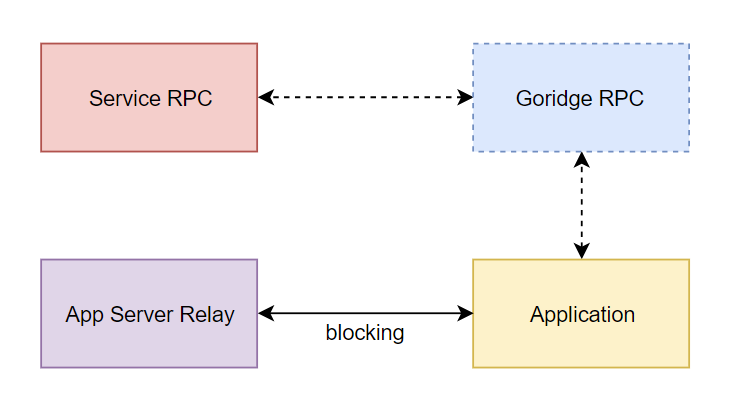
Since a worker resides in memory, all open resources persist across requests, remaining accessible for subsequent interactions. Utilizing the built-in [goridge](https://github.com/roadrunner-server/goridge), you can offload complex computations to the application server. For instance, you can schedule a background PHP job or even develop your own [custom RoadRunner plugin](/docs/customization/plugin) to process complex tasks using Go, which offers improved efficiency and performance. By leveraging the strengths of both PHP and Go, you can create a more robust and high-performance solution for your applications.
The following properties of PHP workers are worth mentioning:
* **Isolation:** Each worker process operates independently, preventing interference with other worker processes and improving stability.
* **Scalability:** The shared-nothing architecture makes it easier to scale applications by simply adding more worker processes.
* **Fault Tolerance:** The failure of a single worker does not impact the functioning of other workers, ensuring uninterrupted service.
* **Simplified Development:** By maintaining the isolation of workers, the shared-nothing architecture reduces the complexity of managing shared resources and simplifies the development process.
## What's Next?
1. [PHP Workers](/docs/php-worker/worker) - Learn how to configure and run PHP workers.
2. [PHP Workers — RPC to RoadRunner](/docs/php-worker/rpc) - Learn how to use RPC to communicate with PHP applications.
3. [Writing a custom plugin](/docs/customization/plugin) - Learn how to create a custom plugin.
# Features
## Join our discord server: [Link](https://discord.gg/TFeEmCs)
RoadRunner is an open-source (MIT licensed) high-performance PHP application server and process manager written in Go and powered with plugins ❤️. It supports running as a service with the ability to extend its functionality on a per-project basis with plugins and is designed to replace traditional Nginx+FPM setups with enhanced performance and versatility. With its wide range of features, RoadRunner is a production-ready solution that is PCI DSS compliant, ensuring the security and safety of your web applications.
RoadRunner includes [PSR-7](https://www.php-fig.org/psr/psr-7), [PSR-17](https://www.php-fig.org/psr/psr-17) compatible HTTP and `HTTP(S)/2/3/fCGI` servers and can be used to replace classic Nginx+FPM setups with much greater performance and flexibility. `HTTP(S)/2/3/fCGI` servers as just one of its many available plugins, but its capabilities extend far beyond:
* Queue drivers: RabbitMQ, Kafka, SQS, Beanstalk, NATS, Google Pub/Sub, BoltDB, In-Memory, and [NSQ](/docs/queues-and-jobs/nsq).
* KV drivers: Redis, Memcached, BoltDB, In-Memory.
* OTLP trace export over gRPC or HTTP.
* Workflows engine via [Temporal](https://temporal.io)
* [gRPC](/docs/grpc/grpc) server with reflection and a [protobuf registry](/docs/grpc/protoreg).
* `HTTP(S)/2/3` and `fCGI` servers with automatic TLS management, 103 Early Hints, static files, headers, gzip, [Zstd](/docs/http/zstd), [rate limiting](/docs/http/rate-limiter), metrics, X-Sendfile, tracing, and proxy IP parsing.
* Embedded distribute lock plugin which manages access to shared resources.
* Metrics server (you might easily expose your own).
* WebSockets and Broadcast via [Centrifugo](https://centrifugal.dev) server.
* Systemd-like services manager with auto-restarts, execution time limiter, etc.
* Embedded supervisor for your PHP workers with execution, max working time, and memory TTLs.
* Compatible with Windows, WSL2, FreeBSD, GNU/Linux, etc.
* And more 😉
These pages describe RoadRunner v3. See the [v3 release notes](/docs/releases/v3-0-0) and [upgrade steps from v2025](/docs/general/v3-migration).
If you have a feature request in mind, you can check out [GitHub issues](https://github.com/roadrunner-server/roadrunner/issues) page. Here you'll find a list of open feature requests. The RoadRunner community is active and responsive, so feel free to join the discussion on our [Discord channel](https://discord.gg/spiralphp) or [contribute](/docs/general/contributing) to the project.
[](https://discord.gg/spiralphp)
With the support of the community, RoadRunner will continue to grow and evolve to meet the needs of modern web development.
### Useful articles
* [Scaling PHP applications with RoadRunner](https://betterstack.com/community/guides/scaling-php/php-roadrunner)
* [RoadRunner for PHP applications](https://butschster.medium.com/roadrunner-an-underrated-powerhouse-for-php-applications-46410b0abc)
* [Turbocharge for your PHP applications](https://davegebler.com/post/php/turbo-charge-your-php-applications-with-roadrunner)
# Quick Start
This guide walks you through getting started with RoadRunner. You'll learn how to install RoadRunner and configure it for your project.
## Step 1: Install RoadRunner
Follow the [installation guide](/docs/general/install) to install RoadRunner v3. Keep the `rr` binary in your project directory.
## Step 2: Install PHP
RR requires PHP to run. If you don't have PHP installed, you can download it from the [official PHP website](https://www.php.net/downloads.php) and follow the installation instructions for your operating system.
Install [Composer](https://getcomposer.org/download/). Enable the PHP `sockets` extension. Run this command in the project directory to install the worker dependencies:
```bash
composer require spiral/roadrunner-http nyholm/psr7
```
## Step 3: Create a simple configuration
Next, you need to create a simple configuration file for RR. Open a text editor and create a new file called `.rr.yaml`. Add the following content to the file:
{% code title=".rr.yaml" %}
```yaml
version: "3"
server:
command: "php psr-worker.php"
http:
address: 0.0.0.0:8080
# Do not use development mode in production
logs:
level: debug
mode: development
```
{% endcode %}
{% hint style="info" %}
RoadRunner is not only an HTTP plugin. There are many other plugins. Find more in the [Plugins](/docs/plugins/intro) section.
{% endhint %}
## Step 4: Create a simple worker
Now create a simple worker. Create a new file called `psr-worker.php` and add the following content:
{% code title="psr-worker.php" %}
```php
waitRequest();
if ($request === null) {
break;
}
} catch (\Throwable $e) {
$psr7->respond(new Response(400));
continue;
}
try {
$psr7->respond(new Response(200, [], 'Hello RoadRunner!'));
} catch (\Throwable $e) {
$psr7->respond(new Response(500, [], 'Something Went Wrong!'));
$psr7->getWorker()->error((string)$e);
}
}
```
{% endcode %}
## Step 5: Start the server
Now start the server. You should have the following files in the current folder:
* `.rr.yaml`
* `psr-worker.php`
* `composer.json`
* `composer.lock`
* `vendor/`
* `rr` binary
Then, open a terminal window in the current folder and run the following command:
```bash
./rr serve
```
Since logs are in development mode, you should see the following output:
# Installation
These guides describe RoadRunner v3 with v6 plugins.
## Requirements
* Go `1.27.1` for the source build.
* PHP `8.5` with the `sockets` extension for the examples.
* Composer 2 for PHP dependencies.
* `curl` and `tar` to download and extract archives.
Check the installed versions and PHP extensions:
```bash
go version
php --version
php --modules
composer --version
```
## Pre-built Binaries
Download RoadRunner `v3.0.0` from the [GitHub release page](https://github.com/roadrunner-server/roadrunner/releases/tag/v3.0.0). Select the archive for your operating system and architecture. Extract `rr` into your application directory.
For Linux AMD64, run:
```bash
curl --fail --location --output roadrunner-3.0.0-linux-amd64.tar.gz \
https://github.com/roadrunner-server/roadrunner/releases/download/v3.0.0/roadrunner-3.0.0-linux-amd64.tar.gz
tar -xzf roadrunner-3.0.0-linux-amd64.tar.gz --strip-components=1 \
roadrunner-3.0.0-linux-amd64/rr
./rr --version
```
## Build From Source
Run these commands from your application directory. The build uses the plugin versions in the downloaded `go.mod` and produces `./rr` for the host operating system and architecture. Set `RR_REF` to a full commit SHA when you need a repeatable build.
```bash
RR_REF=v3.0.0
curl --fail --location --output rr-source.tar.gz \
"https://github.com/roadrunner-server/roadrunner/archive/${RR_REF}.tar.gz"
mkdir rr-source
tar -xzf rr-source.tar.gz --strip-components=1 -C rr-source
CGO_ENABLED=0 go -C rr-source build -mod=readonly -trimpath \
-ldflags "-s -X github.com/roadrunner-server/roadrunner/v3/internal/meta.version=${RR_REF}" \
-o ../rr ./cmd/rr
./rr --version
```
Inspect the compiled module versions with `go version -m ./rr`. Keep the source revision and `go.sum` with your build inputs. To select a different set of plugins, use the [Velox build guide](/docs/customization/build).
## Docker
Use the official image `ghcr.io/roadrunner-server/roadrunner:3.0.0`. The [Docker guide](/docs/app-server/docker#build-the-application-image) shows how to copy its binary into a PHP application image. The v3 image tags are `3`, `3.0`, and `3.0.0`.
For a custom source build, set `CGO_ENABLED=0` and build for Linux and the container architecture. For example, add `GOOS=linux GOARCH=amd64` before `go` for a Linux AMD64 image. Run the version check on the target platform when you cross-compile. See [Build the RoadRunner Image](/docs/app-server/docker#build-the-roadrunner-image) to package a custom binary.
## Composer
Install the PHP packages needed by your worker. For an HTTP worker, run:
```bash
composer require spiral/roadrunner-http nyholm/psr7
```
Composer installs the PHP libraries. Use a pre-built binary or a source build for the RoadRunner server.
## What's Next?
1. [Quick Start Guide](/docs/general/quick-start).
2. [RoadRunner Configuration](/docs/general/config).
3. [Developer Mode](/docs/php-worker/developer).
# Configuration
RoadRunner supports both **YAML** and **JSON** configuration formats. The examples in our documentation use YAML, but you can use JSON as well.
{% hint style="info" %}
To convert a YAML configuration file to JSON, you can use an online tool such as .
{% endhint %}
## Configuration reference
Use the configuration reference for the RoadRunner revision you build:
* [**.rr.yaml for v3.0.0**](https://github.com/roadrunner-server/roadrunner/blob/v3.0.0/.rr.yaml)
{% hint style="warning" %}
We use dots as level separators, e.g.: `http.pool`, you can't use dots in section names, queue names, etc. You can find out more about it [here](https://github.com/roadrunner-server/roadrunner/issues/1529).
{% endhint %}
## Unix Socket Attributes
{% hint style="info" %}
RoadRunner v3 supports these options through its v6 plugins. See the [v3 release notes](/docs/releases/v3-0-0).
{% endhint %}
Configure each filesystem Unix listener separately. Omit its options object to keep the existing socket defaults.
The configuration provider can discard an empty options object (`{}`). It then behaves like omission, including on TCP addresses or the `pipes` worker relay.
| Options object | Listener address |
| ------------------------- | ------------------------------------------------------- |
| `http.unix_socket` | `http.address`, including H2C |
| `http.fcgi.unix_socket` | `http.fcgi.address` |
| `rpc.unix_socket` | `rpc.listen` |
| `grpc.unix_socket` | `grpc.listen` |
| `centrifuge.proxy_socket` | `centrifuge.proxy_address`, the incoming proxy listener |
| `fileserver.unix_socket` | `fileserver.address` |
| `server.relay_socket` | `server.relay`, the worker communication listener |
All objects use the same optional fields:
| Field | Meaning |
| ------ | ------------------------------------------------------------------------------------------ |
| `mode` | Quoted octal string from `"0000"` through `"0777"`. Omitted or empty means no mode change. |
| `uid` | Numeric socket owner ID. Omit it to keep the default owner. |
| `gid` | Numeric socket group ID. Omit it to keep the default group. |
Use numeric UID and GID values from `0` through `4294967294` that fit the platform's Go `int` type. Zero is an explicit ID, not an omitted value. Account names are not supported.
The configuration provider converts values before socket validation. Viper can convert booleans and fractional numbers to integer IDs. An unset or empty environment variable can become ID `0`, rather than cause an error. Set ID variables explicitly, or omit the fields to keep ownership unchanged.
These options require a filesystem `unix://` address on Linux, macOS, or FreeBSD. They do not apply to TCP addresses such as `0.0.0.0:8000`, the `pipes` worker relay, Windows, or Linux abstract sockets. They do not change RoadRunner or PHP worker credentials, the process umask, or application file permissions.
The plugin validates the decoded socket options during initialization, before it opens that listener. Invalid modes, out-of-range IDs, and incompatible listener addresses fail initialization. This validation does not check filesystem permissions.
Create the parent directory before startup. RoadRunner needs permission to create the socket there. Clients need search (`x`) permission on every parent directory. The process also needs permission to apply the requested ownership changes. An unprivileged socket owner can change the socket group only to a group to which its process belongs.
Ownership is applied before mode, after the socket starts listening. Clients can connect before these operations finish. The settings specify final attributes, not access control during startup. Existing directory permissions and umask must restrict initial access. Parent directories must prevent untrusted path replacement. If an attribute change fails, RoadRunner closes that listener and reports the error.
See [Nginx group access](/docs/app-server/nginx-with-rr#unix-socket) for a FastCGI example.
## Configuration file
RoadRunner looks for `.rr.yaml` in the current working directory.
If your configuration file and other application files are located in a different directory than the binary, you can use the `-w` option to specify the working directory.
```bash
./rr serve -w /path/to/project
```
You can also use the `-c` option to specify the path to the configuration file if you don't want to specify the working directory.
```bash
./rr serve -c /path/to/project/.rr-dev.yaml
```
Or you can combine the `-c` and `-w` options to specify both the configuration file and the working directory:
```bash
./rr serve -c .rr-dev.yaml -w /path/to/project
```
Without `-w`, RoadRunner changes its working directory to the configuration file's directory. With `-w`, it uses that directory and resolves a relative `-c` path from there.
{% hint style="info" %}
Read more about starting the server in the [**Server Commands**](/docs/app-server/cli) section.
{% endhint %}
### CLI command and arguments
You can also use environment variables in CLI commands to customize the behavior of your RR server. This is especially useful when you need to pass configuration values that are environment-specific or sensitive, such as secrets or API keys.
```bash
set -a
source /var/www/config/.env
set +a
exec /var/www/rr \
-c /var/www/.rr.yaml \
-w /var/www \
-o http.pool.num_workers=${RR_NUM_WORKERS:-8} \
-o http.pool.max_jobs=${RR_MAX_JOBS:-16} \
-o http.pool.supervisor.max_worker_memory=${RR_MAX_WORKER_MEMORY:-512} \
serve
```
The `set -a` enables automatic exporting of variables. Any variables that are defined in `/var/www/config/.env` will be automatically exported to the environment, making them available to any child processes that are executed from the current shell. The final `set +a` command disables automatic exporting of variables, ensuring that only the variables that were defined in `/var/www/config/.env` are exported, and preventing any unintended variables from leaking into the environment.
In this example, the following options are used:
| Option | Description |
| -------------------------- | ------------------------------------------------------------------------------------------------------------------------------------ |
| **-c** | Specifies the configuration file. |
| **-w** | Specifies the working directory. |
| **-o** | Overwrites specific configuration options. |
| **/var/www/config/.env** | File that contains the required environment variables. |
| **${RR\_NUM\_WORKERS:-8}** | Sets the number of workers to `RR_NUM_WORKERS` from the `.env` file or uses the default value of `8` if the variable is not present. |
## Include configuration files
List additional configuration files under `include`. RoadRunner reads the list in order after it reads the main file and applies CLI overrides. Includes do not require experimental mode.
{% code title=".rr.yaml" %}
```yaml
version: "3"
include:
- config/http.yaml
- config/local.yaml
```
{% endcode %}
Paths are relative to the RoadRunner process working directory. Each included file must contain the same string `version` as the main file. A missing file, invalid YAML, or a different version stops initialization.
For example, put the HTTP settings in this file:
{% code title="config/http.yaml" %}
```yaml
version: "3"
server:
command: "php worker.php"
relay: pipes
http:
address: 127.0.0.1:8080
pool:
num_workers: 2
```
{% endcode %}
An included value overrides a matching value from the main file or an earlier include. Values found only in the main file remain available. Included sections can also override values supplied with `-o`. Use complete sections when replacing an earlier include. Lists are replaced, not appended. Includes have no delete operation and do not process another `include` list recursively.
Environment expansion also applies to included files:
{% code title="config/local.yaml" %}
```yaml
version: "3"
logs:
level: "${RR_LOG_LEVEL:-debug}"
```
{% endcode %}
To set the include list from the CLI, pass a quoted, space-separated list:
```bash
./rr serve -c .rr.yaml -o 'include=config/http.yaml config/local.yaml'
```
### Local environment values
Every include is required. The `include` setting accepts file paths, not objects with `file` and `optional` fields. For developer-specific values, use [environment defaults and `envfile`](/docs/php-worker/environment#dotenv). An `envfile` must also exist when configured.
Use `version: "3"` in the main file and all includes. The configuration version is separate from the RoadRunner release number. See the [Config plugin](/docs/plugins/config#configuration-file-structure).
## What's Next?
1. [Server Commands](/docs/app-server/cli) - learn how to start the server.
2. [PHP worker environment variables](/docs/php-worker/environment) - learn how to configure the worker environment.
3. [Config plugin](/docs/plugins/config) - learn more about the Config plugin.
# Contributing
Are you interested in helping out with RoadRunner? It's an open-source project that needs the help of developers like you to keep it running and make it even better. There are lots of ways you can get involved.
## Support Questions
If you have any questions or need advice or suggestions, feel free to join our [Discord channel](https://discord.gg/spiralphp) for support from the RoadRunner maintainers and community members.
[](https://discord.gg/spiralphp)
## Issues
If you come across any issues or security vulnerabilities while using RoadRunner, please report them. The maintainers take these matters very seriously and will address them as soon as possible. You can report issues or vulnerabilities by [opening an issue](https://github.com/roadrunner-server/roadrunner/issues/new/choose) in `roadrunner-server/roadrunner` GitHub repository.
## Pull Requests
One way to contribute to RoadRunner is by submitting pull requests on GitHub. If you have a fix or improvement, you can submit a [pull request](https://github.com/roadrunner-server/roadrunner/pulls), and it will be reviewed by the maintainers.
## Commercial Support
To further enhance the development and growth of the project, we have introduced the [RoadRunner Sponsors Program](https://github.com/sponsors/roadrunner-server). This initiative enables individuals, businesses, and organizations to contribute financially and help sustain our work, ensuring the continued success of the project.
### Why Sponsor RoadRunner?
By sponsoring our project, you are directly supporting the development of new features, improvements to existing functionalities, and the overall stability and performance of the software. Your contributions will help us maintain a vibrant, innovative, and thriving community that benefits users across the globe.
### How to Become a Sponsor
To become a RoadRunner sponsor, simply visit our [Sponsors Page](https://github.com/sponsors/roadrunner-server) and choose the sponsorship tier that best suits your preferences and level of commitment. Follow the provided instructions to complete the sponsorship process, and you'll be well on your way to supporting the continued success of the RoadRunner project.
We are deeply grateful for the generosity of our sponsors and their commitment to the RoadRunner community. Together, we can continue to drive innovation and deliver outstanding solutions for users worldwide.
## Contributors
RoadRunner is an incredibly successful project thanks to the dedication and commitment of a global community that works tirelessly to improve, test, and refine its features. With a large and diverse group of active contributors from various parts of the world, the project has continued to evolve and deliver exceptional results. We would like to express our deepest gratitude to all those who have contributed their time, expertise, and passion to the project.
\
\
[](https://github.com/roadrunner-server/roadrunner/graphs/contributors)
# Upgrade and Compatibility
These reference pages describe RoadRunner v3 and its v6 plugins. Use the [2025 to v3 upgrade guide](/docs/general/v3-migration) when updating an existing application. See the [v3 release notes](/docs/releases/v3-0-0) for the major changes.
## Configuration Version
| RoadRunner release | `.rr.yaml` version | Go plugin modules |
| ------------------ | ------------------ | ----------------- |
| v2025 | `"3"` | `/v5` |
| v3 | `"3"` | `/v6` |
Keep `version: "3"` at the root of `.rr.yaml`. The configuration version is separate from the RoadRunner release and the Go plugin versions.
## PHP Applications
Use compatible RoadRunner PHP packages for each enabled plugin. The [RPC reference](/docs/php-worker/rpc) describes codec compatibility. The [plugin API reference](/docs/customization/plugin#dto-compatibility) describes changes to generated DTOs.
## Custom Builds
Build custom Go plugins with the v6 interfaces and module paths. See [Writing a Plugin](/docs/customization/plugin) and [Building RR with a Custom Plugin](/docs/customization/build). Source builds require Go 1.27 or later.
# Upgrade from v2025 to v3
This guide lists the major upgrade steps from RoadRunner v2025 with v5 plugins to RoadRunner v3 with v6 plugins. The linked reference pages contain the configuration examples and full behavior descriptions. See the [v3 release notes](/docs/releases/v3-0-0) for new features.
Keep `version: "3"` at the root of `.rr.yaml`. Source builds require Go 1.27 or later.
## Application and Configuration Changes
| Area | Upgrade action |
| --------------------- | -------------------------------------------------------------------------------------------------------------------------------------------------------------------------------------------------------------------------------------------------------------------------- |
| HTTP middleware | Requests enter middleware from left to right. Reverse an existing v5 list to keep its execution order. See [Middleware order](/docs/http/http#middleware-order). |
| HTTP/2 | Use HTTP/2 prior knowledge for cleartext connections. HTTP/1.1 `Upgrade: h2c` is no longer supported. See [HTTP/2](/docs/http/http#http2). |
| AMQP | Move broker settings to named connections. Set `config.connection` for each pipeline. Move exchange and queue settings into their nested sections and remove AMQP `config.version`. See [RabbitMQ](/docs/queues-and-jobs/amqp). |
| Logging | Replace `file_logger_options` with `output`. Use an external tool for log rotation. Update JSON parsers for `time` and uppercase levels. Output is asynchronous; a full queue drops new records. See [Logger](/docs/logging-and-observability/logger). |
| Tracing | Replace the removed Zipkin exporter with OTLP. Use the server span to measure request latency; middleware spans end before the next handler starts. See [OpenTelemetry](/docs/logging-and-observability/otel). |
| RPC | Replace MessagePack with a supported codec. Goridge v4 supports JSON, protobuf, Gob, and raw payloads. See [RPC](/docs/php-worker/rpc). |
| Jobs | Reserve the `pool` job header for named-pool routing. Configure either `jobs.pool` or `jobs.pools`. The default `pipeline_size` is `100000`. Set `pipeline_size: 1000000` to keep the v5 limit. See [Jobs](/docs/queues-and-jobs/overview-queues). |
| NATS | Review stream retention and repeated-job handling. Stopping a pipeline now preserves messages unless stream deletion is enabled. A new consumer can receive retained messages again after restart. See [NATS retention](/docs/queues-and-jobs/nats#delete-stream-on-stop). |
| Centrifuge | Remove calls to `centrifuge.RateLimit`. Update direct clients for the supported DTOs and events. See [Centrifuge](/docs/plugins/centrifuge). |
| Environment files | A root `envfile` is loaded without experimental mode. Supply the configured file or remove the setting. See [Environment](/docs/php-worker/environment). |
| Server initialization | Values in `server.on_init.env` override inherited environment values. Use a command sequence for arguments that contain spaces. See [Server](/docs/plugins/server). |
| Metrics | Update Jobs dashboards for counter types and separate requeue totals. See [Metrics](/docs/logging-and-observability/metrics). |
| TCP plugin | RoadRunner v3 does not support the TCP plugin. Applications that use the `tcp:` plugin stay on RoadRunner v2025. This does not affect `tcp://` transport for RPC or worker relays. See [TCP](/docs/plugins/tcp). |
## Custom Go Plugins
* Update RoadRunner library imports to `github.com/roadrunner-server/roadrunner/v3`.
* Replace imports from `api/v4` with generated bindings from `api-go/v6` or contracts from `api-plugins/v6`. The `api` repository contains protobuf schemas.
* Update plugin loggers to `*slog.Logger` and use the context-aware Jobs and KV contracts.
* Update worker pool imports to `pool/v2` and Goridge imports to `goridge/v4`.
* Update custom builds to the Velox v3 module configuration.
See [Writing a Plugin](/docs/customization/plugin), [Writing a Jobs Driver](/docs/customization/jobs-driver), and [Building RR with a Custom Plugin](/docs/customization/build) for imports, signatures, and build examples.
# Worker
RoadRunner is a high-performance PHP application server designed to handle a large number of requests simultaneously. It does so by running your PHP application in the form of workers, which follow the shared-nothing architecture. Each worker represents an individual process, ensuring isolation and independence in their operation.
In this section, you will learn how to create a PHP worker that handles HTTP requests and returns a response to the RoadRunner server.
## Creating a worker
### Worker types
RoadRunner provides worker plugins for [HTTP](https://github.com/roadrunner-php/http), [Jobs](https://github.com/roadrunner-php/jobs), [Centrifuge](https://github.com/roadrunner-php/centrifugo), [gRPC](https://github.com/roadrunner-php/grpc), and [Temporal](/docs/workflow-engine/worker).
RoadRunner v3 does not support [TCP workers](/docs/plugins/tcp). They need RoadRunner v2025.
You should choose the appropriate plugin based on the requirements of your application. In the examples below, we will explore the creation of an HTTP worker and a simple implementation of an entry point that can handle several types of requests.
### Simple HTTP worker
To create an HTTP worker, you need to install the required Composer packages:
```bash
composer require spiral/roadrunner-http nyholm/psr7
```
After installing the required packages, you can create a worker. Here is an example of the simplest entry point with the PSR-7 server API:
{% code title="psr-worker.php" %}
```php
waitRequest();
if ($request === null) {
break;
}
} catch (\Throwable $e) {
// Although the PSR-17 specification clearly states that there can be
// no exceptions when creating a request, however, some implementations
// may violate this rule. Therefore, it is recommended to process the
// incoming request for errors.
//
// Send "Bad Request" response.
$psr7->respond(new Response(400));
continue;
}
try {
// Here is where the call to your application code will be located.
// For example:
// $response = $app->send($request);
//
// Reply by the 200 OK response
$psr7->respond(new Response(200, [], 'Hello RoadRunner!'));
} catch (\Throwable $e) {
// In case of any exceptions in the application code, you should handle
// them and inform the client about the presence of a server error.
//
// Reply by the 500 Internal Server Error response
$psr7->respond(new Response(500, [], 'Something Went Wrong!'));
// Additionally, we can inform the RoadRunner that the processing
// of the request failed. Use error instead of response to indicate
// worker error, do not use both.
// $psr7->getWorker()->error((string)$e);
}
}
```
{% endcode %}
This worker expects communication with the RoadRunner server over standard pipes.
Create a `.rr.yaml` configuration file to enable it:
{% code title=".rr.yaml" overflow="wrap" %}
```yaml
server:
command: "php psr-worker.php"
http:
address: 0.0.0.0:8080
```
{% endcode %}
{% hint style="info" %}
Read more about HTTP configuration in the [HTTP Plugin](/docs/http/http) section.
{% endhint %}
### Single entry point
In the example below, we will create a single entry point capable of processing incoming HTTP requests and requests from the queue system. RoadRunner provides the `RR_MODE` environment variable, which allows us to determine the type of request received. We can then instantiate the appropriate worker, process the incoming request, return the response, and handle any potential exceptions. In this example, we strive to minimize dependencies and reduce the amount of code to the maximum extent possible. The sole objective of this example is to demonstrate how to handle various types of requests.
First, we need to install the required Composer packages:
```bash
composer require spiral/roadrunner-http spiral/roadrunner-jobs nyholm/psr7
```
The following enum lists worker modes. The `Tcp` mode applies only to RoadRunner v2025, because RoadRunner v3 does not support the TCP plugin. This example uses only `Http` and `Jobs`.
{% code title="RoadRunnerMode.php" %}
```php
namespace App;
enum RoadRunnerMode: string
{
case Http = 'http';
case Jobs = 'jobs';
case Temporal = 'temporal';
case Grpc = 'grpc';
case Tcp = 'tcp';
case Centrifuge = 'centrifuge';
case Unknown = 'unknown';
}
```
{% endcode %}
To split the logic for handling different types of requests, let's introduce the concept of a **dispatcher**. It will determine whether it can handle an incoming request and process it. We'll define an interface for dispatchers, which will include two methods: **canServe** - responsible for determining if the dispatcher can handle the request or not, and **serve** - intended to process the request if the **canServe** method returns **true**:
{% code title="DispatcherInterface.php" %}
```php
namespace App\Dispatcher;
use Spiral\RoadRunner\EnvironmentInterface;
interface DispatcherInterface
{
public function canServe(EnvironmentInterface $env): bool;
public function serve(): void;
}
```
{% endcode %}
Let's implement the two dispatchers we need. One for handling HTTP requests and the other for processing requests from the queuing system:
{% code title="HttpDispatcher.php" %}
```php
namespace App\Dispatcher;
use App\RoadRunnerMode;
use Nyholm\Psr7\Factory\Psr17Factory;
use Nyholm\Psr7\Response;
use Spiral\RoadRunner\EnvironmentInterface;
use Spiral\RoadRunner\Http\PSR7Worker;
use Spiral\RoadRunner\Worker;
final class HttpDispatcher implements DispatcherInterface
{
public function canServe(EnvironmentInterface $env): bool
{
return $env->getMode() === RoadRunnerMode::Http->value;
}
public function serve(): void
{
$factory = new Psr17Factory();
$worker = new PSR7Worker(Worker::create(), $factory, $factory, $factory);
while (true) {
try {
$request = $worker->waitRequest();
if ($request === null) {
break;
}
} catch (\Throwable $e) {
$worker->respond(new Response(400));
continue;
}
try {
// Handle request and return response.
$worker->respond(new Response(200, [], 'Hello RoadRunner!'));
} catch (\Throwable $e) {
$worker->respond(new Response(500, [], 'Something Went Wrong!'));
}
}
}
}
```
{% endcode %}
{% code title="QueueDispatcher.php" %}
```php
namespace App\Dispatcher;
use App\RoadRunnerMode;
use Spiral\RoadRunner\EnvironmentInterface;
use Spiral\RoadRunner\Jobs\Consumer;
final class QueueDispatcher implements DispatcherInterface
{
public function canServe(EnvironmentInterface $env): bool
{
return $env->getMode() === RoadRunnerMode::Jobs->value;
}
public function serve(): void
{
$consumer = new Consumer();
while ($task = $consumer->waitTask()) {
try {
// Handle and process task. Here we just print payload.
var_dump($task);
// Complete task.
$task->complete();
} catch (\Throwable $e) {
$task->fail($e);
}
}
}
}
```
{% endcode %}
In the `canServe` method of both dispatchers, we use the `Spiral\RoadRunner\EnvironmentInterface` interface provided by the [spiral/roadrunner-worker](https://github.com/roadrunner-php/worker) package. This interface provides the `getMode` method, which returns the current mode of RoadRunner as a string. The implementation of this interface, provided by the package, determines the mode based on the `RR_MODE` environment variable.
The `serve` method creates the worker and processes the incoming request. In the **HttpDispatcher**, we've used code from the above HTTP worker example, while in the **QueueDispatcher**, we instantiate the `Spiral\RoadRunner\Jobs\Consumer` class provided by the [spiral/roadrunner-jobs](https://github.com/roadrunner-php/jobs) package. In a loop, we retrieve and handle incoming tasks. Both methods are significantly simplified, lacking real processing logic for requests. They send a string response to the browser and output the task object to the console.
Now, let's create an entry point that will be specified in the RoadRunner configuration file and will use our dispatchers:
{% code title="app.php" %}
```php
require __DIR__ . '/vendor/autoload.php';
use App\Dispatcher\DispatcherInterface;
use App\Dispatcher\HttpDispatcher;
use App\Dispatcher\QueueDispatcher;
use Spiral\RoadRunner\Environment;
/**
* Collect all dispatchers.
*
* @var DispatcherInterface[] $dispatchers
*/
$dispatchers = [
new HttpDispatcher(),
new QueueDispatcher(),
];
// Create environment
$env = Environment::fromGlobals();
// Execute dispatcher that can serve the request
foreach ($dispatchers as $dispatcher) {
if ($dispatcher->canServe($env)) {
$dispatcher->serve();
}
}
```
{% endcode %}
{% hint style="info" %}
The [Roadrunner Bridge](https://github.com/spiral/roadrunner-bridge) package, which provides the integration of **RoadRunner** into the **Spiral Framework** embodies this concept, and you may explore it if you wish to delve deeper into this topic.
{% endhint %}
Create a `.rr.yaml` configuration file:
{% code title=".rr.yaml" %}
```yaml
version: '3'
rpc:
listen: tcp://127.0.0.1:6001
server:
command: "php app.php"
http:
address: "0.0.0.0:8080"
jobs:
consume: [ "default" ]
pool:
num_workers: 2
supervisor:
max_worker_memory: 100
pipelines:
default:
driver: memory
config:
priority: 10
```
{% endcode %}
{% hint style="info" %}
Read more about the [RoadRunner configuration](/docs/general/config).
{% endhint %}
Now you can start the RoadRunner server by running the following command:
```bash
./rr serve
```
{% hint style="info" %}
Read more about how to download and install RoadRunner in the [RoadRunner — Installation](/docs/general/install) section.
{% endhint %}
### Error Handling
There are multiple ways to handle errors produced by PHP workers in RoadRunner. The simplest and most common way is to respond to the parent service with the error message using `$psr7->getWorker()->error()` method.
**Here's an example:**
{% code title="psr-worker.php" %}
```php
try {
$resp = new Psr7\Response();
$resp->getBody()->write("hello world");
$psr7->respond($resp);
} catch (\Throwable $e) {
$psr7->getWorker()->error((string)$e);
}
```
{% endcode %}
Another way to handle errors is to flush warnings and errors to `STDERR` to output them directly into the console.
**Here's an example:**
{% code title="file.php" %}
```php
file_put_contents('php://stderr', 'Error message');
```
{% endcode %}
{% hint style="info" %}
Since RoadRunner 2.0 all warnings send to `STDOUT` will be forwarded to `STDERR` as well.
{% endhint %}
## Communication Methods
By default, workers use standard pipes `STDOUT` and `STDERR` to exchange data frames with the RoadRunner server. However, in some cases, you may want to use alternative communication methods such as `TCP` or `unix` sockets.
{% tabs %}
{% tab title="TCP Sockets" %}
{% code title=".rr.yaml" %}
```yaml
server:
command: "php psr-worker.php"
relay: "tcp://127.0.0.1:7000"
http:
address: 0.0.0.0:8080
```
{% endcode %}
{% endtab %}
{% tab title="Unix Sockets" %}
{% code title=".rr.yaml" %}
```yaml
server:
command: "php psr-worker.php"
relay: "unix://rr.sock"
http:
address: 0.0.0.0:8080
```
{% endcode %}
{% endtab %}
{% endtabs %}
## Process supervision
RoadRunner provides process supervision capabilities to monitor your application and perform a soft reset between requests if necessary. You can configure process supervision for your application by editing your `.rr.yaml` configuration file and specifying the necessary limits.
**Here's an example configuration:**
{% code title=".rr.yaml" %}
```yaml
http:
address: "0.0.0.0:8080"
pool:
supervisor:
# watch_tick defines how often to check the state of the workers (seconds)
watch_tick: 5s
# ttl defines maximum time worker is allowed to live (seconds)
ttl: 0s
# idle_ttl defines maximum duration worker can spend in idle mode after
# first use. Disabled when 0 (seconds)
idle_ttl: 10s
# exec_ttl defines maximum lifetime per job (seconds)
exec_ttl: 10s
# max_worker_memory limits memory usage per worker (MB)
max_worker_memory: 100
num_workers: 6
```
{% endcode %}
{% hint style="warning" %}
RoadRunner v3 uses `supervisor`. This section was named `limit` in RoadRunner v1 and was renamed in v2.0.
{% endhint %}
## Troubleshooting
In some cases, RoadRunner may not be able to handle errors produced by the PHP worker, such as if PHP is missing or the script has died.
```bash
./rr serve
```
If this happens, you can troubleshoot the issue by invoking the `command` specified in your `.rr.yaml` file manually.
```bash
php psr-worker.php
```
If there are any errors or issues with the script, they should be visible in the output of this command.
The worker should not cause any errors until any input is provided, and it should fail with an invalid input signature after the first input character. If this is not the case, there may be an issue with the PHP script or the way it is interacting with RoadRunner.
## What's Next?
1. [Plugins — Server](/docs/plugins/server) - Read more about RoadRunner server plugin.
# Workers pool
RoadRunner uses a worker pool to start PHP CLI processes, assign work, and replace stopped workers. The pool also handles worker reset and shutdown.
The worker pool is not used in every RoadRunner plugin but only in the `http`, `gRPC`, `tcp`, `roadrunner-temporal`, `jobs`, and `centrifuge` plugins.
Additionally, the worker pool contains an internal `supervisor` to control the execution TTL of the workers, overall TTL, and execution time limits.
## Worker pool configuration
RoadRunner v3 uses [pool/v2](https://github.com/roadrunner-server/pool).
{% code title=".rr.yaml" %}
```yaml
# Workers pool settings.
pool:
# Start a fresh worker for each request. Do not pre-allocate workers.
# In debug mode, num_workers is ignored.
#
# Default: false
debug: false
# Override server's command
#
# Default: empty
command: "php my-super-app.php"
# Initial worker count, at most 500. Zero means the number of logical CPUs.
#
# Default: 0
num_workers: 0
# Maximal count of worker executions. Zero (or nothing) means no limit.
#
# Default: 0
max_jobs: 0
# [2023.3.10]
# Request admission limit. Concurrent requests can exceed this value.
#
# Default: 0 (no limit)
max_queue_size: 0
# Timeout for worker allocation. Zero means 60s.
#
# Default: 60s
allocate_timeout: 60s
# Wait for active work before stopping workers during reset. Zero means 60s.
#
# Default: 60s
reset_timeout: 60s
# Timeout for the stream cancellation. Zero means 60s.
#
# Default: 60s
stream_timeout: 60s
# Wait for active work before stopping workers during shutdown. Zero means 60s.
#
# Default: 60s
destroy_timeout: 60s
# Dynamic allocator settings. Base and additional workers share a limit of 2048.
#
# Default: empty
dynamic_allocator:
max_workers: 25
spawn_rate: 10
idle_timeout: 10s
# Supervisor is used to control HTTP workers (previous name was "limit", video: https://www.youtube.com/watch?v=NdrlZhyFqyQ).
# "Soft" limits will not interrupt current request processing. "Hard"
# limit on the contrary - interrupts the execution of the request.
supervisor:
# How often to check the state of the workers.
#
# Default: 5s
watch_tick: 5s
# How long a worker can live (soft limit). Zero means no limit.
#
# Default: 0s
ttl: 0s
# How long a worker can spend in IDLE mode after first use (soft limit). Zero means no limit.
#
# Default: 0s
idle_ttl: 10s
# Maximal worker memory usage in megabytes (soft limit). Zero means no limit.
#
# Default: 0
max_worker_memory: 128
# Maximal job lifetime (hard limit). Zero means no limit.
#
# Default: 0s
exec_ttl: 60s
```
{% endcode %}
## Timeouts and admission
`allocate_timeout` limits worker allocation and each wait for a free worker. With [automatic scaling](/docs/php-worker/auto-scaling), a request can wait again after a scale-up attempt. This setting does not limit PHP request execution. Set `supervisor.exec_ttl` to limit execution time. Without `exec_ttl`, canceling the caller's context does not stop normal pool execution in PHP.
For a stream, `exec_ttl` applies separately to each read, not to the entire stream. `stream_timeout` applies to stream cancellation.
When a stream consumer cancels its context, the pool stops waiting to send response frames to that consumer. It cancels an incomplete worker stream before releasing the worker. A worker blocked in a stream read still needs `exec_ttl` to bound that read.
`reset_timeout` and `destroy_timeout` limit the wait for active work before the pool starts stopping workers. They are not strict limits on the entire operation. A worker stop has its own ten-second grace period.
`max_queue_size` checks the number of active pool `Exec` calls before another call is registered. This includes calls waiting for a worker and calls executing a request. Concurrent calls can pass the check together, so the value is not a strict queue-capacity guarantee. Zero disables the check.
Tips and tricks:
{% hint style="info" %}
See [automatic worker scaling](/docs/php-worker/auto-scaling) for allocation batches, capacity limits, and timeout behavior.
{% endhint %}
{% hint style="info" %}
If you need to control the worker's memory, use `supervisor.max_worker_memory` option rather than `pool.max_jobs`.
{% endhint %}
{% hint style="info" %}
Use `pool.debug = true` locally for development purposes. See [additional info](/docs/php-worker/developer).
{% endhint %}
# Developer mode
When RoadRunner starts workers, they operate in daemon mode. In this mode, you need to reload the server every time you make changes to your codebase.
## Manual restarting
One way to reload the server is using the console command:
```bash
./rr reset
```
This command is also helpful when you need to restart a remote RoadRunner server using a local RoadRunner client.
### Restarting in Docker container
For example, you can use this command to restart workers inside a Docker container. To do this, you need to configure the RoadRunner server to handle external RPC requests by adding the following lines to your configuration file:
{% code title=".rr.yaml" %}
```yaml
rpc:
listen: tcp://:6001
```
{% endcode %}
{% hint style="info" %}
You must also forward/expose port `6001` in your Docker container to be able to use this feature.
{% endhint %}
Now when you run the command, the RoadRunner client sends an RPC request to the running server.
{% hint style="warning" %}
Ensure the RPC host and port used by the RoadRunner client (in `.rr.yaml`) match those used by the RoadRunner server. By default, the client uses `127.0.0.1:6001`.
{% endhint %}
## Debug Mode
It can be a time-consuming and tedious process to restart workers manually, especially during the development phase of a project. To address this issue, RoadRunner provides a debug mode that automatically restarts workers after each handled request, allowing developers to make changes to their codebase without having to manually reload the server each time.
To enable debug mode, set the `pool.debug` option to `true` in the desired plugin section that has a worker pool:
{% code title=".rr.yaml" %}
```yaml
http:
pool:
debug: true
num_workers: 4
```
{% endcode %}
Or, if you have only the `debug` option in the `pool` section, you can use the short syntax:
{% code title=".rr.yaml" %}
```yaml
http:
pool.debug: true
```
{% endcode %}
{% hint style="info" %}
Every plugin in RoadRunner that creates workers has a `pool` section in which you can activate debug mode.
{% endhint %}
{% hint style="warning" %}
When using the `pool.debug` option in RoadRunner, it is important to note that settings in the `pool` section will work differently. All options will be ignored (`supervisor`, `max_jobs`, `num_workers`, etc.). This is because, in debug mode, RoadRunner does not create a worker at startup. Instead, it waits for requests to come in and creates workers accordingly. After the response, RoadRunner stops and removes the worker. When you send multiple parallel requests to RoadRunner, it creates the same number of workers to handle those requests simultaneously. Similarly, when you use the Jobs plugin and the Jobs consumers, every consumed message creates a worker to handle that message. The number of workers is based on the number of messages consumed.
This enables you to make changes to your codebase and reload it automatically.
{% endhint %}
## RoadRunner-Temporal Debug Mode
{% hint style="warning" %}
Note that in the Temporal plugin, `pool` is actually called `activities`. All other `pool` options are the same. For example, `pool.num_workers` is `activities.num_workers`.
{% endhint %}
## Stop Command
In RoadRunner, you can send a `stop` command from the worker to the parent server to force process destruction. When this happens, the job/request will be automatically forwarded to the next worker in the queue.
You can use this feature to implement `max_jobs` control on the PHP side. This can be useful for controlling memory usage inside the PHP script or for managing long-running tasks that need to be periodically restarted.
{% code title="worker.php" %}
```php
waitRequest()) {
try {
$rsp = new Psr7\Response();
$rsp->getBody()->write('Hello world!');
$count++;
if ($count > 10) {
$worker->getWorker()->stop();
return;
}
$worker->respond($rsp);
} catch (\Throwable $e) {
$worker->getWorker()->error((string)$e);
}
}
```
{% endcode %}
As you can see in the example above, we send a `stop` command after handling 10 requests, to force process destruction. This ensures that the script does not consume too much memory and avoids any potential memory leaks.
# Code Coverage
RoadRunner usually starts several PHP-CLI processes, and it's not obvious how to calculate code coverage in that case. Here is some advice on how to do that:
1. Do not use [debug](/docs/php-worker/debugging) [pool](/docs/php-worker/pool) mode.
2. Preferably use `num_workers: 1`.
3. If you're using `pcov`, please read this [thread](https://github.com/orgs/roadrunner-server/discussions/1440#discussioncomment-8486186) on how to configure `pcov` to work with RoadRunner.
# Debugging
You can use RoadRunner with the Xdebug extension. To enable it, configure your IDE to accept remote connections.
{% hint style="info" %}
If you run multiple PHP processes you have to extend the maximum number of allowed connections to the number of active workers, otherwise some calls would not be caught on your breakpoints.
{% endhint %}
## Xdebug for RoadRunner installed on your system

To activate Xdebug, set `xdebug.mode=debug` in your `php.ini`.
To enable Xdebug in your application, set the environment variable `XDEBUG_SESSION`:
{% code title=".rr.yaml" %}
```yaml
version: "3"
rpc:
listen: tcp://127.0.0.1:6001
server:
command: "php worker.php"
env:
XDEBUG_SESSION: 1
http:
address: "0.0.0.0:8080"
pool:
num_workers: 1
debug: true
```
{% endcode %}
Please keep in mind this guide: [xdebug3](https://xdebug.org/docs/upgrade_guide).
You should be able to use breakpoints and view state at this point.
## PhpStorm notes
```bash
export PHP_IDE_CONFIG="serverName=octane-app.test"
export XDEBUG_SESSION="mode=debug start_with_request=yes client_host=127.0.0.1 client_port=9003 idekey=PHPSTORM"
php -dvariables_order=EGPCS artisan octane:start --max-requests=250 --server=roadrunner --port=8000 --rpc-port=6001 --watch --workers=1
```
## Xdebug for RoadRunner in Docker
The application image below uses the [official RoadRunner v3 image](/docs/app-server/docker).
First, create a `docker-compose.yml` file in your project root, or copy the `environment` and `extra_hosts` sections into your existing `docker-compose.yml`:
{% code title="docker-compose.yml" %}
```yml
services:
api:
build:
context: ./
dockerfile: Dockerfile
container_name: projectName-api
command: rr serve -c .rr.yaml
tty: true
ports:
- "8080:8080"
volumes:
- ./api:/app
networks:
- default
environment:
- PHP_IDE_CONFIG=serverName=docker
extra_hosts:
- "host.docker.internal:host-gateway"
```
{% endcode %}
Create `api/public/` for the static middleware. Put the PHP worker and its Composer dependencies in `api/`, which is mounted at `/app`. Create `api/.rr.yaml` with this configuration:
{% code title=".rr.yaml" %}
```yaml
version: "3"
rpc:
listen: 'tcp://127.0.0.1:6001'
http:
address: '0.0.0.0:8080'
middleware:
- gzip
- static
static:
dir: public
forbid:
- .php
- .htaccess
pool:
debug: true
num_workers: 1
supervisor:
max_worker_memory: 100
server:
command: 'php app.php'
relay: pipes
env:
XDEBUG_SESSION: 1
metrics:
address: '127.0.0.1:2112'
```
{% endcode %}
Next, create a `Dockerfile` in your project root or copy the following content:
{% code title="Dockerfile" %}
```dockerfile
FROM ghcr.io/roadrunner-server/roadrunner:3.0.0 AS roadrunner
FROM php:8.5-cli-alpine
ENV XDEBUG_VERSION=3.5.3
RUN apk add --no-cache autoconf g++ make postgresql-dev coreutils --update linux-headers \
&& pecl install xdebug-$XDEBUG_VERSION \
&& rm -rf /tmp/pear \
&& docker-php-ext-configure pgsql --with-pgsql=/usr/local/pgsql \
&& docker-php-ext-install pdo_pgsql sockets \
&& docker-php-ext-enable xdebug \
&& apk del linux-headers make g++ autoconf
RUN mv $PHP_INI_DIR/php.ini-development $PHP_INI_DIR/php.ini
COPY xdebug.ini /usr/local/etc/php/conf.d/xdebug.ini
RUN curl -sS https://getcomposer.org/installer | php \
&& mv composer.phar /usr/local/bin/composer \
&& chmod +x /usr/local/bin/composer
RUN addgroup -g 1000 app && adduser -u 1000 -G app -s /bin/sh -D app
WORKDIR /app
COPY --from=roadrunner /usr/bin/rr /usr/local/bin/rr
RUN chown app:app /usr/local/bin/rr && chmod +x /usr/local/bin/rr
USER app
```
{% endcode %}
The example uses Xdebug `3.5.3` and runs as the `app` user.
Next, create an `xdebug.ini` file in your project root or copy the following content:
{% code title="xdebug.ini" %}
```ini
xdebug.mode=develop,debug
xdebug.start_with_request=yes
xdebug.discover_client_host=0
xdebug.client_host=host.docker.internal
xdebug.client_port=9003
xdebug.log=/dev/stdout
xdebug.log_level=0
```
{% endcode %}
Next, change the settings in your IDE so it can accept remote connections. For example, in PhpStorm go to `PHP > Debug` and set the following options:

Next, create a Server entry in your IDE. For example, in PhpStorm go to `PHP > Servers` and set the following options:

Also check the Docker settings in your IDE. For example, in PhpStorm go to `Build, Execution, Deployment > Docker` and set the following options:

## Jobs debugging
### Prerequisites
1. Xdebug 3 installed and properly configured.
2. Number of jobs workers set to `1` with `jobs.pool.num_workers` configuration option in `.rr.yaml`.
### Debug process
If you have any active Xdebug listener while starting RoadRunner with Xdebug enabled, disable it. This will prevent a false-positive debug session.
Once RoadRunner starts all workers, enable XDebug listener and reset jobs workers with:
```bash
./rr reset jobs
```
Now you should see the debug session started:
1. Step over to where the job task is being resolved with `$consumer->waitTask()`.
2. As soon as you reach it, the debugger stops but the session remains active.
3. Trigger task consumption with either an HTTP request or a console command (depending on how your application works), and continue debugging the job worker within the active session.
4. You can continue debugging jobs as long as the debug session is active.
If the connection/session is broken or times out, you can repeat the instructions above to reestablish the connection by resetting job workers.
# Environment
Environment variables allow you to separate configuration data from your application code, making it more maintainable and portable.
RoadRunner supports the expansion of environment variables using the `${VARIABLE}` or `$VARIABLE` syntax in a configuration file and CLI commands. You can use this feature to dynamically set values based on the current environment, such as database connection strings, API keys, and other sensitive information.
You can specify a default value for an environment variable using the `${VARIABLE:-DEFAULT_VALUE}` syntax. For example, if you want to use a default value of `8080` for the `HTTP_PORT` environment variable if it is not defined or is empty, you can use the following configuration:
{% code title=".rr.yaml" %}
```yaml
http:
address: 127.0.0.1:${HTTP_PORT:-8080}
```
{% endcode %}
{% hint style="info" %}
You can find more information on Bash Environment Variable Defaults in the [Bash Reference Manual](https://www.gnu.org/software/bash/manual/bash.html#Shell-Parameter-Expansion).
{% endhint %}
This allows you to easily customize the configuration based on your specific environment without changing the configuration file itself.
Here is an example of a `docker-compose.yaml` file that redefines the `HTTP_PORT` for an RR service:
{% code title="docker-compose.yaml" %}
```yaml
version: '3.8'
services:
app:
image: xxx
environment:
- HTTP_PORT=8081
```
{% endcode %}
## Setting environment variables
You can set environment variables for PHP workers by defining them in the `server.env` section of the RoadRunner configuration file. These variables will be applied to all workers when they are started by the server.
**Here is an example:**
{% code title=".rr.yaml" %}
```yaml
server:
command: "php worker.php"
env:
APP_RUNTIME: "${APP_RUNTIME:-prod}"
```
{% endcode %}
This example uses the RoadRunner process value of `APP_RUNTIME`. If it is unset or empty, the worker receives `prod`.
Use a mapping for `server.env`, as shown above. Environment defaults are expanded in map values. A sequence of one-key maps does not receive the same expansion.
Values in `server.env` override inherited environment values in the worker processes. They do not change the RoadRunner process environment. Use `server.on_init.env` separately for the [initialization command](/docs/plugins/server#server-initialization).
{% hint style="warning" %}
Keys in `server.env` are automatically converted to uppercase.
{% endhint %}
## Dotenv
Use the root `envfile` setting to load a file before environment variable expansion in the main configuration and included files:
{% code title=".rr.yaml" %}
```yaml
version: "3"
envfile: env/.env
logs:
level: ${RR_LOG_LEVEL:-info}
```
{% endcode %}
With config plugin v6, `envfile` no longer requires experimental mode. Its path is relative to the main configuration file's directory, not the process working directory. In this example, a main configuration at `/var/www/.rr.yaml` loads `/var/www/env/.env`.
The file supplies variables that are not already present in the RoadRunner process environment. It does not replace existing values. For example, an exported `RR_LOG_LEVEL=error` takes precedence over `RR_LOG_LEVEL=info` in the file. A missing or unreadable file stops startup.
The `reset`, `workers`, and `jobs` CLI commands use their own configuration reader. It does not load the root `envfile` setting. Use `--dotenv` for those commands when their RPC address depends on variables from that file:
```bash
./rr serve --dotenv /var/www/config/.env
./rr workers --dotenv /var/www/config/.env
```
The `DOTENV_PATH` environment variable also selects a dotenv file and takes precedence over `--dotenv`. Relative CLI dotenv paths use the effective working directory.
## Default environment variables in PHP workers
RoadRunner comes with a set of default environment (ENV) values that facilitate proper communication between the PHP process and the server. These values are automatically available to workers and can be used to configure and manage various aspects of the worker's operation.
**Here is a list of the default environment variables provided by RoadRunner:**
| Key | Description |
| --------------- | ------------------------------------------------------------------------------------------------------------ |
| **RR\_MODE** | Identifies the mode the worker should run in (`http`, `temporal`, `grpc`, `jobs`, `tcp`, `centrifuge`, etc.) |
| **RR\_RPC** | Contains RPC connection address when enabled. |
| **RR\_RELAY** | `pipes` or `tcp://...`, depends on server relay configuration. |
| **RR\_VERSION** | RoadRunner version that started the PHP worker. Available since RoadRunner `v2023.1.0`. |
These default environment values can be used within your PHP worker to configure various settings and adapt the worker's behavior according to the specific requirements of your application.
{% hint style="info" %}
See how these variables are used in the [spiral/roadrunner-worker](https://github.com/roadrunner-php/worker/blob/3.x/src/Environment.php) to determine the Environment.
{% endhint %}
## What's Next?
1. [Environment variables](/docs/general/config) - Learn how to use environment variables in your RoadRunner configuration.
# Manual workers scaling
## Introduction
Use `Spiral\RoadRunner\WorkerPool` to add or remove workers through [Goridge RPC](/docs/php-worker/rpc). RoadRunner v3 retains these PHP calls.
### Limitations
* This feature is not available when running RoadRunner in debug mode (`pool.debug=true`).
* A pool can hold at most 2048 workers. The initial `num_workers` value cannot exceed 500.
* A removal selects a free worker. It does not interrupt an active request or remove the last worker.
* When an automatic allocator is active, workers above the base `num_workers` count are subject to its idle removal rules, including manually added workers.
### Usage
Add or remove a worker from the HTTP pool:
{% code title="worker.php" %}
```php
use Spiral\RoadRunner\WorkerPool;
use Spiral\Goridge\RPC\RPC;
$rpc = RPC::create('tcp://127.0.0.1:6001');
$pool = new WorkerPool($rpc);
// Add a worker to the pool.
$pool->addWorker('http');
// Remove a worker from the pool.
$pool->removeWorker('http');
```
{% endcode %}
### List of supported plugins
* `http`, `grpc`, `temporal`, `centrifuge`, `tcp`, `jobs`.
For automatic allocation, see [automatic worker scaling](/docs/php-worker/auto-scaling).
# Auto workers scaling
This page describes automatic scaling in RoadRunner v3, using [pool/v2](https://github.com/roadrunner-server/pool).
## Introduction
Automatic scaling has been available since RoadRunner `2024.3`. It adds workers when the pool cannot supply a free worker before the allocation timeout. It removes extra workers when allocation pressure stops.
### Supported plugins
* All plugins that support a worker pool are supported.
### Limitations
* This feature is unavailable when running RoadRunner in debug mode (`*.pool.debug=true`).
* This feature does not scale Temporal workflow workers; only activity workers are scaled.
* The initial `num_workers` value cannot exceed 500. The combined base and additional worker count cannot exceed 2048.
### How it works
If no worker becomes free within `pool.allocate_timeout`, RoadRunner attempts to add up to `spawn_rate` workers. It does not exceed `max_workers` additional workers or the combined pool limit.
Only one allocation batch can run at a time. Concurrent triggers do not each start a batch. The next batch can start after a one-second cooldown once the previous batch finishes.
After a batch adds workers, the request retries worker acquisition. A concurrent request that cannot start a batch because of the cooldown also retries. Each retry waits up to `allocate_timeout`, subject to the caller's context deadline. The total wait can include the initial timeout, worker startup, and the retry timeout.
If a batch adds no workers because the pool is at its limit or worker startup fails, the request returns `NoFreeWorkers`. A batch that adds at least one worker still permits the retry, even if a later worker fails to start. Choose `allocate_timeout` to allow both worker startup and waiting for a free worker.
Idle checks start with the first automatic allocation attempt. After an `idle_timeout` interval without allocation triggers, the allocator removes up to `spawn_rate` extra workers per tick. Recent allocation triggers postpone removal, including triggers rejected by the cooldown. This is not a separate idle timer for each worker.
A removal batch is limited to the number of workers that are free at the start of the check. Each removal attempt waits up to 500 ms for a free worker. If none becomes free, the allocator stops that batch. It does not interrupt a busy worker to scale down. Stopping a selected worker can take longer than the 500 ms wait.
The allocator counts all workers above the base `num_workers` value. This includes workers added through [manual scaling](/docs/php-worker/manual-scaling). Worker resets preserve the current pool size; extra workers remain subject to idle removal.
### Usage
Configure the allocator in the plugin's `pool` section:
{% code title=".rr.yaml" %}
```yaml
version: '3'
rpc:
listen: tcp://127.0.0.1:6002
server:
command: "php worker.php"
http:
address: 127.0.0.1:10085
pool:
num_workers: 2
allocate_timeout: 60s
destroy_timeout: 1s
dynamic_allocator:
max_workers: 25
spawn_rate: 10
idle_timeout: 10s
logs:
mode: development
level: debug
```
{% endcode %}
### Configuration
| Option | Meaning | Default and limit |
| -------------- | ------------------------------------------------------------------------------------- | -------------------------------------------------------------------------------------- |
| `max_workers` | Maximum additional worker count, not the total pool size. | Default: 10. Reduced if necessary so `num_workers + max_workers` does not exceed 2048. |
| `spawn_rate` | Maximum number of workers added per allocation batch or removed per idle tick. | Default: 5. Maximum: 100. |
| `idle_timeout` | Interval for idle checks and minimum time without allocation triggers before removal. | Default: `1m`. Values below `1s` use the default. |
### Observability
No metric reports the dynamic worker count separately. Use these signals from the [metrics plugin](/docs/logging-and-observability/metrics):
* `{{plugin}}_total_workers`, for example `rr_http_total_workers`, counts all workers, including dynamically allocated workers. A value above `num_workers` is the scaled-up part of the pool. The [Grafana dashboards](/docs/logging-and-observability/dashboards) plot this value over time next to `{{plugin}}_workers_working`.
* `rr_http_no_free_workers_total` increments when a scale-up attempt adds no worker, or when the retry after a scale-up also times out. A request that gets a worker after a scale-up does not increment it.
* At log level `debug`, the allocator logs each added and removed worker with the current dynamic worker count.
# RPC
RoadRunner provides a powerful RPC (Remote Procedure Call) interface for communication between PHP applications and the server using the [Goridge library](https://github.com/roadrunner-php/goridge).
## Goridge
Goridge is a high-performance PHP-to-Go/Go-to-PHP library developed specifically for communication between PHP applications and RoadRunner. It is designed to provide a reliable and efficient way to communicate between the two components, allowing PHP developers to take advantage of the performance benefits of Golang-based systems while still writing their applications in PHP.
## Installation
To use Goridge, you first need to install it via Composer.
```bash
composer require spiral/goridge
```
## v6 compatibility
RoadRunner v3 uses Goridge with Go `net/rpc`. Keep the existing TCP or Unix listener address and `plugin.Method` calls. No Connect client migration is required.
The Go transport, `goridge/v4`, no longer supports MessagePack. PHP clients that select a MessagePack codec must switch to a supported codec, even if their PHP Goridge version still offers MessagePack. The server supports JSON, protobuf, Gob, and raw bytes. Use JSON for JSON RPC arguments and protobuf for methods that accept protobuf DTOs.
The Go module version does not change the frame protocol version. The base header, payload-length encoding, CRC calculation, and frame version remain compatible. This does not add a new frame-size limit or make MessagePack calls compatible.
RoadRunner protobuf source, generated Go bindings, and Go plugin contracts now have separate repositories. This relocation alone does not require a PHP worker-loop rewrite. See [plugin migration](/docs/customization/plugin#v6-migration) for the Go imports and DTO exceptions.
## Configuration
You can change the RPC port from the default (`127.0.0.1:6001`) using the following configuration:
{% code title=".rr.yaml" %}
```yaml
version: "3"
rpc:
listen: tcp://127.0.0.1:6001
```
{% endcode %}
### Unix Socket
The RPC plugin can set [Unix socket attributes](/docs/general/config#unix-socket-attributes) independently of worker credentials:
{% code title=".rr.yaml fragment" %}
```yaml
rpc:
listen: "unix:///run/roadrunner/rpc.sock"
unix_socket:
mode: "0600"
```
{% endcode %}
Direct clients must use the same listener address. PHP workers can read it through the environment-based client shown below. Keep RPC permissions separate from sockets used by a web server.
## Connecting to RoadRunner
Once you have installed Goridge, you can connect to the RoadRunner server. To do so, create an instance of the `Spiral\Goridge\RPC\RPC`.
**Here's an example:**
{% code title="worker.php" %}
```php
getRPCAddress();
$rpc = new Goridge\RPC\RPC(
Goridge\Relay::create($address)
);
```
{% endcode %}
{% hint style="warning" %}
The `Environment::getRPCAddress()` method returns the RPC address from the `RR_RPC` environment variable and can be used only inside a PHP worker.
{% endhint %}
## Calling RPC Methods
Once you have created an `$rpc` instance, you can use it to call embedded RPC services.
{% code title="worker.php" %}
```php
$result = $rpc->call('informer.AddWorker', 'http');
var_dump($result);
```
{% endcode %}
{% hint style="warning" %}
In the case of running workers in debug mode `http: { pool.debug: true }` the number of http workers will be zero (i.e. an empty array `[]` will be returned).
This behavior may be changed in the future, you should not rely on this result to check that the RoadRunner was launched in development mode.
{% endhint %}
## Available RPC Methods
RoadRunner provides several built-in RPC methods that you can use in your PHP applications:
* `rpc.Version`: Returns the RoadRunner version.
* `rpc.Config`: Returns the RoadRunner configuration.
There are also several plugins that provide RPC methods, but not described in the documentation. You may be able to find the RPC Go definitions for these plugins in the following repositories:
* [Jobs](https://github.com/roadrunner-server/jobs/blob/master/rpc.go) - Provides a way to create and manage job pipelines and push jobs to the queue.
* [KV](https://github.com/roadrunner-server/kv/blob/master/rpc.go) - Provides a way to store and retrieve key-value pairs.
* [Informer](https://github.com/roadrunner-server/informer/blob/master/rpc.go)
* [Resetter](https://github.com/roadrunner-server/resetter/blob/master/rpc.go) - Provides a way to reset workers globally or separately for each plugin.
* [Status](https://github.com/roadrunner-server/status/blob/master/rpc.go)
* [Metrics](https://github.com/roadrunner-server/metrics/blob/master/rpc.go)
* [Lock](/docs/plugins/locks) - Provides a way to obtain and release locks on resources. [GitHub](https://github.com/roadrunner-server/lock/blob/master/rpc.go)
* [Service](/docs/plugins/service) - Monitors and controls processes through Goridge RPC. [`service.Update`](/docs/plugins/service#update-service-configuration) updates stored service settings. [GitHub](https://github.com/roadrunner-server/service/blob/master/rpc.go)
* [RPC](https://github.com/roadrunner-server/rpc/blob/master/rpc.go)
### Async PHP RPC interface
You can use `Spiral\Goridge\RPC\AsyncRPCInterface` and an implementation with multiple relays to offer non-blocking I/O for RoadRunner communication.
The interface provides these methods:
* `callIgnoreResponse(string $method, mixed $payload): void` - Invoke the method without waiting for its response.
* `callAsync(string $method, mixed $payload): int` - Invoke the method and return an identifier for its response.
* `hasResponse(int $seq): bool, getResponse(int $seq, mixed $options = null): mixed`
* `hasResponses(array $seqs): array`
* `getResponses(array $seqs, mixed $options = null): iterable` - Retrieve responses for the supplied identifiers.
The `callIgnoreResponse` method can be used to invoke RPC methods without waiting for a response. If you don't need a response, this can greatly improve performance. For example, consider sending metric data.
```php
use Spiral\Goridge\RPC\AsyncRPCInterface;
use Spiral\Goridge\RPC\Exception\ServiceException;
use Spiral\RoadRunner\Metrics\Exception\MetricsException;
use Spiral\RoadRunner\Metrics\MetricsInterface;
final class MetricsIgnoreResponse implements MetricsInterface
{
public function __construct(
private readonly AsyncRPCInterface $rpc,
) {
}
public function add(string $name, float $value, array $labels = []): void
{
$this->rpc->callIgnoreResponse('metrics.Add', compact('name', 'value', 'labels'));
}
public function sub(string $name, float $value, array $labels = []): void
{
$this->rpc->callIgnoreResponse('metrics.Sub', compact('name', 'value', 'labels'));
}
public function observe(string $name, float $value, array $labels = []): void
{
$this->rpc->callIgnoreResponse('metrics.Observe', compact('name', 'value', 'labels'));
}
public function set(string $name, float $value, array $labels = []): void
{
$this->rpc->callIgnoreResponse('metrics.Set', compact('name', 'value', 'labels'));
}
public function declare(string $name, CollectorInterface $collector): void
{
$this->rpc->call('metrics.Declare', [
'name' => $name,
'collector' => $collector->toArray(),
]);
}
public function unregister(string $name): void
{
$this->rpc->call('metrics.Unregister', $name);
}
}
```
This code is greatly simplified and does not include error handling, for example. However, it demonstrates how to use the new functionality.
The `callAsync` method allows you to invoke an RPC method and obtain a request identifier, but it does not immediately request a response and does not block further execution while waiting for a response. Instead, you can save the identifier and continue executing other operations that do not require an immediate response from the service. Afterward, you can request the response using the saved identifier.
Using this method, you can implement, for example, sending data to a cache and reading the response only after sending all the necessary data. The code in the example below will be greatly simplified, and the implementation of some methods will be omitted:
```php
use RoadRunner\KV\DTO\V1\Request;
use RoadRunner\KV\DTO\V1\Response;
use Spiral\Goridge\RPC\AsyncRPCInterface;
use Spiral\Goridge\RPC\Exception\ServiceException;
final class AsyncCache
{
private array $responses = [];
public function __construct(
private readonly AsyncRPCInterface $rpc,
) {
}
public function deleteAsync(string $key): bool
{
return $this->deleteMultipleAsync([$key]);
}
public function deleteMultipleAsync(iterable $keys): bool
{
$this->responses[] = $this->rpc->callAsync('kv.Delete', $this->requestKeys($keys));
return true;
}
public function setAsync(string $key, mixed $value, null|int|\DateInterval $ttl = null): bool
{
return $this->setMultipleAsync([$key => $value], $ttl);
}
public function setMultipleAsync(iterable $values, null|int|\DateInterval $ttl = null): bool
{
$this->responses[] = $this->rpc->callAsync(
'kv.Set',
$this->requestValues($values, $this->ttlToRfc3339String($ttl))
);
return true;
}
public function commitAsync(): bool
{
try {
foreach ($this->rpc->getResponses($this->responses, Response::class) as $response) {
// Read each response to detect RPC errors.
}
} catch (ServiceException) {
return false;
} finally {
$this->responses = [];
}
return true;
}
private function requestKeys(iterable $keys): Request
{
// ...
}
protected function requestValues(iterable $values, string $ttl): Request
{
// ...
}
protected function ttlToRfc3339String(null|int|\DateInterval $ttl): string
{
// ...
}
}
```
`getResponses()` returns a lazy iterator. `commitAsync()` returns `true` only after it reads all responses. It returns `false` on the first server-side RPC error; other exceptions propagate. It does not undo completed operations or read the remaining responses after an error.
Usage:
```php
$cache = new AsyncCache($rpc);
$cache->setAsync('key', ['foo' => 'bar']);
$cache->setAsync('second', ['key' => 'value']);
$cache->setAsync('third', 'data');
$result = $cache->commitAsync();
```
## What's Next?
1. [Writing a custom plugin](/docs/customization/plugin) - Learn how to create your own services and RPC methods.
# Building RR with a custom plugin
Velox builds a RoadRunner binary from the plugins listed in `velox.toml`. Use it to select plugins or build with a custom plugin or fork.
{% hint style="info" %}
This guide uses Velox v3 to build RoadRunner v3 with v6 plugins.
{% endhint %}
## Configuration
This TOML configuration selects a minimal HTTP server. Keep all RoadRunner plugins on the `/v6` module line. Use exact plugin tags and an RR commit SHA when you need repeatable builds.
{% code title="velox.toml" %}
```toml
[roadrunner]
ref = "v3.0.0"
[github]
base_url = "https://github.com"
[github.token]
token = "${GITHUB_TOKEN}"
[plugins.logger]
module_name = "github.com/roadrunner-server/logger/v6"
tag = "latest"
[plugins.server]
module_name = "github.com/roadrunner-server/server/v6"
tag = "latest"
[plugins.rpc]
module_name = "github.com/roadrunner-server/rpc/v6"
tag = "latest"
[plugins.http]
module_name = "github.com/roadrunner-server/http/v6"
tag = "latest"
[log]
level = "info"
mode = "production"
```
{% endcode %}
Velox includes `informer` and `resetter` automatically from the downloaded RR `go.mod`. Do not add them to `[plugins]`. Velox warns and ignores those entries.
List each plugin module once. Custom plugins must export a `Plugin` type from the module root.
### Options
| Key | Meaning |
| ---------------------------- | -------------------------------------------------------------------------------------------------------------------------------- |
| `roadrunner.ref` | RR semver tag, branch, or 40-character hexadecimal commit SHA. Defaults to `master`. |
| `plugins..module_name` | Full Go module path, including its major-version suffix. |
| `plugins..tag` | Plugin version or ref. Use an exact semver tag to enable version checks. |
| `target_platform.os` | Target `GOOS`. Defaults to the host OS. |
| `target_platform.arch` | Target `GOARCH`. Defaults to the host architecture. |
| `debug.enabled` | Set to `true` to disable optimization and inlining, retain debug symbols, and enable the `debug` build tag. Defaults to `false`. |
| `debug.race` | Set to `true` to build with `-race` and `CGO_ENABLED=1`. Defaults to `false`. |
Each missing target platform value defaults independently. Race builds need a C compiler and C libraries for the target platform. Without `debug.race`, Velox sets `CGO_ENABLED=0`.
### Module replacements
Append `[[replaces]]` and `[[excludes]]` sections when you need Go module overrides. This example uses a compatible local HTTP fork at `../http` and excludes one dependency version:
{% code title="velox.toml" %}
```toml
[[replaces]]
new = "../http"
old = "github.com/roadrunner-server/http/v6"
[[excludes]]
module = "github.com/redis/go-redis/v9"
version = "v9.15.0"
```
{% endcode %}
Relative replacement paths resolve against the working directory of `vx`, not the configuration file or downloaded RR directory. A container build must mount the local module at a path available inside the container.
For a remote replacement, use `module@version` in `new`. The `old` value can include `@version` to restrict the replacement to that version. A local path must not have a version suffix. Each `old` value must be unique.
An excluded version must be canonical semver and match the module path major. Velox applies these directives before Go resolves dependencies. It retains the downloaded RR `go.mod` as the starting point.
### Older configuration
Velox v3 ignores the old `[github.plugins.*]` and `[gitlab.*]` tables. It does not convert them. Move plugin entries to `[plugins.]` with `module_name` and `tag`.
The old per-plugin `ref`, `owner`, `repository`, `folder`, and inline `replace` fields are also ignored. Use the module path declared in the plugin's `go.mod`, including for plugins in repository subdirectories. Move inline replacements to `[[replaces]]`.
The `build_args` setting is removed. Use `debug.enabled`, `debug.race`, and `target_platform` for build options. Velox sets version metadata from `roadrunner.ref` and the build timestamp.
### Private repositories
Go downloads plugin modules, including modules hosted on GitLab. Configure SSH or HTTPS credentials for Go module downloads. Set `GOPRIVATE` for your private module prefixes. Replace the organization names in this example:
```bash
export GOPRIVATE="github.com/your-org/*,gitlab.com/your-org/*"
```
Velox inherits the Go environment, including `GOPRIVATE`, `GOPROXY`, and `GOFLAGS`. The GitHub archive token does not authenticate plugin module downloads.
### RR archive access
The `[github.token]` section is optional for public RR source. Its `token` value expands environment variables and is sent as a bearer token on the archive request. With the example above, export `GITHUB_TOKEN` when authentication is needed. Exporting the variable without the token configuration does not enable authentication.
To download from GitHub Enterprise, set `[github] base_url` to your host, such as `https://ghe.example.com`. The RR mirror must be at `/roadrunner-server/roadrunner`. This setting does not change plugin module hosts. Archive downloads accept redirects and direct HTTP 200 responses.
## Building
Use Go `1.27.1` for this example. Install Velox v3:
{% code title="go install" %}
```bash
go install github.com/roadrunner-server/velox/v3/cmd/vx@latest
```
{% endcode %}
Add the Go binary installation directory to `PATH`. Build from the directory that contains `velox.toml`:
{% code title="vx build" %}
```bash
vx build -c velox.toml -o .
```
{% endcode %}
| Option | Meaning |
| ---------------- | ---------------------------------------------------- |
| `-c`, `--config` | Configuration file. Defaults to `velox.toml`. |
| `-o`, `--out` | Output directory. Defaults to the current directory. |
The command produces `./rr`. When the target matches the host OS and architecture, Velox checks `rr --version` before it replaces the output binary. For a cross-build, run that check on the target system. The output directory can be on another filesystem, including a container volume mount.
Build errors include the last 8 KB of the Go command's standard error output. Set `log.level = "debug"` to see that output while the command runs.
### Reproducible builds
`SOURCE_DATE_EPOCH` sets the binary build timestamp in Unix seconds. Without a valid value, Velox uses the current time. The reported binary version comes from `roadrunner.ref`; the old `VERSION` and `TIME` environment variables are not used.
Keep the Velox revision, RR commit, plugin tags, Go toolchain, target platform, build flags, and environment fixed for repeated builds. Keep local replacement contents fixed.
After Go resolves dependencies, Velox checks semver plugin pins. A different resolved version causes the build to fail. Use `[[replaces]]` to force a version only after you check its compatibility.
Non-semver plugin refs, including `latest`, branch names, and commit SHAs, skip this version comparison. A same-module replacement compares its replacement version with the requested plugin tag. Local and different-module replacements skip the comparison.
## Known limitations
* Windows targets are rejected, including `target_platform.os = "windows"`.
* The Connect/gRPC build server, `vx server`, and `--address`/`-a` are removed. Use `vx build`.
# Integrating with Golang Apps
In some cases, it can be useful to embed a RoadRunner server inside another Go program. This is often the case in microservice architectures where you may have a mandated Go framework for all the apps. In such cases, it might not be possible to run a stock RoadRunner instance, and the only choice is to run RoadRunner inside the main app framework/ program.
Here's an example of how to embed RoadRunner into a Go program with an HTTP handler:
Use Go `1.27.1`. Import the RoadRunner library. Use the same commit SHA as your [source build](/docs/general/install#build-from-source) when you need a fixed revision:
{% code title="Install the library" %}
```bash
go get github.com/roadrunner-server/roadrunner/v3/lib@latest
```
{% endcode %}
The library imports v6 plugins and uses the [v6 plugin contracts](/docs/customization/plugin#v6-migration). `NewRR` returns `(*RR, error)`.
## Create an RR instance
{% code title="main.go" %}
```go
import (
"github.com/roadrunner-server/roadrunner/v3/lib"
)
func main() {
overrides := []string{} // List of configuration overrides
plugins := lib.DefaultPluginsList() // List of RR plugins to enable
rr, err := lib.NewRR(".rr.yaml", overrides, plugins)
}
```
{% endcode %}
Here we use the default list of plugins. This is the same list of plugins you would get if you were to run `rr serve` with a stock RoadRunner binary.
You can select plugins and add your own plugin. Replace `example.com/my-plugin` with your module path. The omitted entries must include the dependencies required by the selected plugins:
{% code title="main.go" %}
```go
import (
custom "example.com/my-plugin"
httpPlugin "github.com/roadrunner-server/http/v6"
"github.com/roadrunner-server/informer/v6"
"github.com/roadrunner-server/resetter/v6"
"github.com/roadrunner-server/roadrunner/v3/lib"
)
func main() {
overrides := []string{
"http.address=127.0.0.1:4444",
"http.pool.num_workers=4",
}
plugins := []any{
&informer.Plugin{},
&resetter.Plugin{},
// ...
&httpPlugin.Plugin{},
// ...
&custom.Plugin{},
}
rr, err := lib.NewRR(".rr.yaml", overrides, plugins)
}
```
{% endcode %}
## Starting & stopping embedded RoadRunner
Once everything is ready, we can start the RoadRunner instance:
{% code title="main.go" %}
```go
errCh := make(chan error, 1)
go func() {
errCh <- rr.Serve()
}()
```
{% endcode %}
`rr.Serve()` will block until it returns an error or `nil` if it was stopped gracefully.
To gracefully stop the server, simply call `rr.Stop()`.
# Writing a Middleware
RoadRunner provides a flexible and extensible architecture that allows developers to build custom middleware for `http` and custom interceptors for the `grpc` and `temporal` plugins. Moving highly loaded parts of an application, such as authentication, to middleware written in Go can provide a significant performance boost. By leveraging the speed and efficiency of Go, developers can improve the overall performance of their application and handle spikes in traffic more effectively.
The middleware architecture allows developers to create custom middleware for their specific needs. The HTTP middleware can be used to intercept and modify HTTP requests and responses, while a gRPC interceptor can be used to intercept and modify gRPC requests and responses. This allows developers to add functionality to their applications without having to modify the core application logic.
## HTTP
The HTTP middleware intercepts incoming HTTP requests and can be used to perform additional processing, such as authentication, rate limiting, and logging.
To create custom middleware for HTTP requests in RoadRunner, follow these steps:
1. Define a struct that implements the `Init()`, `Middleware()`, and `Name()` methods. The `Init()` method is called when the plugin is initialized, the `Middleware()` method is called for each incoming HTTP request, and the `Name()` method returns the name of the middleware/plugin.
2. In the `Middleware()` method, perform any necessary processing on the incoming HTTP request, and then call the next middleware in the pipeline using the `next.ServeHTTP()` method.
Here is an example:
{% code title="middleware.go" %}
```go
package middleware
import (
"net/http"
)
const PluginName = "middleware"
type Plugin struct{}
// to declare plugin
func (p *Plugin) Init() error {
return nil
}
func (p *Plugin) Middleware(next http.Handler) http.Handler {
return http.HandlerFunc(func(w http.ResponseWriter, r *http.Request) {
// do something
// ...
// continue request through the middleware pipeline
next.ServeHTTP(w, r)
})
}
// Middleware/plugin name.
func (p *Plugin) Name() string {
return PluginName
}
```
{% endcode %}
{% hint style="info" %}
The plugin must implement the [HTTP middleware interface](https://github.com/roadrunner-server/http/blob/master/api/interfaces.go#L36-L40), including `Name() string`. See [plugin migration](/docs/customization/plugin#v6-migration) for the v6 imports and shared contracts.
{% endhint %}
## gRPC
The interceptor intercepts incoming gRPC requests and can be used to perform additional processing, such as authentication, rate limiting, and logging.
To create a custom interceptor for gRPC requests in RoadRunner, follow these steps:
1. Define a struct with `Init()`, `UnaryServerInterceptor()`, and `Name()` methods. `UnaryServerInterceptor()` returns the interceptor used for incoming requests.
2. Process the request in the returned function, then call `handler(ctx, req)` to continue execution.
{% hint style="warning" %}
RoadRunner supports `gRPC` interceptors since version `v2023.2.0`.
{% endhint %}
Here is an example:
{% code title="middleware.go" %}
```go
package middleware
import (
"context"
"google.golang.org/grpc"
)
const PluginName = "interceptor"
type Plugin struct{}
// to declare plugin
func (p *Plugin) Init() error {
return nil
}
func (p *Plugin) UnaryServerInterceptor() grpc.UnaryServerInterceptor {
return func(ctx context.Context, req any, info *grpc.UnaryServerInfo, handler grpc.UnaryHandler) (any, error) {
return handler(ctx, req)
}
}
// Middleware/plugin name.
func (p *Plugin) Name() string {
return PluginName
}
```
{% endcode %}
{% hint style="info" %}
The plugin must implement the [gRPC interceptor interface](https://github.com/roadrunner-server/grpc/blob/master/api/interfaces.go#L16-L19), including `Name() string`.
{% endhint %}
See [unary gRPC interceptors](/docs/grpc/interceptors) for configuration and [go-grpc-middleware](https://github.com/grpc-ecosystem/go-grpc-middleware) for interceptor examples.
## PSR7 Attributes
PSR-7 server request attributes hold metadata for request processing. They are not response attributes.
Attributes can be used to store any kind of metadata that might be useful for processing the request or response. For example, you might use attributes to store information about the authenticated user, the user's IP address, or any other custom data that you want to attach to the request.
Use `Psr\Http\Message\ServerRequestInterface::getAttributes()` to read the attributes in PHP.
You can safely pass values to a PHP application and retrieve attributes on the PHP side using the `Psr\Http\Message\ServerRequestInterface->getAttributes()` method through the [attributes](https://github.com/roadrunner-server/http/blob/master/attributes/attributes.go) package:
{% code title="middleware.go" %}
```go
import (
"net/http"
"github.com/roadrunner-server/http/v6/attributes"
)
func (p *Plugin) Middleware(next http.Handler) http.Handler {
return http.HandlerFunc(func(w http.ResponseWriter, r *http.Request) {
r = attributes.Init(r)
if err := attributes.Set(r, "key", "value"); err != nil {
http.Error(w, "cannot set request attribute", http.StatusInternalServerError)
return
}
next.ServeHTTP(w, r)
})
}
```
{% endcode %}
{% hint style="info" %}
To retrieve the attributes in a PHP application, you would need to use a PSR-7 implementation that supports the `getAttributes()` method. For example, the `nyholm/psr7` package provides a PSR-7 implementation that supports it.
{% endhint %}
## Registering middleware
Include the middleware plugin in your RoadRunner binary. Follow [Building RoadRunner](/docs/customization/build) for the Velox configuration and build steps.
If you maintain the Go entry point yourself, import the middleware module and add `&middleware.Plugin{}` to the existing plugin list in [container/plugins.go](https://github.com/roadrunner-server/roadrunner/blob/master/container/plugins.go). Keep the other required plugins in that list.
Then add the value returned by `Name()` to `http.middleware`. A plugin included in the binary does not handle HTTP requests until it is selected in this list.
{% code title=".rr.yaml" %}
```yaml
http:
# Provide the plugin name (in this example, "middleware")
middleware: [ "middleware" ]
```
{% endcode %}
## Video tutorial
### Writing a middleware for HTTP
{% embed url="" %}
# Writing a Jobs Driver
JOBS drivers are mini-plugins that are connected to the main JOBS plugin and initialized by it.
## Architecture
The Jobs plugin discovers drivers through the `Constructor` interface. The [Jobs contracts](https://github.com/roadrunner-server/api-plugins/blob/master/jobs/driver.go) are in `github.com/roadrunner-server/api-plugins/v6/jobs`. See [plugin migration](/docs/customization/plugin#v6-migration) for the shared import and logging changes.
Constructor interface:
{% code title="constructor.go" %}
```go
// Constructor constructs Consumer interface. Endure abstraction.
type Constructor interface {
// Name returns the name of the driver
Name() string
// DriverFromConfig constructs a driver (e.g. kafka, amqp) from the configuration using the provided configKey
DriverFromConfig(ctx context.Context, configKey string, queue Queue, pipeline Pipeline) (Driver, error)
// DriverFromPipeline constructs a driver (e.g. kafka, amqp) from the pipeline. All configuration is provided by the pipeline
DriverFromPipeline(ctx context.Context, pipe Pipeline, queue Queue) (Driver, error)
}
```
{% endcode %}
Driver interface:
{% code title="driver.go" %}
```go
// Driver represents the interface for a single jobs driver
type Driver interface {
// Push pushes the job to the underlying driver
Push(ctx context.Context, msg Message) error
// Run starts consuming the pipeline
Run(ctx context.Context, pipeline Pipeline) error
// Stop stops the consumer and closes the underlying connection
Stop(ctx context.Context) error
// Pause pauses the jobs consuming (while still allowing job pushing)
Pause(ctx context.Context, pipeline string) error
// Resume resumes the consumer
Resume(ctx context.Context, pipeline string) error
// State returns information about the driver state
State(ctx context.Context) (*State, error)
}
```
{% endcode %}
So every driver should implement the `Constructor` interface to be found by the JOBS plugin. Let's have a look at the methods included in the `Constructor` interface:
1. `Name() string`: This method should return a user-friendly name for the driver. It'll be used later in the pipelines `.driver` option. **It is an important option. The name here and name in the pipeline options should match.**
2. `DriverFromConfig(ctx context.Context, configKey string, queue Queue, pipeline Pipeline) (Driver, error)`: Creates a driver from configuration. RoadRunner supplies the context, configuration key, queue, and pipeline.
3. `DriverFromPipeline(ctx context.Context, pipe Pipeline, queue Queue) (Driver, error)`: Creates a driver for an RPC `jobs.Declare` call. The pipeline contains its configuration. Pass the context to backend connection and setup operations.
### Initialization
During initialization, the JOBS plugin searches for the JOBS drivers and saves them into a hashmap by the name provided by the `Name() string` method. It is not possible to have two drivers with the same name. Drivers here are the ones declared in the `jobs.pipelines` configuration. RoadRunner also saves pipelines declared via configuration by their name. Pipelines can also be declared with the [`jobs.Declare`](https://github.com/roadrunner-php/jobs/blob/v4.5.0/src/Jobs.php#L26) RPC method. If required, you may use the `Configurer` plugin to unmarshal global driver configuration, such as a connection string.

### How to create a driver for JOBS
The [sample driver](https://github.com/roadrunner-server/samples/blob/master/plugins/jobs_driver/) shows the backend structure. The examples below use the v6 contracts. Use your own module path in place of `example.com/jobs-driver`.
To create a driver for jobs, you need to create a plugin instance:
{% code title="driver.go" %}
```go
package jobs_driver //nolint:revive,stylecheck
import (
"context"
"log/slog"
"example.com/jobs-driver/driver"
"github.com/roadrunner-server/api-plugins/v6/jobs"
"github.com/roadrunner-server/errors"
)
const pluginName string = "my_awesome_driver"
var _ jobs.Constructor = (*Plugin)(nil)
type Configurer interface {
UnmarshalKey(name string, out any) error
Has(name string) bool
}
type Logger interface {
NamedLogger(name string) *slog.Logger
}
type Plugin struct {
log *slog.Logger
cfg Configurer
}
func (p *Plugin) Init(log Logger, cfg Configurer) error {
if !cfg.Has(pluginName) {
return errors.E(errors.Disabled)
}
p.log = log.NamedLogger(pluginName)
p.cfg = cfg
return nil
}
func (p *Plugin) Name() string {
return pluginName
}
func (p *Plugin) DriverFromConfig(ctx context.Context, configKey string, pq jobs.Queue, pipeline jobs.Pipeline) (jobs.Driver, error) {
return driver.FromConfig(ctx, configKey, p.log, p.cfg, pipeline, pq)
}
func (p *Plugin) DriverFromPipeline(ctx context.Context, pipe jobs.Pipeline, pq jobs.Queue) (jobs.Driver, error) {
return driver.FromPipeline(ctx, pipe, p.log, p.cfg, pq)
}
```
{% endcode %}
This is a simple representation of the RR plugin. It is called driver because it is attached to another controlling plugin as a pluggable extender, aka: a driver. Keep in mind the plugin's name.
JOBS plugin will send the following data to the `Constructor` interface methods:
1. If declared via configuration (`.rr.yaml`) - `configKey`, you may use that key to unmarshal the configuration section related solely to this driver. If the driver was declared via `jobs.Declare` RPC method, all configuration options would be stored in the `jobs.Pipeline` interface.
2. `jobs.Queue`: Priority-Queue, used to push the messages and later process by the PHP workers.
3. All other things like logger, `Configurer` plugin which will be used to get the values from the `.rr.yaml` configuration you may pass if you need them from the driver's root (e.g.: `p.log`).
Now, let's see the simplified `Driver` implementation:
{% code title="driver.go" %}
```go
package driver
import (
"context"
"log/slog"
"github.com/roadrunner-server/api-plugins/v6/jobs"
)
var _ jobs.Driver = (*Driver)(nil)
type Configurer interface {
UnmarshalKey(name string, out any) error
Has(name string) bool
}
type Driver struct {
queue jobs.Queue
}
func FromConfig(ctx context.Context, configKey string, log *slog.Logger, cfg Configurer, pipeline jobs.Pipeline, pq jobs.Queue) (*Driver, error) {
return &Driver{queue: pq}, nil
}
// FromPipeline initializes consumer from pipeline
func FromPipeline(ctx context.Context, pipeline jobs.Pipeline, log *slog.Logger, cfg Configurer, pq jobs.Queue) (*Driver, error) {
return &Driver{queue: pq}, nil
}
func (d *Driver) Push(ctx context.Context, job jobs.Message) error {
return nil
}
func (d *Driver) Run(ctx context.Context, p jobs.Pipeline) error {
return nil
}
func (d *Driver) State(ctx context.Context) (*jobs.State, error) {
return &jobs.State{}, nil
}
func (d *Driver) Pause(ctx context.Context, p string) error {
return nil
}
func (d *Driver) Resume(ctx context.Context, p string) error {
return nil
}
func (d *Driver) Stop(ctx context.Context) error {
return nil
}
```
{% endcode %}
Remember the following things:
1. The `FromConfig` and `FromPipeline` methods are used to initialize the driver, not to start message consumption.
2. The `JOBS` plugin will automatically call the `Run` method if your pipelines are in the `jobs.consume` array.
3. For pipelines declared via the `jobs.Declare` RPC call, the `jobs.Resume` method should be called instead.
### Pushing jobs into the priority queue
To push a job into the priority queue, you need to slightly transform it to add `Ack`, `Nack`, etc. methods to it. The [Job interface](https://github.com/roadrunner-server/api-plugins/blob/master/jobs/job.go) includes `jobs.Item`:
{% code title="job.go" %}
```go
import "github.com/roadrunner-server/api-plugins/v6/jobs"
// Job represents a binary heap item
type Job interface {
jobs.Item
// Ack acknowledges the item after processing
Ack() error
// Nack discards the item
Nack() error
// NackWithOptions discards the item with an optional requeue flag
NackWithOptions(requeue bool, delay int) error
// Requeue puts the message back to the queue with an optional delay
Requeue(headers map[string][]string, delay int) error
// Body returns the payload associated with the item
Body() []byte
// Context returns any meta-information associated with the item
Context() ([]byte, error)
// Headers return the metadata for the item
Headers() map[string][]string
}
```
{% endcode %}
`jobs.Item` requires `ID() string`, `GroupID() string`, and `Priority() int64`. Update the driver's `Push` method to insert a `jobs.Job` into its queue:
{% code title="driver.go" %}
```go
func (d *Driver) Push(_ context.Context, job jobs.Message) error {
item := fromJob(job)
d.queue.Insert(item)
return nil
}
func fromJob(job jobs.Message) *Item {
return &Item{
Job: job.Name(),
Ident: job.ID(),
Payload: job.Payload(),
headers: job.Headers(),
Options: &Options{
Priority: job.Priority(),
Pipeline: job.GroupID(),
Delay: int(job.Delay()),
AutoAck: job.AutoAck(),
},
}
}
```
{% endcode %}
The `fromJob` method is needed to simply transform `jobs.Message` into a `Job`. See [link](https://github.com/roadrunner-server/samples/blob/master/plugins/jobs_driver/driver/message.go). The rest is to implement driver-specific `Ack`, `Nack`, etc. methods.
Configuration for your jobs driver:
{% code title=".rr.yaml" %}
```yaml
version: '3'
rpc:
listen: tcp://127.0.0.1:6001
server:
command: "php your_php_worker.php"
relay: "pipes"
your_global_section:
addr: "some_connection_string"
logs:
level: error
encoding: console
mode: development
jobs:
pool:
num_workers: 10
allocate_timeout: 60s
destroy_timeout: 1s
pipelines:
test-1:
driver: my_awesome_driver
config:
priority: 1
prefetch: 100
# rest of the options
consume: [ "test-1" ]
```
{% endcode %}
Examples of existing drivers: [AMQP](https://github.com/roadrunner-server/amqp), [Kafka](https://github.com/roadrunner-server/kafka), [In-Memory](https://github.com/roadrunner-server/memory), [Nats](https://github.com/roadrunner-server/nats), [SQS](https://github.com/roadrunner-server/sqs), [BoltDB](https://github.com/roadrunner-server/boltdb), [Google Pub-Sub](https://github.com/roadrunner-server/google-pub-sub)
# Writing a Plugin
RoadRunner provides the ability to create custom plugins, event listeners, middlewares, etc., that extend its functionality. It uses the Endure container to manage dependencies. This approach is similar to the PHP container implementation with automatic method injection.
**To create a custom plugin, you can follow these steps:**
* Define a struct with a public `Init` method that returns an error value.
* Implement `Serve` and `Stop` only if the plugin starts a service.
* Request dependencies using their respective interfaces and inject them using the Endure container.
* Register the plugin in the RoadRunner container and [build the binary](/docs/customization/build).
Below you can find more information about the plugin interface, how to define a plugin, and how to access other plugins.
## v6 migration
Use the module versions selected by the RoadRunner build. RoadRunner v3 uses v6 plugin modules and `endure/v2`. The Endure lifecycle and dependency injection interfaces stay the same. The RoadRunner library module is `roadrunner/v3`.
The API repositories now have separate roles. [api](https://github.com/roadrunner-server/api) contains protobuf source, not a Go module. [api-go](https://github.com/roadrunner-server/api-go) contains generated Go bindings. [api-plugins](https://github.com/roadrunner-server/api-plugins) contains Go plugin contracts, not RPC messages.
All import paths in this table start with `github.com/roadrunner-server/`:
| Previous import | v6 plugin import |
| ------------------------------------------- | ---------------------------------------- |
| `roadrunner/v2025/` | `roadrunner/v3/` |
| `/v5` | `/v6` |
| `pool/` | `pool/v2/` |
| `goridge/v3/pkg/` | `goridge/v4/pkg/` |
| `api/v4/build//v1` | `api-go/v6//v1` |
| `api/v4/build/lock/v1beta1` | `api-go/v6/lock/v1` |
| `api/v4/build/status/v1beta1` | `api-go/v6/status/v1` |
| `api/v4/plugins/v4/jobs` | `api-plugins/v6/jobs` |
| `api/v4/plugins/v1/{kv,lock,logger,status}` | `api-plugins/v6/{kv,lock,logger,status}` |
| `api/v4/plugins/v4/priority_queue` | `api-plugins/v6/priority_queue` |
Generated imports have no `build/` segment. For example:
```go
import jobsv1 "github.com/roadrunner-server/api-go/v6/jobs/v1"
```
Update implementations, local interfaces, and call sites together:
* **Logging:** use `logger.Named` from `api-plugins/v6/logger` or a local interface with `NamedLogger(string) *slog.Logger`. The old `logger.Log` interface is removed. Pool constructors, worker factories, and logger options also take `*slog.Logger`. Replace `log.Info("started", zap.String("plugin", name))` with `log.Info("started", "plugin", name)`. Slog has no `Fatal`, `Panic`, or `DPanic` methods.
* **Jobs:** add a leading `context.Context` to `DriverFromConfig` and `DriverFromPipeline`. Calls become `constructor.DriverFromConfig(ctx, key, queue, pipeline)` and `constructor.DriverFromPipeline(ctx, pipeline, queue)`. Existing `Driver` methods already take contexts. See the [Jobs driver tutorial](/docs/customization/jobs-driver).
* **KV:** every `Storage` method now takes a leading context, including `Stop`. Update calls such as `storage.Get(ctx, key)`, `storage.Set(ctx, items...)`, and `storage.Stop(ctx)`. Construction becomes `constructor.KvFromConfig(ctx, key)`. Pass the context to backend operations. See the [KV contracts](https://github.com/roadrunner-server/api-plugins/blob/master/kv/interface.go).
* **Queues:** lock queue signatures use `lock.Item` and `[]lock.Item`, not the old priority-queue package's named interface. Jobs defines its own `jobs.Item`. Both retain `ID`, `GroupID`, and `Priority`. Update queue type arguments and method signatures. The `priority_queue` package now declares the Go package name `priorityqueue`.
* **Pool defaults:** direct calls to `DynamicAllocationOpts.InitDefaults()` must pass the base worker count: `InitDefaults(cfg.NumWorkers)`. `WorkerWatcher.Watch(workers)` has no return value. Remove checks for its former error result. See the [worker pool](/docs/php-worker/pool) for execution and shutdown behavior.
* **Goridge frames:** `Header()` and `Payload()` return frame-owned slices. Copy data that must survive frame reset or reuse. `From`, `ReadFrame`, and `ReadHeader` retain the supplied buffers; later writes can change those buffers. See the [frame API](https://github.com/roadrunner-server/goridge/blob/master/pkg/frame/frame.go).
* **Removed helpers:** replace `proxy.Cidrs` from `proxy_ip_parser` with `[]*net.IPNet`. Resetter no longer exposes `Plugin.Reset(string)`; its `resetter.Reset` RPC remains available. OTEL removes `HTTPHandler` and `TemporalHandler`; use `Plugin.Middleware` and `Plugin.WorkerInterceptor`. Temporal no longer exposes `ResetAP`; normal activity-worker replacement is handled by the pool.
### DTO compatibility
`api-go/v6` uses the v1 message set. The `lock/v1` package defines `Request` and `Response`. Regenerated PHP lock DTOs use `RoadRunner\Lock\DTO\V1`. The lock field numbers and types are unchanged; custom descriptor or protobuf `Any` users must account for the package-name change.
Relocation alone does not change the retained HTTP or Jobs wire fields and does not require a PHP worker-loop rewrite. RPC still uses Goridge and Go `net/rpc`, not Connect. See [RPC compatibility](/docs/php-worker/rpc#v6-compatibility) for the MessagePack change.
Direct Centrifugo DTO users have separate changes. Use typed fields instead of `Command.id/method/params` and `Reply.id/result`, which are removed. The `RateLimit` RPC and its types are removed. `UpdatePushStatusRequest.uid` becomes `analytics_uid` at the same string field number 1; update generated accessors and JSON names. The proxy bindings add experimental `NotifyCacheEmpty`; a custom server must implement it or embed the generated unimplemented server. The RoadRunner plugin forwards this event to PHP; update handlers and DTOs as described in [Centrifuge](/docs/plugins/centrifuge).
## Interface
A plugin that starts a service implements `Service`, which provides `Serve` and `Stop`. Middleware and other plugins that do not start a service do not need those methods. Optional interfaces such as `Named`, `Provider`, `Weighted`, and `Collector` provide names, dependencies, initialization weights, and dependency collection.
**Here is an example:**
{% code title="plugin.go" %}
```go
package sample
import (
"context"
"github.com/roadrunner-server/endure/v2/dep"
)
type (
// Service interface can be implemented by the plugin to use start/stop functionality
Service interface {
// Serve starts the plugin
Serve() chan error
// Stop stops the plugin
Stop(context.Context) error
}
// Named -> name of the service
Named interface {
// Name returns a user-friendly name of the plugin
Name() string
}
// Provider declares the ability to provide service edges of declared types.
Provider interface {
// Provides returns a set of functions that provide dependencies to other plugins
Provides() []*dep.Out
}
// Weighted is optional to implement, but when implemented, the return value is used during topological sort
Weighted interface {
Weight() uint
}
// Collector declares the ability to accept plugins that match the provided method signature.
Collector interface {
// Collects searches for plugins that implement the given interfaces in the args
Collects() []*dep.In
}
)
```
{% endcode %}
## Plugin definition
To define a custom plugin, create a struct with a public `Init` method that returns an error value (you can use `roadrunner-server/errors` as the `error` package). In this method, you can access other plugins by requesting dependencies.
{% code title="plugin.go" %}
```go
package custom
const PluginName = "custom"
type Plugin struct{}
func (s *Plugin) Init() error {
return nil
}
```
{% endcode %}
## Disabling a plugin
Sometimes, you may want to disable a plugin at runtime based on certain conditions. For example, if there are no configurations for the plugin, or if there is an initialization error but you still do not want to stop server execution. In such cases, you can return the special type of error called `Disabled`, which can be found in the `github.com/roadrunner-server/errors` package. This type of error can only be used in the `Init` function of the plugin.
{% code title="plugin.go" %}
```go
package custom
import (
"github.com/roadrunner-server/errors"
)
const PluginName = "custom"
type Configurer interface {
// UnmarshalKey takes a single key and unmarshal it into a Struct.
UnmarshalKey(name string, out any) error
// Has checks if config section exists.
Has(name string) bool
}
type Plugin struct{}
func (s *Plugin) Init(cfg Configurer) error {
const op = errors.Op("custom_plugin_init")
// In this sample code, we're checking with the help of the configurer plugin if the `custom` configuration section exists
// and if not, disabling the plugin.
if !cfg.Has(PluginName) {
return errors.E(op, errors.Disabled)
}
return nil
}
```
{% endcode %}
## Dependencies
You can access other plugins by requesting dependencies in your `Init` method. All dependencies should be represented as interfaces, and a plugin implementing this interface should be registered in RR's container, Endure.
{% code title="plugin.go" %}
```go
package custom
import (
"log/slog"
)
type Configurer interface { // <-- config plugin implements
// UnmarshalKey takes a single key and unmarshal it into a Struct.
UnmarshalKey(name string, out any) error
// Has checks if config section exists.
Has(name string) bool
}
type Logger interface { // <-- logger plugin implements
NamedLogger(name string) *slog.Logger
}
type Service struct{}
func (s *Service) Init(r Configurer, log Logger) error {
return nil
}
```
{% endcode %}
## Configuration
In most cases, your services would require a set of configuration values. RoadRunner can automatically populate and validate your configuration structure using the `config` plugin via an interface.
### YAML configuration sample
{% code title=".rr.yaml" %}
```yaml
custom:
address: tcp://127.0.0.1:8888
```
{% endcode %}
### Plugin
{% code title="plugin.go" %}
```go
package custom
import (
"log/slog"
"github.com/roadrunner-server/errors"
)
const PluginName = "custom"
type Configurer interface { // <-- config plugin implements
// UnmarshalKey takes a single key and unmarshal it into a Struct.
UnmarshalKey(name string, out any) error
// Has checks if config section exists.
Has(name string) bool
}
type Logger interface { // <-- logger plugin implements
NamedLogger(name string) *slog.Logger
}
type Plugin struct {
cfg *Config
log *slog.Logger
}
// Init plugin
// file: plugin.go
func (s *Plugin) Init(cfg Configurer, log Logger) error {
const op = errors.Op("custom_plugin_init") // error operation name
if !cfg.Has(PluginName) {
return errors.E(op, errors.Disabled)
}
s.log = log.NamedLogger(PluginName)
// unmarshal initial configuration
err := cfg.UnmarshalKey(PluginName, &s.cfg)
if err != nil {
// Error will stop execution
return errors.E(op, err)
}
// Check the unmarshaled configuration and fill in defaults if not provided by the configuration
s.cfg.InitDefaults()
return nil
}
```
{% endcode %}
### Configuration type
{% code title="config.go" %}
```go
package custom
type Config struct {
Address string `mapstructure:"address"`
}
// InitDefaults .. You can also initialize some default values for config keys
func (cfg *Config) InitDefaults() {
if cfg.Address == "" {
cfg.Address = "tcp://127.0.0.1:8088"
}
}
```
{% endcode %}
## Serving
Endure calls `Serve()` synchronously. Start blocking work in a goroutine owned by the plugin, then return an error channel promptly. A blocking `Serve()` prevents the remaining plugins from starting and prevents container shutdown.
`Stop(ctx)` must stop the service cooperatively and respect the context deadline. The `endure.grace_period` setting determines this deadline. Endure does not terminate plugin goroutines when the deadline expires.
{% code title=".rr.yaml" %}
```yaml
## RoadRunner internal container configuration (docs: https://github.com/roadrunner-server/endure).
endure:
# How long to wait for stopping.
#
# Default: 30s
grace_period: 30s
```
{% endcode %}
### Plugin
This example starts a local HTTP server. Its `Stop` method uses `http.Server.Shutdown(ctx)` to wait for active requests until the context expires.
{% code title="plugin.go" %}
```go
package custom
import (
"context"
"net/http"
)
type Plugin struct {
server *http.Server
}
func (s *Plugin) Init() error {
s.server = &http.Server{
Addr: "127.0.0.1:8088",
Handler: http.NotFoundHandler(),
}
return nil
}
func (s *Plugin) Serve() chan error {
errCh := make(chan error, 1)
go func() {
if err := s.server.ListenAndServe(); err != nil && err != http.ErrServerClosed {
errCh <- err
}
}()
return errCh
}
func (s *Plugin) Stop(ctx context.Context) error {
return s.server.Shutdown(ctx)
}
```
{% endcode %}
`http.ErrServerClosed` is the normal result of HTTP shutdown, so the example does not send it to Endure. Other errors are sent through the buffered channel. Endure does not make plugin code thread-safe; the plugin must synchronize access to shared state.
## Collecting dependencies at runtime
RoadRunner provides a way to collect dependencies at runtime via the `Collects` interface. This is very useful for middlewares or extending plugins with additional functionality without changing them.
Let's create an HTTP middleware:
Declare the required interface:
{% code title="middleware.go" %}
```go
package custom
import (
"net/http"
)
// Middleware interface
type Middleware interface {
Middleware(f http.Handler) http.Handler
Name() string
}
```
{% endcode %}
Implement the `Collects` interface in the plugin that accepts the middleware:
{% code title="middleware.go" %}
```go
package custom
// Collects HTTP middleware
func (p *Plugin) Collects() []*dep.In {
return []*dep.In{
dep.Fits(func(pp any) {
mdw := pp.(Middleware)
// add the middleware to the list
}, (*Middleware)(nil)),
}
}
```
{% endcode %}
Important notes:
1. `dep.Fits`: method used to check all registered plugins that fit the specified interface.
2. `func(pp any){}`: is a callback. You can pass an existing method with a `func (_ any)` signature or anonymous as in the example.
3. `(*Middleware)(nil)`: is the second argument of the `dep.Fits` method which should be an interface you want to find in the registered plugins.
## RPC Methods
Expose an RPC receiver through `RPC() any`. Its exported methods use the Go `net/rpc` signature: an input argument, a reply pointer, and an `error` result. Do not add a context argument to these RPC methods when updating the Jobs or KV contracts.
**Example based on the `informer` plugin:**
Suppose we have created a file `rpc.go`. The next step is to create a structure:
Create the receiver type:
{% code title="rpc.go" %}
```go
package custom
import (
"log/slog"
)
type rpc struct {
plugin *Plugin
log *slog.Logger
}
```
{% endcode %}
Add an exported method:
{% code title="rpc.go" %}
```go
package custom
func (s *rpc) Hello(input string, output *string) error {
*output = input
// s.plugin.Foo() <-- you may also use methods from the Plugin itself
s.log.Debug("foo")
return nil
}
```
{% endcode %}
Add `RPC()` to the plugin:
{% code title="rpc.go" %}
```go
package custom
func (p *Plugin) RPC() any {
return &rpc{plugin: p, log: p.log}
}
```
{% endcode %}
RPC plugin will automatically find and register your [RPC](https://github.com/roadrunner-server/rpc/blob/master/plugin.go#L184) methods under your plugin name. So, for example, to call the `Hello` method you might use the following sample:
{% code title="file.php" %}
```php
var_dump($rpc->call('custom.Hello', 'world'));
```
{% endcode %}
## Tips
1. More about plugins can be found here: [link](https://github.com/roadrunner-server/endure/tree/master/examples)
# Events Bus
In a typical application, plugins often need to communicate with one another to coordinate tasks or respond to events. RoadRunner provides a built-in event bus that makes it easy for plugins to raise events and listen for events from other plugins. This event-driven architecture allows plugins to be more loosely coupled and makes it easier to extend the functionality of your application.
The RoadRunner event bus provides a simple and efficient way to subscribe to and emit events. You can subscribe to specific events or use wildcards to subscribe to a broader range of events. It also supports message passing, allowing you to include additional information with each event.
In the following sections, we will explore how to subscribe to events.
## Subscribing to events
To subscribe to an event, you'll first need to obtain an instance of the event bus and create a channel to receive events. You can then subscribe to events using the `SubscribeP` method, which takes an event pattern as an argument. After subscribing to an event, you can send events using the `Send` method and receive them on the channel.
Here's an example of a simple event subscription:
{% code title="foo.go" %}
```go
package foo
import (
"github.com/roadrunner-server/events"
)
func foo() {
// Get the (global) instance of the event bus. Make sure to
// unsubscribe the event handler when you don't need it anymore: eh.Unsubscribe(id).
eh, id := events.NewEventBus()
defer eh.Unsubscribe(id)
// Create an events channel.
ch := make(chan events.Event, 100)
// Subscribe to worker errors from the HTTP plugin.
err := eh.SubscribeP(id, "http.EventWorkerError", ch)
if err != nil {
panic(err)
}
// Send an event to the channel.
eh.Send(events.NewEvent(events.EventWorkerError, "http", "worker failed"))
// Receive an event from the channel.
evt := <-ch
// evt.Message() -> "worker failed"
// evt.Plugin() -> "http"
// evt.Type().String() -> "EventWorkerError"
}
```
{% endcode %}
{% hint style="info" %}
If you only send events, use `eh, _ := events.NewEventBus()`. You do not need to unsubscribe when you have no subscriptions.
{% endhint %}
### Event Payload
Each event carries additional information that can be useful for subscribers. This information includes the event message, the plugin that raised the event, and the event type.
Let's take a closer look at each of these properties:
| Property | Description |
| ----------- | -------------------------------------------------------------------------------------------------------------------------------------------------------------------------------------------------------------------------------------------------------------------------------------------------------------------- |
| **Message** | The message is a custom, user-defined string that can be used to convey information about the event. This can be useful for logging purposes or providing extra context to the subscriber when an event is received. In the examples provided earlier, the message is set to "worker failed" when sending the event. |
| **Plugin** | The plugin property indicates the source plugin that raised the event. This information can be helpful in identifying the origin of the event and can be used for filtering or processing events based on their source. In the examples, the plugin is set to "http" when creating the event. |
| **Type** | The event type is a custom or RoadRunner defined identifier that categorizes the event. This identifier is used when subscribing to events and can help subscribers determine how to process the event or decide if they are interested in it. In the examples, the event type is set to `events.EventWorkerError`. |
When receiving an event, you can access these properties using the following methods:
| Method | Description |
| --------------- | ----------------------------------------------------- |
| `evt.Message()` | Returns the custom message associated with the event. |
| `evt.Plugin()` | Returns the source plugin that raised the event. |
| `evt.Type()` | Returns the event type identifier. |
### Wildcards
The event bus supports wildcard subscriptions such as `*.SomeEvent`, `http.*`, `http.Some*`, `*`, allowing you to subscribe to multiple events using a single pattern. Wildcards can be used to match any event type, plugin, or both.
Here's an example of a wildcard subscription:
{% code title="foo.go" %}
```go
package foo
import (
"github.com/roadrunner-server/events"
)
func foo() {
eh, id := events.NewEventBus()
defer eh.Unsubscribe(id)
ch := make(chan events.Event, 100)
// Subscribe to the events which fits your pattern (`http.*`).
err := eh.SubscribeP(id, "http.*", ch)
if err != nil {
panic(err)
}
eh.Send(events.NewEvent(events.EventWorkerError, "http", "worker failed"))
evt := <-ch
// evt.Message() -> "worker failed"
// evt.Plugin() -> "http"
// evt.Type().String() -> "EventWorkerError"
}
```
{% endcode %}
The `http.*` subscription matches any event from the HTTP plugin, including `http.EventWorkerError`.
## How to implement a custom event
To implement custom events, you need to define a custom event type that implements the `fmt.Stringer` interface. This involves creating a new type and implementing the `String()` method on that type. You can also define an enumeration with the actual events.
Let's walk through the process step by step:
### Step 1: Define a Custom Event Type
Create a custom event type that represents the domain of your event. This can be any name that suits your application. In this example, we define a custom type named `MySuperEvent`:
{% code title="foo.go" %}
```go
package foo
type MySuperEvent uint32
```
{% endcode %}
### Step 2: Implement the `fmt.Stringer` Interface
To implement the `fmt.Stringer` interface on your custom event type, you need to define a `String()` method that returns a string representation of the event type:
{% code title="foo.go" %}
```go
package foo
type MySuperEvent uint32
func (mse MySuperEvent) String() string {
switch mse {
case EventHTTPError:
return "EventHTTPError"
default:
return "UnknownEventType"
}
}
```
{% endcode %}
### Step 3: Create an enumeration with actual events
Next, you need to create an enumeration of actual events using your custom event type:
{% code title="foo.go" %}
```go
package foo
type MySuperEvent uint32
const (
EventHTTPError MySuperEvent = iota
)
func (mse MySuperEvent) String() string {
switch mse {
case EventHTTPError:
return "EventHTTPError"
default:
return "UnknownEventType"
}
}
```
{% endcode %}
### Usage
Once you've defined your custom event type and implemented the `fmt.Stringer` interface, you can use it in your application like this:
{% code title="foo.go" %}
```go
package foo
import (
"github.com/roadrunner-server/events"
)
func foo() {
eh, id := events.NewEventBus()
defer eh.Unsubscribe(id)
ch := make(chan events.Event, 100)
err := eh.SubscribeP(id, "http.EventHTTPError", ch)
if err != nil {
panic(err)
}
// The first argument of the NewEvent method is an fmt.Stringer
eh.Send(events.NewEvent(EventHTTPError, "http", "foo"))
evt := <-ch
// Output would be as follows:
// evt.Message() -> "foo"
// evt.Plugin() -> "http"
// evt.Type().String() -> "EventHTTPError"
}
```
{% endcode %}
{% hint style="info" %}
You don't need to import your custom event types into the subscriber. You only need to know the name of that event and pass a string to the subscriber.
{% endhint %}
# Intro into Plugins
RoadRunner boasts a powerful plugin system that not only comes with an extensive suite of pre-built plugins, but also allows developers to create their own custom plugins and share them with the community. This versatility makes RoadRunner an adaptable and flexible solution for a wide range of applications and use cases.
## Available plugins
RoadRunner offers numerous plugins out of the box, designed to cater to common requirements and streamline the development process. Some of the most notable plugins include:
* [**Centrifuge**](/docs/plugins/centrifuge): Real-time websocket messaging and broadcasting.
* [**HTTP**](/docs/http/http): Efficient and scalable HTTP server implementation.
* [**Logger**](/docs/logging-and-observability/logger): Robust logging capabilities for various output formats and destinations.
* [**App-Logger**](/docs/logging-and-observability/applogger): Send application logs to the RoadRunner logger from a PHP application.
* [**gRPC**](/docs/grpc/grpc): Efficient and scalable gRPC server implementation.
* [**Protoreg**](/docs/grpc/protoreg): Protobuf descriptors for gRPC reflection and custom plugins.
* [**Temporal**](/docs/workflow-engine/temporal): Workflow and task orchestration with distributed computing capabilities.
* [**Server**](/docs/plugins/server): Core server functionality and lifecycle management.
* [**Service**](/docs/plugins/service): Start and monitor services like a supervisor.
* [**Locks**](/docs/plugins/locks): Distributed locking mechanisms for concurrency control.
* [**Metrics**](/docs/logging-and-observability/metrics): Application-level metrics and monitoring.
* [**KV**](/docs/key-value/overview-kv): Key-value store interface for storage and retrieval of data.
* [**Jobs**](/docs/queues-and-jobs/overview-queues): Background job processing and management.
* [**NSQ**](/docs/queues-and-jobs/nsq): Jobs driver with topics, channels, and broker discovery.
* [**Rate limiter**](/docs/http/rate-limiter): HTTP request limits by global, IP, or header key.
* [**Zstd**](/docs/http/zstd): HTTP response compression with Zstandard.
* [**HealthChecks**](/docs/logging-and-observability/health): Health monitoring and reporting for system components.
* [**OpenTelemetry (OTEL)**](/docs/logging-and-observability/otel): Distributed tracing and observability with OpenTelemetry integration.
RoadRunner v3 does not support the [TCP plugin](/docs/plugins/tcp). Its reference applies to RoadRunner v2025.
## Custom plugins
In addition, RoadRunner encourages developers to create their own custom plugins, tailored to meet specific requirements or extend the core functionality. By creating plugins in Go, developers can tap into the performance, concurrency, and scalability benefits that Go offers, while still using PHP for the core application logic.
To get started with custom plugin development, refer to [Writing Plugins](/docs/customization/plugin) and the [HTTP Middleware](/docs/customization/middleware) documentation. These provide a comprehensive guide on how to create, test, and integrate your own plugins into RoadRunner.
## Community Sharing
RoadRunner fosters a collaborative ecosystem by encouraging developers to share their custom plugins with the community. By sharing your work, you contribute to a growing library of plugins, which in turn helps other developers find solutions to their challenges and fosters innovation.
If you've developed a custom plugin that you believe would benefit others, consider submitting it to the RoadRunner Plugin Repository, where it can be discovered and used by the broader community.
# Centrifuge (WebSockets)
The RoadRunner Centrifuge plugin provides seamless integration with [Centrifugo](https://centrifugal.dev/), a powerful websocket server. This plugin allows you to proxy events from Websocket server to PHP workers running on RoadRunner and send data back to the websocket client, enabling real-time communication between the server and the client.
The plugin provides the following features:
1. **Event Proxying:** The plugin allows RoadRunner to receive all the events from Centrifugo server such as [Connect](https://centrifugal.dev/docs/server/proxy#connect-proxy), [Refresh](https://centrifugal.dev/docs/server/proxy#refresh-proxy), [RPC](https://centrifugal.dev/docs/server/proxy#rpc-proxy), [Subscribe](https://centrifugal.dev/docs/server/proxy#subscribe-proxy), [Publish](https://centrifugal.dev/docs/server/proxy#publish-proxy), and [Sub refresh](https://centrifugal.dev/docs/server/proxy#sub-refresh-proxy). It then proxies these events into PHP workers and sends a result from PHP application back to the websocket client.
2. **RPC API**: The plugin provides an RPC API that allows you to send data to the websocket server. For example, you can publish or broadcast data into a channel from PHP application using the API.
{% hint style="info" %}
The Centrifuge plugin `[since 2.12.0]` replaces our deprecated `Websockets` and `Broadcast` plugins.
{% endhint %}
In addition, Centrifugo provides a convenient [JavaScript library](https://centrifugal.dev/docs/transports/client_api) that simplifies the development of real-time applications.
## PHP client
The RoadRunner centrifuge plugin comes with a convenient PHP package that simplifies the process of integrating the plugin with your PHP application. The package provides a set of classes and functions that handle incoming events from Centrifugo and allow you to send data back to the websocket server via RPC.
### Installation
To install the package, run the following command:
```bash
composer require roadrunner-php/centrifugo
```
### Configuration
Add a `centrifuge` section to your RoadRunner configuration. The plugin starts an incoming proxy listener and a PHP worker pool. If `proxy_address` is omitted or empty, it uses `tcp://127.0.0.1:30000`. These components also start when the application only sends outgoing API calls.
{% code title=".rr.yaml" %}
```yaml
version: "3"
rpc:
listen: tcp://127.0.0.1:6001
server:
command: "php centrifuge-worker.php"
relay: pipes
centrifuge:
# Centrifugo server proxy address (docs: https://centrifugal.dev/docs/server/proxy#grpc-proxy)
# Optional, default: tcp://127.0.0.1:30000
proxy_address: "tcp://127.0.0.1:30000"
# gRPC server API address (docs: https://centrifugal.dev/docs/server/server_api#grpc-api)
# Optional, default: 127.0.0.1:10000. Centrifugo: `grpc_api` should be set to true and `grpc_port` should be the same as in the RR's config.
grpc_api_address: "127.0.0.1:10000"
# Use gRPC gzip compressor
# Optional, default: false
use_compressor: true
# Your application version
# Optional, default: 1.0.0
version: "v1.0.0"
# Your application name
# Optional, default: roadrunner
name: "roadrunner"
# TLS configuration
# Optional, default: null
tls:
# TLS key
# Required
key: /path/to/key.pem
# TLS certificate
# Required
cert: /path/to/cert.pem
```
{% endcode %}
And also you need to configure Centrifugo server to use RoadRunner as a proxy.
For example:
{% code title="config.json" %}
```json
{
"admin": true,
"api_key": "secret",
"admin_password": "password",
"admin_secret": "admin_secret",
"allowed_origins": [
"*"
],
"proxy_publish": true,
"proxy_subscribe": true,
"allow_subscribe_for_client": true,
"proxy_connect_endpoint": "grpc://127.0.0.1:30000",
"proxy_connect_timeout": "10s",
"proxy_publish_endpoint": "grpc://127.0.0.1:30000",
"proxy_publish_timeout": "10s",
"proxy_subscribe_endpoint": "grpc://127.0.0.1:30000",
"proxy_subscribe_timeout": "10s",
"proxy_refresh_endpoint": "grpc://127.0.0.1:30000",
"proxy_refresh_timeout": "10s",
"proxy_rpc_endpoint": "grpc://127.0.0.1:30000",
"proxy_rpc_timeout": "10s"
}
```
{% endcode %}
{% hint style="info" %}
`proxy_connect_endpoint`, `proxy_publish_endpoint`, `proxy_subscribe_endpoint`, `proxy_refresh_endpoint`, `proxy_rpc_endpoint` - endpoint address of roadrunner server with activated centrifuge plugin.
{% endhint %}
### Unix Socket
Configure [Unix socket attributes](/docs/general/config#unix-socket-attributes) for the incoming proxy listener:
{% code title=".rr.yaml fragment" %}
```yaml
centrifuge:
proxy_address: "unix:///run/roadrunner/centrifuge.sock"
proxy_socket:
mode: "0660"
```
{% endcode %}
Configure Centrifugo to connect to the same Unix socket. `proxy_socket` does not configure `grpc_api_address` or the TLS client used for outgoing API calls.
### PHP worker example
This worker authenticates one configured service account with a bearer token. Set `APP_CENTRIFUGO_USER` to that account's ID in the RoadRunner process environment. Generate a token with the following command:
```bash
php -r 'echo bin2hex(random_bytes(32)), PHP_EOL;'
```
Set `APP_CENTRIFUGO_TOKEN` to the command output in the RoadRunner process environment. Give the token only to that account. Send it in the Centrifugo client's connection `data` as `{"token": ""}`. Use WSS outside local tests. Do not put the token in public JavaScript or logs. The worker obtains the user ID from server configuration, not from client data. It rejects missing or incorrect credentials.
Connections expire after five minutes. The refresh handler marks them as expired, so clients must reconnect and authenticate again. To revoke the token, replace it. Then restart RoadRunner. Existing connections remain valid until they expire or you disconnect them through the Centrifugo API.
For multiple users, validate a separate credential for each user against your application's session or token store. The subscribe, publish, and RPC handlers below are examples, not per-channel authorization rules. Replace the sample admin and API credentials in the Centrifugo configuration before exposing the server.
{% code title="centrifuge-worker.php" %}
```php
waitRequest()) {
if ($request instanceof Request\Invalid) {
$errorMessage = $request->getException()->getMessage();
if ($request->getException() instanceof \RoadRunner\Centrifugo\Exception\InvalidRequestTypeException) {
$payload = $request->getException()->payload;
}
// Handle invalid request
// $logger->error($errorMessage, $payload ?? []);
continue;
}
if ($request instanceof Request\Connect) {
$token = $request->getData()['token'] ?? null;
if (!is_string($token) || !hash_equals($authToken, $token)) {
$request->error(1000, 'Invalid credentials.');
continue;
}
$request->respond(new Payload\ConnectResponse(
user: $authUser,
expireAt: time() + 300,
));
continue;
}
if ($request instanceof Request\Refresh) {
try {
$request->respond(new Payload\RefreshResponse(
expired: true,
));
} catch (\Throwable $e) {
$request->error($e->getCode(), $e->getMessage());
}
continue;
}
if ($request instanceof Request\Subscribe) {
try {
// Do something
$request->respond(new Payload\SubscribeResponse(
// ...
));
// Use disconnect() instead of respond() to reject a connection.
} catch (\Throwable $e) {
$request->error($e->getCode(), $e->getMessage());
}
continue;
}
if ($request instanceof Request\Publish) {
try {
// Do something
$request->respond(new Payload\PublishResponse(
// ...
));
// Use disconnect() instead of respond() to reject a connection.
} catch (\Throwable $e) {
$request->error($e->getCode(), $e->getMessage());
}
continue;
}
if ($request instanceof Request\RPC) {
try {
$request->respond(new Payload\RPCResponse(
data: $request->getData(),
));
} catch (\Throwable $e) {
$request->error($e->getCode(), $e->getMessage());
}
continue;
}
}
```
{% endcode %}
## Protobuf API
To make it easy to use the Centrifugo proto API in PHP, we provide a [GitHub repository](https://github.com/roadrunner-php/roadrunner-api-dto), that contains all the generated PHP DTO classes for the Centrifugo proxy and API proto files, making it easy to work with these files in your PHP application.
### Proxy interface
* [Docs](https://centrifugal.dev/docs/server/proxy#grpc-proxy)
RR follows the [proxy.proto](https://github.com/centrifugal/centrifugo/blob/master/internal/proxyproto/proxy.proto) specifications and proxies these events to the PHP worker. To determine what proxy method was called inside the PHP, RR adds a `type` : `endpoint` metadata. For example, if the `Subscribe` method was called, RR will add `type`:`subscribe` metadata to the worker's context.
The proxy supports the unary events listed below. Unidirectional and bidirectional subscription streams are not implemented.
### RPC
You may also use RPC methods to communicate with Centrifugo server. RR follows the official [Centrifugo proto API](https://github.com/centrifugal/centrifugo/blob/master/internal/apiproto/api.proto). Official documentation available [here](https://centrifugal.dev/docs/server/server_api#grpc-api)
{% hint style="warning" %}
The v6 plugin no longer exposes `centrifuge.RateLimit`. Remove calls to this RPC before upgrading. The plugin does not provide a replacement method.
{% endhint %}
### Proxy events
With the incoming payload, RoadRunner also adds the type of the proxied request to the headers before sending it to the PHP worker. The key in the headers is called `type`. Here is the complete list of types supported by RoadRunner:
* `connect`: Connect proxy request.
* `refresh`: Refresh proxy request.
* `subscribe`: Subscribe proxy request.
* `publish`: Publish proxy request.
* `rpc`: RPC proxy request.
* `subrefresh`: Subscription refresh proxy request.
* `notifycacheempty`: Notify cache empty proxy request (`NotifyCacheEmpty`).
* `notifychannelstate`: Notify channel state proxy request.
To handle `NotifyCacheEmpty`, use a PHP DTO package and worker request handler that support this method. RoadRunner forwards the event with `type: notifycacheempty`.
## Metrics
RoadRunner has a [metrics plugin](/docs/logging-and-observability/metrics) that provides metrics for the Centrifuge plugin, which can be used with Prometheus.

# Service (Systemd)
RoadRunner Service Plugin provides a simple API to monitor and control processes. It is often used to manage background processes, daemons, or services that need to run continuously. The Service Plugin allows you to start, stop, and manage any number of processes, including PHP scripts, binaries, and bash/powershell scripts.
## Manage services using RoadRunner config
The Service Plugin is configured using a `.rr.yaml`.
Here is an example configuration:
{% code title=".rr.yaml" %}
```yaml
version: "3"
service:
meilisearch:
service_name_in_log: true
timeout_stop_sec: 10
remain_after_exit: true
restart_sec: 1
command: "./bin/meilisearch"
user: "www-data"
centrifuge:
service_name_in_log: true
timeout_stop_sec: 10
remain_after_exit: true
restart_sec: 1
command: "./bin/centrifugo --config=centrifugo.json"
some_service_1:
command: "php loop.php"
process_num: 10
timeout_stop_sec: 10
exec_timeout: 0s
remain_after_exit: true
service_name_in_log: false
env:
foo: "BAR"
restart_sec: 1
```
{% endcode %}
The `service` section is where you define your services, with each service having its own configuration settings.
### Configuration Settings
The following are the available configuration settings for each service:
| Setting | Description |
| ----------------------- | --------------------------------------------------------------------------------------------------------------------------------------------- |
| **command** | The command to execute. There are no restrictions on commands. It could be a binary, a PHP file, a script, etc. |
| **process\_num** | The number of processes for the command to fire. The default value is `1`. |
| **exec\_timeout** | The maximum execution time as a YAML duration, such as `1h`, `1m`, or `1s`. The default is `0s` (unlimited). RPC and PHP use integer seconds. |
| **timeout\_stop\_sec** | The stop timeout in integer seconds. The default is `5`; `0` selects the default. |
| **remain\_after\_exit** | If `true`, automatically restarts the process after any exit code. The time between starts includes execution time and `restart_sec`. |
| restart\_sec | The delay after process exit, in integer seconds. The default is `30`; `0` selects the default. |
| service\_name\_in\_log | If `true`, adds a `service` log attribute with the service name. The logger name remains `service`. The default is `false`. |
| env | Environment variables to pass to the underlying process from the config. |
| user | Username (not UID) for the Service process. An empty value means to use the RR process user. |
Services will be started when RoadRunner starts and will be stopped when RoadRunner stops.
Service plugin v5 used `service_name_in_log` to change the logger name to `service.NAME`. In v6, update log filters to use the separate `service` attribute. Use production mode or a custom [logger format](/docs/logging-and-observability/logger#custom-format) with `%attrs%` to retain that attribute; raw mode discards it.
## PHP client
The RoadRunner Service Plugin PHP Client Library allows you to manage processes in PHP application using the Service Plugin. You can use the library to create, start, stop, restart, and manage any number of services.
### Installation
You can install the package via composer:
```bash
composer require spiral/roadrunner-services
```
### Usage
To use the library, you need to create an instance of `Spiral\RoadRunner\Services\Manager`:
{% code title="app.php" %}
```php
use Spiral\RoadRunner\Services\Manager;
use Spiral\Goridge\RPC\RPC;
require __DIR__ . '/vendor/autoload.php';
$manager = new Manager(RPC::create('tcp://127.0.0.1:6001'));
```
{% endcode %}
### Create a service
To create a new service, use the `create` method:
{% code title="app.php" %}
```php
use Spiral\RoadRunner\Services\Exception\ServiceException;
try {
$result = $manager->create(
name: 'listen-jobs',
command: 'php app.php queue:listen',
processNum: 3,
execTimeout: 0,
remainAfterExit: false,
env: ['APP_ENV' => 'production'],
restartSec: 30
);
if (!$result) {
throw new ServiceException('Service creation failed.');
}
} catch (ServiceException $e) {
// handle exception
}
```
{% endcode %}
#### Update service configuration
{% hint style="info" %}
The PHP examples use `Manager::update()` and the `Update` and `Environment` DTOs. The server exposes this operation as `service.Update` over Goridge RPC.
{% endhint %}
Use `update()` to change the desired configuration of an existing service. A `true` result confirms acceptance. A name-only call succeeds. Omitted arguments and `null` keep stored values. Explicit `false`, `0`, and `[]` are sent.
{% code title="app.php" %}
```php
$result = $manager->update(
name: 'listen-jobs',
processNum: 2,
execTimeout: 60,
remainAfterExit: true,
env: ['APP_ENV' => 'production', 'QUEUE' => 'priority'],
restartSec: 5,
serviceNameInLogs: true,
stopTimeout: 10
);
```
{% endcode %}
| RPC field | PHP argument | Behavior |
| ---------------------- | ------------------- | ------------------------------------------------------------------------------------------------------------------------------------------ |
| `process_num` | `processNum` | Target process count, at least `1`. |
| `exec_timeout` | `execTimeout` | Integer seconds; `0` means unlimited. A running execution keeps its deadline. |
| `remain_after_exit` | `remainAfterExit` | Automatic restart after any exit code. The latest value controls exit handling and queued starts. `false` cancels queued automatic starts. |
| `env` | `env` | Replaces the complete service override map for new executions. `[]` clears overrides. |
| `restart_sec` | `restartSec` | Integer seconds; `0` selects `30`. A queued timer keeps its delay. The next scheduled restart uses the new delay. |
| `service_name_in_logs` | `serviceNameInLogs` | Adds the separate `service` log attribute for new executions. Current output keeps its logger. YAML uses `service_name_in_log`. |
| `timeout_stop_sec` | `stopTimeout` | Integer seconds; `0` selects `5`. New executions use this stop timeout. Current executions keep theirs. |
Updates keep current PIDs. When automatic restart is enabled, the next exit or queued restart adjusts the process count. Excess processes finish without replacement. An increase starts the missing processes at the next restart opportunity. To change the command or user, terminate the service and create it with the new settings.
Processes inherit the RoadRunner environment. Override keys become uppercase. Values expand from the RoadRunner environment. Empty strings and the string `'0'` are preserved.
For example, send explicit values to clear settings and disable automatic restart:
{% code title="app.php" %}
```php
$result = $manager->update(
name: 'listen-jobs',
execTimeout: 0,
remainAfterExit: false,
env: [],
serviceNameInLogs: false
);
```
{% endcode %}
A later explicit `Restart` or `Reset` uses unlimited execution time, cleared environment overrides, and no separate service log attribute. Automatic restart stays disabled.
Server validation rejects the whole invalid request. An unknown service returns an RPC error. `Manager` converts these RPC errors to `Spiral\RoadRunner\Services\Exception\ServiceException`.
Updates stay in memory. RoadRunner process startup reloads file configuration. Explicit `Restart` and `Reset` use the latest settings and count. An inactive service with no queued starts stays inactive until `Restart` or `Reset`.
#### Checking Service Status
To check the status of a service, use the `statuses` method:
{% code title="app.php" %}
```php
use Spiral\RoadRunner\Services\Exception\ServiceException;
try {
$status = $manager->statuses(name: 'listen-jobs');
// Will return an array with statuses of every run process
} catch (ServiceException $e) {
// handle exception
}
```
{% endcode %}
#### Restarting a Service
To restart a service, use the `restart` method:
Restart cancels queued automatic starts and waits for all current processes to stop before it starts replacements. A process receives `SIGINT`, then a forced stop if its stop timeout expires. The service has an interval with no running process.
{% code title="app.php" %}
```php
use Spiral\RoadRunner\Services\Exception\ServiceException;
try {
$result = $manager->restart(name: 'listen-jobs');
if (!$result) {
throw new ServiceException('Service restart failed.');
}
} catch (ServiceException $e) {
// handle exception
}
```
{% endcode %}
If a replacement fails to start, RoadRunner stops the replacements that already started and removes the service from its registry. Fix the startup error. Then call `create` with the required service settings.
#### Terminating a Service
To terminate a service, use the `terminate` method:
{% code title="app.php" %}
```php
use Spiral\RoadRunner\Services\Exception\ServiceException;
try {
$result = $manager->terminate(name: 'listen-jobs');
if (!$result) {
throw new ServiceException('Service termination failed.');
}
} catch (ServiceException $e) {
// handle exception
}
```
{% endcode %}
{% hint style="info" %}
When you're terminating the service, RR sends the `SIGINT` signal to the underlying process(ses).
{% endhint %}
#### Listing All Services
To get a list of all services, use the `list` method:
{% code title="app.php" %}
```php
use Spiral\RoadRunner\Services\Exception\ServiceException;
try {
$services = $manager->list();
// Will return an array with services names
// ['listen-jobs', 'websocket-connection']
} catch (ServiceException $e) {
// handle exception
}
```
{% endcode %}
## API
### Protobuf API
To make it easy to use the Service proto API in PHP, we provide a [GitHub repository](https://github.com/roadrunner-php/roadrunner-api-dto), that contains all the generated PHP DTO classes proto files, making it easy to work with these files in your PHP application.
* [Service protobuf API](https://github.com/roadrunner-server/api/blob/master/roadrunner/api/service/v1/service.proto)
### Update with Goridge
Use Goridge RPC with `ProtobufCodec` for `service.Update`. It takes `Update` and returns `Response`. Use a PHP DTO package that provides the types listed [above](#update-service-configuration).
{% code title="app.php" %}
```php
use RoadRunner\Service\DTO\V1\Environment;
use RoadRunner\Service\DTO\V1\Response;
use RoadRunner\Service\DTO\V1\Update;
use Spiral\Goridge\RPC\Codec\ProtobufCodec;
use Spiral\Goridge\RPC\RPC;
require __DIR__ . '/vendor/autoload.php';
$rpc = RPC::create('tcp://127.0.0.1:6001')->withCodec(new ProtobufCodec());
$update = (new Update())
->setName('listen-jobs')
->setEnv(new Environment());
$response = $rpc->call('service.Update', $update, Response::class);
$result = $response->getOk();
```
{% endcode %}
Call setters only for fields to change. Omitting `setEnv()` keeps the override map. A present empty `Environment` clears it. To replace the map, use `setEnv((new Environment())->setValues(['APP_ENV' => 'production']))`.
# Configuration
The config plugin reads configuration files and expands environment variables. Other plugins use it to read their settings.
## Configuration File Structure
Use YAML or JSON for the RoadRunner configuration. Set `version: "3"` in each file. This value identifies the configuration format.
{% hint style="warning" %}
The configuration format version is separate from the RoadRunner release number.
{% endhint %}
**Example of a YAML configuration file:**
{% code title=".rr.yaml" %}
```yaml
version: '3'
# ... other config values
```
{% endcode %}
{% hint style="warning" %}
Version numbers are strings, not numbers. For example, `version: "3"` is correct, but `version: 3` is not.
{% endhint %}
The file-based configuration loader rejects a missing or non-string version. The legacy value `"2.7"` still loads with an upgrade warning. Each included file must have the same version as the main file.
## Includes and overrides
Use [`include`](/docs/general/config#include-configuration-files) to load additional files. The loader applies CLI `-o` values before includes, so an included section can replace an override. List values are replaced. Includes have no delete operation and do not load nested include lists.
Each include is required. The config plugin does not support optional include objects. Use environment variables with defaults for values that differ between systems.
## Environment Files
The root `envfile` setting loads a file before the config plugin expands environment variables. With config plugin v6, it no longer requires experimental mode. A setting that was ignored without experimental mode in v5 is now active.
Remove an unused `envfile` setting. If you need it, supply the file it names. A missing or unreadable file stops initialization. See [Dotenv](/docs/php-worker/environment#dotenv) for configuration examples, relative paths, and environment precedence.
## Tips
1. RoadRunner looks for `.rr.yaml` in the current working directory. Use `-c` to select a file and `-w` to select a working directory.
# Server
RoadRunner server plugin, is responsible for starting worker pools for plugins that use workers, such as `http`, `tcp`, `jobs`, `centrifuge`, `temporal`, and `grpc`. The worker pools inherit all of RoadRunner's features, such as supervising, state machine, and command handling.
## Configuration
The `server` section contains various options for configuring the plugin.
**Here is an example of a configuration:**
{% code title=".rr.yaml" %}
```yaml
server:
on_init:
# Command to execute before the main server's command
#
# This option is required if using on_init
command: "any php or script here"
# Username (not UID) of the user from whom the on_init command is executed. An empty value means to use the RR process user.
#
# Default: ""
user: ""
# Timeout after the command starts. Default: 60s. Include a unit.
exec_timeout: 20s
# Environment variables for the initialization command.
#
# Default:
env:
SOME_KEY: "SOME_VALUE"
SOME_KEY2: "SOME_VALUE2"
# Exit RR if the `on_init` command fails or exceeds the `exec_timeout`.
exit_on_error: false
# Worker starting command, with any required arguments.
#
# This option is required.
command: "php psr-worker.php"
# Username (not UID) for the worker processes. An empty value means to use the RR process user.
#
# Default: ""
user: ""
# Environment variables for the worker processes.
#
# Default:
env:
SOME_KEY: "SOME_VALUE"
SOME_KEY2: "SOME_VALUE2"
relay: pipes
```
{% endcode %}
{% hint style="info" %}
Worker relay can be: `pipes`, TCP (e.g.: `tcp://127.0.0.1:6002`), or socket (e.g.: `unix:///var/run/rr.sock`). But in most cases, you should use the default `pipes` relay, it is the fastest communication transport. It uses an inter-process communication mechanism that allows for fast and efficient communication between processes. It does not require any network connections or external libraries, making it a lightweight and fast option.
{% endhint %}
{% hint style="info" %}
Use `on_init.user` option to execute the on\_init command under a different user.
{% endhint %}
### Unix Relay
The server plugin supports [Unix socket attributes](/docs/general/config#unix-socket-attributes) for the shared worker relay:
{% code title=".rr.yaml fragment" %}
```yaml
server:
command: "php worker.php"
relay: "unix:///run/roadrunner/relay.sock"
relay_socket:
mode: "0600"
```
{% endcode %}
`relay_socket` controls only the socket file. It does not select the [worker user](#worker-user) or `on_init.user`. Its permissions must allow the configured workers to connect. Omit this object when using the default `pipes` relay or TCP.
### Server initialization
The `on_init` section is used for application initialization or warming up before starting workers. It allows you to set a command script that will be executed before starting the workers. You can also set environment variables to pass to this script.
With server plugin v6, `on_init.env` values override inherited process environment values. In v5, inherited values took precedence for this command. Check for conflicting variable names when upgrading. `server.env` does not configure the initialization command.
The `on_init.exec_timeout` interval starts after the command starts successfully. Use a duration with a unit, such as `20s`.
{% hint style="info" %}
By default, RoadRunner logs an `on_init` command error and continues startup. Set `on_init.exit_on_error: true` to stop RoadRunner if the command fails or exceeds `exec_timeout`.
{% endhint %}
### Worker starting command
The `server.command` option is required and is used to start the worker pool for each configured section in the config.
{% hint style="info" %}
This option can be overridden by plugins with a pool section, such as the `http.pool.command`, or in general `.pool.command`.
{% endhint %}
In v6, a scalar command or a one-element sequence is split at whitespace. Repeated spaces and tabs do not create empty arguments. This is not shell parsing: quotes inside a scalar do not keep words in one argument. Use a sequence with one element for the executable and one for each argument when an argument contains spaces:
{% code title=".rr.yaml" %}
```yaml
server:
command: ["php", "worker.php", "--label", "my worker"]
```
{% endcode %}
The same argument rules apply to `server.on_init.command` and pool command overrides.
### Worker User
Set `server.user` to an account name, not a numeric UID. An empty value keeps the RoadRunner process user. The server plugin resolves the selected account's UID and GID during initialization. `server.group` does not override that GID.
In v6, a failed account lookup or an invalid numeric UID or GID stops initialization. Correct the account name before restarting RoadRunner. A nonempty `server.user` is not supported on Windows and also stops initialization; remove that setting on Windows.
{% hint style="warning" %}
On Unix, RoadRunner needs permission to change process credentials when `server.user` selects a different account.
{% endhint %}
Use `server.env` to set [worker environment variables](/docs/php-worker/environment#setting-environment-variables).
## PHP Client
There is a package that simplifies the process of integrating the RoadRunner worker pool with a PHP application. The package contains a common codebase for all RoadRunner workers, making it easy to integrate and communicate with workers created by RoadRunner.
When RoadRunner creates workers for any plugin that uses workers, it runs a PHP script and starts communicating with it using a relay. The relay can be `pipes`, `TCP`, or a `socket`. The PHP client simplifies this process by providing a convenient interface for sending and receiving payloads to and from the worker.
**Here is an example of simple PHP worker:**
{% code title="worker.php" %}
```php
waitPayload()) {
// Received Payload
var_dump($data);
// Respond Answer
$worker->respond(new \Spiral\RoadRunner\Payload('DONE'));
}
```
{% endcode %}
The worker waits for incoming payloads, for example `HTTP request`, `TCP request`, `Queue task` or`Centrifuge message`, processes them, and sends a response back to the server. Once a payload is received, the worker processes it and sends a response using the `respond` method.
## What's Next?
1. [PHP Workers](/docs/php-worker/worker) - Read more about PHP workers.
# Locks
The Lock plugin provides exclusive and shared resource locks through RPC. Use it to coordinate access to a resource from multiple PHP workers.
{% hint style="info" %}
The plugin has two lock backends. The in-memory backend is the default, and it keeps the lock state in one RoadRunner instance. The Redis backend shares locks between RoadRunner instances.
{% endhint %}
## Configuration
Omit the `lock` section or set `driver: memory` to use the in-memory backend. Each RoadRunner instance then keeps its own lock state.
Set `driver: redis` to share locks between RoadRunner instances:
{% code title=".rr.yaml" %}
```yaml
lock:
driver: redis
config:
addrs: ["127.0.0.1:6379"]
username: ""
password: ""
db: 0
master_name: ""
sentinel_password: ""
pool_size: 0
dial_timeout: 5s
read_timeout: 5s
write_timeout: 5s
tls:
root_ca: ""
cert: ""
key: ""
```
{% endcode %}
The Redis backend requires Redis 7 or later. It uses the `go-redis` v9 client.
A set `master_name` selects a failover client for any number of addresses. Without `master_name`, one address selects a standalone client, and two or more addresses select a cluster client. The `db` setting applies to a standalone client and to a failover client. A negative `db` is rejected at startup. A cluster client uses database 0 only. Without `master_name`, a non-zero `db` with more than one address is rejected at startup.
Set `master_name` to use Redis Sentinel. The `addrs` list then holds the Sentinel addresses. Set `sentinel_password` when the Sentinel nodes need their own password.
The lock backend accepts password-only Sentinel authentication. Its configuration does not include the `sentinel_username` option of the Redis KV driver. `username` and `password` authenticate against the Redis data nodes.
Set `pool_size` to size the connection pool for one Redis node. The client opens more connections when the pool is busy. The value `0` selects the `go-redis` default.
The `dial_timeout`, `read_timeout`, and `write_timeout` settings accept Go durations, such as `5s`. Negative values are rejected at startup. Omitted timeouts use the Redis client defaults.
Add the `tls` block to connect with TLS. Remove the block for a plaintext connection. An empty `root_ca` selects the system root certificates. Set `root_ca` to the PEM file of a private certificate authority. Set `cert` and `key` together to send a client certificate. The backend reads the pair for each handshake, so a renewed certificate needs no restart. The minimum protocol version is TLS 1.2.
Write at least one key in the `tls` block. The configuration reader drops a block that has no keys, and the connection then stays plaintext. Write `root_ca: ""` for a server with a public certificate authority.
The backend does not accept some keys of the [RoadRunner Redis plugin](/docs/key-value/redis). The `max_retries` key is absent, because a retry after a lost reply reports contention for a lock that the caller now holds. The `route_by_latency`, `route_randomly`, and `read_only` keys are absent, because the lock script writes and must run on the master. The `min_retry_backoff`, `max_retry_backoff`, `min_idle_conns`, `max_conn_age`, `pool_timeout`, `idle_timeout`, and `idle_check_freq` keys are absent as well.
The `lock` section requires `driver: memory` or `driver: redis`. Invalid configuration and connection failures stop plugin initialization.
The backend stores lock state under the fixed `rr:lock:` key prefix. The resource name is the namespace. Give resources unique names when different applications share one Redis server. Redis server time controls expiration. Each read lock has its own TTL. A TTL of `0` creates a lock that remains until release.
### Redis lock behavior
* `ForceRelease` removes all locks on the resource. It returns `Ok: true` only if it removed at least one lock.
* Both backends refuse a second read lock with the same ID on the same resource. Use `UpdateTTL` to extend a held lock.
* Contention, or an expired wait during an acquisition, returns `Ok: false`.
* A failed Redis command, or a deadline that occurs during a Redis command, returns an RPC error. The lock state is then unknown. Call `Exists` or `Release` to find the state of the lock.
* A `wait` of `0` on Redis makes one acquisition attempt, bounded by `read_timeout`, which is 5 seconds by default. The memory backend waits 1 millisecond instead.
* Stored locks stay in Redis after a RoadRunner restart until release or expiry.
For `Release`, `ForceRelease`, `Exists`, and `UpdateTTL`, Redis uses `wait` as the deadline for the command. These calls do not wait for lock contention. A deadline during the command returns an RPC error with an unknown result. All waiting acquisition calls in one RoadRunner instance share one Redis Pub/Sub connection.
## PHP client
The RoadRunner lock plugin comes with a convenient PHP package that simplifies the process of integrating the plugin with your PHP application.
### Installation
To get started, you can install the package via Composer using the following command:
```bash
composer require roadrunner-php/lock
```
### Usage
After the installation, you can create an instance of the `RoadRunner\Lock\Lock` class, which will allow you to use the available class methods.
**Here is an example:**
{% code title="app.php" %}
```php
use RoadRunner\Lock\Lock;
use Spiral\Goridge\RPC\RPC;
require __DIR__ . '/vendor/autoload.php';
$lock = new Lock(RPC::create('tcp://127.0.0.1:6001'));
```
{% endcode %}
{% hint style="warning" %}
To interact with the RoadRunner lock plugin, you will need to have the RPC defined in the rpc configuration section. You can refer to the documentation page [here](/docs/php-worker/rpc) to learn more about the configuration and installation.
{% endhint %}
The `RoadRunner\Lock\Lock` class provides four methods that allow you to manage locks:
#### Acquire lock
Attempts to acquire an exclusive lock on a resource. Set a positive `waitTTL` to wait for a conflicting lock to be released. The method returns a lock ID on success or `false` on failure. Check the result before accessing the protected resource.
The PHP SDK uses seconds for numeric `ttl` and `waitTTL` values. It converts these values to microseconds for RPC. In PHP SDK 1.0.x, `waitTTL` defaults to `0`. The memory backend then uses a one-millisecond acquisition window. The Redis backend makes one acquisition attempt, bounded by `read_timeout`. Set `waitTTL` explicitly when you need a longer wait.
{% code title="app.php" %}
```php
$id = $lock->lock('pdf:create', ttl: 10, waitTTL: 5);
if ($id === false) {
throw new \RuntimeException('Could not acquire pdf:create.');
}
try {
// Access the protected resource here.
} finally {
$lock->release('pdf:create', $id);
}
```
{% endcode %}
These calls show alternative arguments. Use the same success check and release handling for each call:
{% code title="app.php" %}
```php
// Set a ten-second TTL.
$id = $lock->lock('pdf:create', ttl: 10);
// or
$id = $lock->lock('pdf:create', ttl: new \DateInterval('PT10S'));
// Wait for at most five seconds to acquire the lock.
$id = $lock->lock('pdf:create', waitTTL: 5);
// or
$id = $lock->lock('pdf:create', waitTTL: new \DateInterval('PT5S'));
// Acquire lock with id - 14e1b600-9e97-11d8-9f32-f2801f1b9fd1
$id = $lock->lock('pdf:create', id: '14e1b600-9e97-11d8-9f32-f2801f1b9fd1');
```
{% endcode %}
#### Acquire read lock
Attempts to acquire a shared lock on a resource. Multiple readers can hold shared locks. An exclusive acquisition must wait until all readers release their locks or its wait expires. Set a positive `waitTTL` to wait for an existing exclusive lock. `lockRead()` returns a lock ID on success or `false` on failure. The PHP time units and default wait are the same as for `lock()`.
{% code title="app.php" %}
```php
$id = $lock->lockRead('pdf:create', ttl: 10, waitTTL: 5);
if ($id === false) {
throw new \RuntimeException('Could not acquire a read lock on pdf:create.');
}
try {
// Read the protected resource here.
} finally {
$lock->release('pdf:create', $id);
}
```
{% endcode %}
These calls show alternative arguments. Check each result before reading the resource:
{% code title="app.php" %}
```php
// Set a ten-second TTL.
$id = $lock->lockRead('pdf:create', ttl: 10);
// or
$id = $lock->lockRead('pdf:create', ttl: new \DateInterval('PT10S'));
// Wait for at most five seconds to acquire the read lock.
$id = $lock->lockRead('pdf:create', waitTTL: 5);
// or
$id = $lock->lockRead('pdf:create', waitTTL: new \DateInterval('PT5S'));
// Acquire lock with id - 14e1b600-9e97-11d8-9f32-f2801f1b9fd1
$id = $lock->lockRead('pdf:create', id: '14e1b600-9e97-11d8-9f32-f2801f1b9fd1');
```
{% endcode %}
#### Release lock
Releases an exclusive lock or read lock on a resource that was previously acquired by a call to `lock()` or `lockRead()`.
{% code title="app.php" %}
```php
// Release lock after task is done.
$lock->release('pdf:create', $id);
// Force release lock
$lock->forceRelease('pdf:create');
```
{% endcode %}
#### Check lock
Checks if a resource is currently locked and returns information about the lock.
{% code title="app.php" %}
```php
$status = $lock->exists('pdf:create');
if($status) {
// Lock exists
} else {
// Lock not exists
}
```
{% endcode %}
#### Update TTL
Replaces the remaining TTL with a new duration from the time the server applies the update. It does not add time to the previous expiry. Numeric PHP values use seconds. A shorter value can release the lock before the protected operation finishes. Check the update result. Stop accessing the resource if the update fails. Finish the operation or renew the lock before its TTL expires.
{% code title="app.php" %}
```php
// Set the remaining TTL to ten seconds.
if (!$lock->updateTTL('pdf:create', $id, 10)) {
throw new \RuntimeException('Could not renew pdf:create.');
}
// Alternative: use a DateInterval for the same duration.
if (!$lock->updateTTL('pdf:create', $id, new \DateInterval('PT10S'))) {
throw new \RuntimeException('Could not renew pdf:create.');
}
```
{% endcode %}
## Symfony integration
### Installation
You can install the package via composer:
```bash
composer require roadrunner-php/symfony-lock-driver
```
### Usage
{% code title="app.php" %}
```php
use RoadRunner\Lock\Lock;
use Spiral\Goridge\RPC\RPC;
use Spiral\RoadRunner\Symfony\Lock\RoadRunnerStore;
use Symfony\Component\Lock\LockFactory;
require __DIR__ . '/vendor/autoload.php';
$lock = new Lock(RPC::create('tcp://127.0.0.1:6001'));
$factory = new LockFactory(
new RoadRunnerStore($lock)
);
```
{% endcode %}
Read more about using a Symfony Lock component [here](https://symfony.com/doc/current/components/lock.html).
## API
### Protobuf API
To make it easy to use the Lock proto API in PHP, we provide a [GitHub repository](https://github.com/roadrunner-php/roadrunner-api-dto), that contains all the generated PHP DTO classes proto files, making it easy to work with these files in your PHP application.
* [Lock protobuf API](https://github.com/roadrunner-server/api/blob/25217e9/roadrunner/api/lock/v1/lock.proto)
### RPC API
RoadRunner provides an RPC API, which allows you to manage locks in your applications using remote procedure calls. The RPC API provides a set of methods that map to the available methods of the `RoadRunner\Lock\Lock` class in PHP.
Raw RPC requests use microseconds for `Request.ttl` and `Request.wait`. For example, `wait: 5000000` allows an acquisition wait of five seconds. An omitted or zero `wait` is not an unlimited wait. The memory backend then uses a one-millisecond acquisition window, and the Redis backend makes one acquisition attempt, bounded by `read_timeout`. PHP SDK arguments use seconds and are converted before the RPC call.
`Lock`, `LockRead`, and `UpdateTTL` accept `ttl` values from `0` to `9223372036854775` microseconds. All methods accept `wait` values in the same range. A value outside the range returns an RPC error and changes no lock state.
For `Lock` and `LockRead`, require `Response.Ok == true` before accessing the resource. A completed RPC call with no error can still return `Ok == false`, including when the acquisition wait expires.
### Lock
Attempts to acquire an exclusive lock. If the resource has a conflicting lock, the call waits until that lock is released or the acquisition deadline expires. Check `Response.Ok` before entering the protected section.
```go
func (r *rpc) Lock(req *lockApi.Request, resp *lockApi.Response) error {}
```
### LockRead
Attempts to acquire a shared lock. Readers can share the resource, but an existing exclusive lock prevents acquisition. The call waits until the conflict ends or the acquisition deadline expires. Check `Response.Ok` before reading the protected resource. An exclusive acquisition also has a finite wait when readers hold the resource.
```go
func (r *rpc) LockRead(req *lockApi.Request, resp *lockApi.Response) error {}
```
#### Release
Releases an exclusive lock or a read lock on a resource that was previously acquired by a call to `Lock` or `LockRead`.
```go
func (r *rpc) Release(req *lockApi.Request, resp *lockApi.Response) error {}
```
#### ForceRelease
Releases all locks on a resource, regardless of which process acquired them.
```go
func (r *rpc) ForceRelease(req *lockApi.Request, resp *lockApi.Response) error {}
```
#### Exists
Checks if a resource is currently locked and returns information about the lock.
```go
func (r *rpc) Exists(req *lockApi.Request, resp *lockApi.Response) error {}
```
#### UpdateTTL
Replaces the remaining TTL with `Request.ttl` microseconds from the time the server applies the update. It does not add to the previous expiry. Check `Response.Ok` to detect a failed update.
```go
func (r *rpc) UpdateTTL(req *lockApi.Request, resp *lockApi.Response) error {}
```
# TCP
{% hint style="warning" %}
RoadRunner v3 does not support the TCP plugin. This page describes the plugin for RoadRunner v2025. Applications that use the `tcp:` plugin stay on RoadRunner v2025. This does not affect `tcp://` transport for RPC or worker relays.
{% endhint %}
The RoadRunner TCP plugin helps you handle TCP requests. You can use this plugin to make your own servers like an SMTP server, and send TCP requests directly to PHP workers for handling.
## Principle of work
The RoadRunner TCP plugin operates by receiving client requests and proxying them to free PHP workers that are not currently processing any request.
{% hint style="warning" %}
It's essential to note that PHP workers are stateless, meaning you cannot save the context of a request between multiple requests from a single client. Instead, you must use external storage, for example [Key Value](/docs/key-value/overview-kv), to maintain context and rely on the connection UUID to identify requests from individual clients.
{% endhint %}
The request sent to the PHP worker contains the following context:
* `event` - The event type. The following events are supported:
* `CONNECTED`: Sent when a client connects to the server.
* `DATA`: Sent when a client sends data to the server.
* `CLOSED`: Sent when a client disconnects from the server.
* `remote_addr`: The client's IP address.
* `server`: The server name, as specified in the RoadRunner configuration (e.g., `smtp`, `server2`).
* `body`: The request body.
* `uuid`: The connection UUID.
The protocol used by the RoadRunner TCP plugin provides a bidirectional communication channel between the PHP worker and the RoadRunner server. This design allows PHP workers to send responses back to the client, enabling seamless handling of client requests and communication between all parties.
## Configuration
The TCP plugin is configured via the `tcp` section of the RoadRunner configuration file.
**Here is an example configuration:**
{% tabs %}
{% tab title="Server command" %}
{% code title=".rr.yaml" %}
```yaml
server:
command: "php tcp-worker.php"
tcp:
servers:
smtp:
addr: tcp://127.0.0.1:1025
delimiter: "\r\n" # by default
server2:
addr: tcp://127.0.0.1:8889
pool:
num_workers: 2
max_jobs: 0
allocate_timeout: 60s
destroy_timeout: 60s
# The size of the read buffer in MB. Can be increased to reduce the number of read syscalls.
# Consider using a larger buffer size if you expect to receive large payloads on the TCP server.
# Optional; example.
read_buf_size: 20
```
{% endcode %}
{% hint style="info" %}
You can define command to start server in the `server.command` section:. It will be used to start PHP workers for all registered plugins, such as `grpc`, `http`, `jobs`, etc.
{% endhint %}
{% endtab %}
{% tab title="Worker command" %}
Set `tcp.pool.command` to use a separate command for TCP workers.
{% code title=".rr.yaml" %}
```yaml
server:
command: "php worker.php"
tcp:
servers:
smtp:
addr: tcp://127.0.0.1:1025
delimiter: "\r\n" # by default
server2:
addr: tcp://127.0.0.1:8889
pool:
command: "php tcp-worker.php"
num_workers: 2
max_jobs: 0
allocate_timeout: 60s
destroy_timeout: 60s
```
{% endcode %}
{% endtab %}
{% endtabs %}
### Configuration Parameters
* `servers`: A list of TCP servers to start. Each server should contain the following keys:
* `addr`: The server address and port, specified in the format `tcp://:`.
* `delimiter`: (Optional) The data packet delimiter. By default, it is set to `\r\n`. Each data packet should end either with an `EOF` or the specified delimiter.
* `pool`: Configuration for the PHP worker pool for the TCP servers. See for available parameters.
## PHP client
The RoadRunner TCP plugin comes with a convenient PHP package that simplifies the process of integrating the plugin with your PHP application.
### Installation
To get started, you can install the package via Composer using the following command:
```bash
composer require spiral/roadrunner-tcp
```
### Usage
The following example demonstrates how to create a simple PHP worker:
{% code title="tcp-worker.php" %}
```php
require __DIR__ . '/vendor/autoload.php';
use Spiral\RoadRunner\Worker;
use Spiral\RoadRunner\Tcp\TcpWorker;
use Spiral\RoadRunner\Tcp\TcpResponse;
use Spiral\RoadRunner\Tcp\TcpEvent;
// Create new RoadRunner worker from global environment
$worker = Worker::create();
$tcpWorker = new TcpWorker($worker);
while ($request = $tcpWorker->waitRequest()) {
try {
if ($request->event === TcpEvent::Connected) {
// You can close connection according to your restrictions
if ($request->remoteAddr !== '127.0.0.1') {
$tcpWorker->close();
continue;
}
// Or continue reading data from the server
// By default, the server closes the connection if a worker
// doesn't send a CONTINUE response
$tcpWorker->read();
// Or send a response to the TCP connection, for example, to an SMTP client
$tcpWorker->respond("220 mailamie \r\n");
} elseif ($request->event === TcpEvent::Data) {
$body = $request->body;
// Handle request from TCP server [tcp_access_point_1]
if ($request->server === 'tcp_access_point_1') {
// Send response and close connection
$tcpWorker->respond('Access denied', TcpResponse::RespondClose);
// Handle request from TCP server [server2]
} elseif ($request->server === 'server2') {
// Send response to the TCP connection and wait for the next request
$tcpWorker->respond(\json_encode([
'remote_addr' => $request->remoteAddr,
'server' => $request->server,
'uuid' => $request->connectionUuid,
'body' => $request->body,
'event' => $request->event
]));
}
// Handle closed connection event
} elseif ($request->event === TcpEvent::Close) {
// Do something
// You don't need to send a response on a closed connection
}
} catch (\Throwable $e) {
$tcpWorker->respond("Something went wrong\r\n", TcpResponse::RespondClose);
$worker->error((string)$e);
}
}
```
{% endcode %}
## What's Next?
1. [Plugins - KV](/docs/key-value/overview-kv) - Learn how to use the Key Value plugin to store data between requests.
# Intro into Community Plugins
## Introduction
Community plugins are plugins that are not officially supported by the RoadRunner team. They are maintained by the community and are not part of the RoadRunner distribution. They can be built using the tool called [Velox](https://github.com/roadrunner-server/velox).
Not being official does not mean they are not good. In fact, some community plugins are very useful and can be used in production. A community plugin can be in any organization or personal repository. For RoadRunner v3, its Go module must export a `Plugin` type and implement the [v6 plugin interfaces](/docs/customization/plugin#v6-migration). Add its module path and revision to the [Velox configuration](/docs/customization/build).
Community plugins have their own issues and PRs. If you have any questions or issues with a community plugin, you should create an issue or discussion in the plugin's repository.
Community plugins can have their own licenses and versioning.
## How to install a community plugin
To install a community plugin, you need to build it using the Velox tool. The Velox tool is a CLI tool that can be used to build RoadRunner with plugins. You can find more information about the Velox tool in the [Customization](/docs/customization/build) section.
## List of community plugins
Here is a list of community plugins that are available:
| Plugin name | Repository | Description | Docs |
| -------------- | ------------------------------------------------------------------------ | ------------------------------------------------------------ | ---------------------------------------------------------------------------------- |
| SendRemoteFile | [link](https://github.com/roadrunner-server/sendremotefile) | Used to send a file from a remote endpoint into the response | [docs](/docs/community-plugins/sendremotefile) |
| CircuitBreaker | [link](https://github.com/roadrunner-server/circuit-breaker) | Circuit breaker pattern implementation for RoadRunner | [docs](/docs/community-plugins/circuit-breaker) |
| RFC 7234 Cache | [link](https://github.com/darkweak/souin/tree/master/plugins/roadrunner) | RFC 7234 Cache implementation for RoadRunner | [docs](https://github.com/darkweak/souin?tab=readme-ov-file#roadrunner-middleware) |
Feel free to make a PR to add your plugin to the list.
# Circuit Breaker
Circuit breaker HTTP middleware is used to detect failures and prevent failures from constantly recurring. This middleware is still under development.
## Configuration
```yaml
version: '3'
rpc:
listen: tcp://127.0.0.1:6002
server:
command: "php php_test_files/php-test-worker.php"
relay: "pipes"
http:
address: 127.0.0.1:17876
max_request_size: 1024
middleware: ["circuitbreaker"]
pool:
num_workers: 1
circuitbreaker:
max_error_rate: 0.1
error_codes: [ 500, 503 ]
logs:
mode: development
level: debug
```
# SendRemoteFile
The `Sendremotefile` HTTP middleware and the `X-Sendremotefile` HTTP response header are used to stream large files using RoadRunner. Unlike the [X-Sendfile middleware](/docs/http/sendfile), `Sendremotefile` allows passing a URL as a header value. While the file is being streamed with the help of RoadRunner, the PHP worker may accept the next request.
The middleware reads the file in 10 MB chunks. For example, for a 5 GB file, only 10 MB of RSS memory is used. If the file is smaller than 10 MB, the middleware adjusts the buffer to fit the file size.
## Configuration
{% code title=".rr.yaml" %}
```yaml
version: "3"
http:
address: 127.0.0.1:55555
max_request_size: 1024
access_logs: false
middleware: [ "sendremotefile" ]
pool:
num_workers: 2
max_jobs: 0
allocate_timeout: 60s
destroy_timeout: 60s
```
{% endcode %}
## Samples
{% code title="worker.php" %}
```php
waitRequest()) {
try {
$resp = new Response(
200,
["X-Sendremotefile" => "https://example.com/file.mp4", "Content-Disposition" => "attachment; filename=file.mp4"]
);
$psr7->respond($resp);
unset($resp);
} catch (\Throwable $e) {
$psr7->getWorker()->error((string)$e);
}
}
```
{% endcode %}
# RFC 7234 Cache
Cache middleware implements HTTP caching (RFC 7234). It's based on the [Souin](https://github.com/darkweak/souin) HTTP cache library.
Have a look at the [Souin documentation](https://github.com/darkweak/souin) if you need more information.
{% hint style="warning" %}
This is a third-party plugin and isn't included by default. See the "Building RoadRunner with Cache" section for more information.
{% endhint %}
## Features
* Sets [the `Cache-Status` HTTP Response Header](https://httpwg.org/http-extensions/draft-ietf-httpbis-cache-header.html)
* [RFC 7234](https://httpwg.org/specs/rfc7234.html) compliant HTTP Cache.
* REST API to purge the cache and list stored resources.
* Built-in support for distributed cache.
* Tag-based invalidation.
* Partial GraphQL caching.
* Configure multiple HTTP verbs to cache (especially for GraphQL).
* Built-in timeout.
## Building RoadRunner with Cache
RoadRunner v3 requires a Souin revision that implements the [v6 plugin interfaces](/docs/customization/plugin#v6-migration), including `NamedLogger(string) *slog.Logger` for logging.
Follow the [Velox build guide](/docs/customization/build). Add `[plugins.cache]` with `module_name = "github.com/darkweak/souin/plugins/roadrunner"` and set `tag` to a compatible revision. The module path includes the plugin subdirectory.
**Available storages**: In-memory/Filesystem
* `nutsdb`
* `badger` (default one)
Distributed
* `etcd`
* `olric`
More info about customizing RR with your own plugins: [link](/docs/customization/plugin)
## Configuration
You can set each Souin configuration key under the `http.cache` key. There is a configuration example below.
{% code title=".rr.yaml" %}
```yaml
http:
# Other HTTP subkeys
cache:
api:
basepath: /httpcache_api
prometheus:
basepath: /anything-for-prometheus-metrics
souin: { }
default_cache:
allowed_http_verbs:
- GET
- POST
- HEAD
cdn:
api_key: XXXX
dynamic: true
hostname: XXXX
network: XXXX
provider: fastly
strategy: soft
headers:
- Authorization
regex:
exclude: '/excluded'
timeout:
backend: 5s
cache: 1ms
ttl: 5s
stale: 10s
log_level: debug
ykeys:
The_First_Test:
headers:
Content-Type: '.+'
The_Second_Test:
url: 'the/second/.+'
surrogate_keys:
The_First_Test:
headers:
Content-Type: '.+'
The_Second_Test:
url: 'the/second/.+'
middleware:
- cache
# Other middlewares
```
{% endcode %}
# Production Usage
When utilizing RoadRunner in a production environment, it is important to consider various tips and suggestions to ensure optimal performance and stability.
## State and memory
One crucial aspect to keep in mind is that state and memory are **not shared** between different worker instances, but they are **shared** for a single worker instance. As a result, it is essential to take precautions such as closing all descriptors and avoiding state pollution to prevent memory leaks and ensure application stability.
**Here are some tips to keep in mind:**
* Make sure you close all descriptors (especially on fatal exceptions).
* Watch out for memory leaks—you need to be more selective about the components you use. Workers will be restarted in case of a memory leak, but it should not be difficult to avoid this problem altogether by designing your application properly.
* Avoid state pollution (i.e., caching globals or user data in memory).
* Database connections and any `pipe`/`socket` are potential points of failure. An easy way to deal with them is to close all connections after every iteration. Note that this is not the most performant solution.
{% hint style="warning" %}
Consider calling `gc_collect_cycles` after every execution if you want to keep memory usage low. **However, this will slow down execution a lot. Use with caution**.
{% endhint %}
## Useful tips
* Make sure you are **NOT** listening on `0.0.0.0` in the RPC service (unless in Docker).
* Connect to a worker using `pipes` for better performance (Unix sockets are just a bit slower).
* Adjust your pool timings to the values you like.
* **Number of workers = number of CPU threads** in your system; unless your application is I/O-bound, then choose the number heuristically based on the available memory on the server.
* Consider using `max_jobs` for your workers if you experience application stability or memory issues over time.
* RoadRunner has 40% higher performance when using keep-alive connections.
* Set the memory limit at least 10–20% below `max_memory_usage`.
* Since RoadRunner runs workers from the CLI, you need to enable `OPcache` in the CLI with `opcache.enable_cli=1`.
* Make sure to use the [health check endpoint](/docs/logging-and-observability/health) when running `rr` in a cloud environment.
* Use the `user` option in the `server` plugin configuration to start worker processes as the specified user on Linux-based systems. Note that in this case RoadRunner should be started as `root` to allow fork-exec processes from different users.
* If your application uses mostly I/O (disk, network, etc.), you can allocate as many workers as you have memory for the application. Workers are cheap. A hello-world worker uses no more than **\~26MB** of RSS memory.
* For CPU-bound operations, monitor average CPU load and choose the number of workers to target **90–95%** CPU utilization. Leave a few percent for the Go GC.
* If you have `~const` worker latency, you can calculate the number of workers needed to handle the target [load](https://github.com/orgs/roadrunner-server/discussions/799#discussioncomment-1332646).
* If you are running RoadRunner inside Docker, avoid using Alpine-based images. Alpine relies on musl libc, which is not fully compatible with RoadRunner’s Go binaries and many PHP extensions. This may cause runtime instability and hard-to-diagnose production issues. Prefer debian, ubuntu, or non-alpine official PHP images.
# RoadRunner with NGINX
RoadRunner seamlessly integrates with various web servers like Nginx, providing a powerful backend solution for processing PHP requests.
## Nginx configuration
### FastCGI
RoadRunner can be configured to listen for FastCGI requests on a specific port. (Disabled by default.)
{% code title=".rr.yaml" %}
```yaml
version: "3"
http:
fcgi:
address: tcp://0.0.0.0:9000
```
{% endcode %}
The FastCGI method allows Nginx to communicate directly with the RoadRunner server using the FastCGI protocol. This method is suitable when both Nginx and RoadRunner are running on the same machine.
{% hint style="warning" %}
Remember to adjust the configuration examples according to your specific environment and requirements. If RoadRunner and Nginx are running in separate Docker containers, utilize the container DNS names (e.g., `roadrunner:9000`) instead of IP addresses in the Nginx configuration.
{% endhint %}
{% code title="docker/nginx/rr.conf" %}
```nginx
server {
listen 80;
listen [::]:80;
server_name _;
location / {
fastcgi_pass 127.0.0.1:9000;
include fastcgi_params;
access_log off;
error_log off;
}
}
```
{% endcode %}
{% hint style="info" %}
Consider using `fastcgi_pass` instead of `proxy_pass`: Using the `fastcgi_pass` directive might offer better performance in certain configurations.
{% endhint %}
#### Unix Socket
The HTTP plugin can give Nginx group access to a FastCGI socket without changing application file permissions:
{% code title=".rr.yaml fragment" %}
```yaml
http:
fcgi:
address: "unix:///run/roadrunner/fcgi.sock"
unix_socket:
mode: "0660"
gid: 2000
```
{% endcode %}
Replace the `fastcgi_pass` directive in the Nginx example with:
```nginx
fastcgi_pass unix:/run/roadrunner/fcgi.sock;
```
Replace `2000` with the numeric group shared by RoadRunner and the Nginx worker processes. A non-root RoadRunner process must belong to this group to set the socket group. Nginx workers must also belong to this group to connect through the group permissions. The socket owner stays unchanged because `uid` is omitted.
Create the parent directory first. RoadRunner needs permission to create the socket there. Nginx needs search permission on every parent directory. See [Unix socket attributes](/docs/general/config#unix-socket-attributes) for configuration. The Docker example below uses TCP connections. A Unix socket between containers requires a shared socket directory.
### Proxy
RoadRunner can be configured to listen for HTTP requests on a specific port.
{% code title=".rr.yaml" %}
```yaml
http:
address: 0.0.0.0:8080
```
{% endcode %}
{% hint style="info" %}
Read more about configuring the HTTP server in the [HTTP Plugin](/docs/http/http) section.
{% endhint %}
The Proxy method involves configuring Nginx to act as a reverse proxy for RoadRunner. Nginx receives client requests and forwards them to RoadRunner for processing. This method is useful when both are running on separate machines or when additional load balancing or caching features are required.
{% hint style="warning" %}
Remember to adjust the configuration examples according to your specific environment and requirements. If RoadRunner and Nginx are running in separate Docker containers, utilize the container DNS names (e.g., `roadrunner:8080`) instead of IP addresses in the Nginx configuration.
{% endhint %}
{% code title="docker/nginx/rr.conf" %}
```nginx
server {
listen 80;
listen [::]:80;
server_name _;
location / {
proxy_pass http://127.0.0.1:8080;
proxy_set_header Host $host;
proxy_set_header X-Forwarded-For $remote_addr;
proxy_set_header X-Forwarded-Port $server_port;
proxy_set_header X-Forwarded-Host $host;
proxy_set_header X-Forwarded-Proto $scheme;
proxy_read_timeout 1200s;
}
}
```
{% endcode %}
### WebSocket proxy
To enable WebSocket connections using an Nginx proxy, you need to configure the proxy accordingly.
This can be done by including the following configuration in the Nginx configuration file:
{% code title="docker/nginx/rr.conf" %}
```nginx
map $http_upgrade $connection_upgrade {
default upgrade;
'' close;
}
server {
listen 80;
listen [::]:80;
server_name _;
location /connection/websocket {
proxy_pass http://127.0.0.1:8000/connection/websocket;
proxy_http_version 1.1;
proxy_set_header Upgrade $http_upgrade;
proxy_set_header Connection $connection_upgrade;
proxy_set_header Host $host;
}
location / {
proxy_pass http://127.0.0.1:9000;
# ...
}
}
```
{% endcode %}
{% hint style="warning" %}
`http://127.0.0.1:8000` is the default address for the Centrifugo WebSocket server and `/connection/websocket` is the default path for Bidirectional WebSocket connections.
{% endhint %}
The location `/connection` block defines the path where WebSocket connections will be handled.
## Docker
In this example, we will demonstrate how to use RoadRunner with Nginx in a Docker environment.
### Dockerfile
This Dockerfile uses the [official RoadRunner v3 image](/docs/app-server/docker).
{% code title="docker/app/Dockerfile" %}
```dockerfile
FROM ghcr.io/roadrunner-server/roadrunner:3.0.0 AS roadrunner
FROM php:8.5-cli-alpine
COPY --from=roadrunner /usr/bin/rr /usr/local/bin/rr
COPY --from=mlocati/php-extension-installer:2 /usr/bin/install-php-extensions /usr/local/bin/
RUN install-php-extensions @composer-2 sockets protobuf
WORKDIR /src
COPY worker.php .
COPY .rr.yaml .
COPY composer.* .
RUN composer install
ENTRYPOINT ["rr"]
```
{% endcode %}
### RoadRunner configuration
Create a `.rr.yaml` configuration file to specify how RoadRunner should interact with your PHP application.
{% code title=".rr.yaml" %}
```yaml
version: '3'
rpc:
listen: tcp://127.0.0.1:6001
server:
command: "php worker.php"
relay: pipes
http:
address: 0.0.0.0:8080
fcgi:
address: tcp://0.0.0.0:9000
pool:
num_workers: 10
logs:
encoding: json
level: error
mode: production
```
{% endcode %}
### PHP Worker
Create a PHP worker to handle HTTP requests.
**Here is a simple example:**
{% code title="worker.php" %}
```php
waitRequest()) {
try {
$resp = new \Nyholm\Psr7\Response();
$resp->getBody()->write("Hello from the RoadRunner :)");
$psr7->respond($resp);
} catch (\Throwable $e) {
$psr7->getWorker()->error((string)$e);
}
}
```
{% endcode %}
Do not forget the `composer.json` file:
{% code title="composer.json" %}
```json
{
"require": {
"nyholm/psr7": "^1.8",
"spiral/roadrunner-http": "^4.1",
"spiral/goridge": "^4.0"
}
}
```
{% endcode %}
{% hint style="info" %}
Read more about the RoadRunner PHP Worker in the [PHP Workers](/docs/php-worker/worker) section.
{% endhint %}
### Docker Compose
To assemble and manage all components, create a `docker-compose.yaml` file that defines the RoadRunner and Nginx services, as well as their configurations.
{% code title="docker-compose.yaml" %}
```yaml
version: "3.8"
services:
roadrunner:
build:
context: .
dockerfile: docker/app/Dockerfile
ports:
- "127.0.0.1:6001:6001"
command:
- "serve"
- "-c"
- "/src/.rr.yaml"
networks:
nginx-docs:
web:
image: nginx:stable-alpine
ports:
- "8080:80"
volumes:
- ./docker/nginx:/etc/nginx/conf.d
environment:
- NGINX_PORT=80
networks:
nginx-docs:
networks:
nginx-docs:
name: nginx-docs
```
{% endcode %}
{% hint style="info" %}
Store one of the configuration files provided in the [Nginx configuration](#nginx-configuration) section in the `docker/nginx` directory.
{% endhint %}
# RR as AWS Lambda
RoadRunner can run PHP as an AWS Lambda function.
## PHP Worker
Use PHP `8.5` with the `sockets` extension and Composer 2. This worker returns an HTTP response for each invocation:
{% code title="handler.php" %}
```php
waitRequest()) {
try {
$resp = new \Nyholm\Psr7\Response();
$resp->getBody()->write("hello world");
$psr7->respond($resp);
} catch (\Throwable $e) {
$psr7->getWorker()->error((string)$e);
}
}
```
{% endcode %}
Name this file `handler.php` and put it in the root of your project. Make sure to run:
```bash
composer require 'spiral/roadrunner-http:^4.1' nyholm/psr7
```
### Application
The application uses v6 plugins, `pool/v2`, `goridge/v4`, and the HTTP protobuf messages from `api-go/v6`. Its RoadRunner module versions match the [RoadRunner source build](/docs/general/install#build-from-source). The adapter follows the protobuf request and response structure in the [AWS Lambda example](https://github.com/roadrunner-server/aws-lambda).
We can create a simple application to demonstrate how it works:
1. You need three files: `main.go` with the `Endure` container:
{% code title="main.go" %}
```go
package main
import (
_ "embed"
"log"
"log/slog"
"os"
"os/signal"
"syscall"
"time"
"github.com/roadrunner-server/config/v6"
"github.com/roadrunner-server/endure/v2"
"github.com/roadrunner-server/logger/v6"
"github.com/roadrunner-server/server/v6"
)
//go:embed .rr.yaml
var rrYaml []byte
func main() {
_ = os.Setenv("PATH", os.Getenv("PATH")+":"+os.Getenv("LAMBDA_TASK_ROOT"))
_ = os.Setenv("LD_LIBRARY_PATH", "./lib:/lib64:/usr/lib64")
cont := endure.New(slog.LevelError)
cfg := &config.Plugin{
Version: "lambda-v6",
Timeout: time.Second * 30,
Type: "yaml",
ReadInCfg: rrYaml,
}
err := cont.RegisterAll(
cfg,
&logger.Plugin{},
&Plugin{},
&server.Plugin{},
)
if err != nil {
log.Fatal(err)
}
err = cont.Init()
if err != nil {
log.Fatal(err)
}
ch, err := cont.Serve()
if err != nil {
log.Fatal(err)
}
sig := make(chan os.Signal, 1)
signal.Notify(sig, syscall.SIGINT, syscall.SIGTERM)
defer signal.Stop(sig)
select {
case e := <-ch:
if e != nil {
log.Println(e.Error)
}
case <-sig:
}
if err := cont.Stop(); err != nil {
log.Println(err)
}
}
```
{% endcode %}
2. `plugin.go` with the plugin implementation:
The adapter uses API Gateway HTTP API payload format `2.0` and the HTTP protobuf protocol. It encodes `http/v1.Request` in `Payload.Context` and sends raw body bytes in `Payload.Body`. It decodes response metadata as `http/v1.Response`. The adapter returns base64 response bodies so API Gateway can restore text and binary data. Form bodies remain raw; the PHP application must parse them if needed.
The execution context sets a 10-second budget for worker acquisition and the initial response. A nonzero `Supervisor.ExecTTL` gives each stream read a separate 10-second timeout. Cleanup cancels the execution context and drains the result channel. A stream read already in progress can continue until its timeout expires. The pool then kills the worker, reaps the process, and starts a replacement. The handler reserves 10 seconds for cleanup plus a 1-second margin before the Lambda deadline. If too little time remains, the handler returns an error without executing PHP. To allow the full execution budget, set the Lambda timeout above 21 seconds, for example 30 seconds, with additional time for initialization and response delivery.
{% code title="plugin.go" %}
```go
package main
import (
"context"
"encoding/base64"
"log/slog"
"net/http"
"net/url"
"strings"
"sync"
"time"
httpV1 "github.com/roadrunner-server/api-go/v6/http/v1"
"github.com/roadrunner-server/errors"
"github.com/roadrunner-server/goridge/v4/pkg/frame"
"github.com/roadrunner-server/pool/v2/pool"
"github.com/roadrunner-server/pool/v2/worker"
"github.com/aws/aws-lambda-go/events"
"github.com/aws/aws-lambda-go/lambda"
"github.com/roadrunner-server/pool/v2/payload"
poolImp "github.com/roadrunner-server/pool/v2/pool/static_pool"
"google.golang.org/protobuf/proto"
)
const (
pluginName string = "lambda"
executionTimeout = 10 * time.Second
)
type Plugin struct {
mu sync.Mutex
log *slog.Logger
srv Server
pldPool sync.Pool
wrkPool Pool
}
// Logger plugin
type Logger interface {
NamedLogger(name string) *slog.Logger
}
type Pool interface {
// Workers returns workers list associated with the pool.
Workers() (workers []*worker.Process)
// Exec payload
Exec(ctx context.Context, p *payload.Payload, stopCh chan struct{}) (chan *poolImp.PExec, error)
// RemoveWorker removes worker from the pool.
RemoveWorker(ctx context.Context) error
// AddWorker adds worker to the pool.
AddWorker() error
// Reset kill all workers inside the watcher and replaces with new
Reset(ctx context.Context) error
// Destroy all underlying stacks (but let them complete the task).
Destroy(ctx context.Context)
}
// Server creates workers for the application.
type Server interface {
NewPool(ctx context.Context, cfg *pool.Config, env map[string]string, _ *slog.Logger) (*poolImp.Pool, error)
}
func (p *Plugin) Init(srv Server, log Logger) error {
p.srv = srv
p.log = log.NamedLogger(pluginName)
p.pldPool = sync.Pool{
New: func() any {
return &payload.Payload{
Codec: frame.CodecProto,
Context: make([]byte, 0, 100),
Body: make([]byte, 0, 100),
}
},
}
return nil
}
func (p *Plugin) Serve() chan error {
errCh := make(chan error, 1)
const op = errors.Op("plugin_serve")
p.mu.Lock()
defer p.mu.Unlock()
workers, err := p.srv.NewPool(context.Background(), &pool.Config{
NumWorkers: 1,
AllocateTimeout: time.Second * 20,
DestroyTimeout: time.Second * 20,
StreamTimeout: time.Second,
Supervisor: &pool.SupervisorConfig{
ExecTTL: executionTimeout,
},
}, nil, nil)
if err != nil {
errCh <- errors.E(op, err)
return errCh
}
p.wrkPool = workers
go func() {
// register handler
lambda.Start(p.handler())
}()
return errCh
}
func (p *Plugin) Stop(ctx context.Context) error {
p.mu.Lock()
defer p.mu.Unlock()
if p.wrkPool != nil {
p.wrkPool.Destroy(ctx)
}
return nil
}
func (p *Plugin) handler() func(ctx context.Context, request events.APIGatewayV2HTTPRequest) (events.APIGatewayV2HTTPResponse, error) {
return func(ctx context.Context, request events.APIGatewayV2HTTPRequest) (events.APIGatewayV2HTTPResponse, error) {
deadline := time.Now().Add(executionTimeout)
if d, ok := ctx.Deadline(); ok {
d = d.Add(-executionTimeout - time.Second)
if d.Before(deadline) {
deadline = d
}
}
ctx, cancel := context.WithDeadline(ctx, deadline)
defer cancel()
if err := ctx.Err(); err != nil {
return events.APIGatewayV2HTTPResponse{}, err
}
body := []byte(request.Body)
if request.IsBase64Encoded {
var err error
body, err = base64.StdEncoding.DecodeString(request.Body)
if err != nil {
return events.APIGatewayV2HTTPResponse{StatusCode: 400}, nil
}
}
headers := make(http.Header, len(request.Headers))
for name, value := range request.Headers {
headers.Set(name, value)
}
if len(request.Cookies) != 0 {
headers.Set("Cookie", strings.Join(request.Cookies, "; "))
}
cookies := make(map[string]*httpV1.HeaderValue)
for _, cookie := range (&http.Request{Header: headers}).Cookies() {
if value, err := url.QueryUnescape(cookie.Value); err == nil {
cookies[cookie.Name] = &httpV1.HeaderValue{Value: [][]byte{[]byte(value)}}
}
}
protoHeaders := make(map[string]*httpV1.HeaderValue, len(headers))
for name, values := range headers {
header := &httpV1.HeaderValue{}
for _, value := range values {
header.Value = append(header.Value, []byte(value))
}
protoHeaders[name] = header
}
host := headers.Get("Host")
if host == "" {
host = request.RequestContext.DomainName
}
uri := "https://" + host + request.RawPath
if request.RawQueryString != "" {
uri += "?" + request.RawQueryString
}
metadata, err := proto.Marshal(&httpV1.Request{
RemoteAddr: request.RequestContext.HTTP.SourceIP,
Protocol: request.RequestContext.HTTP.Protocol,
Method: request.RequestContext.HTTP.Method,
Uri: uri,
Header: protoHeaders,
Cookies: cookies,
RawQuery: request.RawQueryString,
Parsed: false,
})
if err != nil {
return events.APIGatewayV2HTTPResponse{Body: "", StatusCode: 500}, nil
}
pld := p.getPld()
defer p.putPld(pld)
pld.Body = body
pld.Context = metadata
stopCh := make(chan struct{})
re, err := p.wrkPool.Exec(ctx, pld, stopCh)
if err != nil {
return events.APIGatewayV2HTTPResponse{Body: "", StatusCode: 500}, nil
}
defer func() {
// StreamCancel uses ctx. ExecTTL bounds a stream read already in progress.
cancel()
close(stopCh)
for range re {
}
}()
var r *payload.Payload
select {
case <-ctx.Done():
return events.APIGatewayV2HTTPResponse{}, ctx.Err()
case pl, ok := <-re:
if !ok || pl == nil {
return events.APIGatewayV2HTTPResponse{Body: "worker empty response", StatusCode: 500}, nil
}
if pl.Error() != nil {
return events.APIGatewayV2HTTPResponse{Body: "", StatusCode: 500}, nil
}
r = pl.Payload()
if r == nil {
return events.APIGatewayV2HTTPResponse{Body: "worker empty response", StatusCode: 500}, nil
}
if r.Flags&frame.STREAM != 0 {
return events.APIGatewayV2HTTPResponse{Body: "streaming is not supported", StatusCode: 500}, nil
}
}
var responseMetadata httpV1.Response
err = proto.Unmarshal(r.Context, &responseMetadata)
if err != nil || responseMetadata.Status < 100 || responseMetadata.Status >= 600 {
return events.APIGatewayV2HTTPResponse{Body: "", StatusCode: 500}, nil
}
response := events.APIGatewayV2HTTPResponse{
StatusCode: int(responseMetadata.Status),
Headers: make(map[string]string, len(responseMetadata.Headers)),
Body: base64.StdEncoding.EncodeToString(r.Body),
IsBase64Encoded: true,
}
for name, header := range responseMetadata.Headers {
values := make([]string, 0, len(header.GetValue()))
for _, value := range header.GetValue() {
values = append(values, string(value))
}
if strings.EqualFold(name, "Set-Cookie") {
response.Cookies = append(response.Cookies, values...)
} else {
response.Headers[name] = strings.Join(values, ", ")
}
}
return response, nil
}
}
func (p *Plugin) putPld(pld *payload.Payload) {
pld.Body = nil
pld.Context = nil
p.pldPool.Put(pld)
}
func (p *Plugin) getPld() *payload.Payload {
pld := p.pldPool.Get().(*payload.Payload)
return pld
}
```
{% endcode %}
3. A config file, which can be embedded into the binary using the [`embed`](https://pkg.go.dev/embed) package:
{% code title=".rr.yaml" %}
```yaml
version: "3"
server:
command: "php handler.php"
relay: pipes
logs:
mode: production
level: error
encoding: json
output: [ stderr ]
endure:
grace_period: 1s
```
{% endcode %}
Here you can take full advantage of RoadRunner: you can include any plugin here and configure it with the embedded config (within reasonable limits).
Use Go `1.27.1`. If your project has no `go.mod`, run `go mod init example.com/lambda` from the project root. Select the dependencies before building:
```bash
go get github.com/aws/aws-lambda-go@v1.55.0 \
github.com/roadrunner-server/api-go/v6@latest \
github.com/roadrunner-server/config/v6@latest \
github.com/roadrunner-server/endure/v2@v2.6.2 \
github.com/roadrunner-server/errors@v1.5.0 \
github.com/roadrunner-server/goridge/v4@latest \
github.com/roadrunner-server/logger/v6@latest \
github.com/roadrunner-server/pool/v2@latest \
github.com/roadrunner-server/server/v6@latest \
google.golang.org/protobuf@v1.36.12
```
The build uses `-mod=readonly` because Composer's `vendor` directory does not contain Go modules. AWS Lambda requires an executable named [`bootstrap`](https://docs.aws.amazon.com/lambda/latest/dg/runtimes-custom.html#runtimes-custom-bootstrap) at the root of the deployment package. Include a Linux PHP `8.5` executable named `php` and its shared libraries in `lib/`, built for Amazon Linux 2023 and `x86_64`. Run these commands from the project root:
{% code title="build.sh" %}
```bash
go mod tidy
CGO_ENABLED=0 GOOS=linux GOARCH=amd64 go build -mod=readonly -trimpath -ldflags "-s" -o bootstrap main.go plugin.go
zip -r main.zip bootstrap php lib handler.php vendor
```
{% endcode %}
Use the Lambda `provided.al2023` runtime and `x86_64` architecture. Upload the package and connect it to an API Gateway HTTP API with payload format `2.0`. For a direct Lambda test, use an API Gateway v2 HTTP request event, not a string event. API Gateway v2 omits the custom-domain API mapping prefix from `rawPath`; this adapter uses the path supplied in the event.
## Repository with the full example
* [link](https://github.com/roadrunner-server/aws-lambda)
## Notes
There are multiple notes to acknowledge:
* Start with one worker per Lambda function to control your memory usage.
* Make sure to include the environment variables listed in the code to properly resolve the location of the PHP binary and its dependencies.
# Docker Images
Use the [official RoadRunner image](https://github.com/roadrunner-server/roadrunner/pkgs/container/roadrunner) at `ghcr.io/roadrunner-server/roadrunner:3.0.0`. The application, Nginx, and debugging examples use this release tag.
The `3` and `3.0` tags follow releases in their respective version lines. Use `3.0.0` to select a specific release. Copy the RoadRunner binary into an application image with PHP.
## Build the RoadRunner Image
For a custom binary, follow the [source installation guide](/docs/general/install#build-from-source). Build a static Linux `rr` binary for the target architecture with `CGO_ENABLED=0`. Put the binary and `Dockerfile.rr` in the same build directory:
{% code title="Dockerfile.rr" %}
```dockerfile
FROM scratch AS roadrunner
COPY rr /usr/bin/rr
```
{% endcode %}
Build the image for the same target platform as your PHP application image:
```bash
docker build -f Dockerfile.rr -t roadrunner:v3-local .
```
`roadrunner:v3-local` contains the compiled binary. Copy this binary into an application image with PHP. The binary, this image, and the application image must use the same target architecture. Setting Docker `--platform` does not recompile a binary copied from the host.
To use this custom image, set the first `FROM` below to `roadrunner:v3-local`.
## Build the Application Image
Here is an example of a `Dockerfile` that can be used to build a Docker image with RoadRunner for a PHP application:
{% hint style="warning" %}
Note that this example utilizes a folder named `app` for your application. If your application is located in a different folder, feel free to customize this Dockerfile to suit your needs.
{% endhint %}
{% code title="Dockerfile" %}
```dockerfile
FROM ghcr.io/roadrunner-server/roadrunner:3.0.0 AS roadrunner
FROM php:8.5-cli-alpine
# https://github.com/mlocati/docker-php-extension-installer
# https://github.com/docker-library/docs/tree/0fbef0e8b8c403f581b794030f9180a68935af9d/php#how-to-install-more-php-extensions
RUN --mount=type=bind,from=mlocati/php-extension-installer:2,source=/usr/bin/install-php-extensions,target=/usr/local/bin/install-php-extensions \
install-php-extensions @composer-2 opcache zip intl sockets protobuf
COPY --from=roadrunner /usr/bin/rr /usr/local/bin/rr
EXPOSE 8080/tcp
WORKDIR /app
ENV COMPOSER_ALLOW_SUPERUSER=1
# Copy composer files from the app directory to install dependencies
COPY ./app/composer.* .
RUN composer install --optimize-autoloader --no-dev
# Copy application files
COPY ./app .
# Run the RoadRunner server
CMD ["/usr/local/bin/rr", "serve", "-c", ".rr.yaml"]
```
{% endcode %}
# Kubernetes + Argo CD

You can deploy RoadRunner to Kubernetes via GitOps using Argo CD with the official example repository: [roadrunner-server/k8s-examples](https://github.com/roadrunner-server/k8s-examples). The chart lives in [`deploy/charts/roadrunner`](https://github.com/roadrunner-server/k8s-examples/tree/master/deploy/charts/roadrunner), and the Argo CD example is in [`deploy/argocd`](https://github.com/roadrunner-server/k8s-examples/tree/master/deploy/argocd).
## Prerequisites
* Kubernetes `>= 1.26`
* Argo CD installed
* `kubectl` access to your cluster
* A RoadRunner v3 application image in a registry that the cluster can access. See [Build the Application Image](/docs/app-server/docker#build-the-application-image).
## Use the Official Example
Use these files from the upstream repository:
* Chart: [`deploy/charts/roadrunner`](https://github.com/roadrunner-server/k8s-examples/tree/master/deploy/charts/roadrunner)
* Argo application: [`deploy/argocd/application.yaml`](https://github.com/roadrunner-server/k8s-examples/blob/master/deploy/argocd/application.yaml)
* Values overrides: [`deploy/argocd/values.yaml`](https://github.com/roadrunner-server/k8s-examples/blob/master/deploy/argocd/values.yaml)
## Recommended Values (MetalLB-Friendly)
Set `image.repository` and `image.tag` to your published v3 application image. The probe paths below require v3.
This profile uses MetalLB for external service access:
{% code title="values.yaml" %}
```yaml
image:
repository: registry.example.com/your-team/rr-app
tag: "3.0.0"
service:
type: LoadBalancer
gateway:
enabled: false
ingress:
enabled: false
```
{% endcode %}
## Configure Probes
Set the chart probe paths to the RoadRunner v3 status endpoints:
{% code title="values.yaml" %}
```yaml
probes:
liveness:
path: /livez?plugin=http
port: status
readiness:
path: /readyz?plugin=http
port: status
```
{% endcode %}
The chart binds the status server to port `2114` in the pod. Liveness accepts active HTTP workers, including busy workers. Readiness requires at least one idle HTTP worker. During graceful shutdown, liveness remains successful and readiness fails. See [Health and Readiness checks](/docs/logging-and-observability/health).
## Apply with Argo CD
Commit your values to the repository used by Argo CD. Set `repoURL` and `targetRevision` in `application.yaml` to that repository and revision. Then apply the Argo CD `Application` manifest:
```bash
kubectl apply -f deploy/argocd/application.yaml
```
## Verify Sync and Health
```bash
kubectl -n roadrunner get svc roadrunner -w
curl -sS http:///
```
To check the status server, forward its pod port:
```bash
kubectl -n roadrunner port-forward deployment/roadrunner 2114:2114
```
In another terminal, request the probes:
```bash
curl -sS 'http://127.0.0.1:2114/livez?plugin=http'
curl -sS 'http://127.0.0.1:2114/readyz?plugin=http'
```
## Troubleshooting
* If Argo CD shows `Progressing` and `Waiting for controller`, Gateway resources are enabled but no Gateway controller/GatewayClass is reconciling them.
* If your cluster has no Gateway controller, keep `gateway.enabled=false` and `ingress.enabled=false`, and use `service.type=LoadBalancer`.
* If no external IP appears, verify MetalLB IP pool allocation and inspect service events.
## Next Steps
* Argo CD deployment guide: [deploy/argocd/README.md](https://github.com/roadrunner-server/k8s-examples/blob/master/deploy/argocd/README.md)
* Health checks and probes in RoadRunner docs: [HealthChecks](/docs/logging-and-observability/health)
# CLI Commands
RoadRunner offers a convenient CLI to start and manage the server.
| Command | Purpose |
| --------------------------------------------- | -------------------------------------- |
| `rr serve` | Start RoadRunner. |
| `rr stop` | Signal the process recorded in `.pid`. |
| `rr reset [plugin...]` | Reset worker pools through RPC. |
| `rr workers [plugin...]` | Show worker state through RPC. |
| `rr jobs --list` | List Jobs pipelines through RPC. |
| `rr jobs --pause`, `--resume`, or `--destroy` | Manage Jobs pipelines through RPC. |
Use `rr --help` or `rr --help` to list the options in your binary.
## Version
To display the version of RoadRunner, you can use the `-v` or `--version` option:
```bash
./rr -v
```
The output includes the RoadRunner version, build time, Go version, operating system, and architecture. The build time below is a placeholder.
```output
rr version 3.0.0 (build time: , go1.27.1), OS: linux, arch: amd64
```
## Starting the Server
To start the server, you can use the following command:
```terminal
./rr serve
```
RoadRunner looks for `.rr.yaml` in the current working directory. Use `-c` to select a different configuration file:
```terminal
./rr serve -c /var/www/.rr.yaml
```
Use `-w` to select a working directory. Without `-w`, RoadRunner uses the directory that contains the selected configuration file:
```terminal
./rr serve -w /var/www
```
Use `--dotenv` to load an environment file before the command reads configuration. `DOTENV_PATH` takes precedence over this option:
```terminal
./rr serve --dotenv .env -c .rr.yaml
```
## PID file
Use `-p` to write the process ID to `.pid` in the working directory. The process stays in the foreground. Use a process manager such as [systemd](/docs/app-server/systemd) to run it as a service.
```terminal
./rr serve -p
```
## Debug mode
RoadRunner also supports running the Golang pprof server in debug mode using the `-d` option. This option enables the debug mode, which starts the pprof server and listens for incoming requests on port 6061.
```terminal
./rr serve -d -c .rr.yaml
```
## Experimental features
RoadRunner also supports experimental features. To enable experimental features, use the `--enable-experimental` or `-e` option:
```terminal
./rr serve --enable-experimental -c .rr.yaml
```
```terminal
./rr serve -e -c .rr.yaml
```
## Options
* `-c` - selects the configuration file. The default is `.rr.yaml` in the current working directory.
* `-w` - sets the working directory. Without this option, RoadRunner uses the configuration file's directory.
* `--dotenv` - loads an environment file. Existing process environment values take precedence over values in the file.
* `-d` - starts a Go profiling server. See [pprof](https://pkg.go.dev/net/http/pprof).
* `-s` - suppresses command status messages. Configure plugin logs through the `logs` section.
* `-o` - overrides a configuration key, such as `-o http.address=127.0.0.1:8080`. Included files can override these values.
* `-p` - creates a `.pid` file for `rr stop`.
* `-e` or `--enable-experimental` - enables experimental features. This option is useful when you want to test new features that are not yet available in the stable release.
## Stopping the Server
To stop RoadRunner, you have a few options:
* You can send a `SIGINT`, `SIGTERM`, or `SIGQUIT` signal to the main RoadRunner process. Inside a Kubernetes environment, this is done automatically when you're stopping the pod. All these signals trigger a graceful shutdown.
* If you want to stop RoadRunner manually, you can hit `ctrl+c` for a graceful stop or hit `ctrl+c` one more time to force stop.
{% hint style="info" %}
`SIGQUIT` is only available on Unix-like systems (Linux, macOS, FreeBSD, etc.) and is not supported on Windows.
{% endhint %}
{% hint style="info" %}
The default grace period is 30 seconds. Set `endure.grace_period` to change it. See [plugin shutdown](/docs/customization/plugin#serving).
{% endhint %}
You can also use the following command to stop the server:
```terminal
./rr stop
```
If you want to force stop the server, you can use the `-f` option:
```terminal
./rr stop -f
```
{% hint style="info" %}
The `rr stop` command can only be used to stop a RoadRunner server that was started with the `-p` option and has a `.pid` file.
{% endhint %}
### Options
* `-f` - force stop.
* `-s` - silent mode.
## Restarting the Server
Use `SIGUSR2` on Unix-like systems to reload RoadRunner configuration. RoadRunner stops its plugins, then starts the same executable with the same arguments and environment. Listeners close during this restart, so requests need another available instance if continuous service is required.
To restart RoadRunner, send the `SIGUSR2` signal to the main RoadRunner process:
```bash
kill -USR2 1234
```
Replace `1234` with the process ID of the main RoadRunner process.
When RoadRunner receives the `SIGUSR2` signal, it performs the following steps:
1. Resolves the executable path.
2. Stops workers and plugins.
3. Replaces the process with the same executable, arguments, and environment.
4. Reads the configuration during startup.
{% hint style="info" %}
If the configuration file is a symlink, RoadRunner will properly re-read the configuration from the symlink target after restart. This allows you to update the symlink to point to a new configuration file for deployment workflows.
{% endhint %}
{% hint style="warning" %}
`SIGUSR2` is only available on Unix-like systems (Linux, macOS, FreeBSD, etc.) and is not supported on Windows.
{% endhint %}
## Reloading workers
RoadRunner allows you to reload all workers.
```terminal
./rr reset
```
This command calls `resetter.Reset` for plugins that support worker reset. It loads new PHP code with the running server's configuration. Use [SIGUSR2](#restarting-the-server) to apply changes to `.rr.yaml`.
By default, this command displays output in the console. However, if you want to reload the workers silently, you can use the `--silent` option:
```terminal
./rr reset --silent
```
{% hint style="info" %}
You can attach this command as a file watcher in your IDE.
{% endhint %}
Additionally, you can reload only particular plugins by specifying their names:
```terminal
./rr reset http
```
{% hint style="info" %}
The pool waits up to `pool.reset_timeout` for active work before it starts stopping workers. Requests waiting for a worker can still reach their allocation timeout. See [worker pool timeouts](/docs/php-worker/pool#timeouts-and-admission).
{% endhint %}
### Options
* `-c` - specifies the path to the configuration file. By default, RoadRunner looks for a .rr.yaml file in the current working directory. However, you can specify a different file using this option.
## Workers status (OS metrics)
RoadRunner provides a command to view the status of active workers. You can use this command to monitor the health and performance of your workers and diagnose any issues.
```terminal
./rr workers
```
This command displays a table with the status of all workers, including their PID, status, number of executions, memory usage, and creation time.
```output
Workers of [jobs]:
+---------+-----------+---------+---------+---------+--------------------+
| PID | STATUS | EXECS | MEMORY | CPU% | CREATED |
+---------+-----------+---------+---------+---------+--------------------+
| 3458 | ready | 0 | 45 MB | 0.00 | 1 day ago |
| 3460 | ready | 0 | 45 MB | 0.00 | 1 day ago |
| 3461 | ready | 0 | 46 MB | 0.00 | 1 day ago |
| 3462 | ready | 0 | 46 MB | 0.00 | 1 day ago |
+---------+-----------+---------+---------+---------+--------------------+
Workers of [http]:
+---------+-----------+---------+---------+---------+--------------------+
| PID | STATUS | EXECS | MEMORY | CPU% | CREATED |
+---------+-----------+---------+---------+---------+--------------------+
| 3454 | ready | 396 | 79 MB | 0.04 | 1 day ago |
+---------+-----------+---------+---------+---------+--------------------+
```
You can also specify plugin names to view the status of workers for a particular plugin:
```terminal
./rr workers http
```
Use the `-i` option to enable interactive mode. In this mode, the command will update the statistics every second:
```terminal
./rr workers -i
```
This command is useful for debugging performance issues and identifying workers that are not performing as expected. Additionally, you can use this command to monitor the health of your workers and identify any potential problems before they become critical.
{% hint style="info" %}
When the `pool.debug` configuration option is set to `true`, the `rr workers` command will not display any workers in the pool. This is because workers are only created when incoming requests arrive, so there may not be any active workers at the time the command is executed.
{% endhint %}
### Options
* `-c` - specifies the path to the configuration file. By default, RoadRunner looks for a `.rr.yaml` file in the current working directory. However, you can specify a different file using this option.
* `-w` - sets the working directory. Without this option, RoadRunner uses the configuration file's directory.
* `-i` - interactive mode (updates statistics every second).
## Jobs commands
RoadRunner provides several CLI commands to manage jobs and pipelines.
{% tabs %}
{% tab title="Pause" %}
This command allows you to specify one or more pipelines to `pause`. For example, to pause pipelines `pipeline1` and `pipeline2`, you can use the following command:
```bash
./rr jobs --pause pipeline1,pipeline2
```
{% endtab %}
{% tab title="Resume" %}
This command allows you to specify one or more pipelines to `resume`. For example, to resume pipelines `pipeline1` and `pipeline2`, you can use the following command:
```bash
./rr jobs --resume pipeline1,pipeline2
```
{% endtab %}
{% tab title="Destroy" %}
This command allows you to specify one or more pipelines to `destroy`. For example, to destroy pipelines `pipeline1` and `pipeline2`, you can use the following command:
```bash
./rr jobs --destroy pipeline1,pipeline2
```
{% endtab %}
{% endtabs %}
To list all running pipelines, you can use the following command:
```terminal
./rr jobs --list
```
### Options
* `-c` - specifies the path to the configuration file. By default, RoadRunner looks for a `.rr.yaml` file in the current working directory. However, you can specify a different file using this option.
## RoadRunner client
The `reset`, `workers`, and `jobs` commands use RoadRunner's RPC interface to interact with the server, and the connection information is obtained from the configuration file.
This means that you can use a local RoadRunner binary as a client to connect to a remote server, as long as the server's host and port information is specified in the local configuration. This can be useful in situations where you want to manage a remote RoadRunner instance from your local machine.
To specify the server `host` and `port` information, you can use the `rpc` section of the `.rr.yaml` file.
For example:
```yaml
version: "3"
rpc:
listen: "tcp://127.0.0.1:6001"
```
If the RPC address uses values from a dotenv file, pass `--dotenv` to the client command. These commands do not load the root `envfile` setting. See [environment files](/docs/php-worker/environment#dotenv).
# Systemd
## Configuring the unit
Here you can find an example of a systemd unit file that can be used to run RoadRunner as a daemon on a server:
{% code title="rr.service" %}
```ini
[Unit]
Description=High-performance PHP application server
Documentation=https://docs.roadrunner.dev/
[Service]
ExecStart=/usr/local/bin/rr serve -c /var/www/.rr.yaml
Type=notify
# Prevent systemd from terminating the worker processes
KillMode=mixed
# Adjust this to the value in jobs.pool.destroy_timeout
TimeoutStopSec=30
Restart=always
RestartSec=30
[Install]
WantedBy=default.target
```
{% endcode %}
Where:
* `/usr/local/bin/rr` - path to the RoadRunner binary file
* `/var/www/.rr.yaml` - path to the RoadRunner configuration file
{% hint style="warning" %}
These paths are just examples, and the actual paths may differ depending on the specific server configuration and file locations. You should update these paths to match the actual paths used in your server setup.
{% endhint %}
You should also update the `ExecStart` option with your own configuration and save the file with a suitable name, such as `rr.service`. Usually, such user unit files are located in the `.config/systemd/user/` directory. To enable the service, you should run the following commands:
```bash
systemctl enable --user rr.service
```
and
```bash
systemctl start rr.service
```
This will start RoadRunner as a daemon on the server.
For more information about systemd unit files, you can refer to the following [link](https://wiki.archlinux.org/index.php/systemd#Writing_unit_files).
## Status and logs
To ensure the systemd service has started successfully, use the command:
```bash
systemctl status rr.service
```
Example output:
```
● rr.service - High-performance PHP application server
Loaded: loaded (/lib/systemd/system/rr.service; enabled; vendor preset: enabled)
Active: active (running) since Tue 2026-10-06 19:20:55 UTC; 35min ago
Docs: https://docs.roadrunner.dev/
CGroup: /system.slice/rr.service
├─2835793 /usr/local/bin/rr serve -c /var/www/.rr.yaml
├─2895807 /usr/local/bin/php worker.php
├─2897198 /usr/local/bin/php worker.php
├─2897765 /usr/local/bin/php worker.php
```
To view logs in real time, use the command:
```bash
journalctl -f -u rr.service
```
Example startup output (see [startup logs](/docs/logging-and-observability/logger#startup-logs)). The build time below is a placeholder:
```log
Oct 06 20:12:53 server systemd[1]: Starting PHP application server...
Oct 06 20:12:55 server rr[2936506]: [INFO] RoadRunner server started; version: 3.0.0, buildtime:
Oct 06 20:12:55 server rr[2936506]: [INFO] sdnotify: notified
Oct 06 20:12:55 server systemd[1]: Started PHP application server.
```
## `sd_notify` protocol
RoadRunner supports the [sd\_notify](https://man.archlinux.org/man/sd_notify.3.en) protocol. You can use it to notify systemd about the readiness of your application. Don't forget to add the `Type=notify` directive to the `Service` section; RoadRunner will automatically detect systemd and send the notification. The only option that can be configured is the watchdog timeout. By default, it is turned off. You can enable it by setting the following option in your `.rr.yaml` configuration file:
{% code title=".rr.yaml" %}
```yaml
endure:
log_level: error
watchdog_sec: 60 # watchdog timeout in seconds
```
{% endcode %}
# Intro into KV
The RoadRunner KV (Key-Value) plugin is a powerful cache implementation written in Go. It offers lightning-fast communication with cache drivers such as:
* [Redis Server](https://redis.io/),
* [Memcached](https://memcached.org/),
* [BoltDB](https://github.com/etcd-io/bbolt) - does not require a separate server,
* [In-memory](/docs/key-value/memory) storage — temporary stores data in RAM.
It can handle cache operations more efficiently than the same operations in PHP, leading to faster response times and improved application performance.
It provides the ability to store arbitrary data inside RoadRunner between different requests (in the case of an HTTP application) or different types of applications. Thus, using [Temporal](https://docs.temporal.io/docs/php/introduction), for example, you can transfer data inside the [HTTP application](/docs/php-worker/worker) and vice versa.
One of the key benefits of using the RoadRunner KV plugin is its RPC interface, which allows for seamless integration with your existing infrastructure.

## OpenTelemetry tracing
All KV drivers support OpenTelemetry tracing. To enable tracing, add the [otel](/docs/logging-and-observability/otel) section to your configuration file:
{% code title=".rr.yaml" %}
```yaml
version: "3"
kv:
example:
driver: memory
config: { }
otel:
resources:
service_name: "rr_test"
service_version: "1.0.0"
service_namespace: "RR-Shop"
service_instance_id: "UUID"
insecure: true
compress: false
exporter: otlp
endpoint: 127.0.0.1:4317
```
{% endcode %}
After that, you can see traces in [Dash0](https://www.dash0.com/), [Jaeger](https://www.jaegertracing.io/), [Uptrace](https://uptrace.dev/), [Zipkin](https://zipkin.io/), or any other OpenTelemetry-compatible tracing system.
## Configuration
To use the RoadRunner KV plugin, you need to define multiple key-value storages with desired storage drivers in the configuration file. Each storage must have a `driver` that indicates the type of connection used by those storages. At the moment, four different types of drivers are available: `boltdb`, `redis`, `memcached`, and `memory`.
An unknown driver name in `kv..driver` stops RoadRunner startup with a `no such constructor was registered` error. Check the driver name. Confirm that your RoadRunner binary includes the driver.
{% hint style="info" %}
The `memory` and `boltdb` drivers do not require additional binaries and are available immediately, while the others require additional setup. Please see the appropriate documentation for installing [Redis Server](https://redis.io/) and/or [Memcached Server](https://memcached.org/).
{% endhint %}
Here is a simple configuration example:
{% code title=".rr.yaml" %}
```yaml
version: "3"
rpc:
listen: tcp://127.0.0.1:6001
kv:
example:
driver: memory
config: { }
```
{% endcode %}
{% hint style="info" %}
To interact with the RoadRunner KV plugin, you need to have RPC defined in the `rpc` configuration section. You can refer to the documentation page [here](/docs/php-worker/rpc) to learn more about the configuration.
{% endhint %}
## PHP client
The RoadRunner KV plugin comes with a convenient PHP package that simplifies integration with your PHP application and lets you store and retrieve data from storages using RoadRunner RPC.
### Installation
> **Requirements**
>
> * PHP >= 8.1
> * *ext-protobuf (optional)*
You can install the package via Composer using the following command:
```bash
composer require spiral/roadrunner-kv
```
## Usage
First, you need to create the RPC connection to the RoadRunner server.
{% code title="app.php" %}
```php
use Spiral\RoadRunner\Environment;
use Spiral\Goridge\RPC\RPC;
// Manual configuration
$rpc = RPC::create('tcp://127.0.0.1:6001');
```
{% endcode %}
{% hint style="info" %}
You can refer to the documentation page [here](/docs/php-worker/rpc) to learn more about creating the RPC connection.
{% endhint %}
To work with storages, you should create the `Spiral\RoadRunner\KeyValue\Factory` object after creating the RPC connection. It provides a method for selecting the storage.
* `Factory::select(string)`- method receives the name of the storage as the first argument and returns the implementation of the [PSR-16](https://www.php-fig.org/psr/psr-16/) `Psr\SimpleCache\CacheInterface` for interacting with the key-value RoadRunner storage.
Here is a simple example:
{% code title="app.php" %}
```php
use Spiral\Goridge\RPC\RPC;
use Spiral\RoadRunner\KeyValue\Factory;
$factory = new Factory($rpc);
$storage = $factory->select('storage-name');
// Expected:
// An instance of Psr\SimpleCache\CacheInterface interface
$storage->set('key', 'value');
var_dump($storage->get('key'));
// Expected:
// string(5) "string"
```
{% endcode %}
The RoadRunner KV API provides several additional methods, such as `getTtl(string)` and `getMultipleTtl(string)`, which allow you to get information about the expiration of an item stored in a key-value storage.
{% hint style="info" %}
Please note that the `memcached` driver [**does not support**](https://github.com/memcached/memcached/issues/239) these methods.
{% endhint %}
{% code title="app.php" %}
```php
$ttl = $factory
->select('memory')
->getTtl('key');
// Expected:
// - An instance of \DateTimeInterface if "key" expiration time is available
// - Or null otherwise
$ttl = $factory
->select('memcached')
->getTtl('key');
// Expected:
// Spiral\RoadRunner\KeyValue\Exception\KeyValueException: Storage "memcached"
// does not support kv.TTL RPC method execution. Please use another driver for
// the storage if you require this functionality.
```
{% endcode %}
### Value Serialization
To save and receive data from the key-value store, the data serialization mechanism is used. This way you can store and receive arbitrary serializable objects.
{% code title="app.php" %}
```php
$storage->set('test', (object)['key' => 'value']);
$item = $storage->set('test');
// Expected:
// object(StdClass)#399 (1) {
// ["key"] => string(5) "value"
// }
```
{% endcode %}
If you need to specify your custom serializer, you can do so by specifying it in the key-value factory constructor as a second argument, or by using the `Factory::withSerializer(SerializerInterface): self` method. This will allow you to use your own serialization mechanism and store more complex objects in the key-value store.
{% code title="app.php" %}
```php
use Spiral\Goridge\RPC\RPC;
use Spiral\RoadRunner\KeyValue\Factory;
$storage = (new Factory($rpc))
->withSerializer(new CustomSerializer())
->select('storage');
```
{% endcode %}
If you require a specific serializer for a particular value stored in the key-value storage, you can use the `withSerializer()` method. This allows you to use a custom serializer for that particular value while still using the default serializer for other values.
{% code title="app.php" %}
```php
// Using default serializer
$storage->set('key', 'value');
// Using custom serializer
$storage
->withSerializer(new CustomSerializer())
->set('key', 'value');
```
{% endcode %}
#### igbinary value serialization
The serialization mechanism in PHP is not always efficient, which can impact the performance of your application. To increase the speed of serialization and deserialization, it is recommended to use the [igbinary extension](https://github.com/igbinary/igbinary).
{% tabs %}
{% tab title="Linux and macOS" %}
In Linux and macOS environments, it may be installed with a simple command:
```bash
pecl install igbinary
```
{% endtab %}
{% tab title="Windows" %}
For Windows, you can download it from the [PECL website](https://windows.php.net/downloads/pecl/releases/igbinary/).
{% endtab %}
{% endtabs %}
{% hint style="info" %}
More detailed installation instructions are [available here](https://github.com/igbinary/igbinary#installing).
{% endhint %}
Here is an example of using the `igbinary` serializer:
{% code title="app.php" %}
```php
use Spiral\Goridge\RPC\RPC;
use Spiral\RoadRunner\KeyValue\Factory;
use Spiral\RoadRunner\KeyValue\Serializer\IgbinarySerializer;
$rpc = RPC::create('tcp://127.0.0.1:6001');
$storage = (new Factory($rpc))
->withSerializer(new IgbinarySerializer())
->select('example');
```
{% endcode %}
#### End-to-End Value Encryption
Some data may contain sensitive information, such as personal data of the user. In these cases, it is recommended to use data encryption.
{% hint style="info" %}
To use encryption, you need to install the [Sodium extension](https://www.php.net/manual/en/book.sodium.php).
{% endhint %}
Next, you should have an encryption key generated using [sodium\_crypto\_box\_keypair()](https://www.php.net/manual/en/function.sodium-crypto-box-keypair.php) function. You can do this using the following command:
```bash
php -r "echo sodium_crypto_box_keypair();" > keypair.key
```
{% hint style="warning" %}
Do not store security keys in a version control system (like Git)!
{% endhint %}
After generating the keypair, you can use it to encrypt and decrypt the data.
{% code title="app.php" %}
```php
use Spiral\Goridge\RPC\RPC;
use Spiral\RoadRunner\KeyValue\Factory;
use Spiral\RoadRunner\KeyValue\Serializer\SodiumSerializer;
$rpc = RPC::create('tcp://127.0.0.1:6001');
$storage = (new Factory($rpc))
->select('example');
// Encrypted serializer
$key = file_get_contents(__DIR__ . '/keypair.key');
$encrypted = new SodiumSerializer($storage->getSerializer(), $key);
// Storing public data
$storage->set('user.login', 'test');
// Storing private data
$storage->withSerializer($encrypted)
->set('user.email', 'test@example.com');
```
{% endcode %}
## API
### Protobuf API
To make it easy to use the KV proto API in PHP, we provide a [GitHub repository](https://github.com/roadrunner-php/roadrunner-api-dto), that contains all the generated PHP DTO classes proto files, making it easy to work with these files in your PHP application.
* [API](https://github.com/roadrunner-server/api/blob/master/roadrunner/api/kv/v1/kv.proto)
### RPC API
RoadRunner provides an RPC API, which allows you to manage key-value in your applications using remote procedure calls. The RPC API provides a set of methods that map to the available methods of the `Spiral\RoadRunner\KeyValue\Cache` class in PHP.
The plugin uses Goridge RPC with `kv/v1` Protobuf messages. Each request must name a configured storage. The `memory`, `redis`, and `memcached` drivers reject empty item lists for `Has`, `MGet`, `Set`, and `Delete`. The `memory` and `redis` drivers also reject empty `TTL` requests. Skip empty batches in direct RPC clients. `Clear` needs a storage name but no items.
#### Has
Checks for the presence of one or more keys in the specified storage.
```go
func (r *rpc) Has(in *kvv1.Request, out *kvv1.Response) error {}
```
#### Set
Sets one or more key-value pairs in the specified storage.
```go
func (r *rpc) Set(in *kvv1.Request, _ *kvv1.Response) error {}
```
#### MGet
Gets the values of one or more keys from the specified storage.
```go
func (r *rpc) MGet(in *kvv1.Request, out *kvv1.Response) error {}
```
#### MExpire
Sets the expiration time for one or more keys in the specified storage.
The `timeout` field is an absolute RFC 3339 timestamp, not a duration in seconds. Read the [memory expiration warning](/docs/key-value/memory#expiration) before sending deadlines near the current time.
```go
func (r *rpc) MExpire(in *kvv1.Request, _ *kvv1.Response) error {}
```
#### TTL
Gets the expiration time of a single key in the specified storage.
```go
func (r *rpc) TTL(in *kvv1.Request, out *kvv1.Response) error {}
```
#### Delete
Deletes one or more keys from the specified storage.
```go
func (r *rpc) Delete(in *kvv1.Request, _ *kvv1.Response) error {}
```
#### Clear
Clears all keys from the specified storage.
```go
func (r *rpc) Clear(in *kvv1.Request, _ *kvv1.Response) error {}
```
### Example
To use the RPC API in PHP, you can create an RPC connection to the RoadRunner server and use the `call()` method to perform the desired operation. For example, to call the `MGet` method, you can use the following code:
{% code title="app.php" %}
```php
use Spiral\Goridge\RPC\RPC;
use Spiral\Goridge\RPC\Codec\ProtobufCodec;
use RoadRunner\KV\DTO\V1\{Request, Response};
$response = RPC::create('tcp://127.0.0.1:6001')
->withServicePrefix('kv')
->withCodec(new ProtobufCodec())
->call('MGet', new Request([ ... ]), Response::class);
```
{% endcode %}
# Memcached
Before configuring the Memcached driver, please make sure that the Memcached Server is installed and running. You can read more about this [in the documentation](https://memcached.org/).
## Configuration
The complete memcached driver configuration:
{% code title=".rr.yaml" %}
```yaml
version: "3"
kv:
# User defined name of the storage.
memcached:
# Required section.
# Should be "memcached" for the memcached driver.
driver: memcached
config:
# Optional section.
# Default: "127.0.0.1:11211"
addr: "127.0.0.1:11211"
```
{% endcode %}
## Options
Below is a more detailed description of each of the memcached-specific options:
### Addr
`addr`: String of memcached connection in format "`[HOST]:[PORT]`".
In the case that there are several memcached servers, then the list of connections can be listed in an array format, for example:
{% code title=".rr.yaml" %}
```yaml
version: "3"
kv:
memcached:
driver: memcached
config:
addr: [ "127.0.0.1:11211", "127.0.0.1:11222" ]
```
{% endcode %}
# In-Memory
This type of driver is already supported by the RoadRunner and does not require any additional installations.
{% hint style="warning" %}
Restarting RoadRunner removes all data from this storage. For persistent values, see [BoltDB](/docs/key-value/boltdb#persistence), which does not persist expiration metadata.
{% endhint %}
## Configuration
The complete memory driver configuration:
{% code title=".rr.yaml" %}
```yaml
version: "3"
kv:
# User defined name of the storage.
memory:
# Required section.
# Should be "memory" for the memory driver.
driver: memory
config: {}
```
{% endcode %}
There are no additional configuration options for this driver. The `in-memory` driver will automatically create callbacks for items with TTL.
## Expiration
The `kv.MExpire` RPC method takes an absolute RFC 3339 `timeout` timestamp.
{% hint style="warning" %}
`kv.MExpire` truncates the remaining time to whole seconds. A result of zero or less includes past deadlines and deadlines less than one second ahead when RoadRunner handles the request. In this case, the driver replaces the entry with the request's value and removes its TTL. A request with only a key and timeout can replace an existing value with empty bytes.
{% endhint %}
Use `kv.Delete` for immediate removal. Do not use past or subsecond deadlines with `kv.MExpire`.
# BoltDB
This type of driver is already supported by the RoadRunner and does not require any additional installations.
## Configuration
The complete boltdb driver configuration:
{% code title=".rr.yaml" %}
```yaml
version: "3"
kv:
# User defined name of the storage.
boltdb:
# Required section.
# Should be "boltdb" for the boltdb driver.
driver: boltdb
config:
# Optional section.
# Default: "rr.db"
file: "./rr.db"
# Optional section.
# Default: 0777
permissions: 0777
# Optional section.
# Default: 60
interval: 60
```
{% endcode %}
## Options
Below is a more detailed description of the various boltdb options.:
### File
`file`: Database file path name. In the case that such a file does not exist, RoadRunner will create this file on its own at startup. Note that this must be an existing directory, otherwise a "The system cannot find the path specified" error will occur, indicating that the full database pathname is invalid. Might be a full path with file: `/foo/bar/rr1.db`. Default: `rr.db`.
Use a separate database file for each KV storage. Each storage opens the file with an exclusive lock. Sharing a file between storage instances causes startup to fail.
The driver uses the fixed internal bucket `default`. It does not support a `bucket` configuration option.
### Permissions
`permissions`: The file permissions in UNIX format of the database file, set at the time of its creation. If the file already exists, the permissions will not be changed.
### Interval
`interval`: The time in seconds between expiration checks. Expired entries can remain readable until the next check.
## Persistence
Values remain in the database after a RoadRunner restart. Expiration timestamps are kept only in memory and are lost at restart. Reapply expiration timestamps from application data after startup if needed. Use [Redis](/docs/key-value/redis) when expiration must survive a RoadRunner restart.
Upgrading from v5 does not require a database format conversion. Stop RoadRunner before backing up the database file.
## Write Errors
`kv.Set` and `kv.Delete` return database commit errors through RPC. Handle these errors before treating a write or deletion as successful.
# Redis
Before configuring the Redis driver, please make sure that the Redis Server is installed and running.
{% hint style="info" %}
You can read more about this [in the documentation](https://redis.io/).
{% endhint %}
## Configuration
In the simplest case, when a full-fledged cluster or a fault-tolerant system is not required, we have one connection to the Redis Server.
The complete redis driver configuration:
{% code title=".rr.yaml" %}
```yaml
version: "3"
kv:
# User defined name of the storage.
redis:
# Required section.
# Should be "redis" for the redis driver.
driver: redis
config:
# Optional section.
# By default, one connection will be specified with the "127.0.0.1:6379" value.
addrs:
- "127.0.0.1:6379"
# Optional section.
# Default: ""
username: ""
# Optional section.
# Default: ""
password: ""
# Optional section.
# Default: 0
db: 0
# Optional section.
# Default: 0 (equivalent to the default value of 5 seconds)
dial_timeout: 0
# Optional section.
# Default: 0 (3 command retries after the initial attempt).
max_retries: 0
# Optional section.
# Default: 0 (equivalent to the default value of 8ms)
min_retry_backoff: 0
# Optional section.
# Default: 0 (equivalent to the default value of 512ms)
max_retry_backoff: 0
# Optional section.
# Default: 0 (equivalent to the default value of 10 connections per CPU).
pool_size: 0
# Optional section.
# Default: 0 (do not use idle connections)
min_idle_conns: 0
# Optional section.
# Default: 0 (do not close aged connections)
max_conn_age: 0
# Optional section.
# Default: 0 (equivalent to the default value of 3s)
read_timeout: 0
# Optional section.
# Default: 0 (equivalent to the value specified in the "read_timeout" section)
write_timeout: 0
# Optional section.
# Default: 0 (equivalent to the value specified in the "read_timeout" + 1s)
pool_timeout: 0
# Optional section.
# Default: 0 (equivalent to the default value of 5m)
idle_timeout: 0
# Optional section.
# Default: 0 (equivalent to the default value of 1m)
idle_check_freq: 0
# Optional section.
# Default: false
read_only: false
# Optional. Remove this section for a non-TLS connection.
tls:
# Optional section.
# Default: ""
cert: ""
# Optional section.
# Default: ""
key: ""
# Optional section.
# Default: ""
root_ca: ""
```
{% endcode %}
## Options
Below is a more detailed description of each of the Redis-specific options:
### Addresses
`addrs`: An array of strings of connections to the Redis Server. Must contain at least one value of an existing connection in the format of host or IP address and port, separated by a colon (`:`) character.
### Username and Password
`username`: Optional value containing the username credentials of the Redis connection. You can omit this field, or specify an empty string if the username of the connection is not specified.
`password`: Optional value containing the password credentials of the Redis connection. You can omit this field, or specify an empty string if the password of the connection is not specified.
### DB
`db`: An optional identifier for the database used in this connection to the Redis Server.
{% hint style="info" %}
Read more about databases section on the documentation page for the description of the [select command](https://redis.io/commands/select).
{% endhint %}
### Timeouts
`dial_timeout`: Server connection timeout. A value of `0` is equivalent to a timeout of 5 seconds (`5s`). After the specified time has elapsed, if the connection has not been established, a connection error will occur.
Must be in the format of a "numeric value" + "time format suffix", like "`2h`" where suffixes means:
* `h` - the number of hours. For example `1h` means 1 hour.
* `m` - the number of minutes. For example `2m` means 2 minutes.
* `s` - the number of seconds. For example `3s` means 3 seconds.
* `ms` - the number of milliseconds. For example `4ms` means 4 milliseconds.
If no suffix is specified, the value will be interpreted as specified in nanoseconds. In most cases, this accuracy is redundant and may not be true. For example `5` means 5 nanoseconds.
{% hint style="info" %}
All time intervals can be suffixed.
{% endhint %}
`read_timeout`: Timeout for socket reads. If reached, commands will fail with a timeout instead of blocking. Must be in the format of a "numeric value" + "time format suffix". A value of `0` is equivalent to a timeout of 3 seconds (`3s`). A value of `-1` disables timeout.
`write_timeout`: Timeout for socket writes. If reached, commands will fail with a timeout instead of blocking. A value of `0` is equivalent of the value specified in the `read_timeout` section. If `read_timeout` value is not specified, a value of 3 seconds (`3s`) will be used.
`pool_timeout`: Amount of time client waits for connection if all connections are busy before returning an error. A value of `0` is equivalent of the value specified in the `read_timeout` + `1s`. If `read_timeout` value is not specified, a value of 4 seconds (`4s`) will be used.
`idle_timeout`: Amount of time after which client closes idle connections. Must be in the format of a "numeric value" + "time format suffix". A value of `0` is equivalent to a timeout of 5 minutes (`5m`). A value of `-1` disables idle timeout check.
### Retries
`max_retries`: Maximum number of command retries after the initial attempt. A value of `0` selects the default of three retries. A value of `-1` disables command retries. It does not enable unlimited connection attempts.
`min_retry_backoff`: Minimum backoff between each retry. Must be in the format of a "numeric value" + "time format suffix". A value of `0` is equivalent to a timeout of 8 milliseconds (`8ms`). A value of `-1` disables backoff.
`max_retry_backoff`: Maximum backoff between each retry. Must be in the format of a "numeric value" + "time format suffix". A value of `0` is equivalent to a timeout of 512 milliseconds (`512ms`). A value of `-1` disables backoff.
`min_retry_backoff` controls the minimum retry delay independently of `max_retry_backoff`.
### Pool Size
`pool_size`: Maximum number of RoadRunner socket connections. A value of `0` is equivalent to a `10` connections per every CPU. Please note that specifying the value corresponds to the number of connections **per core**, so if you have 8 cores in your system, then setting the option to 2 you will get 16 connections.
### TLS Configuration
The `tls` section enables TLS for the Redis connection. Omit the section for a non-TLS connection. A TLS configuration without `root_ca` uses the system trust store.
`cert`: Path to the client certificate file. Set this with `key` when the server requires client authentication.
`key`: Path to the client private key file.
`root_ca`: Optional path to PEM-encoded CA certificates. The driver adds these certificates to the system trust store to verify the server certificate. This option does not require `cert` or `key`.
An unreadable CA file or a CA file without valid PEM certificates prevents startup.
### Other
`min_idle_conns`: Minimum number of idle connections which is useful when establishing new connection is slow. A value of 0 means no such idle connections. More details about the problem requiring the presence of this option available in the [corresponding issue](https://github.com/go-redis/redis/issues/772).
`max_conn_age`: Connection age at which client retires (closes) the connection. A value of `0` is equivalent to a disabling this option. In this case, aged connections will not be closed.
`idle_check_freq`: Frequency of idle checks made by idle connections reaper. Must be in the format of a "numeric value" + "time format suffix". A value of`0` is equivalent to a timeout of 1 minute (`1m`). A value of `-1` disables idle connections' reaper. Note, that idle connections are still discarded by the client if `idle_timeout` is set.
`read_only`: An optional boolean value that enables or disables read-only mode. If `true` value is specified, the writing will be unavailable. Note that this option **not allowed** when working with Redis Sentinel.
These are all options available for all Redis connection types.
## Redis Cluster
In the case that you want to configure a [Redis Cluster](https://redis.io/topics/cluster-tutorial), then you can specify additional options required only if you are organizing this type of server.
When creating a cluster, multiple connections are available to you. For example, you call such a command `redis-cli --cluster create 127.0.0.1:6379 127.0.0.1:6380`, you should specify the appropriate set of connections. In addition, when organizing a cluster, two additional options with algorithms for working with connections will be available to you: `route_by_latency` and `route_randomly`.
{% code title=".rr.yaml" %}
```yaml
version: "3"
kv:
redis:
driver: redis
config:
addrs:
- "127.0.0.1:6379"
- "127.0.0.1:6380"
# Optional section.
# Default: false
route_by_latency: false
# Optional section.
# Default: false
route_randomly: false
```
{% endcode %}
Where new options means:
* `route_by_latency`: Allows routing read-only commands to the closest master or slave node. If this option is specified, the `read_only` configuration value will be automatically set to `true`.
* `route_randomly`: Allows routing read-only commands to the random master or slave node. If this option is specified, the `read_only` configuration value will be automatically set to `true`.
## Redis Sentinel
Redis Sentinel provides high availability for Redis. You can find more information about [Sentinel on the documentation page](https://redis.io/topics/sentinel).
Sentinel configuration adds three options: `master_name`, `sentinel_username`, and `sentinel_password`. Set `addrs` to the Sentinel endpoints.
{% code title=".rr.yaml" %}
```yaml
version: "3"
kv:
redis:
driver: redis
config:
addrs:
- "${REDIS_SENTINEL_ADDRESS}"
# Required: master name configured in Sentinel.
master_name: "${REDIS_SENTINEL_MASTER_NAME}"
# Optional: Redis master credentials.
username: "${REDIS_USERNAME}"
password: "${REDIS_PASSWORD}"
# Optional: Sentinel credentials, independent of the master credentials.
sentinel_username: "${REDIS_SENTINEL_USERNAME}"
sentinel_password: "${REDIS_SENTINEL_PASSWORD}"
```
{% endcode %}
Sentinel options:
* `master_name`: The name of the Redis master monitored by Sentinel.
* `sentinel_username`: Optional Sentinel ACL username. Defaults to an empty string.
* `sentinel_password`: Optional password for the Sentinel ACL user, or the password configured with `requirepass` for the default user. Defaults to an empty string.
`username` and `password` authenticate against the Redis master. `sentinel_username` and `sentinel_password` authenticate against Sentinel. For password-only Sentinel authentication, omit `sentinel_username` or set it to `""`.
## Expiration Errors
`kv.MExpire` returns Redis command errors through RPC. Handle these errors before assuming that an expiration was set. A batch can update some keys before a later key fails.
# Intro into Jobs
The Jobs plugin sends tasks to queues and runs them in PHP workers. A producer sends tasks. A consumer receives and processes them.
The RoadRunner PHP library provides APIs for both producers and consumers.
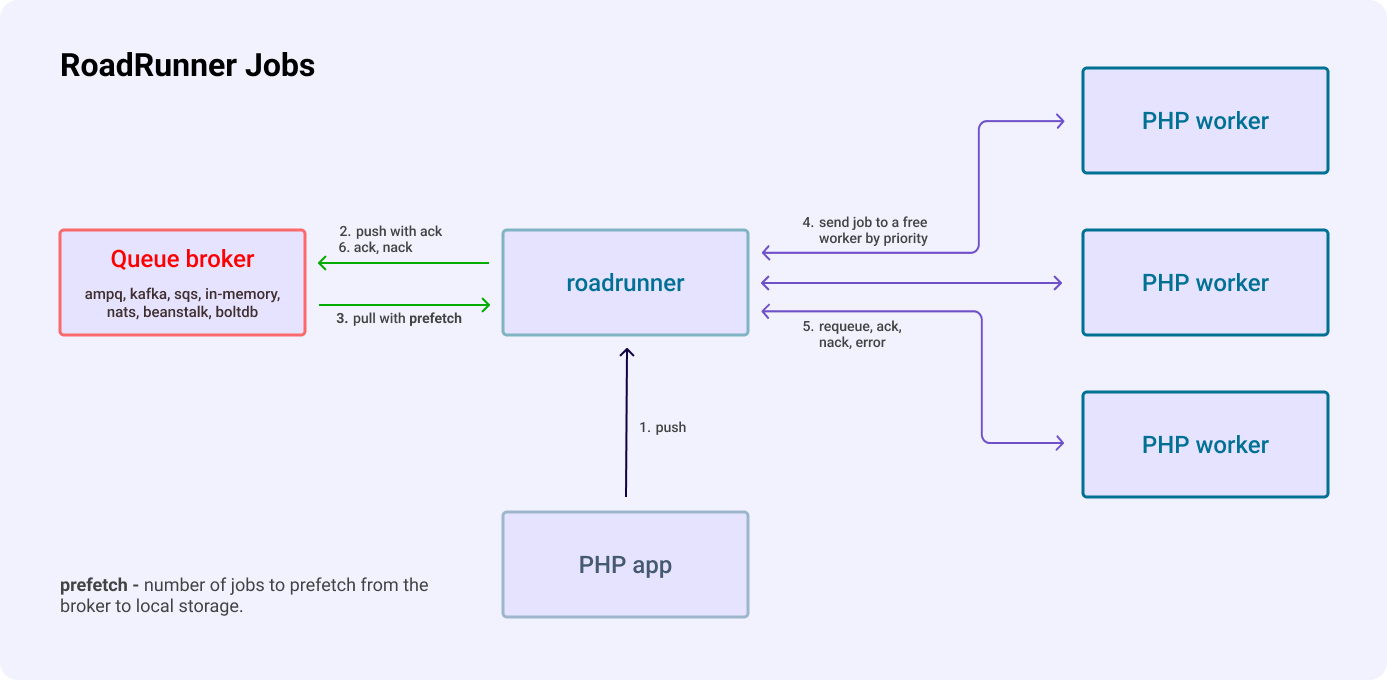
## Configuration
After installing all the required dependencies, you need to configure this plugin. To enable it add `jobs` section to your configuration.
**Here is an example of configuration:**
{% code title=".rr.yaml" %}
```yaml
version: "3"
rpc:
listen: tcp://127.0.0.1:6001
server:
command: php consumer.php
relay: pipes
jobs:
# List of RoadRunner queues that can be processed by
# the consumer specified in the "server" section.
consume: [ "test" ]
pipelines:
test: # RoadRunner queue identifier
driver: memory # - Queue driver name
config:
priority: 10
prefetch: 10
```
{% endcode %}
* The `rpc` section is responsible for client settings. It is at this address that we will connect, *dispatching tasks* to the queue.
* The `server` section is responsible for configuring the server. Previously, we have already met with its description when setting up the [PHP Worker](/docs/php-worker/worker).
* And finally, the `jobs` section is responsible for the work of the queues themselves. It contains information on how the RoadRunner should work with connections to drivers, what can be handled by the consumer, and other queue-specific settings.
### Common Configuration
Let's now focus on the common settings of the queue server. In full, it may look like this:
{% code title=".rr.yaml" %}
```yaml
version: "3"
jobs:
timeout: 60
pipeline_size: 100000
options:
parallelism: 10
pool:
num_workers: 10
allocate_timeout: 60s
destroy_timeout: 60s
consume: [ "queue-name" ]
pipelines:
queue-name:
driver: # "[DRIVER_NAME]"
config: # NEW in 2.7
# And driver-specific configuration below...
```
{% endcode %}
Common Jobs settings:
* `num_pollers`: RR derives the number of queue pollers from the worker count and ignores this setting. A single pool uses `num_workers + 2` pollers. If `num_workers` is omitted or zero, RR uses the default worker count of the pool. Named pools use the total worker count plus two.
* `timeout`: The internal Golang context timeouts (in seconds). For example, if the connection was disconnected or your push was in the middle of a redial state with a timeout of 10 minutes (but our timeout is e.g. 1 minute), or the queue is full. If the timeout is exceeded, your call will be rejected with an error. Default: 60 (seconds).
* `options.parallelism`: Limits concurrent pipeline initialization and destruction. Default: `10` when `options` is omitted; `5` when `options.parallelism` is zero.
* `pipeline_size`: The size of the priority queue (PQ). All pipelines share one PQ. The PQ stores jobs in order of priority, and jobs with the same priority leave the PQ in the order they arrived. The priority can be set for the job or inherited by the pipeline. When the workers are slower than the drivers, the PQ fills up to `pipeline_size`. After that, each driver waits for a free slot before it adds the next job. Default: `100000`. **Lower number means higher priority.**
{% hint style="info" %}
A full PQ blocks further inserts. Publishing can continue if the driver has capacity.
A job can wait in the PQ for about `pipeline_size` multiplied by the average job time, divided by the number of workers. Keep this time shorter than the acknowledgment deadline of the broker, for example the beanstalk TTR, the SQS visibility timeout or the NATS `ack_wait`. If the wait is longer, the broker can deliver the job again while it is in the PQ.
The PQ does not guarantee recovery after a crash. Recovery depends on the driver's persistence, broker retention, and acknowledgment settings. The memory driver loses jobs when RoadRunner stops. Auto-ack can acknowledge a job before PHP processes it.
Kafka pipelines with a configured consumer group use partition offset commits. A later acknowledgment can cause unfinished earlier records in the same partition to be skipped after a crash. See [Kafka acknowledgments](/docs/queues-and-jobs/kafka#acknowledgments).
{% endhint %}
* `pool`: A single [worker pool](/docs/php-worker/pool) for all consumed pipelines.
* `pools`: Named worker pools. Configure either `pool` or `pools`. See [Named Worker Pools](#named-worker-pools).
* `consume`: Pipeline names to start consuming when RoadRunner starts. Pipelines outside this list are available for publishing. Use `jobs.Resume` to start consumption later.
* `pipelines`: This section contains a list of all queues created in the RoadRunner. The key is a unique *queue identifier*, and the value is an object of the driver-specific configuration (we will talk about this later).
### Named Worker Pools
Named pools let you assign worker capacity and worker settings to different pipelines. Configure them under `jobs.pools`. Setting both `jobs.pool` and a nonempty `jobs.pools` is an error.
Set each pipeline's `pool` to a configured pool name:
{% code title=".rr.yaml" %}
```yaml
version: "3"
rpc:
listen: tcp://127.0.0.1:6001
server:
command: php consumer.php
relay: pipes
jobs:
pools:
default:
num_workers: 4
reports:
num_workers: 1
consume: ["emails", "reports"]
pipelines:
emails:
driver: memory
pool: default
config:
prefetch: 10
reports:
driver: memory
pool: reports
config:
prefetch: 10
```
{% endcode %}
Each pool accepts the [worker pool settings](/docs/php-worker/pool), including `command` to select a different PHP worker command. Jobs worker metrics include workers from all pools. A jobs reset resets all pools. Worker add and remove operations apply to each pool.
On `jobs.Push` and `jobs.PushBatch`, RR copies a nonempty pipeline `pool` setting into the lowercase `pool` job header. This replaces any existing value. The consumer selects the named pool from the first header value.
Treat `pool` as a reserved header. An unknown pool name causes a negative acknowledgment, even in single-pool mode. In multi-pool mode, a missing or empty `pool` header also causes a negative acknowledgment. A pool named `default` is not an automatic fallback.
Producers that publish directly to a broker must supply the `pool` header in the driver's job format. The pipeline setting alone does not route incoming jobs. Process existing jobs without this header before switching to named pools. Producer and consumer instances must agree on pool names.
{% hint style="warning" %}
BoltDB does not preserve the `pool` header in stored jobs. Use a single `jobs.pool` when consuming BoltDB pipelines. This also affects newly published jobs.
{% endhint %}
### Producer-only Pipelines
Omit a pipeline from `jobs.consume` to use it only for publishing on that RoadRunner instance. Set `consume: []` to start no consumers. Driver connections and pipeline setup still run at startup.
The Jobs plugin still creates PHP worker pools with this configuration. A `num_workers` value of `0` selects the default worker count. See the [AMQP example](/docs/queues-and-jobs/amqp#pipeline-configuration) for a pipeline that publishes without a queue name.
## PHP Client (Producer)
### Installation
To get access from the PHP code, you should put the corresponding dependency using [the Composer](https://getcomposer.org/).
```bash
composer require spiral/roadrunner-jobs
```
Now that we have the server configured, we can start writing our first code to send the task to the queue. But before we do that, we need to connect to our server. And to do that, it is enough to create a `Jobs` instance.
{% code title="connect.php" %}
```php
use Spiral\RoadRunner\Jobs\Jobs;
// Server Connection
$jobs = new Spiral\RoadRunner\Jobs\Jobs();
```
{% endcode %}
{% hint style="info" %}
In this case we did not specify any connection settings. And this is really not necessary if this code is executed in a RoadRunner environment. However, in case you need to connect from a third-party application (e.g. a CLI command), you need to specify the settings explicitly.
{% endhint %}
{% code title="connect.php" %}
```php
use Spiral\RoadRunner\Jobs\Jobs;
use Spiral\Goridge\RPC\RPC;
$jobs = new Jobs(
// Expects RPC connection
RPC::create('tcp://127.0.0.1:6001')
);
```
{% endcode %}
{% hint style="warning" %}
To interact with the RoadRunner jobs plugin, you will need to have the RPC defined in the rpc configuration section. You can refer to the documentation page [here](/docs/php-worker/rpc) to learn more about the configuration and installation.
{% endhint %}
When the connection is created, and the availability of the functionality is checked, we can connect to the queue we need using `connect()` method.
{% code title="connect.php" %}
```php
$queue = $jobs->connect('queue-name');
```
{% endcode %}
### Task Creation
Before submitting a task to the queue, you should create this task. To create a task, it is enough to call the corresponding `create()` method.
{% code title="create.php" %}
```php
$task = $queue->create(SendEmailTask::class);
// Expected:
// object(Spiral\RoadRunner\Jobs\Task\PreparedTaskInterface)
```
{% endcode %}
{% hint style="info" %}
The name of the task does not have to be a class. Here we are using `SendEmailTask` just for convenience.
{% endhint %}
Also, this method takes an additional second argument with additional data to complete this task.
{% code title="create.php" %}
```php
$task = $queue->create(
SendEmailTask::class,
payload: \json_encode(['email' => 'dev@null.pipe'])
);
```
{% endcode %}
{% hint style="warning" %}
The payload must be any string. You need to serialize the data yourself. The RoadRunner does not provide any serialization tools.
{% endhint %}
In addition, the method takes an additional third argument with `Spiral\RoadRunner\Jobs\OptionsInterface` where you can pass object with predefined options.
{% code title="create.php" %}
```php
$options = new \Spiral\RoadRunner\Jobs\Options(autoAck: true);
$task = $queue->create(
SendEmailTask::class,
options: $options->withDelay(10)
);
```
{% endcode %}
You can also redefine options for created task.
{% code title="create.php" %}
```php
$options = new \Spiral\RoadRunner\Jobs\Options(autoAck: true);
$task = $queue->create(SendEmailTask::class);
$task = $task->withOptions($options);
```
{% endcode %}
### Task creation for Kafka driver
Please note, a queue with Kafka driver requires a task with specified `topic`. In this case you have to use `Spiral\RoadRunner\Jobs\KafkaOptionsInterface`, because it has all required methods for working with Kafka driver. Connect to queue using `Spiral\RoadRunner\Jobs\KafkaOptionsInterface`. To redefine this options for a particular message, simply pass another `Spiral\RoadRunner\Jobs\KafkaOptionsInterface` implementation as a third parameter of the `create` method.
{% code title="kafka.php" %}
```php
$options = new \Spiral\RoadRunner\Jobs\KafkaOptions(topic: 'topic_name');
$queue = $jobs->connect('queue_name', $options);
$task = $queue->create(
SendEmailTask::class,
options: $options->withPartition(10)->withOffset(1)->withMetadata('foo=bar')
);
```
{% endcode %}
As noted above, we use interfaces everywhere to configure task options, and developers can create their own implementations of those interfaces.
### Task Dispatching
And to send tasks to the queue, we can use different methods: `dispatch()` and `dispatchMany()`. The difference between these two implementations is that the first one sends a task to the queue, returning a dispatched task object, while the second one dispatches multiple tasks, returning an array. Moreover, the second method provides one-time delivery of all tasks in the array, as opposed to sending each task separately.
{% code title="dispatch.php" %}
```php
$a = $queue->create(SendEmailTask::class, \json_encode(['email' => 'john.doe@example.com']));
$b = $queue->create(SendEmailTask::class, \json_encode(['email' => 'john.snow@the-wall.north']));
foreach ([$a, $b] as $task) {
$result = $queue->dispatch($task);
// Expected:
// object(Spiral\RoadRunner\Jobs\Task\QueuedTaskInterface)
}
// Using a batching send
$result = $queue->dispatchMany($a, $b);
// Expected:
// array(2) {
// object(Spiral\RoadRunner\Jobs\Task\QueuedTaskInterface),
// object(Spiral\RoadRunner\Jobs\Task\QueuedTaskInterface)
// }
```
{% endcode %}
### Task Immediately Dispatching
In the case that you do not want to create a new task and then immediately dispatch it, you can simplify the work by using the `push` method. However, this functionality has a number of limitations. In case of creating a new task:
* You can flexibly configure additional task capabilities using a convenient fluent interface.
* You can prepare a common task for several others and use it as a basis to create several alternative tasks.
* You can create several different tasks and collect them into one collection and send them to the queue at once (using the so-called batching).
In the case of immediate dispatch, you will have access to only the basic features: The `push()` method accepts two required arguments. The first argument is the name of the task to be executed. The second argument is the payload data for the task. In addition, the method takes an additional third argument with `Spiral\RoadRunner\Jobs\OptionsInterface` where you can pass object with predefined options. Moreover, this method is designed to send only one task.
{% code title="dispatch.php" %}
```php
use Spiral\RoadRunner\Jobs\Options;
$payload = \json_encode(['email' => $email, 'message' => $message]);
$task = $queue->push(SendEmailTask::class, $payload, new Options(
delay: 60 // in seconds
));
```
{% endcode %}
### Task Headers
In addition to the data itself, we can send additional metadata that is not related to the payload of the task, that is, headers. In them, we can pass any additional information, for example: Encoding of messages, their format, the server's IP address, the user's token or session id, etc.
Headers can only contain string values and are not serialized in any way during transmission, so be careful when specifying them.
The lowercase `pool` header is [reserved for worker-pool routing](#named-worker-pools).
In the case to add a new header to the task, you can use methods [similar to PSR-7](https://www.php-fig.org/psr/psr-7/).
**That is:**
* `withHeader(string, iterable|string): self` - Return an instance with the provided value replacing the specified header.
* `withAddedHeader(string, iterable|string): self` - Return an instance with the specified header appended with the given value.
* `withoutHeader(string): self` - Return an instance without the specified header.
{% code title="headers.php" %}
```php
$task = $queue->create(RestartServer::class, payload: \json_encode(['server' => 'web-1']))
->withAddedHeader('access-token', 'IDDQD');
$queue->dispatch($task);
```
{% endcode %}
### Trace Context
Enable the [OpenTelemetry plugin](/docs/logging-and-observability/otel) to export job traces. Put the producer's `traceparent` and optional `tracestate` values in the task headers to continue its trace. The `jobs.Push` RPC handler extracts this context before it starts the push span. Without valid trace context, RR starts a new trace.
`jobs.PushBatch` uses the first valid trace context in the batch as the parent of its push span. Submit jobs from separate traces in separate calls when their trace boundaries must remain separate.
Trace propagation through storage depends on the driver. BoltDB does not store job headers. Beanstalk jobs written by v5 also lack stored headers.
### Task Delayed Dispatching
If you want to specify that a job should not be immediately available for processing by a jobs worker, you can use the delayed job option. For example, let's specify that a job shouldn't be available for processing until 42 minutes after it has been dispatched:
{% code title="delay.php" %}
```php
$task = $queue->create(SendEmailTask::class)
->withDelay(42 * 60); // 42 min * 60 sec
```
{% endcode %}
## Consumer Usage
You probably already noticed that when setting up a jobs consumer, the `"server"` configuration section is used in which a PHP file-handler is defined. Exactly the same one we used earlier to write a [HTTP Worker](/docs/php-worker/worker).
Does this mean that if we want to use the Jobs Worker, then we can no longer use the HTTP Worker? No it does not!
During the launch of the RoadRunner, it spawns several workers defined in the `"server"` config section (by default, the number of workers is equal to the number of CPU cores). At the same time, during the spawn of the workers, it transmits in advance to each of them information about the *mode* in which this worker will be used. The information about the *mode* itself is contained in the environment variable `RR_ENV` and for the HTTP worker the value will correspond to the `"http"`, and for the Jobs worker the value of `"jobs"` will be stored there.
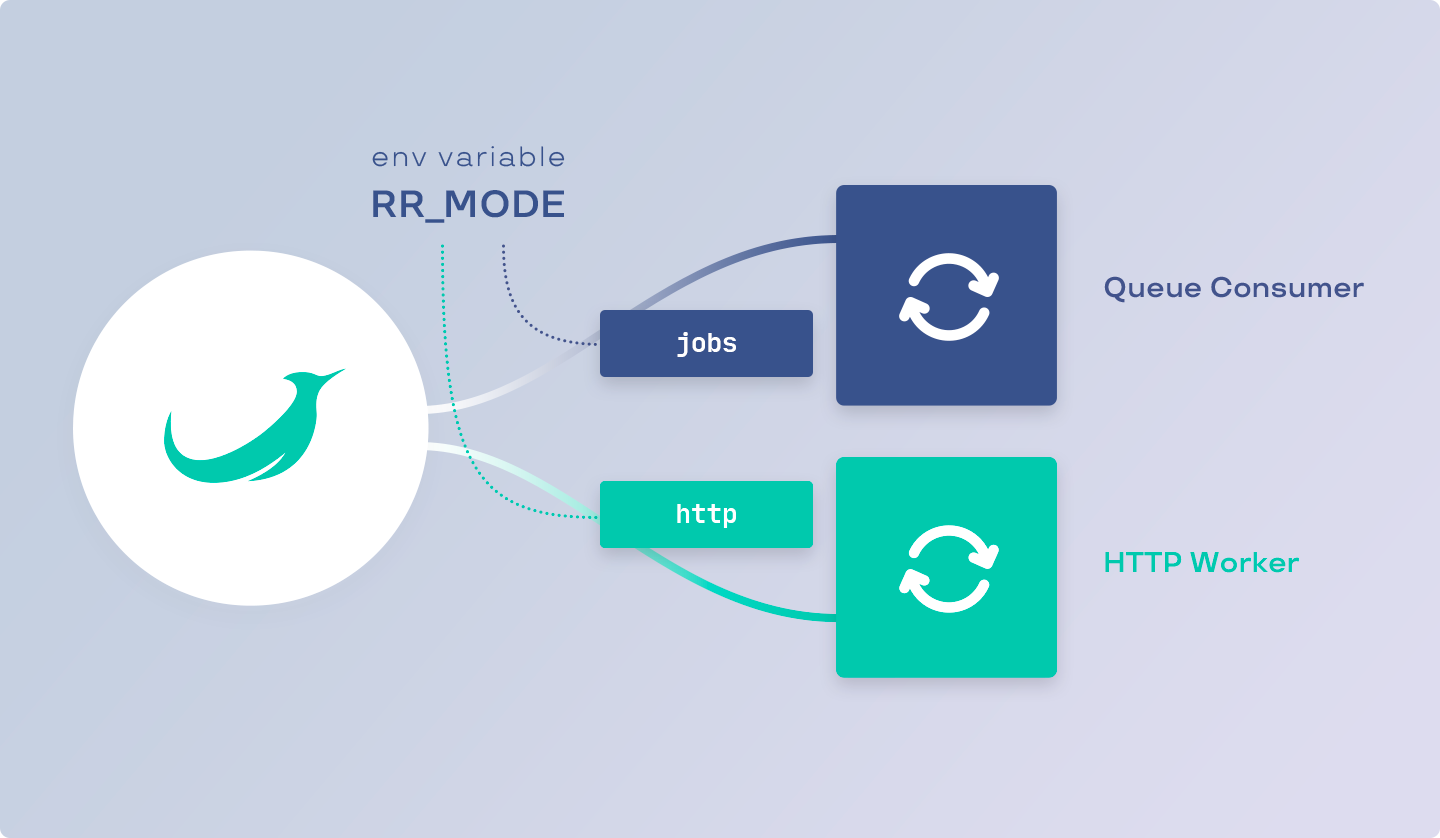
There are several ways to check the operating mode from the code:
* By getting the value of the env variable.
* Or using the appropriate API method (from the `spiral/roadrunner-worker` package).
The second choice may be more preferable in cases where you need to change the RoadRunner's mode, for example, in tests.
{% code title="consumer.php" %}
```php
use Spiral\RoadRunner\Environment;
use Spiral\RoadRunner\Environment\Mode;
// 1. Using global env variable
$isJobsMode = $_SERVER['RR_MODE'] === 'jobs';
// 2. Using RoadRunner's API
$env = Environment::fromGlobals();
$isJobsMode = $env->getMode() === Mode::MODE_JOBS;
```
{% endcode %}
After we are convinced of the specialization of the worker, we can write the corresponding code for processing tasks. To get information about the available task in the worker, use the `$consumer->waitTask(): ReceivedTaskInterface` method.
{% code title="consumer.php" %}
```php
use Spiral\RoadRunner\Jobs\Consumer;
use Spiral\RoadRunner\Jobs\Task\ReceivedTaskInterface;
$consumer = new Consumer();
/** @var Spiral\RoadRunner\Jobs\Task\ReceivedTaskInterface $task */
while ($task = $consumer->waitTask()) {
var_dump($task);
}
```
{% endcode %}
After you receive the task from the queue, you can start processing it in accordance with the requirements. Don't worry about how much memory or time this execution takes - the RoadRunner takes over the tasks of managing and distributing tasks among the workers.
After you have processed the incoming task, you can execute the `complete(): void` method. After that, you tell the RoadRunner that you are ready to handle the next task.
{% code title="consumer.php" %}
```php
$consumer = new Spiral\RoadRunner\Jobs\Consumer();
while ($task = $consumer->waitTask()) {
//
// Task handler code
//
$task->complete();
}
```
{% endcode %}
We got acquainted with the possibilities of receiving and processing tasks, but we do not yet know what the received task is. Let's see what data it contains.
### Task Failing
In some cases, an error may occur during task processing. In this case, you should use the `fail()` method, informing the RoadRunner about it. The method takes two arguments. The first argument is required and expects any string or string-like (instance of `Stringable`, for example any exception) value with an error message. The second is optional and tells the server to restart this task.
{% code title="consumer.php" %}
```php
$consumer = new Spiral\RoadRunner\Jobs\Consumer();
$shouldBeRestarted = false;
while ($task = $consumer->waitTask()) {
try {
//
// Do something...
//
$task->complete();
} catch (\Throwable $e) {
$task->fail($e, $shouldBeRestarted);
}
}
```
{% endcode %}
In the case that the next time you restart the task, you should update the headers, you can use the appropriate method by adding or changing the headers of the received task.
{% code title="consumer.php" %}
```php
$task
->withHeader('attempts', (int)$task->getHeaderLine('attempts') - 1)
->withHeader('retry-delay', (int)$task->getHeaderLine('retry-delay') * 2)
->fail('Something went wrong', requeue: true)
;
```
{% endcode %}
In addition, you can re-specify the task execution delay. For example, in the code above, you may have noticed the use of a custom header `"retry-delay"`, the value of which doubled after each restart, so this value can be used to specify the delay in the next task execution.
{% code title="consumer.php" %}
```php
$task
->withDelay((int)$task->getHeaderLine('retry-delay'))
->fail('Something went wrong', true)
;
```
{% endcode %}
### Received Task ID
Each task in the queue has a **unique** identifier. This allows you to unambiguously identify the task among all existing tasks in all queues, no matter what name it was received from.
In addition, it is worth paying attention to the fact that the identifier is not a sequential number that increases indefinitely. It means that there is still a chance of an identifier collision, but it is about 1/2.71 quintillion. Even if you send 1 billion tasks per second, it will take you about 85 years for an ID collision to occur.
{% code title="script.php" %}
```php
echo $task->getId();
// Expected Result
// string(36) "88ca6810-eab9-473d-a8fd-4b4ae457b7dc"
```
{% endcode %}
In the case that you want to store this identifier in the database, it is recommended to use a binary representation (16 bytes long if your DB requires blob sizes).
{% code title="script.php" %}
```php
$binary = hex2bin(str_replace('-', '', $task->getId()));
// Expected Result
// string(16) b"ˆÊh\x10ê¹G=¨ýKJäW·Ü"
```
{% endcode %}
### Received Task Queue
Since a worker can process several different queues at once, you may need to somehow determine from which queue the task came. To get the name of the queue, use the `getQueue(): string` method.
{% code title="script.php" %}
```php
echo $task->getQueue();
// Expected
// string(13) "example-queue"
```
{% endcode %}
For example, you can select different task handlers based on different types of queues.
{% code title="script.php" %}
```php
// This is just an example of a handler
$handler = $container->get(match($task->getQueue()) {
'emails' => 'email-handler',
'billing' => 'billing-handler',
default => throw new InvalidArgumentException('Unprocessable queue [' . $task->getQueue() . ']')
});
$handler->process($task);
```
{% endcode %}
### Task auto acknowledge
Automatic task acknowledgment has been supported since RoadRunner `v2.10.0`. This option acknowledges a task as soon as RR receives it from the queue. Use it for tasks that can be lost if processing fails.
To use this option you may update the Options:
{% code title="options.php" %}
```php
// Create with default values
$options = new Options(
Options::DEFAULT_DELAY,
Options::DEFAULT_PRIORITY,
Options::DEFAULT_AUTO_ACK, // false by default
);
```
{% endcode %}
Or manage that manually per every `Task`:
{% code title="task.php" %}
```php
use Spiral\RoadRunner\Jobs\Queue\MemoryCreateInfo;
use Spiral\RoadRunner\Jobs\Options;
use Spiral\RoadRunner\Jobs\Jobs;
$options = new Options();
// Jobs service
$jobs = new Jobs(RPC::create('tcp://127.0.0.1:6001'));
// Select "test" queue from jobs
$queue = $jobs->connect('test');
// or create a new queue
$queue = $jobs->create(new MemoryCreateInfo('local'));
// Set default auto ack for all tasks
$queue = $queue->withDefaultOptions(
$options->withAutoAck(true)
);
// Create a new task with custom auto ack
$task = $queue->push('task_name', \json_encode(['foo' => 'bar']), (new Options())->withAutoAck(false));
// or change auto ack for created task
$task = $queue->create('task_name', \json_encode(['foo' => 'bar']))->withAutoAck(false);
$queue->dispatch($task);
```
{% endcode %}
### Received Task Name
The task name is some identifier associated with a specific type of task. For example, it may contain the name of the task class so that in the future we can create an object of this task by passing the required data there. To get the name of the task, use the `getName(): string` method.
{% code title="script.php" %}
```php
echo $task->getName();
// Expected
// string(21) "App\\Queue\\Task\\EmailTask"
```
{% endcode %}
Thus, we can implement the creation of a specific task with certain data for this task.
{% code title="script.php" %}
```php
$class = $task->getName();
if (!class_exists($class)) {
throw new InvalidArgumentException("Unprocessable task [$class]");
}
$handler->process($class::fromTask($task));
```
{% endcode %}
### Received Task Payload
Each task contains a set of arbitrary user data to be processed within the task. To obtain this data, you can use one of the available methods:
#### getPayload
Also, you can get payload data in `string` format using the `getPayload` method. This method may be useful to you in cases of transferring all data to the DTO.
{% code title="script.php" %}
```php
$class = $task->getName();
$payload = $task->getPayload();
$dto = new $class($payload);
```
{% endcode %}
### Received Task Headers
In the case that you need to get any additional information that is not related to the task, then for this you should use the functionality of headers.
For example, headers can convey information about the serializer, encoding, or other metadata.
{% code title="script.php" %}
```php
$message = $task->getPayload();
$encoding = $task->getHeaderLine('encoding');
if (strtolower($encoding) !== 'utf-8') {
$message = iconv($encoding, 'utf-8', $message);
}
```
{% endcode %}
The interface for receiving headers is completely similar to [PSR-7](https://www.php-fig.org/psr/psr-7/), so methods are available to you:
* `getHeaders(): array>` - Retrieves all task header values.
* `hasHeader(string): bool` - Checks if a header exists by the given name.
* `getHeader(string): array` - Retrieves a message header value by the given name.
* `getHeaderLine(string): string` - Retrieves a comma-separated string of the values for a single header by the given name.
We got acquainted with the data and capabilities that we have in the consumer. Let's now get down to the basics - sending these messages.
## Advanced Functionality
In addition to the main functionality of queues for sending and processing in API has additional functionality that is not directly related to these tasks. After we have examined the main functionality, it's time to disassemble the advanced features.
### Creating A New Queue
In the very [first chapter](/docs/queues-and-jobs/overview-queues), we got acquainted with the queue settings and drivers for them. In approximately the same way, we can do almost the same thing with the help of the PHP code using `create()` method through `Jobs` instance.
To create a new queue, the following types of DTO are available to you:
* `Spiral\RoadRunner\Jobs\Queue\AMQPCreateInfo` for AMQP queues.
* `Spiral\RoadRunner\Jobs\Queue\BeanstalkCreateInfo` for Beanstalk queues.
* `Spiral\RoadRunner\Jobs\Queue\MemoryCreateInfo` for in-memory queues.
* `Spiral\RoadRunner\Jobs\Queue\SQSCreateInfo` for SQS queues.
* `Spiral\RoadRunner\Jobs\Queue\KafkaCreateInfo` for Kafka queues.
* `Spiral\RoadRunner\Jobs\Queue\BoltdbCreateInfo` for Boltdb queues.
Such a DTO with the appropriate settings should be passed to the `create()` method to create the corresponding queue:
{% code title="create.php" %}
```php
use Spiral\RoadRunner\Jobs\Jobs;
use Spiral\RoadRunner\Jobs\Queue\MemoryCreateInfo;
$jobs = new Jobs();
//
// Create a new "example" in-memory queue
//
$queue = $jobs->create(new MemoryCreateInfo(
name: 'example',
priority: 42,
prefetch: 10,
));
```
{% endcode %}
### Getting A List Of Queues
In that case, to get a list of all available queues, you just need to use the standard functionality of the `foreach` operator. Each element of this collection will correspond to a specific queue registered in the RoadRunner. And to simply get the number of all available queues, you can pass a `Job` object to the `count()` function.
{% code title="list.php" %}
```php
$jobs = new Spiral\RoadRunner\Jobs\Jobs();
foreach ($jobs as $queue) {
var_dump($queue->getName());
// Expects name of the queue
}
$count = count($jobs);
// Expects the number of a queues
```
{% endcode %}
### Pausing A Queue
In addition to the ability to create new queues, there may be times when a queue needs to be suspended for processing. Such cases can arise, for example, in the case of deploying a new application, when the processing of tasks should be suspended during the deployment of new application code.
In this case, the code will be pretty simple. It is enough to call the `pause()` method, passing the names of the queues there. In order to start the work of queues further (unpause), you need to call a similar `resume()` method.
{% code title="pause.php" %}
```php
$jobs = new Spiral\RoadRunner\Jobs\Jobs();
// Pause "emails", "billing" and "backups" queues.
$jobs->pause('emails', 'billing', 'backups');
// Resuming only "emails" and "billing".
$jobs->resume('emails', 'billing');
```
{% endcode %}
## Metrics
Enable the [Metrics plugin](/docs/logging-and-observability/metrics) to export these Prometheus counters:
| Metric | Meaning |
| ---------------------- | --------------------------------------------------------------------------- |
| `rr_jobs_jobs_ok` | Successfully acknowledged processing attempts. |
| `rr_jobs_jobs_err` | Failed processing attempts, including worker, routing, and response errors. |
| `rr_jobs_jobs_requeue` | Attempts that the worker response handler successfully requeues. |
| `rr_jobs_push_ok` | Successful job pushes to drivers. |
| `rr_jobs_push_err` | Failed driver push calls. |
A successful requeue increments `rr_jobs_jobs_requeue` without incrementing `rr_jobs_jobs_ok`. A failed requeue increments `rr_jobs_jobs_err`. A later successful attempt increments `rr_jobs_jobs_ok`. Broker redelivery without a worker requeue response does not increment the requeue counter.
These metrics count attempts across all pipelines and pools. They are counters and reset when RoadRunner restarts. Use Prometheus `rate()` or `increase()` to measure activity over time.
## RPC Interface
PHP communicates with the Jobs plugin through Goridge RPC with [jobs/v1 Protobuf messages](https://github.com/roadrunner-server/api/blob/master/roadrunner/api/jobs/v1/jobs.proto). The statistics method is `jobs.Stat`.
* `Push(in *jobsv1.PushRequest, out *jobsv1.Empty) error` - The arguments: the first argument is a `PushRequest`, which contains one field of the `Job` being sent to the queue; the second argument is `Empty`, which means that the function does not return a result (returns nothing). The error returned if the request fails.
* `PushBatch(in *jobsv1.PushBatchRequest, out *jobsv1.Empty) error` - The arguments: the first argument is a `PushBatchRequest`, which contains one repeated (list) field of the `Job` being sent to the queue; the second argument is `Empty`, which means that the function does not return a result. The error returned if the request fails.
* `Pause(in *jobsv1.Pipelines, out *jobsv1.Empty) error` - The arguments: the first argument is a `Pipelines`, which contains one repeated (list) field with the `string` names of the queues to be paused; the second argument is `Empty`, which means that the function does not return a result. The error returned if the request fails.
* `Resume(in *jobsv1.Pipelines, out *jobsv1.Empty) error` - The arguments: the first argument is a `Pipelines`, which contains one repeated (list) field with the `string` names of the queues to be resumed; the second argument is `Empty`, which means that the function does not return a result. The error returned if the request fails.
* `List(in *jobsv1.Empty, out *jobsv1.Pipelines) error` - The arguments: the first argument is an `Empty`, meaning that the function does not accept anything (from the point of view of the PHP API, an empty string should be passed); the second argument is `Pipelines`, which contains one repeated (list) field with the `string` names of the all available queues. The error returned if the request fails.
* `Declare(in *jobsv1.DeclareRequest, out *jobsv1.Empty) error` - The arguments: the first argument is an `DeclareRequest`, which contains one `map` pipeline field of queue configuration; the second argument is `Empty`, which means that the function does not return a result. The error returned if the request fails.
* `Stat(in *jobsv1.Empty, out *jobsv1.Stats) error` - The arguments: the first argument is an `Empty`, meaning that the function does not accept anything (from the point of view of the PHP API, an empty string should be passed); the second argument is `Stats`, which contains one repeated (list) field named `Stats` of type `Stat`. The error returned if the request fails.
From the PHP point of view, such requests (`List` for example) are as follows:
{% code title="rpc.php" %}
```php
use Spiral\Goridge\RPC\RPC;
use Spiral\Goridge\RPC\Codec\ProtobufCodec;
use Spiral\RoadRunner\Jobs\DTO\V1\Maintenance;
$response = RPC::create('tcp://127.0.0.1:6001')
->withServicePrefix('jobs')
->withCodec(new ProtobufCodec())
->call('List', '', Maintenance::class);
```
{% endcode %}
# Google Pub/Sub
RoadRunner publishes jobs to Google Pub/Sub topics and receives them through subscriptions.
{% hint style="info" %}
Read more about Google Pub/Sub [here](https://cloud.google.com/pubsub/docs/overview).
{% endhint %}
## Configuration
The global `google_pub_sub` section is required. This example connects to a local Pub/Sub emulator:
{% code title=".rr.yaml" %}
```yaml
version: "3"
google_pub_sub:
insecure: true
endpoint: 127.0.0.1:8085
jobs:
consume: ["test-1"]
pool:
num_workers: 10
pipelines:
test-1:
driver: google_pub_sub
config:
priority: 1
project_id: test
topic: rrTopic1
dead_letter_topic: "dead-letter-topic"
max_delivery_attempts: 10
```
{% endcode %}
### Google Cloud Connection
For Google Cloud, set `insecure: false` and an explicit service endpoint. The client uses TLS and [Application Default Credentials](https://docs.cloud.google.com/docs/authentication/provide-credentials-adc).
{% code title=".rr.yaml" %}
```yaml
google_pub_sub:
insecure: false
endpoint: pubsub.googleapis.com:443
```
{% endcode %}
Set each pipeline's `project_id` to your Google Cloud project ID. Without an explicit `endpoint`, RR uses `127.0.0.1:8085`. Use `insecure: true` for an emulator. This setting disables TLS, authentication, and Google client telemetry.
## Configuration options
**Here is a detailed description of each of the Google Pub/Sub-specific options:**
### Priority
`priority`- job priority, integer. A lower value corresponds to a higher priority. For instance, consider two pipelines: `pipe1` with a priority of `1` and `pipe10` with a priority of `10`. Workers will only take jobs from `pipe10` if all the jobs from `pipe1` have been processed.
### Project ID
`project_id` - required, string. Google Cloud project ID. You can use a special value `*detect-project-id*` (with asterisks) to detect the project ID from the credentials. More info: [link](https://developers.google.com/accounts/docs/application-default-credentials)
### Topic
`topic` - required, string. Topic is a named resource that represents a feed of messages. The specified topic ID must start with a letter, and contain only letters `([A-Za-z])`, numbers `([0-9])`, dashes `(-)`, underscores `(_)`, periods `(.)`, tildes `(~)`, plus `(+)` or percent signs `(%)`. It must be between 3 and 255 characters in length, and must not start with "goog". For more information, see: [link](https://cloud.google.com/pubsub/docs/admin#resource_names)
### Dead letter topic
`dead_letter_topic`: Optional topic ID. Use it with `max_delivery_attempts` to configure forwarding of messages that cannot be acknowledged. See [Pub/Sub dead-letter topics](https://cloud.google.com/pubsub/docs/handling-failures#dead_letter_topic).
### Max delivery attempts
`max_delivery_attempts`: Optional delivery-attempt setting for dead-letter forwarding. RoadRunner defaults to `10` when `dead_letter_topic` is set. See [Pub/Sub dead-letter configuration](https://cloud.google.com/pubsub/docs/handling-failures#dead_letter_topic).
## Subscriptions
RR reuses existing topics and subscriptions. The pipeline name is the subscription ID. Keep the project, topic, and pipeline names unchanged during an upgrade to use the same subscription.
RR applies `dead_letter_topic` and `max_delivery_attempts` when it creates subscriptions for both YAML pipelines and dynamically declared pipelines. These settings do not update an existing subscription. Use Pub/Sub administration to change an existing subscription's dead-letter policy. Do not delete a subscription with pending messages just to apply new settings.
## Pause and Resume
Pausing a pipeline cancels its receive operation and stops new message pulls. Publishing remains available while paused. Jobs already received by RoadRunner can still complete. Resume starts receiving from the same subscription again.
## Statistics
Use Google Pub/Sub monitoring for queue counts. RR statistics return pipeline identity only. Zero counts and `ready: false` do not report the broker's actual state.
# Beanstalk
Beanstalk is a simple and fast general purpose work queue. To install Beanstalk, you can use the [local queue server](https://github.com/beanstalkd/beanstalkd) or run the server inside [AWS Elastic](https://aws.amazon.com/elasticbeanstalk/). You can choose any option that is convenient for you.
Setting up the server is similar to setting up AMQP and requires specifying the connection in the `beanstalk` section of your RoadRunner configuration file.
{% code title=".rr.yaml" %}
```yaml
beanstalk:
addr: tcp://127.0.0.1:11300
```
{% endcode %}
## Configuration
{% code title=".rr.yaml" %}
```yaml
version: "3"
beanstalk:
# Optional section.
# Default: tcp://127.0.0.1:11300
addr: tcp://127.0.0.1:11300
# Optional section.
# Default: 30s
timeout: 10s
jobs:
pipelines:
# User defined name of the queue.
beanstalk-pipeline-name:
# Required section.
# Should be "beanstalk" for the Beanstalk driver.
driver: beanstalk
config: # NEW in 2.7
# Optional section.
# Default: 10
priority: 10
# Optional section.
# Default: 1
tube_priority: 1
# Optional section.
# Default: default
tube: default
# Optional section.
# Default: 5s
reserve_timeout: 5s
```
{% endcode %}
## Configuration options
**Here is a detailed description of each of the beanstalk-specific options:**
### Priority
`priority` - Similar to the same option in other drivers. This is queue default priority for each task pushed into this queue if the priority value for these tasks was not explicitly set. Lower value - higher priority.
### Tube priority
`tube_priority` - The value for specifying the priority within Beanstalk is the internal priority of the server. The value should not exceed `int32` size.
### Tube
`tube` - The name of the inner "tube" specific to the Beanstalk driver.
## Headers
RR stores headers with the job body and preserves them on delivery and requeue. This includes retry counts, trace context, and the `pool` header for named worker pools. Existing v5 jobs need no conversion, but headers that v5 did not store cannot be recovered. Process those jobs before switching to named pools.
## Statistics
Queue counters describe the configured tube. An unused tube reports zero jobs. Pipelines that share a tube report the same tube counters.
# In-Memory
This type of driver is already supported by the RoadRunner and does not require any additional installations.
Note that using this type of queue driver, all data is in memory and will be destroyed when the RoadRunner Server is restarted. If you need persistent queue, then it is recommended to use alternative drivers: `amqp`, `beanstalk` or `sqs`.
{% hint style="warning" %}
This driver cannot hold more than **1000 tasks** with delay at the same time (RR limitation)
{% endhint %}
## Configuration
{% code title=".rr.yaml" %}
```yaml
version: "3"
jobs:
pipelines:
# User defined name of the queue.
example:
# Required section.
# Should be "memory" for the in-memory driver.
driver: memory
config: # NEW in 2.7
# Optional section.
# Default: 10
priority: 10
# Optional section.
# Default: 10
prefetch: 10
```
{% endcode %}
## Configuration options
**Here is a detailed description of each of the in-memory-specific options:**
### Priority
`priority` - Queue default priority for each task pushed into this queue if the priority value for these tasks was not explicitly set. Lower value - higher priority.
**For example, we have 2 pipelines "pipe1" with priority 1 and "pipe10" with priority 10. Jobs from "pipe10" will be taken by workers only if all the jobs from "pipe1" are handled.**
### Prefetch
`prefetch` - A local buffer between the PQ (priority queue) and driver. If the PQ size is set to 100 and prefetch to 100000, you'll be able to push up to prefetch number of jobs even if PQ is full.
# RabbitMQ
Strictly speaking, AMQP (and 0.9.1 version used) is a protocol, not a full-fledged driver, so you can use any servers that support this protocol (on your own, only rabbitmq was tested), such as:
* [RabbitMQ](https://www.rabbitmq.com/),
* [Apache Qpid](http://qpid.apache.org/)
* [Apache ActiveMQ](http://activemq.apache.org/).
However, it is recommended to use RabbitMQ as the main implementation, and reliable performance with other implementations is not guaranteed.
To install and configure the RabbitMQ, use the corresponding [documentation page](https://www.rabbitmq.com/download.html).
{% hint style="info" %}
Immediate publishes wait for a publisher confirm from RabbitMQ. Delayed publishes do not wait for that confirmation before returning. A publisher confirm does not prove that a message reached a queue.
{% endhint %}
## Named Connections
Define each connection under `amqp.`. Each entry requires an explicit `addr` with a [connection DSN](https://www.rabbitmq.com/uri-spec.html). Each entry can also have an optional `tls` section. Every YAML AMQP pipeline must set `config.connection` to a configured name.
RR rejects pipeline creation if the connection selector is missing or empty. An unknown connection name also causes an error. RR also rejects a selected connection with a missing or empty `addr`.
There is no implicit default connection or localhost fallback. Top-level `amqp.addr` and `amqp.tls` are not supported. Connection names select configuration. Each pipeline keeps its own broker sockets.
Connection names are separate from [named worker pools](/docs/queues-and-jobs/overview-queues#named-worker-pools). Connection selection does not add a message header.
TLS options belong under `amqp..tls`:
* `key`: path to a key file.
* `cert`: path to a certificate file.
* `root_ca`: path to Root CAs used by the AMQP client to trust and verify the broker/server certificate during TLS dial.
* `client_auth_type`: possible values are `no_client_cert`, `request_client_cert`, `require_any_client_cert`, `verify_client_cert_if_given`, `require_and_verify_client_cert`. This setting does not control broker certificate verification.
Configure [RabbitMQ TLS support](https://www.rabbitmq.com/ssl.html) on the broker.
`root_ca` adds trust roots for broker certificate verification. Reconnects reuse the configured TLS settings. Use an `amqps://` address with valid `key` and `cert` files. A `root_ca`-only TLS block is not supported. Omit `tls` when using a plain `amqp://` connection.
{% code title=".rr.yaml" %}
```yaml
version: "3"
amqp:
brokerA:
addr: amqps://guest:guest@rabbitmq.example.com:5671/
# AMQPS TLS configuration
#
# This section is optional
tls:
# Path to the key file
#
# This option is required
key: /etc/rr/tls/client.key
# Path to the certificate
#
# This option is required
cert: /etc/rr/tls/client.crt
# Path to Root CAs used by the AMQP client to trust and verify the broker/server certificate during TLS dial.
#
# This option is optional
root_ca: /etc/rr/tls/ca.crt
# Legacy client_auth_type setting.
#
# This option is optional. Default value: no_client_cert. Possible values: no_client_cert, request_client_cert, require_any_client_cert, verify_client_cert_if_given, require_and_verify_client_cert
client_auth_type: no_client_cert
```
{% endcode %}
Configure each pipeline's exchange and queue as shown below.
## Pipeline Configuration
Static AMQP configuration uses only nested `exchange` and `queue` sections under `jobs.pipelines..config`. At least one section is required. Missing sections receive default values.
AMQP `config.version` is removed. Keep the root `version: "3"`. Use the [migration table](#migration) to move old flat entity settings.
### Options in `config`
* `connection`: required connection name from `amqp`.
* `priority`: pipeline priority. If a job has priority `0`, it inherits the pipeline priority. Default: `10`.
* `prefetch`: RabbitMQ QoS prefetch. Default: `10`.
* `redial_timeout`: reconnect timeout in seconds. Default: `60`.
Zero or negative values for `priority`, `prefetch`, and `redial_timeout` use their defaults.
### Exchange settings
* `name`: exchange name. Default: `amqp.default`.
* `type`: exchange type. Supported: `direct`, `fanout`, `topic`, `headers`. Default: `direct`.
* `durable`: durable exchange flag. Default: `false`.
* `auto_delete`: auto-delete exchange when last queue is unbound. Default: `false`.
* `declare`: declare exchange during pipeline creation. Default: `true`.
### Queue settings
* `name`: queue name. Optional for producer-only pipelines; required for `run`, `resume`, and `pause`.
* `routing_key`: routing key. Required when `exchange.type != fanout`.
* `durable`: durable queue flag. Default: `false`.
* `auto_delete`: auto-delete queue after the last consumer unsubscribes. Default: `false`.
* `exclusive`: exclusive queue flag. Default: `false`.
* `consumer_id`: consumer identifier. Default: `roadrunner-`.
* `delete_on_stop`: delete queue when pipeline stops. Default: `false`.
* `multiple_ack`: ACK this and prior unacked deliveries on the same channel. Default: `false`.
* `requeue_on_fail`: use RabbitMQ requeue on failure (Nack). Default: `false`.
* `headers`: queue declaration arguments (for example, `x-queue-mode: lazy`).
* `declare`: declare and bind queue when `Run` or `Resume` starts consumption. Default: `true`.
For both entities, an omitted `declare` has the same effect as `true`. Explicit `false` disables declaration. Pipeline creation does not declare or bind the queue.
{% hint style="info" %}
See also [AMQP model](https://www.rabbitmq.com/tutorials/amqp-concepts.html#amqp-model) documentation section.
{% endhint %}
{% hint style="info" %}
Producer-only pipeline: `queue.name` can be empty, `push` works, but `run`, `resume`, and `pause` will fail without a queue name.
{% endhint %}
{% hint style="info" %}
If `exchange.type` is not `fanout`, `queue.routing_key` must be set when RR initializes or declares the pipeline. This also applies to consume-only pipelines and pipelines with declarations disabled.
{% endhint %}
{% hint style="info" %}
Read more about Nack in RabbitMQ official docs:
{% endhint %}
This example consumes from `brokerA` through `consume-a`. It publishes to `brokerB` through `publish-b`.
{% code title=".rr.yaml" %}
```yaml
version: "3"
rpc:
listen: tcp://127.0.0.1:6001
server:
command: php worker.php
relay: pipes
amqp:
brokerA:
addr: amqp://guest:guest@broker-a:5672/
brokerB:
addr: amqp://guest:guest@broker-b:5672/
jobs:
consume: ["consume-a"]
pipelines:
consume-a:
driver: amqp
config:
connection: brokerA
priority: 10
prefetch: 10
redial_timeout: 60
exchange:
name: amqp.default
type: direct
durable: false
auto_delete: false
declare: true
queue:
name: team-a-queue
routing_key: team-a
durable: false
auto_delete: false
exclusive: false
consumer_id: ""
delete_on_stop: false
multiple_ack: false
requeue_on_fail: false
headers:
x-queue-mode: lazy
declare: true
publish-b:
driver: amqp
config:
connection: brokerB
exchange:
name: team-b-exchange
type: direct
queue:
routing_key: team-b
```
{% endcode %}
Only `consume-a` is in `jobs.consume`. The producer-only `publish-b` pipeline has no queue name. Create a destination queue on broker B before publishing. Bind it to `team-b-exchange` with routing key `team-b`.
{% code title="worker.php" %}
```php
connect('publish-b');
$consumer = new Consumer();
while ($task = $consumer->waitTask()) {
try {
$destination->dispatch($destination->create($task->getName(), $task->getPayload()));
$task->ack();
} catch (\Throwable $e) {
$task->nack($e, redelivery: true);
}
}
```
{% endcode %}
RR does not provide a cross-broker transaction. A failure after publishing to B but before acknowledging on A can cause duplicate messages on B. Make the destination handler safe to repeat.
## Per-job Routing
Set the `x-routing-key` job header to override `queue.routing_key` for one publish. Supply exactly one nonempty string value. RR removes this header before it sends the message. Missing, empty, or multiple values use the pipeline's routing key.
The `pool` job header selects a [PHP worker pool](/docs/queues-and-jobs/overview-queues#named-worker-pools). It does not select an AMQP connection, exchange, or routing key. The `rr_connection` key selects a connection only during [RPC pipeline declaration](#runtime-declaration).
## Read-only RabbitMQ Permissions
Disable declarations when the RabbitMQ user has no `configure` permission:
* `jobs.pipelines..config.exchange.declare: false`
* `jobs.pipelines..config.queue.declare: false`
Create the exchange, queue and binding before starting RR. The broker user still needs `read` permission to consume and `write` permission to publish. Keep `queue.delete_on_stop: false` to avoid a queue deletion request.
With `queue.declare: false`, RR skips both queue binding and passive queue inspection. `jobs.Stat` reports `active: 0` without querying queue depth. This does not mean the queue is empty.
Delayed publishing and delayed requeue still declare and bind temporary queues. These operations still require `configure` permission.
{% code title=".rr.yaml" %}
```yaml
version: "3"
amqp:
brokerA:
addr: amqp://readonly:readonly@127.0.0.1:5675/TEST
jobs:
pipelines:
readonly:
driver: amqp
config:
connection: brokerA
exchange:
name: test-1-exchange
type: fanout
durable: true
auto_delete: false
declare: false
queue:
name: test-1-queue
routing_key: test-1
durable: true
auto_delete: false
exclusive: false
declare: false
```
{% endcode %}
## Runtime Declaration
Dynamic pipeline declaration over RPC remains a flat string map. It is separate from static YAML configuration. It does not use nested `config.exchange` or `config.queue` sections.
The `jobs.Declare` payload accepts these declaration controls as strings:
* `exchange_declare`: `"true"` (default) or `"false"`.
* `queue_declare`: `"true"` (default) or `"false"`.
Set the flat `connection` field to a configured name such as `"brokerB"`. Do not send a DSN or TLS settings in the RPC payload.
The existing PHP 4.x [AMQPCreateInfo API](https://github.com/roadrunner-php/jobs/blob/4.x/src/Queue/AMQPCreateInfo.php) accepts `queueHeaders`. `Jobs` serializes this map as JSON in the flat `queue_headers` field. Set the reserved `rr_connection` key in that map to select a connection. No PHP package change is required.
RR reads `rr_connection` only when the flat `connection` field is absent. The flat field takes precedence whenever it is present, even when it is empty. An empty value causes an error. RR removes the reserved key from queue arguments before broker declaration and configuration storage. Other queue arguments stay unchanged. This key is RPC configuration metadata, not a message header. YAML pipelines must still set `config.connection`.
This runtime example creates the `runtime-b` pipeline on `brokerB` and declares its exchange. It does not declare or bind the queue. PHP 4.x `Jobs` requires an RPC instance:
{% code title="create.php" %}
```php
use Spiral\Goridge\RPC\RPC;
use Spiral\RoadRunner\Jobs\Jobs;
use Spiral\RoadRunner\Jobs\Queue\AMQPCreateInfo;
$jobs = new Jobs(RPC::create('tcp://127.0.0.1:6001'));
$queue = $jobs->create(new AMQPCreateInfo(
name: 'runtime-b',
queue: 'team-b-queue',
exchange: 'team-b-exchange',
routingKey: 'team-b',
queueHeaders: ['rr_connection' => 'brokerB'],
));
```
{% endcode %}
Call `$jobs->resume('runtime-b')` after creation to declare and bind the queue and start consumption. For a producer-only pipeline, omit this call. Its destination queue and binding must exist before publishing.
## Migration
To update an existing configuration:
1. Move `amqp.addr` to `amqp..addr`. Move optional `amqp.tls` to `amqp..tls`. Set an explicit address for each connection.
2. Set `config.connection` on every YAML AMQP pipeline. There is no implicit default connection or localhost fallback.
3. Remove `config.version` from every YAML AMQP pipeline. Keep the root `version: "3"`.
4. For runtime declarations, send flat `connection` or use the existing PHP `queueHeaders` map with `rr_connection`. The flat field takes precedence even when empty. RR removes the reserved key before broker declaration and configuration storage.
Move old flat entity settings to the nested fields below. All paths are relative to `jobs.pipelines..config`.
| Old Field | New Field |
| ---------------------------------------------------------------------------- | ---------------------- |
| `exchange` | `exchange.name` |
| `exchange_type` | `exchange.type` |
| `exchange_durable` | `exchange.durable` |
| `exchange_auto_delete` | `exchange.auto_delete` |
| `queue` | `queue.name` |
| `durable` | `queue.durable` |
| `queue_auto_delete` | `queue.auto_delete` |
| `delete_queue_on_stop` | `queue.delete_on_stop` |
| `queue_headers` | `queue.headers` |
| `routing_key`, `exclusive`, `consumer_id`, `multiple_ack`, `requeue_on_fail` | Same key under `queue` |
Keep `priority`, `prefetch` and `redial_timeout` directly in `config`.
The configuration schema rejects `config.version` and removed flat keys. The normal config provider can ignore unknown keys, but old scalar `exchange` or `queue` values fail to decode. Flat flags do not set nested values. For example, a flat `durable: true` does not set `queue.durable`. Migrate all entity settings before starting RR.
For restricted RabbitMQ permissions, set `exchange.declare: false` and `queue.declare: false`. Review the [declaration limitations](#read-only-rabbitmq-permissions) before using delayed jobs.
## What's Next?
1. [Queues and Jobs overview](/docs/queues-and-jobs/overview-queues) - Review the full jobs pipeline model before configuring AMQP in production.
2. [Read-only RabbitMQ permissions](https://www.rabbitmq.com/docs/access-control) - See declaration flags for restricted users. Use [Runtime Declaration](#runtime-declaration) for flat `jobs.Declare` keys.
3. [Pipeline configuration](#pipeline-configuration) - Use nested AMQP entity settings. See [RoadRunner configuration](/docs/general/config) for the general configuration structure.
4. [Exchange settings](#exchange-settings) and [Queue settings](#queue-settings) - Review routing and consumption settings.
5. [Allocate Timeout](/docs/error-codes/allocate-timeout) and [CRC validation failed](/docs/error-codes/stdout-crc) - Use these troubleshooting references when workers fail to process queue jobs as expected.
# BoltDB
This type of driver is already supported by RoadRunner and requires no additional installation. It uses boltdb as the main job store. This driver should be used locally for testing or development. It should not be used in production environments. The maximum RPS it can have is not more than 30-50.
Data in this driver is stored in the boltdb database file. You can't use the same file at the same time for the 2 pipelines or for the for KV plugin and Jobs plugin. This is a boltdb limitation on simultaneous access of 2 processes to the same file.
{% hint style="warning" %}
Stored jobs do not retain application headers, including the `pool` routing header. Use a single `jobs.pool` when consuming BoltDB pipelines. [Named worker pools](/docs/queues-and-jobs/overview-queues#named-worker-pools) cannot route these jobs. This restriction applies to new jobs as well as existing data.
{% endhint %}
## Configuration
{% code title=".rr.yaml" %}
```yaml
version: "3"
jobs:
pipelines:
# User defined name of the queue.
example:
# Required section.
# Should be "boltdb" for the local driver.
driver: boltdb
config: # NEW in 2.7
# Number of jobs to prefetch from the driver.
#
# Default: 100_000.
prefetch: 10000
# Pipeline priority
#
# If the job has priority set to 0, it will inherit the pipeline's priority. Default: 10.
priority: 10
# BoldDB file to create or DB to use
#
# Default: "rr.db"
file: "path/to/rr.db"
# Permissions for the boltdb database file
#
# This option is optional. Default: 0755
permissions: 0755
```
{% endcode %}
## Configuration options
**Here is a detailed description of each of the boltdb-specific options:**
### Priority
`priority` - Queue default priority for each task pushed into this queue, if the priority value for these tasks has not been explicitly set.
Lower value - higher priority. For example, we have 2 pipelines `pipe1` with priority 1 and `pipe10` with priority 10. Jobs from `pipe10` will be taken by workers only if all jobs from `pipe1` are processed.
### Prefetch
`prefetch` - A number of messages to receive from the local queue until ACK/NACK.
### File
`file` - boltdb database file to use. Might be a full path with file: `/foo/bar/rr1.db`.
Default: `rr.db`.
### Permissions
`permissions` - Permissions for the boltdb database file. Default: `0755`.
## Recovery
At startup, RR moves unacknowledged jobs from the in-flight bucket back to the pending bucket in one database transaction. Workers must tolerate repeated deliveries after a restart.
Delayed jobs enter the in-memory priority queue only after their database transaction commits. A failed transaction leaves those jobs in the database for a later attempt.
Keep the same database file when upgrading if you need to retain queued jobs. Stop RoadRunner before backing up the file. The driver reads the existing v5 job format; no conversion is required.
# Kafka
The Kafka driver is supported since RoadRunner version `2.11.0`. The Kafka driver has been reworked in `v2023.1.0`. Apache Kafka is a distributed streaming system used for event stream processing, real-time data pipelines, and large-scale stream processing. Originally developed and open-sourced at LinkedIn in 2011, Kafka has quickly evolved from a messaging queue to a full-fledged event streaming platform. Now used by 80% of the Fortune 500, Kafka brings numerous benefits to virtually every industry and opens up countless new use cases, large and small.
Version `2023.2.0` update:
* Added new `SCRAM-SHA-256` and `SCRAM-SHA-512` authentication mechanisms.
## Configuration
For direct partition consumption, use the [direct partitions example](#direct-partitions).
{% code title=".rr.yaml" %}
```yaml
# Kafka jobs driver
#
# This option is required to use the Kafka driver. Addrs can contain any number of addresses separated by commas (127.0.0.1:9092,127.0.0.1:9093,...)
# Kafka jobs driver
#
# This option is required to use the Kafka driver.
kafka:
# Kafka broker addresses
#
# Required to use the Kafka driver
brokers: [ "127.0.0.1:9092", "127.0.0.1:9002" ]
# Ping to test the connection to Kafka
#
# Examples: "2s", "5m"
# Optional, default: "10s"
ping:
timeout: "10s"
# SSL/TLS configuration
#
# Optional, default: empty
tls:
# Secure connection timeout
#
# Examples: "2s", "5m"
# Optional, default: "10s"
timeout: "10s"
# Path to the key file
#
# This option is required
key: ""
# Path to the certificate
#
# This option is required
cert: ""
# Path to the CA certificate, which defines the set of root certificate authorities that servers use, if required, to verify a client certificate. Used with the `client_auth_type` option.
#
# This option is optional
root_ca: ""
# Client auth type.
#
# This option is optional. Default value: no_client_certs. Possible values: request_client_cert, require_any_client_cert, verify_client_cert_if_given, require_and_verify_client_cert, no_client_certs
client_auth_type: no_client_certs
# SASL authentication options to use for all connections. Depending on the auth type, plain or aws_msk_plain sections might be removed.
#
# Optional, default: empty
sasl:
# ----------- 1. PLAIN and SCRAM auth section ---------------
# Mechanism used for authentication
#
# Required for this section. Can be: 'aws_msk_iam', 'plain', 'SCRAM-SHA-256', 'SCRAM-SHA-512'
mechanism: plain
# Username to use for authentication.
#
# Required for the plain auth mechanism.
username: foo
# Password to use for authentication.
#
# Required for the plain auth mechanism.
password: bar
# Nonce.
#
# Optional for the SHA auth types. Empty by default.
nonce: "foo"
# If true, suffixes the "tokenauth=true" extra attribute to the initial authentication message.
# Set this to true if the user and pass are from a delegation token.
# Optional for the SHA auth types. Empty by default.
is_token: false
# Zid is an optional authorization ID to use for authentication.
#
# Optional, default: empty.
zid: "foo"
# -------------- 2. AWS_MSK_IAM auth section ------------------
# AWS access key ID.
#
# Required
access_key: foo
# AWS secret access key.
#
#
secret_key: bar
# SessionToken, if non-empty, is a session/security token to use for authentication.
# See the following link for more details:
#
# https://docs.aws.amazon.com/STS/latest/APIReference/welcome.html
session_token: bar
# UserAgent is the user agent for the client to use when connecting
# to Kafka, overriding the default "franz-go//".
# Setting a UserAgent allows authorizing based on the aws:UserAgent
# condition key; see the following link for more details:
# https://docs.aws.amazon.com/IAM/latest/UserGuide/reference_policies_condition-keys.html#condition-keys-useragent
user_agent: baz
jobs:
pipeline_size: 100000
pool:
num_workers: 10
max_jobs: 0
allocate_timeout: 60s
destroy_timeout: 60s
pipelines:
test-local-6:
# Driver name
#
# This option is required
driver: kafka
# Driver's configuration
#
# Should not be empty
config:
# Pipeline priority
#
# If the job has priority set to 0, it will inherit the pipeline's priority. Default: 10.
priority: 1
# Auto-create topics for the consumer/producer
#
# Optional, default: false
auto_create_topics_enable: false
# Kafka producer options
#
# Optional; required only if Push/PushBatch is used.
producer_options:
# Kafka partitioning strategy
# One of: Manual | Uniform | RoundRobin | LeastBackup | Sticky
# Applies to records without a key; if a key is set, Kafka
# uses key hashing for partition selection regardless of strategy.
# Default: Uniform
#
# Manual: use an explicitly provided partition (e.g., message options);
# producing without a partition will fail.
# Uniform: random, even distribution across partitions.
# RoundRobin: sequentially cycle through partitions.
# LeastBackup: choose the partition with the fewest buffered records.
# Sticky: stick to a single partition for a short time to maximize batching.
partitioning_strategy: Uniform
# disable_idempotent disables idempotent produce requests, opting out of
# Kafka server-side deduplication in the face of reissued requests due to
# transient network problems.
# Idempotent production is strictly a win, but does require the IDEMPOTENT_WRITE permission on CLUSTER
# (pre-Kafka 3.0), and not all clients can have that permission.
#
# Optional, default: false
disable_idempotent: false
# required_acks sets the required acks for produced records.
#
# Optional, default: AllISRAcks. Possible values: NoAck, LeaderAck, AllISRAck
required_acks: AllISRAck
# max_message_bytes sets an upper bound on the size of a record batch, overriding the default 1,000,012 bytes.
# This mirrors Kafka's max.message.bytes.
#
# Optional, default: 1000012
max_message_bytes: 1000012
# request_timeout sets how long Kafka brokers are allowed to respond to produce requests, overriding the default 10s.
# If a broker exceeds this duration, it will reply with a request timeout error.
#
# Optional, default: 10s. Possible values: 10s, 10m.
request_timeout: 10s
# delivery_timeout sets a rough time of how long a record can sit around in a batch before timing out,
# overriding the unlimited default. If idempotency is enabled (as it is by default), this option is only
# enforced if it is safe to do so without creating invalid sequence numbers.
#
# Optional; default: Kafka's delivery.timeout.ms option. Possible values: 10s, 10m.
delivery_timeout: 100s
# transaction_timeout sets the timeout for a transaction, overriding the default 40s. It is a good idea to
# keep this less than a group's session timeout.
#
# Optional, default: 40s. Possible values: 10s, 10m.
transaction_timeout: 100s
# compression_codec sets the compression codec to use for producing records.
#
# Optional; the default is chosen in the order preferred based on broker support. Possible values: gzip, snappy, lz4, zstd.
compression_codec: gzip
# Kafka consumer options. Needed to consume messages from the Kafka cluster.
#
# Optional, needed only if `consume` is used.
consumer_options:
# topics: adds topics to consume
#
# Default: empty. Required unless consume_partitions is set.
# Regex is supported when consume_regexp is true.
topics: [ "foo", "bar", "^[a-zA-Z0-9._-]+$" ]
# consume_regexp sets the client to parse all topics passed to `topics` as regular expressions.
# When consuming via regex, every metadata request loads *all* topics, so that all topics can be passed to
# any regular expressions. Every topic is evaluated only once ever across all regular expressions; either it
# permanently is known to match, or is permanently known to not match.
#
# Optional, default: false.
consume_regexp: true
# max_fetch_message_size sets the maximum number of bytes a broker will try to send during a fetch, overriding the default 50MiB.
# Note that brokers may not obey this limit if it has records larger than this limit.
# Also note that this client sends a fetch to each broker concurrently, meaning the client will
# buffer up to in memory. This corresponds to the Java fetch.max.bytes setting.
#
# Optional, default: 50000
max_fetch_message_size: 50000
# min_fetch_message_size sets the minimum number of bytes a broker will try to send during a fetch,
# overriding the default 1 byte. With the default of 1, data is sent as soon as it is available.
# This corresponds to the Java fetch.min.bytes setting.
#
# Optional, default: 1.
min_fetch_message_size: 1
# consumer_offset sets the offset to start consuming from, or, if OffsetOutOfRange is seen while fetching,
# to restart consuming from.
#
# Optional, default: AtStart
consumer_offset:
# Partition offset.
#
# Optional, default: AtStart. Possible values: AtEnd, At, AfterMilli, AtStart, Relative, WithEpoch
type: AtStart
# Value for the At, AfterMilli, Relative, and WithEpoch offsets.
#
# Optional, default: 0.
value: 1
# group_options sets the consumer group for the client to join and consume within.
# This option is required if using any other group options.
#
# Default: empty.
group_options:
# group_id sets the group to consume in.
#
# Required if using group consumer.
group_id: foo
# block_rebalance_on_poll switches the client to block rebalances whenever you poll.
#
# Optional, default: false.
block_rebalance_on_poll: true
# instance_id sets an instance ID to use for the consumer group.
# This is used for static group membership (KIP-345).
#
# Optional, default: empty.
instance_id: ""
```
{% endcode %}
## Acknowledgments
Pipelines with `group_options.group_id` set mark acknowledged records for automatic offset commits. A commit advances the consumer group's position for a partition. RR does not wait for all earlier records in that partition to complete.
{% hint style="warning" %}
Workers can complete jobs out of order. If offset `101` is acknowledged while offset `100` is unfinished in the same partition, a commit can advance the group to `102`. After a crash, the group then skips offset `100`, although that job was not acknowledged. Do not assume that every unacknowledged job will be delivered again.
{% endhint %}
Direct partition consumption without `group_options` does not use these consumer-group commits.
## Direct Partitions
Use `consumer_options.consume_partitions` to select topic partitions and starting offsets without a consumer group.
A nonempty `consumer_options.topics` list takes precedence: RR ignores `consume_partitions` in that case. For direct partition consumption, omit `topics` and `group_options`. Leave `consume_regexp` unset or `false`.
This example consumes partition `0` of the existing `orders` topic, starting at offset `100`:
{% code title=".rr.yaml" %}
```yaml
version: "3"
server:
command: php consumer.php
relay: pipes
kafka:
brokers: ["127.0.0.1:9092"]
jobs:
pool:
num_workers: 2
consume: ["orders"]
pipelines:
orders:
driver: kafka
config:
consumer_options:
consume_partitions:
orders:
0:
type: At
value: 100
```
{% endcode %}
Each topic maps partition numbers to offsets. The offset `type` is required: `At`, `AfterMilli`, `AtEnd`, `AtStart`, `Relative` or `WithEpoch`. The `value` defaults to `0` and is used by `At`, `AfterMilli`, `Relative` and `WithEpoch`.
## Consumer Recovery
When a Kafka client closes unexpectedly or reports a non-retriable broker error, the driver asks the Jobs plugin to recreate the pipeline. The driver releases blocked group rebalances when its listener exits. Check the logs if pipeline recreation fails. A broker error that remains, such as denied topic access, still requires operator action.
# NATS
Support for NATS (JetStream only) has been available in RR since `v2.5.0`.
## Configuration
{% code title=".rr.yaml" %}
```yaml
version: "3"
nats:
addr: "demo.nats.io"
jobs:
pipeline_size: 100000
pool:
num_workers: 10
max_jobs: 0
allocate_timeout: 60s
destroy_timeout: 60s
pipelines:
test-1:
driver: nats
config:
# Pipeline priority
# If the job has priority set to 0, it will inherit the pipeline's priority. Default: 10.
priority: 2
# NATS prefetch
# Messages to read into the channel
prefetch: 100
# NATS subject
# Default: default
subject: default
# NATS stream
# Default: default-stream
stream: foo
# The consumer will only start receiving messages that were created after the consumer was created
# Default: false (deliver all messages from the stream beginning)
# RR does not apply this option to the consumer.
deliver_new: true
# Consumer rate-limiter in bytes https://docs.nats.io/jetstream/concepts/consumers#ratelimit
# Default: 1000
# RR does not apply this option to the consumer.
rate_limit: 100
# Delete the stream after the pipeline is stopped
# Default: false
delete_stream_on_stop: false
# Delete message from the stream after successful acknowledge
# Default: false
delete_after_ack: false
# Time before redelivery if no acknowledgment is received.
# Default: 30s
ack_wait: 30s
```
{% endcode %}
## Configuration options
**Here is a detailed description of each of the nats-specific options:**
### Subject
`subject` - nats [subject](https://docs.nats.io/nats-concepts/subjects).
### Stream
`stream` - stream name.
{% hint style="info" %}
To prevent duplicate message consumption, ensure that each pipeline is configured with a unique NATS stream. Using the same stream for multiple pipelines will result in the same message being processed multiple times.
{% endhint %}
### Deliver new
RR parses `deliver_new` but does not apply it to the consumer. It does not prevent replay after a consumer restart.
### Rate limit
RR parses `rate_limit` but does not apply it to the consumer.
### Delete stream on stop
`delete_stream_on_stop` deletes the whole stream when the pipeline stops. Default: `false`.
Stopping a pipeline with `delete_stream_on_stop: false` preserves the stream. Messages remain subject to the stream's retention policy. Setting this option to `true` deletes the stream and its messages.
RR creates a new consumer on each run or resume. Retained messages can be delivered again, including messages acknowledged by an earlier consumer when `delete_after_ack` is `false`. Review stream retention before upgrading. Make job handlers safe to process the same job more than once.
### Delete after ack
`delete_after_ack` - delete message after it successfully acknowledged.
### Ack wait
`ack_wait` sets the time before JetStream redelivers an unacknowledged message.
YAML uses a Go duration string, such as `ack_wait: 30s` or `ack_wait: 2m`. The default is `30s`. Use a duration longer than the expected queueing and processing time.
The `jobs.Declare` RPC payload instead uses integer seconds encoded as a string: `"ack_wait": "30"`. Do not send a duration string such as `"30s"` through RPC.
## Headers
RR preserves job headers when it republishes a job for retry. This includes application headers, trace context, and the `pool` header used by [named worker pools](/docs/queues-and-jobs/overview-queues#named-worker-pools).
# NSQ
RoadRunner publishes jobs to an NSQ topic and consumes them through an NSQ channel.
## Configuration
Start `nsqd` before RoadRunner. The example uses a [Jobs consumer](/docs/queues-and-jobs/overview-queues) in `consumer.php`.
{% code title=".rr.yaml" %}
```yaml
version: "3"
rpc:
listen: tcp://127.0.0.1:6001
server:
command: php consumer.php
relay: pipes
nsq:
addr: tcp://127.0.0.1:4150
lookupd_poll_interval: 5s
jobs:
consume: [tasks]
pipelines:
tasks:
driver: nsq
config:
topic: tasks
channel: workers
prefetch: 10
priority: 10
max_attempts: 5
```
{% endcode %}
The global `nsq` section is required. Put connection settings in this section. Put pipeline settings under `jobs.pipelines..config`. Global values override matching fields in YAML pipeline configurations.
* `addr`: The nsqd TCP address. Both `host:port` and `tcp://host:port` are accepted. The default is `127.0.0.1:4150`. The producer always uses this address, including when consumer discovery is enabled. Driver initialization fails if the producer cannot connect.
* `lookupd`: An optional list of nsqlookupd HTTP addresses, such as `["127.0.0.1:4161"]`. With this option, consumers discover nsqd servers through nsqlookupd. Without it, consumers connect to `addr`.
* `lookupd_poll_interval`: The duration between discovery polls. It also controls the delay before a direct consumer connection reconnects. The default is `60s`.
* `dial_timeout`: The connection timeout. The default is `1s`. Duration settings use a unit suffix, such as `5s`.
* `read_timeout` and `write_timeout`: Network read and write timeouts. Positive values override the NSQ client defaults of `60s` and `1s`.
## Pipeline Options
* `topic`: The topic to publish to and consume from. It defaults to the pipeline name.
* `channel`: The consumer channel. It defaults to `default`. Consumers on the same topic and channel share the work. Separate channels each receive a copy of the topic's messages.
* `prefetch`: The maximum number of messages in flight for the consumer. It defaults to `10`. Zero or negative values also select `10`.
* `priority`: The default job priority in RoadRunner. It defaults to `10`. Lower numbers have higher priority. This affects RR's priority queue, not NSQ delivery order.
* `max_attempts`: The delivery-attempt limit. See [Retry Limit](#retry-limit) before changing it.
## Delivery Behavior
* Acknowledgement completes the NSQ message. Auto-ack completes it before PHP processes it. Do not enable auto-ack when failed jobs must be retried.
* Job delays and explicit retry delays use seconds. A negative acknowledgement can requeue the original message. Disabling requeue completes the message without another attempt.
* A retry that changes headers publishes a new message to the topic before acknowledging the original. The two operations are not atomic. Workers must tolerate repeated deliveries.
* Pause stops requesting new messages without closing the consumer connection. Jobs already received can still run. Publishing remains available while paused. Resume restores the configured prefetch limit.
* The driver can consume raw messages from other producers. It passes the raw body to PHP with the job name `deduced_by_rr`.
## Retry Limit
{% hint style="warning" %}
Omitting `max_attempts` or setting it to `0` keeps the client default of five attempts. Zero does not enable unlimited retries. On a delivery beyond the limit, the client acknowledges the message without sending it to PHP. The driver does not forward it to a dead-letter queue.
{% endhint %}
Use a positive `max_attempts` value for a different limit. A retry that publishes a new message starts a new broker attempt count. This setting is not a total retry limit across those new messages. Applications that must retain failed jobs need their own failure storage.
## Limitations
RR statistics report pipeline identity, listener readiness, and a locally tracked delayed-job count. They do not report the broker backlog. Use [nsqadmin](https://nsq.io/components/nsqadmin.html) for topic and channel counts.
The driver does not expose TLS or authentication settings.
# SQS
[Amazon Simple Queue Service (SQS)](https://aws.amazon.com/sqs/) is an alternative queue server developed by Amazon, provided as part of the AWS Cloud infrastructure. You can find the documentation [here](https://docs.aws.amazon.com/sqs/).
While this service is usually deployed on AWS, you can also self-host any compatible version, such as the community-developed [ElasticMQ](https://github.com/softwaremill/elasticmq).
## Configuration
Specify the following connection settings in the `sqs` configuration settings.
{% code title=".rr.yaml" %}
```yaml
sqs:
# AWS AccessKey ID.
# Default: empty
key: access-key
# AWS Access Key Secret.
# Default: empty
secret: api-secret
# AWS region.
# Default: empty
region: us-west-1
# AWS Session Token. Used for temporary credentials (e.g., from AWS STS).
# Default: empty
session_token: ""
# AWS SQS endpoint.
# This parameter *is only required* if your SQS endpoint is *not* hosted on the AWS infrastructure.
# Always leave this empty if your queue is on AWS SQS.
# For ElasticMQ, the default is http://127.0.0.1:9324
# Default: empty
endpoint: ""
```
{% endcode %}
### Examples
Because the options can be mixed in ways that don't make sense, here are a few examples of how to use the driver in various scenarios. In all examples, the **queue name** is provided in the `jobs.pipelines.pipeline_name.config.queue` property below.
#### AWS SQS with dynamic IAM in same region
If you access your AWS SQS queue from inside AWS via a service that supports dynamic IAM roles (such as EC2), and the queue is in the same region.
{% code title=".rr.yaml" %}
```yaml
sqs:
# No parameters are required. Normally, if your IAM role has the required permissions and your service endpoint
# is in the same region, the environment variables associated with your instance/task will resolve all the
# configuration for you. You must provide the parent sqs key to enable SQS, even if you want to use the defaults.
```
{% endcode %}
#### AWS SQS in different region with dynamic IAM
If you access your AWS SQS queue from inside AWS via a service that supports dynamic IAM roles (such as EC2), and the queue is in a different region.
{% code title=".rr.yaml" %}
```yaml
sqs:
# Only region is required
region: eu-central-1
```
{% endcode %}
#### AWS SQS without dynamic IAM
If you access your AWS SQS queue from outside AWS, or from a service that does not support IAM, you must provide an access key and secret. If you access the service from outside AWS, you must also provide `region`. You may also use this option if your service *does* support dynamic IAM, but you want to use explicit access keys.
{% code title=".rr.yaml" %}
```yaml
sqs:
key: ASIAIOSFODNN7EXAMPLE
secret: wJalrXUtnFEMI/K7MDENG/bPxRfiCYEXAMPLEKEY
# If in a different region *or* if outside AWS, provide the correct region.
region: eu-west-1
```
{% endcode %}
#### Self-hosted (ElasticMQ)
If you self-host your SQS-compatible queue, only the endpoint is required. You may be required to provide a set key of and secret in order to satisfy parameters of the AWS SQS SDK, which RoadRunner uses under the hood.
{% code title=".rr.yaml" %}
```yaml
sqs:
key: foo
secret: bar
endpoint: http://127.0.0.1:9324
```
{% endcode %}
After you have configured the driver, you should configure the queue that will use this connection.
{% code title=".rr.yaml" %}
```yaml
version: "3"
sqs:
# SQS connection configuration. See above example.
jobs:
pipelines:
test-sqs-pipeline:
# Required section.
# Should be "sqs" for the Amazon SQS driver.
driver: sqs
config:
# Optional section.
# Default: 1
prefetch: 10
# Get queue URL only
# Default: false
skip_queue_declaration: false
# Maximum number of messages that can be in-flight at any given time. This is useful to limit the number of messages that are being processed concurrently.
# Default: the same value as prefetch
max_messages_in_flight: 10
# Optional section.
# Default: 0
visibility_timeout: 0
# Optional section.
# Default: 0
wait_time_seconds: 0
# Optional section.
# Default: default
queue: default
# Message group ID: https://docs.aws.amazon.com/AWSSimpleQueueService/latest/APIReference/API_SendMessage.html#SQS-SendMessage-request-MessageGroupId
# Default: empty, should be set if FIFO queue is used
message_group_id: "test"
# Optional section.
# Default: empty
attributes:
DelaySeconds: 42
# etc... see https://docs.aws.amazon.com/AWSSimpleQueueService/latest/APIReference/API_SetQueueAttributes.html
# Optional section.
# Default: empty
tags:
test: "tag"
```
{% endcode %}
## FIFO Queues
AWS supports [FIFO](https://docs.aws.amazon.com/AWSSimpleQueueService/latest/SQSDeveloperGuide/sqs-fifo-queues.html) queues, which guarantee order of delivery. In order for RoadRunner to correctly handle this scenario, some configuration is required.
1. You should set `retain_failed_jobs` to `true` on the pipeline, so a failed job does not get re-queued at the back of the queue. This would break the FIFO order.
2. You should have `prefetch` set to `1` for the pipeline. If you fetch multiple messages at a time, RoadRunner may not process the jobs in correct order.
3. You should make sure to either use an explicit non-zero `visibility_timeout` **or** make sure that the default visibility configuration attribute on your queue (`VisibilityTimeout`) is non-zero.
### Retries
A republished FIFO retry uses a new SQS deduplication ID. The application job ID stays the same. Initial sends use the job ID for deduplication within SQS's five-minute deduplication window.
`retain_failed_jobs: true` applies to native Nack handling. An explicit requeue still republishes the job, even with this option enabled, and can change FIFO processing order. The new deduplication behavior does not add exactly-once job processing. Job handlers must remain safe to retry.
## Configuration Options
### Prefetch
`prefetch` - The number of jobs to request from SQS at a time. This sets the `MaxNumberOfMessages` parameter on the [`ReceiveMessage`](https://docs.aws.amazon.com/AWSSimpleQueueService/latest/APIReference/API_ReceiveMessage.html) call to the queue. Additionally, it limits the number of queues that may be retained on the priority queue in RoadRunner for the pipeline. If you set this to zero or omit it, the default value of 1 will be used.
Default: `1` Maximum: `10`
### Visibility Timeout
`visibility_timeout` - The duration (in seconds) that received messages are hidden from subsequent retrieve requests after being retrieved by a consumer. This value should be **longer** than the time you expect each job to take, or the job may run multiple times. If you do not provide a value for this parameter or set it to 0, the `VisibilityTimeout` attribute of the queue is used, which defaults to 30 seconds. For more information, see the documentation on [visibility timeouts](https://docs.aws.amazon.com/AWSSimpleQueueService/latest/SQSDeveloperGuide/sqs-visibility-timeout.html).
Default: `0` Maximum: `43200` (12 hours)
### Error Visibility Timeout
`error_visibility_timeout` - If `retain_failed_jobs` is enabled, this is the duration (in seconds) that `NACK`'ed (or failed) jobs will have their visibility timeout changed to. Note that you cannot have a message remain invisible for more than the maximum value in cases where it fails multiple times, so setting this value to the maximum is error-prone. This parameter is ignored if `retain_failed_jobs` is `false`, and it must be larger than zero to apply.
Default: `0` Maximum: `43200` (12 hours)
### Retain Failed Jobs
`retain_failed_jobs` - If enabled, jobs will **not** be deleted and re-queued if they fail. Instead, RoadRunner will simply let them be processed again after `visibility_timeout` has passed. If you set `error_visibility_timeout` and enable this feature, RoadRunner will change the timeout of the job to the value of `error_visibility_timeout`. This lets you customize the timeout for errors specifically. If you enable this feature, you can configure SQS to automatically move jobs that fail multiple times to a [dead-letter queue](https://docs.aws.amazon.com/AWSSimpleQueueService/latest/SQSDeveloperGuide/sqs-dead-letter-queues.html). Always enable this feature if you consume from a FIFO queue.
Default: `false`
### Wait Time
`wait_time_seconds` - The duration (in seconds) for which the call waits for a message to arrive in the queue before returning. If a message is available, the call returns sooner than `wait_time_seconds`. If no messages are available and the wait time expires, the call returns successfully with an empty list of messages. Please note that this parameter cannot be explicitly configured to use zero, as zero will apply the queue defaults. In most cases, you should set this to a non-zero value.
Default: `0` Maximum: `20`
{% hint style="warning" %}
### Short vs. Long Polling
By default, SQS and RoadRunner is configured to use **short polling**. Please review the documentation on the differences between [short and long polling](https://docs.aws.amazon.com/AWSSimpleQueueService/latest/SQSDeveloperGuide/sqs-short-and-long-polling.html) and make sure that your queue and RoadRunner is configured correctly. Long polling will *usually* be a cost-saving feature with no practical impact on performance or functionality. Remember that not providing a value (or zero) for `wait_time_seconds` will cause your queue wait time to be based on the `ReceiveMessageWaitTimeSeconds` attribute configured on the queue, which also defaults to zero.
{% endhint %}
### Queue
`queue` - The name of the queue. May only contain alphanumeric characters, hyphens (`-`), and underscores (`_`). On AWS, this will form the last part of the queue URL, i.e. `https://sqs..amazonaws.com//`.
Default: `default`
{% hint style="info" %}
Please note that [FIFO](https://docs.aws.amazon.com/AWSSimpleQueueService/latest/SQSDeveloperGuide/sqs-fifo-queues.html) queue names **must** end with `.fifo`.
{% endhint %}
### Message Group ID
`message_group_id` - Message group ID is required for FIFO queues. Messages that belong to the same message group are processed in a FIFO manner. More info: [link](https://docs.aws.amazon.com/AWSSimpleQueueService/latest/APIReference/API_SendMessage.html#SQS-SendMessage-request-MessageGroupId)
### Skip Queue Declaration
`skip_queue_declaration` - By default, RR tries to create the queue (using the `queue` name) if it does not exist. Set this option to `true` if the queue already exists.
Default: `false`
{% hint style="info" %}
For queue creation to work, the credentials or the IAM role used must have the [required permissions](https://docs.aws.amazon.com/AWSSimpleQueueService/latest/SQSDeveloperGuide/sqs-api-permissions-reference.html), such as `sqs:CreateQueue` and `sqs:SetQueueAttributes`.
{% endhint %}
### Attributes
`attributes` - A list of [AWS SQS attributes](https://docs.aws.amazon.com/AWSSimpleQueueService/latest/APIReference/API_SetQueueAttributes.html) to configure for the queue.
{% code title=".rr.yaml" %}
```yaml
attributes:
DelaySeconds: 0
MaximumMessageSize: 262144
MessageRetentionPeriod: 345600
ReceiveMessageWaitTimeSeconds: 0
VisibilityTimeout: 30
```
{% endcode %}
{% hint style="info" %}
Attributes are only set if RoadRunner creates the queue. Attributes of existing queues are **not modified**.
{% endhint %}
### Tags
`tags` - Tags don't have any semantic meaning. Amazon SQS interprets tags as character strings. Tags are only set if RoadRunner creates the queue. Existing queues are **not** modified.
{% hint style="info" %}
This functionality is rarely used and slows down queues. Please see [this link](https://docs.aws.amazon.com/AWSSimpleQueueService/latest/SQSDeveloperGuide/sqs-queue-tags.html).
{% endhint %}
# Intro into HTTP
HTTP plugin is used to pass `HTTP`/`HTTPS`/`fCGI`/`HTTP2(h2c)`/`HTTP3` requests to the PHP worker.
The RoadRunner v3 bundle includes [HTTP rate limiting](/docs/http/rate-limiter) with global, IP, or header keys and [Zstd response compression](/docs/http/zstd).
## Configuration reference
{% code title=".rr.yaml" %}
```yaml
version: "3"
# HTTP plugin settings.
http:
# Host and port to listen on (e.g.: `127.0.0.1:8080`).
#
# Required for plain HTTP. Omit to use only HTTPS or FastCGI.
address: 127.0.0.1:8080
# Override HTTP error code for internal RR errors
#
# Default: 500
internal_error_code: 505
# HTTP access logs
#
# Default: false
access_logs: false
# Maximum incoming request size in MiB. Zero selects the default limit.
#
# Default: 1000
max_request_size: 256
# Send raw body (unescaped) to the PHP worker for the application/x-www-form-urlencoded content type
#
# Optional, default: false
raw_body: false
# Middleware names depend on the plugins in the build. Requests run left to right in v6.
# The "zstd" middleware compresses responses for clients that accept Zstd.
# The "rate_limiter" middleware uses http.rate_limiter settings.
#
# Default value: []
middleware: [ "headers", "gzip" ]
# Trust HTTP forwarding headers from these proxy addresses.
# Requires "proxy_ip_parser" in middleware. This is not a network access filter.
#
# Default: [] (forwarding headers are not trusted)
trusted_subnets: [ "127.0.0.1/32" ]
# Forwarding headers to read, in priority order.
# Requires "proxy_ip_parser" and a trusted_subnets match.
# An omitted or empty list uses the default order shown here.
trusted_headers: [ "Forwarded", "X-Forwarded-For", "X-Real-IP", "True-Client-IP", "CF-Connecting-IP" ]
# File uploading settings.
uploads:
# Directory for file uploads. Empty value means to use $TEMP based on your OS.
#
# Default: ""
dir: "/tmp"
# Deny uploads with these file extensions.
# Configure forbid or allow for your application's extension restrictions.
# Without either list, RR accepts all file extensions.
#
# Default: []
forbid: [ ".php", ".exe", ".bat", ".sh" ]
# [SINCE 2.6] Allow files with the following extensions to upload
#
# Default: empty
allow: [ ".html", ".aaa" ]
# Settings for "headers" middleware.
headers:
# Allows to control CORS headers. Additional headers "Vary: Origin", "Vary: Access-Control-Request-Method",
# "Vary: Access-Control-Request-Headers" will be added to the server responses. Drop this section for this
# feature disabling.
cors:
# Controls "Access-Control-Allow-Origin" header value (docs: https://mzl.la/2OgD4Qf).
# Replace this example with your application's trusted origin.
#
# Default: ""
allowed_origin: "https://foo.example.com"
# Controls "Access-Control-Allow-Headers" header value (docs: https://mzl.la/2OzDVvk).
#
# Default: ""
allowed_headers: "*"
# Controls "Access-Control-Allow-Methods" header value (docs: https://mzl.la/3lbwyXf).
#
# Default: ""
allowed_methods: "GET,POST,PUT,DELETE"
# Controls "Access-Control-Allow-Credentials" header value (docs: https://mzl.la/3ekJGaY).
#
# Default: false
allow_credentials: true
# Controls "Access-Control-Expose-Headers" header value (docs: https://mzl.la/3qAqgkF).
#
# Default: ""
exposed_headers: "Cache-Control,Content-Language,Content-Type,Expires,Last-Modified,Pragma"
# Controls "Access-Control-Max-Age" header value in seconds (docs: https://mzl.la/2PCSdvt).
#
# Default: 0
max_age: 600
# Automatically add headers to every request passed to PHP.
#
# Default:
request:
input: "custom-header"
# Automatically add headers to every response.
#
# Default:
response:
X-Powered-By: "RoadRunner"
# Settings for "static" middleware.
static:
# Existing directory to serve.
#
# Required when static middleware is enabled.
dir: "."
# File extensions to forbid
#
# Default: empty
forbid: [ ".php", ".htaccess" ]
# Calculate ETags. Strong ETags use CRC32C of the file contents.
#
# Default: false
calculate_etag: false
# Weak ETags use the file size and modification time.
#
# Default: false
weak: false
# File extensions to allow
#
# Default: empty
allow: [ ".txt", ".css", ".js" ]
# URL path prefixes to serve. An empty list accepts all paths.
prefixes: []
# Cache file metadata when calculate_etag is true. Zero disables this cache.
# Default: 10s
cache_ttl: 10s
# Cache missing files and directories. Zero disables this cache.
# Default: 10s
cache_miss_ttl: 10s
# Maximum entries in each cache. Zero selects the default.
# Default: 16384
cache_max_entries: 16384
# Request headers
#
# Default: empty
request:
input: "custom-header"
# Response headers
#
# Default: empty
response:
output: "output-header"
# Workers pool settings.
pool:
# Debug mode for the pool. In this mode, the pool will not pre-allocate the worker. A worker (only 1; num_workers ignored) will be allocated right after a request arrives.
#
# Default: false
debug: false
# Override server's command
#
# Default: empty
command: "php my-super-app.php"
# How many worker processes will be started. Zero (or nothing) means the number of logical CPUs.
#
# Default: 0
num_workers: 0
# Maximal count of worker executions. Zero (or nothing) means no limit.
#
# Default: 0
max_jobs: 0
# [2023.3.10]
# Maximum size of the internal requests queue. After reaching the limit, all additional requests would be rejected with error.
#
# Default: 0 (no limit)
max_queue_size: 0
# Timeout for worker allocation. Zero means 60s.
#
# Default: 60s
allocate_timeout: 60s
# Timeout for the reset operation. Zero means 60s.
#
# Default: 60s
reset_timeout: 60s
# Timeout for worker destroying before process killing. Zero means 60s.
#
# Default: 60s
destroy_timeout: 60s
# Timeout for streaming responses. Zero means 60s.
#
# Default: 60s
stream_timeout: 60s
# Supervisor is used to control HTTP workers (previous name was "limit", video: https://www.youtube.com/watch?v=NdrlZhyFqyQ).
# "Soft" limits will not interrupt current request processing. "Hard"
# limit on the contrary - interrupts the execution of the request.
supervisor:
# How often to check the state of the workers.
#
# Default: 5s
watch_tick: 5s
# Maximum time worker is allowed to live (soft limit). Zero means no limit.
#
# Default: 0s
ttl: 0s
# How long worker can spend in IDLE mode after first using (soft limit). Zero means no limit.
#
# Default: 0s
idle_ttl: 10s
# Maximal worker memory usage in megabytes (soft limit). Zero means no limit.
#
# Default: 0
max_worker_memory: 128
# Maximal job lifetime (hard limit). Zero means no limit.
#
# Default: 0s
exec_ttl: 60s
# SSL/TLS settings.
ssl:
# Host and port to listen on (e.g.: `127.0.0.1:443`).
#
# Default: "127.0.0.1:443"
address: "127.0.0.1:443"
# Use ACME certificates provider (Let's encrypt)
acme:
# Directory to use as a certificate/pk, account info storage
#
# Optional. Default: rr_cache
cache_dir: rr_le_certs
# User email
#
# Used to create LE account. Mandatory. Error on empty.
email: you-email-here@email
# Alternate port for the HTTP challenge. Challenge traffic should be redirected to this port if overridden.
#
# Optional. Default: 80
alt_http_port: 80
# Alternate port for the tls-alpn-01 challenge. Challenge traffic should be redirected to this port if overridden.
#
# Optional. Default: 443.
alt_tlsalpn_port: 443
# Challenge types
#
# Optional. Default: http-01. Possible values: http-01, tlsalpn-01
challenge_type: http-01
# Use production or staging endpoint. NOTE: try to use the staging endpoint to make sure that everything works correctly.
#
# Optional, but for production should be set to true. Default: false
use_production_endpoint: true
# List of your domains to obtain certificates
#
# Mandatory. Error on empty.
domains: [
"your-cool-domain.here",
"your-second-domain.here"
]
# Automatic redirect from http:// to https:// schema.
#
# Default: false
redirect: true
# Path to the cert file. This option is required for SSL working.
#
# This option is required.
cert: /ssl/server.crt
# Path to the cert key file.
#
# This option is required.
key: /ssl/server.key
# Path to the root certificate authority file.
#
# This option is optional (required for the mTLS).
root_ca: /ssl/root.crt
# Client auth type (mTLS)
#
# This option is optional. Default value: no_client_certs. Possible values: request_client_cert, require_any_client_cert, verify_client_cert_if_given, require_and_verify_client_cert, no_client_certs
client_auth_type: no_client_certs
# FastCGI frontend support.
fcgi:
# FastCGI connection DSN. Supported TCP and Unix sockets. An empty value disables this.
#
# Default: ""
address: tcp://0.0.0.0:7921
# HTTP/2 settings.
http2:
# HTTP/2 over non-encrypted TCP connection using H2C.
#
# Default: false
h2c: false
# Maximal concurrent streams count.
#
# Default: 128
max_concurrent_streams: 128
```
{% endcode %}
## HTTPS
You can enable HTTPS support by adding the `ssl` section to the `http` config.
Use brackets around IPv6 addresses, such as `"[::1]:8443"`. The port must be an unsigned integer from 0 through 65535. HTTP-to-HTTPS redirects preserve IPv6 brackets.
{% code title=".rr.yaml" %}
```yaml
version: "3"
http:
address: 127.0.0.1:8080
ssl:
# Host and port separated by a colon.
address: :8892
redirect: false
cert: fixtures/server.crt
key: fixtures/server.key
root_ca: root.crt
```
{% endcode %}
### Let's Encrypt
RR can automatically obtain TLS certificates for your domain. The folder with your certs might be moved between servers, RR will check the `cache_dir` and obtain a new certificate if the old one is about to expire.
RR will track your certificate's expiration date and refresh it automatically.
{% code title=".rr.yaml" %}
```yaml
version: "3"
http:
# other HTTP sections are omitted
# .......
ssl:
address: '0.0.0.0:443'
# ACME section
#
# TLS provider
acme:
# directory to store your certificate and key from the LE
#
# Default: rr_cache_dir
cache_dir: rr_le_certs
# Your email
#
# Mandatory. Error on empty.
email: you-email-here@email
# Alternate port for the HTTP challenge (make sure, that you redirected traffic to the specified port from 80)
#
# Default: 80
alt_http_port: 80
# Alternate port for the TLS-ALPN challenge (make sure, that you redirected traffic to the specified port from 443)
#
# Default: 443
alt_tlsalpn_port: 443
# Challenge type to use
#
# Default: http-01
challenge_type: http-01
# Use staging or production endpoint
#
# Would be a good practice to test your setup, before obtaining a real certificate
use_production_endpoint: false
# List of your domains
#
# Mandatory. Error on empty
domains:
- your-cool-domains.here
# other HTTP sections are omitted
# ........
```
{% endcode %}
### mTLS
To enable [mTLS](https://www.cloudflare.com/en-gb/learning/access-management/what-is-mutual-tls/) use the following configuration:
{% code title=".rr.yaml" %}
```yaml
http:
pool:
num_workers: 1
max_jobs: 0
allocate_timeout: 60s
destroy_timeout: 60s
ssl:
address: :8895
key: "server-key.pem"
cert: "server-cert.pem"
root_ca: "rootCA.pem"
client_auth_type: require_and_verify_client_cert
```
{% endcode %}
**Options for the `client_auth_type` are:**
* `request_client_cert`
* `require_any_client_cert`
* `verify_client_cert_if_given`
* `require_and_verify_client_cert`
* `no_client_certs`
### Redirecting HTTP to HTTPS
To enable an automatic redirect from `http://` to `https://` set `redirect` option to `true` (disabled by default).
### Root certificate authority support
Root CA supported by the option in `.rr.yaml`
{% code title=".rr.yaml" %}
```yaml
version: "3"
http:
ssl:
root_ca: root.crt
```
{% endcode %}
## HTTP/2
You can enable HTTP/2 support by adding the `http2` section to the `http` config.
{% code title=".rr.yaml" %}
```yaml
version: "3"
http:
address: 127.0.0.1:8080
http2:
h2c: false
max_concurrent_streams: 128
```
{% endcode %}
### HTTP/2 Push Resources
RoadRunner supports [HTTP/2 push](https://en.wikipedia.org/wiki/HTTP/2_Server_Push) via virtual headers provided by the PHP response.
{% code title="script.php" %}
```php
return $response->withAddedHeader('Http2-Push', '/test.js');
```
{% endcode %}
This virtual header requires the exact name `Http2-Push`.
Note that the path of the resource must be related to the public application directory and must include `/` at the beginning.
{% hint style="info" %}
HTTP/2 push only works under HTTPS with the `static` service enabled.
{% endhint %}
### H2C
H2C provides HTTP/2 over an unencrypted connection. The client must start with HTTP/2 prior knowledge. HTTP/1.1 requests with `Upgrade: h2c` are handled as HTTP/1.1; RR does not upgrade them.
{% code title=".rr.yaml" %}
```yaml
version: "3"
http:
address: 127.0.0.1:8080
http2:
h2c: true
```
{% endcode %}
For example, use a curl build with HTTP/2 support:
```bash
curl --http2-prior-knowledge http://127.0.0.1:8080/
```
## FastCGI
FastCGI frontend support is available inside the HTTP module; you can enable it (disabled by default):
{% code title=".rr.yaml" %}
```yaml
version: "3"
http:
fcgi:
# FastCGI connection DSN. Supported TCP and Unix sockets.
address: tcp://0.0.0.0:6920
```
{% endcode %}
## Unix Sockets
Configure independent [Unix socket attributes](/docs/general/config#unix-socket-attributes) for plain HTTP and FastCGI. Each listener accepts optional `mode`, `uid`, and `gid` fields:
{% code title=".rr.yaml fragment" %}
```yaml
http:
address: "unix:///run/roadrunner/http.sock"
unix_socket:
mode: "0600"
fcgi:
address: "unix:///run/roadrunner/fcgi.sock"
unix_socket:
mode: "0660"
```
{% endcode %}
`http.unix_socket` also applies when H2C uses the plain HTTP listener. It does not configure FastCGI, HTTPS, HTTP/3, or ACME challenge listeners. Keep `http.fcgi.unix_socket` separate. PROXY protocol still requires TCP and cannot be used on these Unix listeners.
A socket options object does not enable a listener. Set its `address` to a filesystem Unix socket. Omit its socket options when the listener is disabled.
During shutdown, the HTTP plugin closes the FastCGI listener. This stops new connections. It does not close FastCGI connections that the server already accepted.
See [Nginx configuration](/docs/app-server/nginx-with-rr) for a FastCGI socket shared with a web server. These settings were added in [HTTP PR #284](https://github.com/roadrunner-server/http/pull/284).
## PROXY protocol
PROXY protocol v1 and v2 let a TCP proxy supply client addresses. Configure each application listener separately. `http.proxy_protocol` controls plain HTTP, including H2C. `http.ssl.proxy_protocol` controls HTTPS. Omit the corresponding section to disable it.
The following example enables PROXY protocol on both listeners:
{% code title=".rr.yaml" %}
```yaml
http:
address: "0.0.0.0:8080"
proxy_protocol:
trusted_proxies: [ "10.20.0.10" ]
read_header_timeout: 5s
ssl:
address: "0.0.0.0:8443"
cert: "server.crt"
key: "server.key"
proxy_protocol:
trusted_proxies: [ "10.20.0.10" ]
read_header_timeout: 5s
```
{% endcode %}
* `trusted_proxies` must contain at least one IP address or CIDR for an immediate TCP peer. Hostnames are not accepted. Replace the example address with the address of your proxy.
* RR rejects peers outside this list. Trusted peers must send a valid PROXY header. Direct HTTP requests without that header are rejected.
* `read_header_timeout` limits the time to read the PROXY header. The default is `5s`. Zero selects the default; negative values are invalid. This setting does not control HTTP or TLS timeouts.
* For HTTPS, the proxy must send the PROXY header before the TLS handshake. The HTTPS listener still requires certificates or ACME configuration. Temporary ACME challenge listeners are not wrapped.
* Only TCP application listeners support this setting. It does not apply to HTTP/3 or FastCGI. Headers with TCP4 or TCP6 addresses replace the connection addresses; v1 `UNKNOWN` and v2 `LOCAL` retain the socket addresses.
The supplied client address applies to the whole connection, including all HTTP/2 streams. The proxy must use separate backend connections for different client identities. PROXY metadata does not change the TLS state or URL scheme.
This trust list is separate from [HTTP forwarding-header trust](/docs/http/proxy). If `proxy_ip_parser` also runs, it checks `trusted_subnets` against the client address supplied by PROXY protocol, not the original TCP peer.
Route HTTP readiness checks through a trusted proxy that sends a PROXY header. For direct checks, use the status plugin's separate [health and readiness endpoints](/docs/logging-and-observability/health). A successful TCP connection alone does not prove that RR accepted the PROXY header or that a worker is ready.
The parser can reject fragmented v1 headers. It limits the v2 address and metadata payload to 4,096 bytes. Use v2 when the proxy supports it. See [HTTP PR #283](https://github.com/roadrunner-server/http/pull/283).
## HTTP/3
HTTP/3 support is experimental and might change in the future. Docs are available in the [experimental](/docs/experimental-features/experimental) section.
## Overriding HTTP default error code
{% code title=".rr.yaml" %}
```yaml
version: "3"
http:
# Override HTTP error code for internal RR errors (default: 500)
internal_error_code: 505
```
{% endcode %}
The `http.internal_error_code` is used for `SoftJob`, allocation, TTL, network, and similar errors. For example, a load balancer might require a different code, so you may override the default.
Malformed request bodies that RR cannot parse return `400 Bad Request`. Requests that exceed `max_request_size` return `413 Request Entity Too Large`. `internal_error_code` does not override these responses.
{% hint style="warning" %}
With `http.pool.debug: true`, internal error responses can contain HTML-escaped error text. Keep debug mode disabled on public production servers.
{% endhint %}
## Middleware order
Requests enter middleware from left to right in the configuration list. Responses return through the same middleware in reverse order. A middleware can return a response without calling the remaining handlers.
The order was reversed in v5. Reverse an existing list to preserve its v5 behavior.
{% code title="v5 configuration" %}
```yaml
http:
middleware: [ "static", "headers", "gzip" ]
```
{% endcode %}
{% code title="Equivalent v6 configuration" %}
```yaml
http:
middleware: [ "gzip", "headers", "static" ]
```
{% endcode %}
In the v6 example, requests enter `gzip`, then `headers`, then `static`. Put `headers` and `gzip` before `static` to apply them to static responses. Middleware can replace headers set by an earlier handler.
## Tracing
Configure [OpenTelemetry](/docs/logging-and-observability/otel) and put `otel` before the middleware to trace:
{% code title=".rr.yaml fragment" %}
```yaml
http:
middleware: [ "otel", "headers", "gzip" ]
```
{% endcode %}
The `headers`, `gzip`, `zstd`, `proxy_ip_parser`, and `rate_limiter` spans end before the next handler starts. They cover work before that call. Compression spans do not measure the full response compression time. The `static` span includes file serving when it handles the request. When it forwards the request, its span ends before the next handler starts.
The `sendfile` middleware uses a second span, `sendfile:post`, for work after the PHP response. The HTTP plugin's internal `http` span includes worker and response processing. The outer HTTP server span measures the request through the handlers that follow `otel`.
## Request queues
RR has an internal queue for requests. The `allocate_timeout` is used to assign a worker to a request. If your worker runs for 1 minute but `allocate_timeout` is 30 seconds, after this timeout RR will start rejecting the first request in the queue, then another 30 seconds for the second, and so on.
# Headers and CORS
The headers middleware sets request/response headers and controls CORS for your application.
## CORS
To enable CORS headers, add the following section to your configuration.
{% code title=".rr.yaml" %}
```yaml
version: "3"
http:
address: 127.0.0.1:44933
middleware: ["headers"]
# ...
headers:
cors:
allowed_origin: "https://foo.example.com"
# If `allowed_origin_regex` option is set, the content of `allowed_origin` is ignored
allowed_origin_regex: "^https://foo[.]example[.]com$"
allowed_headers: "*"
allowed_methods: "GET, POST, PUT, DELETE"
allow_credentials: true
exposed_headers: "Cache-Control,Content-Language,Content-Type,Expires,Last-Modified,Pragma"
max_age: 600
# Status code to use for successful OPTIONS requests. Default value is 200.
options_success_status: 200
# Debugging flag adds additional output to debug server side CORS issues, consider disabling in production.
debug: false
```
{% endcode %}
> Make sure to declare "headers" middleware.
Replace the example origin in both settings with your trusted origin. Keep `^` and `$` in the regex. Use `[.]` to match literal dots. Do not use `allowed_origin: "*"` with `allow_credentials: true`.
`allowed_origin`, `allowed_methods`, `allowed_headers`, and `exposed_headers` ignore whitespace around each comma-separated value. For example, `"GET, POST"` selects both methods.
{% hint style="info" %}
Since RoadRunner v2023.2.0, the following changes were made:
* Ability to define status code of successful OPTIONS request via `options_success_status` config;
* Debug flag (`debug: true/false`) was added to enable additional output to debug CORS issues;
* Allowed to define multiple `allowed_origin` values separated by comma;
* CORS requests are handled using [rs/cors](https://github.com/rs/cors) package.
{% endhint %}
## Custom headers for response or request
You can control additional headers for outgoing responses and headers to be added to requests sent to your application.
Put `headers` before `static` in the v6 middleware list to apply headers to static responses. See [middleware order](/docs/http/http#middleware-order).
{% code title=".rr.yaml" %}
```yaml
version: "3"
http:
# ...
headers:
# Automatically add headers to every request passed to PHP.
request:
Example-Request-Header: "Value"
# Automatically add headers to every response.
response:
X-Powered-By: "RoadRunner"
```
{% endcode %}
# Proxy IP parser
This middleware gets the client address from HTTP forwarding headers when the request comes from a trusted proxy. In v6, `trusted_headers` selects the headers and their order.
## Description
When the immediate peer is within `trusted_subnets`, the middleware uses the first nonempty parsed header value as `RemoteAddr`. Otherwise, it leaves `RemoteAddr` unchanged. This setting controls trust in forwarding headers; it does not block incoming connections.
Add `proxy_ip_parser` to `http.middleware` and configure a nonempty `http.trusted_subnets` list to enable it. An omitted or empty subnet list disables it. Each subnet must use CIDR notation, such as `127.0.0.1/32` or `::1/128`.
## Usage
{% code title=".rr.yaml" %}
```yaml
http:
address: 127.0.0.1:12811
max_request_size: 1024
middleware: [ "proxy_ip_parser" ] # Middleware
uploads:
forbid: [ ".php", ".exe", ".bat" ]
# Replace this with the immediate proxy's actual CIDR.
trusted_subnets: [ "127.0.0.1/32" ]
pool:
num_workers: 2
allocate_timeout: 60s
destroy_timeout: 60s
```
{% endcode %}
## Trusted headers
`http.trusted_headers` is an ordered allowlist. The middleware ignores headers that are not listed. It removes whitespace around configured header names, compares names without case sensitivity, and removes duplicate names.
An omitted, empty, or all-blank list uses the default order: `Forwarded`, `X-Forwarded-For`, `X-Real-IP`, `True-Client-IP`, `CF-Connecting-IP`. An empty header list does not disable trust. If a header produces no parsed value, the middleware tries the next header. For example, a `Forwarded` value without `for=` does not prevent use of `X-Forwarded-For`. This setting was added in [proxy\_ip\_parser PR #120](https://github.com/roadrunner-server/proxy_ip_parser/pull/120).
The following example trusts only `X-Real-IP` and `CF-Connecting-IP`:
{% code title=".rr.yaml" %}
```yaml
http:
middleware: [ "proxy_ip_parser" ]
trusted_subnets: [ "10.20.0.10/32" ]
trusted_headers: [ "X-Real-IP", "CF-Connecting-IP" ]
```
{% endcode %}
{% hint style="info" %}
`X-Forwarded-For` uses the first value before a comma. `Forwarded` uses the first `for=` value and removes its surrounding quotes. All other headers, including custom headers, are used without changing their values.
{% endhint %}
{% hint style="warning" %}
The parser does not validate that a selected header value is an IP address. Trust only proxy addresses you control. Configure each trusted proxy to overwrite the selected headers so a client cannot supply the address used by the application.
{% endhint %}
## PROXY protocol
HTTP forwarding headers are separate from the TCP [PROXY protocol](/docs/http/http#proxy-protocol). With PROXY protocol enabled, `trusted_subnets` checks the client address supplied by the TCP proxy. Configure forwarding-header trust for that address.
# Rate limiter
The `rate_limiter` middleware limits requests before they reach PHP. It uses one process-local token bucket policy with a global, IP, or header key.
## Availability
The RoadRunner v3 bundle includes this middleware. See [rate-limiter PR #1](https://github.com/roadrunner-server/rate-limiter/pull/1) and [RoadRunner PR #2389](https://github.com/roadrunner-server/roadrunner/pull/2389).
## Configuration
Add `rate_limiter` to `http.middleware`. Define its policy under `http.rate_limiter`:
{% code title=".rr.yaml" %}
```yaml
version: "3"
server:
command: "php worker.php"
relay: pipes
http:
address: "127.0.0.1:8080"
middleware: ["rate_limiter"]
rate_limiter:
key: ip
rate: 10
interval: 1s
burst: 20
max_entries: 10000
```
{% endcode %}
| Field | Default | Meaning |
| ------------- | -------- | ---------------------------------------------------------------------------------------- |
| `key` | `ip` | One of `global`, `ip`, or `header`. |
| `rate` | Required | Positive integer. Tokens added per `interval`. |
| `interval` | `1s` | Positive Go duration, such as `250ms`, `1s`, or `1m`. |
| `burst` | `1` | Positive integer. Bucket capacity and initial token count. |
| `max_entries` | `10000` | Positive integer. Maximum number of stored buckets. |
| `header` | Empty | A valid HTTP header name is required for `key: header`. It must be empty in other modes. |
Omitted fields use their defaults. An explicit zero or negative value for `rate`, `interval`, `burst`, or `max_entries` is invalid. Invalid configuration fails initialization. An absent `http.rate_limiter` section disables the plugin. A configured policy has no effect unless the middleware list selects it.
## Token Accounting
The middleware uses the [`golang.org/x/time/rate` token bucket](https://pkg.go.dev/golang.org/x/time/rate#Limiter). Each new bucket starts with `burst` tokens. Each allowed request uses one token. Tokens refill continuously at `rate / interval`, up to `burst`. Rejected requests do not reserve future tokens.
For example, `rate: 60`, `interval: 1m`, and `burst: 10` allow 10 requests immediately and add one token per second. This is not a fixed-window limit of 60 requests per minute. The bucket does not reset at minute boundaries, and `burst` can exceed `rate`.
## Client Identity
| Key | Bucket identity |
| -------- | --------------------------------------------------------------------------------------------------------------------------------------------------------------------------- |
| `global` | All requests share one bucket. |
| `ip` | The normalized IP from `RemoteAddr`, without its port. IPv4-mapped IPv6 addresses share the IPv4 bucket. |
| `header` | The trimmed value of the configured header. Values are case-sensitive. The plugin stores a SHA-256 hash, not the raw value. For `Host`, it reads Go's `Request.Host` field. |
For header mode, set `key: header` and `header: X-Client-ID`. A header value is not proof of identity. For per-user limits, a trusted upstream must supply a stable, verified identity and overwrite client-supplied values. A client that controls the selected value can obtain new buckets and fill the map.
IP mode reads `RemoteAddr`. It does not read `Forwarded` or `X-Forwarded-For` directly. Behind a proxy, configure the [Proxy IP parser](/docs/http/proxy) and place it before the limiter. The proxy must overwrite the selected forwarding headers. Without this setup, IP mode can limit the proxy address or use a forged client identity. Use `global` or `header` mode when the transport provides no client IP.
## Responses
| Condition | Response |
| ------------------------------------------------------ | ----------------------------------------------------------------------- |
| A token is available | Call the next handler without changing its response. |
| The selected header is missing or empty after trimming | `400 Bad Request`. |
| `RemoteAddr` has no valid IP in IP mode | `400 Bad Request`. |
| The bucket has no token | `429 Too Many Requests` with `Retry-After`. |
| A new identity arrives when the map is full | `503 Service Unavailable`. Existing identities still use their buckets. |
The middleware sets `Cache-Control: no-store` on its error responses. `Retry-After` gives the delay until the next token, rounded up to whole seconds, with a minimum of `1`. It does not reserve capacity; other requests can consume the token first. Rejected requests do not reach PHP. Rejected HEAD requests have no response body.
See [RFC 6585, section 4](https://www.rfc-editor.org/rfc/rfc6585.html#section-4) for `429` and [RFC 9110, section 10.2.3](https://www.rfc-editor.org/rfc/rfc9110.html#section-10.2.3) for `Retry-After`.
## State And Cleanup
All HTTP listeners and PHP workers in one RoadRunner process share the policy state. Separate RoadRunner processes have independent quotas. A process restart clears the state. An HTTP worker reset does not clear it.
`max_entries` bounds the number of buckets. Cleanup runs during requests, at most once per minute. It removes only fully refilled buckets. The plugin does not evict depleted buckets to admit new identities. Idle entries can remain until a later request starts cleanup. There is no background cleanup worker.
The middleware provides HTTP admission control only. It has no RPC API, PHP-supplied policy updates, database lookups, path rules, or distributed storage.
## Middleware Order
In v6, requests enter middleware from left to right. Place `proxy_ip_parser` before the limiter to resolve client IPs from trusted proxy headers. Place `headers` before it when error responses need CORS headers. Place `http_metrics` and `otel` before it to include rejected requests in metrics and tracing.
```yaml
http:
middleware: ["otel", "proxy_ip_parser", "headers", "http_metrics", "rate_limiter"]
```
A handler that answers before the limiter consumes no token. This includes CORS preflight responses when `headers` comes first. Place the limiter before `static` to count static-file requests. Place `static` first to let its responses bypass the limit.
The built-in HTTP access logger runs inside the configured middleware chain. It does not record limiter rejections. The limiter's internal OpenTelemetry span ends before the next handler starts. The HTTP server span includes downstream request time.
# Static files
The `static` HTTP middleware serves static content using RoadRunner on the main HTTP plugin endpoint.
{% hint style="info" %}
The middleware serves files for `GET` and `HEAD` requests. It forwards other requests to PHP. See [cache and prefixes](#cache-and-prefixes) to limit filesystem checks and cache file metadata.
{% endhint %}
## Enable HTTP middleware
To enable static content serving, use the configuration inside the HTTP section:
{% code title=".rr.yaml" %}
```yaml
version: "3"
http:
# Host and port separated by a colon.
address: 127.0.0.1:44933
middleware: [ "static" ] # Add static to the list of middleware
static:
dir: "."
forbid: [ ".php", ".htaccess" ]
calculate_etag: false
weak: false
allow: [ ".txt", ".css", ".js" ]
request:
input: "custom-header"
response:
output: "output-header"
```
{% endcode %}
Where:
1. `dir`: required path to an existing directory.
2. `forbid`: file extensions that should not be served.
3. `allow`: extensions that should be served (empty = serve all except forbidden). If an extension is present in both lists (allow and forbid), it is treated as forbidden.
4. `calculate_etag`: enable [ETag calculation](#etags) for the static file.
5. `weak`: use file size and modification time for a weak ETag (`W/`). With `weak: false`, RR calculates a strong CRC32C ETag from the file contents. This setting requires `calculate_etag: true`.
6. `request/response`: custom headers for the static files.
Put `static` after `gzip` and `headers` so they also apply to static responses. See [middleware order](/docs/http/http#middleware-order) when migrating a v5 configuration.
{% code title=".rr.yaml" %}
```yaml
version: "3"
http:
# Host and port separated by a colon.
address: 127.0.0.1:44933
middleware: [ "gzip", "headers", "static" ]
# Settings for "headers" middleware.
headers:
cors:
allowed_origin: "https://app.example.com"
allowed_headers: "*"
allowed_methods: "GET,POST,PUT,DELETE"
allow_credentials: true
exposed_headers: "Cache-Control,Content-Language,Content-Type,Expires,Last-Modified,Pragma"
max_age: 600
# Settings for "static" middleware.
static:
dir: "."
forbid: [ ".php", ".htaccess" ]
calculate_etag: false
weak: false
allow: [ ".txt", ".css", ".js" ]
request:
input: "custom-header"
response:
output: "output-header"
```
{% endcode %}
## Cache and prefixes
The middleware normalizes the URL path before checking prefixes and file extensions. Requests for missing files, directories, or paths without a file extension go to PHP.
{% code title=".rr.yaml" %}
```yaml
http:
address: 127.0.0.1:44933
middleware: [ "static" ]
static:
dir: "."
forbid: [ ".php", ".htaccess" ]
allow: [ ".txt", ".css", ".js" ]
calculate_etag: true
weak: false
prefixes: [ "/assets/", "/build/" ]
cache_ttl: 10s
cache_miss_ttl: 10s
cache_max_entries: 16384
```
{% endcode %}
* `prefixes`: serve only normalized paths that start with a listed prefix. An empty list considers every path. Each prefix must start with `/`. Use a trailing slash, such as `/assets/`, to match a directory. Prefixes are not removed from the file path.
* `cache_ttl`: cache file metadata, including the ETag and content type. This cache is active only when `calculate_etag` is enabled. The default is `10s`. An explicit `0s` disables it.
* `cache_miss_ttl`: cache missing-file and directory results. The default is `10s`. An explicit `0s` disables it.
* `cache_max_entries`: entry limit for each cache. The default is `16384`; zero selects the default. A full cache attempts to remove expired entries. If it cannot free space, RR serves the request without adding a new entry.
Negative TTLs and negative entry limits are invalid.
A positive cache hit still opens the file and reads its metadata. RR reuses cached metadata only when the file size and modification time match. It detects deleted files and changed metadata on the next request. A cached miss avoids the filesystem lookup. RR can continue to send requests for a newly created file to PHP until `cache_miss_ttl` expires.
If a deployment preserves both file size and modification time, RR can reuse an old ETag until `cache_ttl` expires. Run `rr reset static` after such a deployment to clear both caches. This command requires [RPC](/docs/php-worker/rpc). Set both TTLs to `0s` to disable caching.
These options were added in [static PR #147](https://github.com/roadrunner-server/static/pull/147).
## ETags
Set `calculate_etag: true` to add ETags. Strong ETags use CRC32C of the file contents. RR does not generate a strong ETag for an empty file or a file larger than 32 MiB. Set `weak: true` to use file size and modification time for a weak ETag.
Clients can send `If-None-Match` with a stored ETag. An unchanged file can return `304 Not Modified` without its body. Store and send ETags as opaque values. Do not calculate them in the client.
## Fileserver plugin
The Fileserver plugin serves static files. It works similarly to the `static` HTTP middleware and has extended functionality. The `static` middleware runs on the main HTTP endpoint. The Fileserver plugin uses a separate listener and serves only static files.
## File server configuration
Startup fails if `address` is empty or `serve` has no entries. Each `prefix` must be nonempty and start with `/`.
{% code title=".rr.yaml" %}
```yaml
fileserver:
# File server address
#
# Error on empty
address: 127.0.0.1:10101
# ETag calculation from the response body.
#
# Default: false
calculate_etag: true
# Weak etag calculation
#
# Default: false
weak: false
# Stream incoming request bodies.
#
# Default: false
stream_request_body: true
serve:
# HTTP prefix
#
# Required. Must start with a forward slash.
- prefix: "/foo"
# Directory to serve
#
# Default: "."
root: "../../../tests"
# When set to true, the server tries minimizing CPU usage by caching compressed files
#
# Default: false
compress: false
# Expiration duration for inactive file handlers. Units: seconds.
#
# Default: 10, use a negative value to disable it.
cache_duration: 10
# The value for the Cache-Control HTTP-header. Units: seconds
#
# Default: 0 (no Cache-Control header)
max_age: 10
# Enable range requests
# https://developer.mozilla.org/en-US/docs/Web/HTTP/Range_requests
#
# Default: false
bytes_range: true
- prefix: "/foo/bar"
root: "../../../tests"
compress: false
cache_duration: 10
max_age: 10
bytes_range: true
```
{% endcode %}
### Unix Socket
The Fileserver plugin supports [Unix socket attributes](/docs/general/config#unix-socket-attributes). Set optional `mode`, `uid`, and `gid` fields under `fileserver.unix_socket`:
{% code title=".rr.yaml fragment" %}
```yaml
fileserver:
address: "unix:///run/roadrunner/files.sock"
unix_socket:
mode: "0660"
serve:
- prefix: "/"
root: "public"
```
{% endcode %}
These settings apply to the Fileserver listener. See [Fileserver PR #95](https://github.com/roadrunner-server/fileserver/pull/95).
# X-Sendfile
The `Send` HTTP middleware and the `X-Sendfile` HTTP response header are used to stream large files using RoadRunner. While the file is being streamed with the help of RoadRunner, the PHP worker may accept the next request.
The middleware reads the file with a buffer of up to 10 MiB. For smaller files, the buffer matches the file size. See the [X-Sendfile proposal](https://github.com/roadrunner-server/roadrunner-plugins/issues/9).
## Similar approaches
* [NGINX](https://www.nginx.com/resources/wiki/start/topics/examples/xsendfile/)
* [Apache2](https://tn123.org/mod_xsendfile/)
## Configuration
{% code title=".rr.yaml" %}
```yaml
version: "3"
http:
address: 127.0.0.1:55555
max_request_size: 1024
access_logs: false
middleware: [ "sendfile" ]
pool:
num_workers: 2
max_jobs: 0
allocate_timeout: 60s
destroy_timeout: 60s
```
{% endcode %}
## File responses
A response with `X-Sendfile` uses `Content-Type: application/octet-stream`. This replaces any content type supplied by the PHP worker. Check clients that depend on a specific media type for inline display. Use `Content-Disposition: attachment` for downloads.
An empty file returns `200 OK` with no body. Paths are normalized before file access. Use paths controlled by the application: this middleware does not restrict access to a configured root directory.
To apply gzip to file responses, put `gzip` before `sendfile` in the v6 middleware list. See [middleware order](/docs/http/http#middleware-order).
# Streaming
Response streaming has been available since RoadRunner v2023.3.
RoadRunner supports HTTP response streaming, which allows responses to be sent to the client in chunks. This is useful when you need to send a large amount of data to the client. You don't need to update the configuration to enable this feature; it is enabled by default and controlled by the PHP worker.
## Samples
### Sending a response in chunks
The size of the chunks is controlled by the PHP worker. You can send a chunk by calling the `respond()` method of the `Spiral\RoadRunner\Http\HttpWorker` class. The signature of the method is the following:
{% code title="script.php" %}
```php
/**
* @throws \JsonException
*/
public function respond(int $status, string|Generator $body = '', array $headers = [], bool $endOfStream = true): void
```
{% endcode %}
The `$body` parameter can be a string or a generator. If it is a generator, the worker will iterate over it and send chunks to the client. `$status` and `$headers` are the same as in the `respond()` method of the `Spiral\RoadRunner\Http\HttpWorker` class. The `$endOfStream` parameter indicates whether the response is finished. If set to false, the worker will wait for the next chunk.
Here is an example of a streaming response:
{% code title="worker.php" %}
```php
waitRequest()) {
$http->respond(200, $read());
}
} catch (\Throwable $e) {
$worker->error($e->getMessage());
}
```
{% endcode %}
### Sending headers and status codes
You can send multiple informational responses before the final response. Send an empty body and set `endOfStream: false` for each informational response. Send the final status and headers before streaming its body.
{% hint style="warning" %}
RR ignores worker responses with status `101 Switching Protocols`. A PHP worker cannot upgrade the connection by sending this status. RR also drops bodies attached to informational responses. Do not send informational responses after the final response has started.
{% endhint %}
{% code title="worker.php" %}
```php
waitRequest()) {
$http->respond(100, '', headers: ['X-100' => ['100']], endOfStream: false);
$http->respond(102, '', headers: ['X-102' => ['102']], endOfStream: false);
$http->respond(103, '', headers: ['Link' => ['; rel=preload; as=style'], 'X-103' => ['103']], endOfStream: false);
$http->respond(200, $read(), headers: ['X-200' => ['200']], endOfStream: true);
}
} catch (\Throwable $e) {
$worker->error($e->getMessage());
}
```
{% endcode %}
This example sends `100`, `102`, and `103` before the final `200` response. Headers supplied only in an informational response are not copied to the final response. Repeat any headers needed in the final `respond()` call.
# gzip
The gzip middleware can compress HTTP responses for clients that send `Accept-Encoding: gzip`. It does not decompress incoming request bodies.
## Documentation
* MDN: [Accept-Encoding](https://developer.mozilla.org/en-US/docs/Web/HTTP/Headers/Accept-Encoding)
## Configuration
{% code title=".rr.yaml" %}
```yaml
version: "3"
http:
address: 127.0.0.1:15389
middleware: [ gzip ]
pool:
num_workers: 10
allocate_timeout: 60s
destroy_timeout: 60s
```
{% endcode %}
Put `gzip` before `static` or `sendfile` to apply compression to their responses. See [middleware order](/docs/http/http#middleware-order).
This middleware provides gzip compression only. Use the separate [Zstd middleware](/docs/http/zstd) for clients that accept `zstd`.
The gzip middleware supports OpenTelemetry header propagation.
# zstd
The `zstd` middleware compresses HTTP response bodies when the client sends `Accept-Encoding: zstd`. It uses a pure Go implementation and does not require CGO. It does not decompress request bodies.
## Availability
The RoadRunner v3 bundle includes the Zstd plugin. Add `zstd` to `http.middleware` to enable it.
## Configuration
Add `zstd` to the middleware list in your existing HTTP configuration:
{% code title=".rr.yaml" %}
```yaml
version: "3"
http:
address: 127.0.0.1:8080
middleware: [ "zstd" ]
```
{% endcode %}
The middleware does not require a separate configuration section. Eligible responses use `Content-Encoding: zstd`.
Put `zstd` before `static` or `sendfile` to compress their responses. See [middleware order](/docs/http/http#middleware-order).
## Compression behavior
* Clients must request `zstd` explicitly with a nonzero quality value. Missing or unsupported encodings and `zstd;q=0` leave the response uncompressed.
* The default compression level is `zstd.SpeedFastest`. The implementation reuses encoders through a pool.
* The normal minimum response size is 1,024 bytes. A flush can start compression below this limit.
* The middleware skips HEAD requests, empty bodies, responses with an existing `Content-Encoding` or `Content-Range`, and content types excluded by the compression library.
* The middleware adds `Vary: Accept-Encoding`. It removes the original `Content-Length` when it compresses a response.
* The compression library does not change ETags by default.
The middleware supports OpenTelemetry header propagation when RoadRunner tracing is active.
## Using gzip and zstd
The zstd middleware does not provide gzip fallback. The [gzip middleware](/docs/http/gzip) is a separate plugin.
{% hint style="warning" %}
If both gzip and zstd middleware are enabled, their order can determine the selected encoding. The separate plugins do not compare quality values with each other. Do not expect them to select the encoding with the highest quality value across both plugins.
{% endhint %}
## Documentation
* [Zstd middleware plugin](https://github.com/roadrunner-server/zstd)
* [Zstd middleware PR #1](https://github.com/roadrunner-server/zstd/pull/1)
* [MDN Accept-Encoding header](https://developer.mozilla.org/en-US/docs/Web/HTTP/Reference/Headers/Accept-Encoding)
* [HTTP response streaming](/docs/http/resp-streaming)
# Intro into gRPC
RoadRunner gRPC plugin enables PHP applications to communicate with gRPC clients.
It consists of two main parts:
1. **protoc-plugin `protoc-gen-php-grpc`:** This is a plugin for the protoc compiler that generates PHP code from a gRPC service definition file (`.proto`). It generates PHP classes that correspond to the service definition and message types. These classes provide an interface for handling incoming gRPC requests and sending responses back to the client.
2. **gRPC server:** This is a server that starts PHP workers and listens for incoming gRPC requests. It receives requests from gRPC clients, proxies them to the PHP workers, and sends the responses back to the client. The server is responsible for managing the lifecycle of the PHP workers and ensuring that they are available to handle requests.
For custom gRPC interceptor plugins, see [Interceptors](/docs/grpc/interceptors).
## Protoc-plugin
The first step is to define a `.proto` file that describes the gRPC service and messages that your PHP application will handle.
In our documentation, we will use the following example of a `.proto` file that is stored in the `/proto` directory:
{% code title="proto/helloworld.proto" %}
```proto
syntax = "proto3";
option go_package = "proto/greeter";
option php_namespace = "GRPC\\Greeter";
option php_metadata_namespace = "GRPC\\GPBMetadata";
package helloworld;
// The greeting service definition.
service Greeter {
// Sends a greeting
rpc SayHello (HelloRequest) returns (HelloReply) {}
}
// The request message containing the user's name.
message HelloRequest {
string name = 1;
}
// The response message containing the greetings
message HelloReply {
string message = 1;
}
```
{% endcode %}
It defines a simple gRPC service called `Greeter` that takes a name as input and returns a greeting.
The `php_namespace` and `php_metadata_namespace` options allow you to specify the namespaces to use in the generated DTO and Service interface.
### Generating PHP code
Use `protoc` `36.1` and Go `1.27.1`. Install the RoadRunner generator from its pinned source revision:
```bash
go install github.com/roadrunner-server/grpc/protoc_plugins/v5/protoc-gen-php-grpc@4965bf6d7e43
```
Add the Go binary installation directory to `PATH`. Create the `generated` directory before running `protoc`.
The PHP generator uses the separate `protoc_plugins/v5` module. Its module version is independent of the gRPC plugin v6.
**Here's an example command:**
```bash
protoc --php_out=./generated \
--php-grpc_out=./generated \
proto/helloworld.proto
```
{% hint style="info" %}
Make sure that the `generated` directory exists and is writable.
{% endhint %}
After running the command, you can find the generated DTO and `GreeterInterface` files in the `/generated/GRPC/Greeter` directory.
We recommend also registering the GRPC namespace in the `composer.json` file:
{% code title="composer.json" %}
```json
{
"autoload": {
"psr-4": {
...
"GRPC\\": "generated/GRPC"
}
}
}
```
{% endcode %}
By doing this, you can easily use the generated PHP classes in your application.
### Using BUF plugin
You can also use the [BUF](https://buf.build/community/roadrunner-server-php-grpc) RoadRunner gRPC plugin to generate PHP code from the `.proto` file instead of using the `protoc` compiler.
To use BUF to generate PHP gRPC services, you'll need to create two files: `buf.yaml` and `buf.gen.yaml`.
Here's an example of a `buf.yaml` file:
{% code title="buf.yaml" %}
```yaml
version: v2
modules:
- path: proto
lint:
use:
- STANDARD
breaking:
use:
- FILE
```
{% endcode %}
The module contains the `.proto` files in `proto/`. If your files import external schemas, add their Buf modules under `deps`, run `buf dep update`, and keep the resulting `buf.lock` with your source files.
Here's an example of a `buf.gen.yaml` file:
{% code title="buf.gen.yaml" %}
```yaml
version: v2
plugins:
- remote: buf.build/protocolbuffers/php:v36.1
out: generated/php
- remote: buf.build/community/roadrunner-server-php-grpc:v5.3.0
out: generated/php
- remote: buf.build/protocolbuffers/go:v1.36.12
out: generated/go
opt: paths=source_relative
- remote: buf.build/grpc/go:v1.6.2
out: generated/go
opt:
- paths=source_relative
- require_unimplemented_servers=false
- remote: buf.build/grpc/python:v1.83.1
out: generated/python
- remote: buf.build/protocolbuffers/python:v36.1
out: generated/python
- remote: buf.build/protocolbuffers/pyi:v36.1
out: generated/python
```
{% endcode %}
Run `buf generate` from the directory that contains `buf.yaml` and `buf.gen.yaml`. The configuration pins each generator version and uses the RoadRunner plugin to generate PHP gRPC services.
For Buf output, set the `GRPC\\` Composer autoload path to `generated/php/GRPC`. The example also generates Go and Python code.
## PHP Client
The RoadRunner gRPC plugin comes with a convenient PHP package that simplifies the process of integrating the plugin with your PHP application.
### Installation
You can install the package via Composer using the following command:
```bash
composer require spiral/roadrunner-grpc
```
### Implement Service
Next, you will need to create a PHP class that implements the `Greeter` service defined in the `.proto` file. This class should implement the `GRPC/Greeter/GreeterInterface`.
Here's an example:
{% code title="Greeter.php" %}
```php
getName() . "!";
return new HelloReply([
'message' => $greeting
]);
}
}
```
{% endcode %}
### Usage
To use the `Greeter` service, you can create a PHP worker that registers the service with the gRPC server.
Here's an example of how to do this:
{% code title="grpc-worker.php" %}
```php
false, // optional (default: false)
]);
$server->registerService(GreeterInterface::class, new Greeter());
$server->serve(Worker::create());
```
{% endcode %}
After creating the worker, you need to configure RoadRunner to register the `proto/helloworld.proto` service.
Here's an example configuration:
{% tabs %}
{% tab title="Server command" %}
{% code title=".rr.yaml" %}
```yaml
version: "3"
server:
command: "php grpc-worker.php"
grpc:
listen: "tcp://127.0.0.1:9001"
proto:
- "proto/helloworld.proto"
```
{% endcode %}
{% hint style="info" %}
You can define command to start server in the `server.command` section. It will be used to start PHP workers for all registered plugins, such as `grpc`, `http`, `jobs`, etc.
{% endhint %}
{% endtab %}
{% tab title="Worker command" %}
You can also define command to start server in the `grpc.pool.command` section to separate server and grpc workers.
{% code title=".rr.yaml" %}
```yaml
version: "3"
server:
command: "php worker.php"
grpc:
listen: "tcp://127.0.0.1:9001"
pool:
command: "php grpc-worker.php"
proto:
- "proto/helloworld.proto"
```
{% endcode %}
{% endtab %}
{% endtabs %}
{% hint style="info" %}
You can list multiple proto files or glob patterns in the `proto` section. Glob patterns have been supported since RoadRunner v2025.1.9.
{% endhint %}
After configuring the server, you can start it using the following command:
```bash
./rr serve
```
This will start the gRPC server and make the `Greeter` service available for remote clients to call. You can use any gRPC client library in any language that supports gRPC to call the `SayHello` method.
To quickly verify your code's correctness, you can install [grpc-client-cli](https://github.com/vadimi/grpc-client-cli) which provides an interactive CLI tool for talking to gRPC services.
To access the `Greeter` service with `grpc-client-cli` run the following in a terminal:
`grpc-client-cli --proto proto/helloworld.proto 127.0.0.1:9001`
It will provide some interactive prompts asking you what service and method you want to call
```shell
? Choose a service: [Use arrows to move, type to filter]
→ helloworld.Greeter
? Choose a method: [Use arrows to move, type to filter]
[..]
→ SayHello
```
You will then be prompted to manually form the JSON payload it expects and upon pressing enter, your `Greeter` service should respond in an amicable manner:
```
Message json (type ? to see defaults): {"name":"Roadrunner"}
{
"message": "Hello Roadrunner!"
}
```
With debug logging enabled, RoadRunner writes records such as:
```log
time=2026-10-06T12:00:00.000Z level=DEBUG msg="req-resp mode" logger=server pid=81551
time=2026-10-06T12:00:00.000Z level=DEBUG msg="method was called successfully" logger=grpc method=/helloworld.Greeter/SayHello start=2026-10-06T12:00:00.000Z elapsed=0
```
Congratulations on being able to communicate over gRPC to PHP using Roadrunner!
## Metrics
RoadRunner has a [metrics plugin](/docs/logging-and-observability/metrics) that provides metrics for the gRPC server, which can be used with Prometheus and a preconfigured [Grafana dashboard](https://github.com/roadrunner-server/docs/tree/master/lab/dashboards/grpc.md)

## mTLS
To enable [mTLS](https://www.cloudflare.com/en-gb/learning/access-management/what-is-mutual-tls/) use the following configuration:
{% code title=".rr.yaml" %}
```yaml
version: "3"
grpc:
listen: "tcp://127.0.0.1:9001"
proto:
- "first.proto"
- "second.proto"
tls:
key: "server-key.pem"
cert: "server-cert.pem"
root_ca: "rootCA.pem"
client_auth_type: require_and_verify_client_cert
```
{% endcode %}
`require_and_verify_client_cert` requires a client certificate signed by a trusted CA. `request_client_cert` only requests a certificate; it does not require or verify one.
Options for the `client_auth_type` are:
* `request_client_cert`
* `require_any_client_cert`
* `verify_client_cert_if_given`
* `require_and_verify_client_cert`
* `no_client_certs`
## Server reflection
The gRPC plugin enables server reflection on the gRPC listen port. Both the v1 and v1alpha reflection APIs are available without an enable flag.
Without a descriptor registry, reflection lists registered services but cannot return the file and message descriptors for PHP services. Configure the bundled [Protoreg plugin](/docs/grpc/protoreg#server-reflection) with the same service definitions used by `grpc.proto` to provide those descriptors. See [gRPC PR #141](https://github.com/roadrunner-server/grpc/pull/141).
For a listener without TLS, list services with:
```bash
grpcurl -plaintext 127.0.0.1:9001 list
```
{% hint style="warning" %}
Reflection uses streaming RPCs. Authentication in `grpc.interceptors` applies only to unary RPCs and does not protect reflection. Restrict network access to the gRPC port or require [verified client certificates](#mtls). The plugin has no configuration option to disable reflection.
{% endhint %}
## Health Checking
RoadRunner automatically registers a [`grpc.health.v1.Health`](https://github.com/grpc/grpc/blob/master/doc/health-checking.md) service on the same gRPC listen port. This is the standard gRPC health checking protocol. No additional configuration is required.
### Available methods
| Method | Description |
| ------- | ----------------------------------------------------------------------------------------------------------------- |
| `Check` | Returns the current serving status of the server: `SERVING` or `NOT_SERVING`. |
| `Watch` | Opens a server-side stream that pushes status changes in real time. |
| `List` | Returns the health status of all registered services. **Available since v2025.1.0** (requires `grpc >= v1.72.0`). |
### Lifecycle
When RoadRunner starts, the gRPC health service reports `NOT_SERVING` until workers are allocated and ready, then transitions to `SERVING`. On stop or reset the status reverts to `NOT_SERVING`.
### Using `grpc-health-probe`
[`grpc-health-probe`](https://github.com/grpc-ecosystem/grpc-health-probe) is a command-line tool commonly used as a Kubernetes health check for gRPC services.
```bash
grpc-health-probe -addr=127.0.0.1:9001
```
If the server is healthy the tool exits with code `0`; otherwise it exits with a non-zero code.
**Example Kubernetes liveness probe:**
```yaml
livenessProbe:
exec:
command: ["grpc-health-probe", "-addr=:9001"]
initialDelaySeconds: 5
periodSeconds: 10
```
{% hint style="info" %}
For HTTP-based health checks (useful for load balancers and non-gRPC infrastructure), see the [Health and Readiness checks](/docs/logging-and-observability/health) page which documents the `/health` and `/ready` endpoints provided by the **status** plugin.
{% endhint %}
## Full example of Configuration
{% code title=".rr.yaml" %}
```yaml
version: "3"
grpc:
# GRPC address to listen
#
# This option is required
listen: "tcp://127.0.0.1:9001"
# Multiple proto files: since v2.6. Wildcards: since v2023.1.4. Glob patterns: since v2025.1.9.
#
# This option is required
proto:
- "*.proto"
- "first.proto"
- "second.proto"
- "some/path/**/*.proto"
# GRPC TLS configuration
#
# This section is optional
tls:
# Path to the key file
#
# This option is required
key: ""
# Path to the certificate
#
# This option is required
cert: ""
# Path to the CA certificate, defines the set of root certificate authorities that servers use if required to verify a client certificate. Used with the `client_auth_type` option.
#
# This option is optional
root_ca: ""
# Client auth type.
#
# This option is optional. Default value: no_client_certs. Possible values: request_client_cert, require_any_client_cert, verify_client_cert_if_given, require_and_verify_client_cert, no_client_certs
client_auth_type: no_client_certs
# Maximum send message size
#
# This option is optional. Default value: 50 (MB)
max_send_msg_size: 50
# Maximum receive message size
#
# This option is optional. Default value: 50 (MB)
max_recv_msg_size: 50
# MaxConnectionIdle is a duration for the amount of time after which an
# idle connection would be closed by sending a GoAway. Idleness duration is
# defined since the most recent time the number of outstanding RPCs became
# zero or the connection establishment.
#
# This option is optional. Default value: infinity.
max_connection_idle: 0s
# MaxConnectionAge is a duration for the maximum amount of time a
# connection may exist before it will be closed by sending a GoAway. A
# random jitter of +/-10% will be added to MaxConnectionAge to spread out
# connection storms.
#
# This option is optional. Default value: infinity.
max_connection_age: 0s
# Time allowed for active RPCs to finish after max_connection_age.
# Zero or omitted means unlimited grace.
max_connection_age_grace: 0s
# Maximal concurrent streams count.
#
# This option is optional. Default value: 10
max_concurrent_streams: 10
# After a duration of this time if the server doesn't see any activity it
# pings the client to see if the transport is still alive.
# If set below 1s, a minimum value of 1s will be used instead.
#
# This option is optional. Default value: 2h
ping_time: 1s
# After having pinged for keepalive check, the server waits for a duration
# of Timeout and if no activity is seen even after that the connection is
# closed.
#
# This option is optional. Default value: 20s
timeout: 200s
# Usual workers pool configuration
pool:
# Debug mode for the pool. In this mode, pool will not pre-allocate the worker. Worker (only 1, num_workers ignored) will be allocated right after the request arrived.
#
# Default: false
debug: false
# Override server's command
#
# Default: empty
command: "php my-super-app.php"
# How many worker processes will be started. Zero (or nothing) means the number of logical CPUs.
#
# Default: 0
num_workers: 0
# Maximal count of worker executions. Zero (or nothing) means no limit.
#
# Default: 0
max_jobs: 0
# Timeout for worker allocation. Zero means 60s.
#
# Default: 60s
allocate_timeout: 60s
# Timeout for the reset timeout. Zero means 60s.
#
# Default: 60s
reset_timeout: 60s
# Timeout for worker destroying before process killing. Zero means 60s.
#
# Default: 60s
destroy_timeout: 60s
```
{% endcode %}
### Unix Socket
Configure optional `mode`, `uid`, and `gid` fields under `grpc.unix_socket`. See [Unix socket attributes](/docs/general/config#unix-socket-attributes) for their values. Keep the other gRPC settings from the preceding example:
{% code title=".rr.yaml fragment" %}
```yaml
grpc:
listen: "unix:///run/roadrunner/grpc.sock"
unix_socket:
mode: "0660"
```
{% endcode %}
Configure clients to use the same Unix socket. These settings apply to the listener socket. They were added in [gRPC PR #154](https://github.com/roadrunner-server/grpc/pull/154).
### Connection age grace
`max_connection_age_grace` controls how long active RPCs can continue after the connection reaches `max_connection_age`. Zero or omitted grace means unlimited time. Set a finite grace to close the connection after that period.
{% code title=".rr.yaml" %}
```yaml
grpc:
max_connection_age: 5m
max_connection_age_grace: 30s
```
{% endcode %}
The v5 plugin used `max_connection_age` as the grace period and ignored `max_connection_age_grace`. To preserve that behavior, explicitly set both values to the same duration.
## Error details in logs
For a failed unary call, the `grpc` logger adds a `details` field when the error contains supported `google.rpc.Status` details. This field contains an array of type names and one-line message values. It is omitted when the error has no supported details.
The supported types from [`google/rpc/error_details.proto`](https://github.com/googleapis/googleapis/blob/master/google/rpc/error_details.proto) are `BadRequest`, `ErrorInfo`, `DebugInfo`, `Help`, `LocalizedMessage`, `PreconditionFailure`, `QuotaFailure`, `RequestInfo`, `ResourceInfo`, and `RetryInfo`. Other detail types are omitted.
Use a structured log mode to retain the field:
{% code title=".rr.yaml" %}
```yaml
logs:
channels:
grpc:
mode: production
level: error
```
{% endcode %}
For example, a field validation error can include:
```json
{
"details": [
"google.rpc.BadRequest: field_violations:{field:\"email\" description:\"is required\"}"
]
}
```
See [logger configuration](/docs/logging-and-observability/logger) and [gRPC PR #148](https://github.com/roadrunner-server/grpc/pull/148).
## OTLP support in the `gRPC` plugin
In the `v2023.3.8` we added experimental support for the `OTLP` protocol in the `gRPC` plugin. Stable since `v2024.1.1`. To enable it, you need to activate `otel` plugin by adding the following lines to the `.rr.yaml` file:
{% code title=".rr.yaml" %}
```yaml
otel: # <- activate otel plugin
resource:
service_name: "rr_test_grpc"
service_version: "1.0.0"
service_namespace: "RR-gRPC"
service_instance_id: "UUID-super-long-unique-id"
insecure: false
exporter: stderr
```
{% endcode %}
Trace keys passed to the PHP workers are:
1. `Traceparent`
2. `Uber-Trace-Id`
Example:
```log
"Traceparent":["00-2678b910f57fe3320587f4126a390868-6b87f1600005b643-01"],"Uber-Trace-Id":["2678b910f57fe3320587f4126a390868:6b87f1600005b643:0:1"]
```
More about `OTLP` plugin you may read [here](/docs/logging-and-observability/otel).
## Common issues
1. Registering two services with the same name is not allowed. GRPC server will panic after that.
# Interceptors
The RoadRunner gRPC plugin supports custom unary interceptors in both v5.3.0 and v6.
Use an interceptor to add processing before or after an RPC call, such as:
* request/response logging,
* authentication checks,
* rate limiting,
* custom metrics.
{% hint style="info" %}
The plugin supports only unary interceptors (`grpc.UnaryServerInterceptor`). Streaming RPCs, including [server reflection](/docs/grpc/grpc#server-reflection), do not call these interceptors.
{% endhint %}
## Interceptor contract
Your plugin must implement this interface:
{% code title="grpc/api/interfaces.go" %}
```go
type Interceptor interface {
UnaryServerInterceptor() grpc.UnaryServerInterceptor
Name() string
}
```
{% endcode %}
The `Name()` return value is used in the `grpc.interceptors` configuration list.
## Configuration
Add interceptor names under the `grpc.interceptors` section:
{% code title=".rr.yaml" %}
```yaml
version: "3"
server:
command: "php grpc-worker.php"
grpc:
listen: "tcp://127.0.0.1:9001"
proto:
- "proto/helloworld.proto"
interceptors:
- "custom-grpc-interceptor"
```
{% endcode %}
{% hint style="warning" %}
Each name in `grpc.interceptors` must match the `Name()` of a registered interceptor plugin. RR fails to start if a configured interceptor is missing.
{% endhint %}
## Execution order
RoadRunner applies configured interceptors in the same order as the config list.
Example:
{% code title=".rr.yaml" %}
```yaml
grpc:
interceptors: ["first", "second", "third"]
```
{% endcode %}
Execution order will be:
`first -> second -> third -> handler`
## Build a custom binary
Include your interceptor plugin in a [custom RR build](/docs/customization/build). Use plugin versions compatible with v6. Listing an interceptor in `.rr.yaml` does not add its code to the binary.
For an interceptor that reads protobuf descriptors, see the [registry-based example](/docs/grpc/protoreg#example-grpc-interceptor). Use the plugin's `Name()` in `grpc.interceptors`.
### Run and verify
Start RoadRunner:
```bash
./rr serve -c .rr.yaml
```
Send a request using your preferred gRPC client (for example, `grpc-client-cli`) and verify interceptor logs in RR output.
## What's next?
1. [Intro into gRPC](/docs/grpc/grpc)
2. [Writing a Middleware](/docs/customization/middleware)
3. [Building RR with a custom plugin](/docs/customization/build)
# Protoreg
The `protoreg` plugin provides a shared protobuf registry. It reads `.proto` definitions for [gRPC server reflection](#server-reflection), custom interceptors, and dynamic message handling. The RoadRunner v3 bundle includes this plugin.
## Features
* Parses and registers `.proto` files at startup
* Provides a shared `protoregistry` accessible by other plugins
* Supports multiple import paths for proto dependencies
* Automatically resolves and registers proto file dependencies
* Exposes service and method descriptors for reflection-based operations
* Thread-safe registry access
## Use Cases
* **Custom gRPC Interceptors**: Build interceptors that need to inspect or modify messages based on their proto definitions
* **Dynamic Message Handling**: Deserialize and serialize protobuf messages without compile-time generated code
* **Request/Response Validation**: Validate gRPC requests against proto schemas
* **Logging & Monitoring**: Create detailed logs with field-level message inspection
## Configuration
Both `grpc` and `protoreg` configuration sections are required to start the plugin. Keep the service definitions in both sections consistent.
The plugin is configured under the `protoreg` section in your `.rr.yaml` configuration file:
```yaml
version: '3'
grpc:
listen: "tcp://127.0.0.1:9001"
proto:
- "proto/serviceapis/service/v1/service.proto"
- "proto/serviceapis/user/v1/user.proto"
protoreg:
proto_path:
- proto/commonapis
- proto/serviceapis
files:
- service/v1/service.proto
- user/v1/user.proto
```
Set `server.command` to your gRPC worker as shown in the [gRPC configuration](/docs/grpc/grpc#usage).
### Configuration Options
#### `proto_path` (required)
A list of directories where the plugin will search for proto files and their dependencies. These paths work [similarly to the `--proto-path`/`-I` flag in `protoc`](https://www.mankier.com/1/protoc#--proto_path).
**Why it's needed**: Proto files often import other proto files (e.g., `import "google/protobuf/timestamp.proto"`). The import paths tell the parser where to find these dependencies. You typically need:
* A path containing your service definitions
* A path containing shared/common message definitions
* Paths to any third-party proto files (like Google's well-known types)
```yaml
proto_path:
- proto/commonapis # Shared message definitions
- proto/serviceapis # Service-specific proto definitions
- proto/third_party # External dependencies (e.g., google/api)
```
#### `files` (required)
A list of proto files to parse and register. Paths are relative to the `proto_path` directories. Use explicit file names. This list does not expand the glob patterns supported by `grpc.proto`.
Both `proto_path` and `files` must contain at least one entry. Blank entries fail initialization. Each file must exist under at least one configured import path.
**Why it's needed**: This explicitly declares which proto files define the services and messages you want to access at runtime. The plugin will:
1. Parse each listed proto file
2. Automatically resolve and register all imported dependencies
3. Build a registry of all services and their methods
```yaml
files:
- service/v1/service.proto # Your gRPC service definitions
- user/v1/user.proto # Additional service definitions
```
## Server reflection
RR automatically uses the `protoreg` registry for server reflection. Configure the same service files in `grpc.proto` and `protoreg.files`. Paths in `protoreg.files` are relative to `proto_path`; they do not replace `grpc.proto`.
For the [Hello World service](/docs/grpc/grpc#protoc-plugin), use:
{% code title=".rr.yaml" %}
```yaml
grpc:
listen: "tcp://127.0.0.1:9001"
proto:
- "proto/helloworld.proto"
protoreg:
proto_path:
- "proto"
files:
- "helloworld.proto"
```
{% endcode %}
Reflection clients can retrieve file and message descriptors for the PHP service. For the preceding listener without TLS, use `grpcurl` without a local `.proto` file:
```bash
grpcurl -plaintext 127.0.0.1:9001 describe helloworld.Greeter
grpcurl -plaintext -d '{"name":"RoadRunner"}' 127.0.0.1:9001 helloworld.Greeter/SayHello
```
Reflection streams do not call unary authentication interceptors. See [reflection access controls](/docs/grpc/grpc#server-reflection).
## Example: Project Structure
A typical project structure when using this plugin:
```
my-project/
├── .rr.yaml
├── proto/
│ ├── commonapis/
│ │ └── common/
│ │ └── v1/
│ │ └── message.proto
│ └── serviceapis/
│ └── service/
│ └── v1/
│ └── service.proto
└── ...
```
**proto/commonapis/common/v1/message.proto**:
```protobuf
syntax = "proto3";
package common.v1;
message Request {
string id = 1;
string payload = 2;
}
message Response {
string id = 1;
string result = 2;
}
```
**proto/serviceapis/service/v1/service.proto**:
```protobuf
syntax = "proto3";
package service.v1;
import "common/v1/message.proto";
service MyService {
rpc Process (common.v1.Request) returns (common.v1.Response) {}
rpc Ping (common.v1.Request) returns (common.v1.Response) {}
}
```
**Configuration (.rr.yaml)**:
```yaml
version: '3'
grpc:
listen: "tcp://127.0.0.1:9001"
proto:
- "proto/serviceapis/service/v1/service.proto"
protoreg:
proto_path:
- proto/commonapis
- proto/serviceapis
files:
- service/v1/service.proto
```
## Using the Registry in Your Plugin
Declare `protoreg.Registry` as an initialization dependency:
```go
package myplugin
import "github.com/roadrunner-server/protoreg/v6"
type Plugin struct {
registry protoreg.Registry
}
func (p *Plugin) Init(registry protoreg.Registry) error {
p.registry = registry
return nil
}
```
### Registry Interface
The interface uses `protoresolve.Registry` from `github.com/jhump/protoreflect/v2/protoresolve` and descriptors from `github.com/jhump/protoreflect/desc`:
```go
type Registry interface {
// Registry returns the parsed descriptors.
Registry() *protoresolve.Registry
// Services maps fully qualified service names to descriptors.
Services() map[string]*desc.ServiceDescriptor
// The path format is "/package.Service/Method" or "package.Service/Method".
FindMethodByFullPath(method string) (*desc.MethodDescriptor, error)
}
```
## Example: gRPC Interceptor
This unary interceptor logs method descriptors without logging request bodies. Include it with `grpc` and `protoreg` in your custom build. Set `grpc.interceptors: ["descriptor-logger"]` to activate it.
```go
package interceptor
import (
"context"
"log/slog"
"github.com/roadrunner-server/protoreg/v6"
"google.golang.org/grpc"
)
type Logger interface {
NamedLogger(name string) *slog.Logger
}
type Plugin struct {
registry protoreg.Registry
log *slog.Logger
}
func (p *Plugin) Init(registry protoreg.Registry, logger Logger) error {
p.registry = registry
p.log = logger.NamedLogger(p.Name())
return nil
}
func (p *Plugin) Name() string {
return "descriptor-logger"
}
func (p *Plugin) UnaryServerInterceptor() grpc.UnaryServerInterceptor {
return func(ctx context.Context, req any, info *grpc.UnaryServerInfo, handler grpc.UnaryHandler) (any, error) {
method, err := p.registry.FindMethodByFullPath(info.FullMethod)
if err == nil && method != nil {
p.log.Info("grpc method",
"method", method.GetFullyQualifiedName(),
"input_type", method.GetInputType().GetFullyQualifiedName(),
"output_type", method.GetOutputType().GetFullyQualifiedName(),
)
}
return handler(ctx, req)
}
}
```
## Troubleshooting
### "proto path does not exist"
Ensure all paths in `proto_path` exist and are accessible. Paths can be absolute or relative to the RoadRunner working directory.
### "proto file does not exist"
The proto file must exist in one of the configured `proto_path`. Check that:
1. The file path in `files` is relative to an import path, not an absolute path
2. The directory structure matches the import path
### "file already registered"
This occurs when the same proto file is included multiple times (e.g., listed in `files` and also imported by another file). The plugin handles dependencies automatically, so you typically only need to list your top-level service definitions in the `files` section.
## License
MIT License - see LICENSE file for details.
# OpenTelemetry
The RoadRunner OpenTelemetry (OTEL) plugin exports tracing data to an OTLP receiver, standard output, or standard error.
{% hint style="warning" %}
The v6 plugin rejects `exporter: zipkin`. The native Jaeger exporter is also unavailable. Use `exporter: otlp` and an OTLP receiver instead. A Zipkin `/api/v2/spans` endpoint cannot receive OTLP data.
{% endhint %}

{% hint style="info" %}
Read more about OpenTelemetry on the [official site](https://opentelemetry.io/).
{% endhint %}
This page describes trace export. For Prometheus metrics, see [Metrics](/docs/logging-and-observability/metrics).
## Configuration
Here is an example configuration file:
{% code title=".rr.yaml" %}
```yaml
version: "3"
otel:
resource:
service_name: "rr_test"
service_version: "1.0.0"
service_namespace: "RR-Shop"
service_instance_id: "UUID"
insecure: true
compress: false
exporter: otlp
client: grpc
endpoint: 127.0.0.1:4317
```
{% endcode %}
{% hint style="info" %}
You can use environment variables in the configuration with [shell parameter expansion](https://www.gnu.org/software/bash/manual/html_node/Shell-Parameter-Expansion.html). This example leaves `client` and `endpoint` unset so the OTLP exporter can use its environment configuration.
{% code title=".rr.yaml" %}
```yaml
version: "3"
otel:
resource:
service_name: "${OTEL_SERVICE_NAME:-rr_test}"
service_version: "${OTEL_SERVICE_VERSION:-1.0.0}"
insecure: "${OTEL_EXPORTER_OTLP_INSECURE:-true}"
exporter: "${OTEL_TRACES_EXPORTER:-otlp}"
```
{% endcode %}
When `client` is unset, `OTEL_EXPORTER_OTLP_TRACES_PROTOCOL` takes precedence over `OTEL_EXPORTER_OTLP_PROTOCOL`. Supported values are `grpc` and `http/protobuf`. When `endpoint` is unset, the SDK reads its OTLP endpoint environment variables. For example, use `OTEL_EXPORTER_OTLP_PROTOCOL=http/protobuf` with `OTEL_EXPORTER_OTLP_ENDPOINT=http://127.0.0.1:4318`.
{% endhint %}
The `grpc` and `jobs` plugins use the configured trace provider. Temporal collects the `otel` worker interceptor. The `http` plugin requires the `otel` middleware in its middleware list.
**Here is an example:**
{% code title=".rr.yaml" %}
```yaml
http:
address: 127.0.0.1:15389
middleware: [ otel, gzip ]
```
{% endcode %}
Requests pass through the middleware list from left to right. Put `otel` before the middleware you want to trace. In this example, the HTTP server span starts before `gzip` runs.
The `headers`, `gzip`, `zstd`, `proxy_ip_parser`, `rate_limiter`, and `http_metrics` spans end before the next handler starts. They measure work before that call. Compression spans do not measure the full response compression time.
The `static` span includes file serving when it handles the request. When it forwards the request, its span ends before the next handler starts. The HTTP plugin's `http` span has kind `Internal` and includes worker and response processing. The outer HTTP `Server` span covers the handlers that follow `otel`.
The `sendfile:post` and `http_metrics:post` spans measure work after the downstream handler returns. The Prometheus duration histogram includes downstream request execution. See [HTTP tracing](/docs/http/http#tracing) for these span boundaries.
For Jobs, pass the producer's `traceparent` and optional `tracestate` values in the task headers to continue its trace. Without valid trace context, the push RPC starts a new trace. See [Jobs trace context](/docs/queues-and-jobs/overview-queues#trace-context) for batch behavior and driver storage requirements.
**The `otel` section of the configuration file contains the following options:**
| Option | Description |
| -------------------- | ------------------------------------------------------------------------------------------------------------------------------------------ |
| **insecure** | Use an OTLP connection without TLS. The configuration default is `false`. |
| **compress** | Compress exported spans with gzip. The configuration default is `false`. |
| **exporter** | Trace exporter: `otlp`, `stdout`, or `stderr`. The default is `otlp`. |
| **custom\_url** | Override the HTTP request path, for example `/v1/traces`. This option does not set the receiver address. |
| **client** | OTLP transport: `http` or `grpc`. If unset, the plugin checks the protocol environment variables and defaults to `http`. |
| **endpoint** | OTLP receiver address as `host:port`, without a scheme or path. If unset, the SDK uses its environment configuration or transport default. |
| **service\_name** | Deprecated. Use `resource.service_name`. The default resource value is `RoadRunner`. |
| **service\_version** | Deprecated. Use `resource.service_version`. The default resource value is `1.0.0`. |
| **headers** | Headers sent to the OTLP receiver, such as an `api-key` header. |
| **resource** | Service attributes: `service_name`, `service_version`, `service_namespace`, and `service_instance_id`. |
Values in `resource` take precedence over environment resource attributes. For service name and version, the deprecated top-level settings take precedence over the environment when their `resource` values are empty. The plugin also reads `OTEL_SERVICE_NAME` and `OTEL_RESOURCE_ATTRIBUTES`.
{% hint style="warning" %}
Match `client` to the receiver protocol. OTLP normally uses port `4317` for `grpc` and port `4318` for `http`. For example, `client: http` requires an HTTP receiver such as `endpoint: 127.0.0.1:4318`. See the [OTLP exporter configuration](https://opentelemetry.io/docs/languages/sdk-configuration/otlp-exporter/).
{% endhint %}
## Collector
The OpenTelemetry Collector offers a vendor-agnostic implementation of how to receive, process and export telemetry data. It removes the need to run, operate, and maintain multiple agents/collectors. This works with improved scalability and supports open-source observability data formats (e.g. Jaeger, Prometheus, Fluent Bit, etc.) sending to one or more open-source or commercial back-ends. The local Collector agent is the default location to which instrumentation libraries export their telemetry data.
To start the collector, you can use the official Docker container `otel/opentelemetry-collector-contrib`.
**Here is an example `docker-compose.yaml`:**
{% code title="docker-compose.yaml" %}
```yaml
version: "3.6"
services:
collector:
image: otel/opentelemetry-collector-contrib
command: [ "--config=/etc/otel-collector-config.yml" ]
volumes:
- ./otel-collector-config.yml:/etc/otel-collector-config.yml
ports:
- "4318:4318"
- "4317:4317"
```
{% endcode %}
{% hint style="info" %}
Read more about the OpenTelemetry Collector on the [official site](https://opentelemetry.io/docs/collector/).
{% endhint %}
### Collector Configuration
The collector is started with the `otel-collector-config.yml` configuration file, which specifies how the collector should receive, process, and export the tracing data.
RoadRunner sends OTLP data to the Collector. This Collector configuration prints received traces with the `debug` exporter. Replace it with your backend exporter to store traces.
{% code title="otel-collector-config.yml" %}
```yaml
receivers:
otlp:
protocols:
grpc:
endpoint: 0.0.0.0:4317
http:
endpoint: 0.0.0.0:4318
processors:
batch:
timeout: 1s
exporters:
debug:
verbosity: detailed
service:
pipelines:
traces:
receivers: [ otlp ]
processors: [ batch ]
exporters: [ debug ]
```
{% endcode %}
| Option | Description |
| -------------- | ------------------------------------------------------------------------------------------------ |
| **receivers** | Protocols that receive trace data. |
| **processors** | Processing steps for trace data. This example uses `batch` to group traces before export. |
| **exporters** | Output destinations. This example uses `debug` to print traces. |
| **service** | Enabled pipelines. This example connects the OTLP receiver, batch processor, and debug exporter. |
{% hint style="info" %}
Read more about the OpenTelemetry Collector configuration on the [official site](https://opentelemetry.io/docs/collector/configuration/).
{% endhint %}
## PHP Client
The official [PHP SDK](https://github.com/open-telemetry/opentelemetry-php) for OpenTelemetry provides support for the OpenTelemetry standard on the PHP side.
To configure your PHP application to use the RoadRunner OpenTelemetry plugin, you need to use environment variables.
**Here is an example of the required environment variables:**
{% code title=".env" %}
```sh
# OpenTelemetry
OTEL_SERVICE_NAME=php-blog
OTEL_TRACES_EXPORTER=otlp
OTEL_EXPORTER_OTLP_PROTOCOL=http/protobuf
OTEL_EXPORTER_OTLP_ENDPOINT=http://127.0.0.1:4318 # Collector address
OTEL_PHP_TRACES_PROCESSOR=simple
```
{% endcode %}
You can pass these environment variables to your PHP application from the RoadRunner configuration using the `server.env` option:
{% code title=".rr.yaml" %}
```yaml
server:
command: "php otel_worker.php"
env:
- OTEL_SERVICE_NAME: php
- OTEL_TRACES_EXPORTER: otlp
- OTEL_EXPORTER_OTLP_PROTOCOL: http/protobuf
- OTEL_EXPORTER_OTLP_ENDPOINT: http://127.0.0.1:4318
- OTEL_PHP_TRACES_PROCESSOR: simple
relay: pipes
```
{% endcode %}
## Supported plugins
Here is the list of currently supported plugin
| Plugin/Driver | Description |
| ------------- | -------------------------------------------------------------------------------------------- |
| **Redis** | Redis driver, e.g.: [link](https://redis.uptrace.dev/guide/go-redis-monitoring.html#uptrace) |
| **Memcached** | Memcached driver. Native OTEL integration. |
| **In-Memory** | In-Memory KV/Jobs driver. |
| **BoltDB** | Jobs and KV drivers. |
| **KV** | KV PRC layer. |
| **HTTP** | HTTP plugin with all HTTP middleware (gzip, http\_tracing, headers, etc). |
| **JOBS** | JOBS plugin RPC layer. |
| **AMQP** | AMQP driver. |
| **SQS** | SQS driver. |
| **Kafka** | Kafka driver. |
| **NATS** | NATS driver. |
| **Beanstalk** | Beanstalk driver. |
| **Temporal** | Workflow and activity tracing through the `otel` worker interceptor. |
{% hint style="info" %}
Thanks to [Brett McBride](https://github.com/brettmc), he created a rr-otel [PHP demo](https://github.com/brettmc/rr-otel-demo).
{% endhint %}
## Original issue
* [link](https://github.com/roadrunner-server/roadrunner/issues/1027)
## Troubleshooting:
* If you have problems with setting endpoints via OTEL envs, read this comment: [link](https://github.com/roadrunner-server/roadrunner/issues/1848#issuecomment-1938860185)
# HealthChecks
The RoadRunner Status Plugin provides a healthcheck status for various plugins such as `http`, `grpc`, `temporal`, `jobs` and `centrifuge`. This plugin provides an easy way to check the condition of the workers and ensure that they are ready to serve requests.
## Activation of the Status Plugin
To activate the health/readiness checks endpoint, include a `status` section in your configuration file.
Here is an example:
{% code title=".rr.yaml" %}
```yaml
version: "3"
status:
address: 127.0.0.1:2114
```
{% endcode %}
The above configuration sets the address to `127.0.0.1:2114`. This is the address that the plugin will listen to. You can change the address to any IP address and port number of your choice.
To access the health check, use the following URL: `http://127.0.0.1:2114/health`. This URL will return the health status of all plugins that are enabled and support health probes. To specify a particular plugin, you need to use the `plugin` query parameter: `http://127.0.0.1:2114/health?plugin=http`. In that case, the health status of the `http` plugin will be returned.
{% hint style="info" %}
Repeat the `plugin` query parameter to check multiple plugins: `http://127.0.0.1:2114/health?plugin=http&plugin=grpc`. Names that do not support the check are skipped.
{% endhint %}
The `/health` endpoint calls each selected plugin's health check. For worker-pool checks, an active worker can be busy with a request. Use `/ready` to check for idle workers.
If a checked plugin reports a status of `500` or higher, the HTTP response uses `unavailable_status_code` (`503` by default). The JSON response lists the checked plugins and their reported status or errors:
```json
[
{
"plugin_name": "http",
"error_message": "",
"status_code": 200
},
{
"plugin_name": "grpc",
"error_message": "some error message",
"status_code": 404
}
]
```
## Readiness Check
To access the readiness check, use the following URL: `http://127.0.0.1:2114/ready`.
For worker-pool checks, `/ready` returns `HTTP 200` when each checked plugin has at least one idle worker. If a checked pool has no ready workers, including when all workers are busy, the endpoint returns `unavailable_status_code` (`503` by default).
Like the health check, you can target a specific plugin using the `plugin` query parameter:
* `http://127.0.0.1:2114/ready?plugin=http`
* `http://127.0.0.1:2114/ready?plugin=grpc`
{% hint style="info" %}
Repeat the `plugin` query parameter to check multiple plugins: `http://127.0.0.1:2114/ready?plugin=http&plugin=grpc`.
{% endhint %}
The response format is the same JSON structure as the `/health` endpoint.
## Kubernetes Endpoint Aliases
The status server provides these endpoint aliases:
| Endpoint | Alias | Check |
| --------- | --------- | --------- |
| `/health` | `/livez` | Liveness |
| `/ready` | `/readyz` | Readiness |
Each alias uses the same handler as its original endpoint. Both names accept the same `plugin` query parameters and return the same status codes and response bodies. For example, use `/livez?plugin=http` or `/readyz?plugin=http&plugin=grpc`.
## Customizing the Not-Ready Status Code
By default, the Status Plugin uses a `503` status code. However, you can replace this status code with a custom one.
To achieve this, utilize the `unavailable_status_code` option:
{% code title=".rr.yaml" %}
```yaml
version: "3"
status:
address: 127.0.0.1:2114
unavailable_status_code: 501
```
{% endcode %}
## Graceful Shutdown
During graceful shutdown, `/health` and `/livez` return `200`. The `/ready`, `/readyz`, and `/jobs` endpoints return `unavailable_status_code` (`503` by default). These responses contain the text `service is shutting down`, not the usual JSON report.
Use `/health` for liveness and `/ready` for readiness. This lets the process finish its current work after readiness checks stop new traffic.
## Check Timeout
Set `check_timeout` to an integer number of seconds. The default is `60`. This value sets the status server's HTTP request and header read timeouts. It does not set a deadline for `Status()`, `Ready()`, or `JobsState()` execution.
{% code title=".rr.yaml" %}
```yaml
version: "3"
status:
address: 127.0.0.1:2114
check_timeout: 30
```
{% endcode %}
## Jobs plugin pipelines check
In addition to checking the health status of the workers, you can also examine the pipelines in the Jobs plugin using the following URL:
This endpoint returns a JSON array of pipeline states:
```json
[
{
"pipeline": "test-1",
"priority": 13,
"ready": true,
"queue": "test-1",
"active": 0,
"delayed": 0,
"reserved": 0,
"driver": "amqp",
"error_message": ""
}
]
```
If the Jobs plugin is absent, `/jobs` returns `unavailable_status_code`. The handler passes the HTTP request context to `JobsState()` so the check can respond to request cancellation.
## Use cases
The health check endpoint serves the following purposes:
### Kubernetes Readiness and Liveness Probes
Configure the liveness probe to use `/livez` and the readiness probe to use `/readyz`. Busy workers can fail readiness without failing liveness. During shutdown, readiness fails while liveness remains successful.
Bind the status server to an address that Kubernetes can reach, such as `0.0.0.0:2114`:
{% code title=".rr.yaml" %}
```yaml
version: "3"
status:
address: 0.0.0.0:2114
```
{% endcode %}
Add these probes to the RoadRunner container specification:
```yaml
livenessProbe:
httpGet:
path: /livez
port: 2114
readinessProbe:
httpGet:
path: /readyz
port: 2114
```
**Read more** [**here**](https://kubernetes.io/docs/tasks/configure-pod-container/configure-liveness-readiness-startup-probes/)
### AWS Target Group Health Checks
If you are using AWS Elastic Load Balancer, you can use it as a health check for your target group. You can configure the target group to check the health check endpoint and take appropriate action if the endpoint returns an error.
**Read more** [**here**](https://docs.aws.amazon.com/elasticloadbalancing/latest/application/target-group-health-checks.html)
### GCE Load Balancing Health Checks
If you are using Google Cloud Platform, you can use it as a health check for your load balancer. You can configure the load balancer to check the health check endpoint and take appropriate action if the endpoint returns an error.
**Read more** [**here**](https://cloud.google.com/load-balancing/docs/health-checks)
# Access Logs
RoadRunner writes HTTP access logs through the `http` logger channel at `info` level.
{% hint style="info" %}
This feature is disabled by default, but it can be enabled by configuring the HTTP server.
{% endhint %}
## Enabling HTTP Access Logs
To enable HTTP access logs in RoadRunner, you need to modify the configuration file of the HTTP server.
**Here is an example configuration file:**
{% code title=".rr.yaml" %}
```yaml
version: "3"
http:
address: 127.0.0.1:8000
access_logs: true
# ...
logs:
channels:
http:
mode: production
level: info
```
{% endcode %}
The message is `http access log`. Use production mode or a [custom format](/docs/logging-and-observability/logger#custom-format) with `%attrs%` to retain its fields:
| Field | Value |
| ----------------------- | ------------------------------------------------------------ |
| `method` | HTTP request method. |
| `remote_address` | Client address. |
| `read_bytes` | Request body bytes read. |
| `write_bytes` | Response body bytes written. |
| `content_len` | Request content length. |
| `host` | Request host. |
| `URI` | Request URI. |
| `URL` | Request URL. |
| `query` | Query string. |
| `status` | Final HTTP response status. |
| `user_agent` | User-Agent header. |
| `referer` | Referer header. |
| `time_local` | Request start time in the `02/Jan/06:15:04:05 -0700` layout. |
| `request_time`, `start` | Request start timestamp. |
| `elapsed` | Request duration in whole milliseconds. |
Use `elapsed` to measure request duration. The `request_time` field is a timestamp. See [Logger](/docs/logging-and-observability/logger) for JSON record fields and asynchronous output.
## Client Addresses Behind a Proxy
Enable `proxy_ip_parser` to use forwarded client addresses in `remote_address`. Set `trusted_subnets` to the networks that contain your proxies. Set `trusted_headers` to select the headers and their priority:
{% code title=".rr.yaml fragment" %}
```yaml
http:
access_logs: true
middleware: [proxy_ip_parser]
trusted_subnets: ["10.0.0.0/8"]
trusted_headers: ["X-Forwarded-For", "X-Real-IP"]
```
{% endcode %}
See [Trusted Subnets](/docs/http/proxy) for address selection and configuration.
# AppLogger
The app-logger plugin accepts log messages over RPC. Level-based methods use the `app` logger channel. The `log()` method writes directly to RoadRunner's standard error.
## Configuration
Configure the `app` channel in the `logs` section to select the output format and minimum level:
{% code title=".rr.yaml" %}
```yaml
rpc:
listen: tcp://127.0.0.1:6001
logs:
channels:
app:
mode: production
level: info
```
{% endcode %}
{% hint style="warning" %}
Configure [RPC](/docs/php-worker/rpc#configuration) to use app-logger.
{% endhint %}
This example emits JSON records at `info` level or higher and filters out `debug`. These settings do not control raw log calls.
{% hint style="info" %}
See [Logger](/docs/logging-and-observability/logger) for formats, levels, and output destinations. Level-based methods use the logger's [asynchronous output queue](/docs/logging-and-observability/logger#asynchronous-output).
{% endhint %}
## PHP client
The RoadRunner `app-logger` plugin comes with a convenient PHP package that simplifies the process of integrating the plugin with your PHP application.
### Installation
To get started, you can install the package via Composer using the following command:
```bash
composer require roadrunner-php/app-logger
```
### Usage
After the installation, you can create an instance of the `RoadRunner\Logger\Logger` class, which will allow you to use the available class methods.
**Here is an example:**
{% code title="logger.php" %}
```php
use Spiral\Goridge\RPC\RPC;
use RoadRunner\Logger\Logger;
$rpc = RPC::create('tcp://127.0.0.1:6001');
$logger = new Logger($rpc);
$logger->info('Hello, RoadRunner!');
$logger->warning('Something might be wrong...');
$logger->error('Houston, we have a problem!');
```
{% endcode %}
{% hint style="info" %}
See [RPC connections](/docs/php-worker/rpc) for connection setup.
{% endhint %}
### Available methods
* `debug(string): void`: Sends a debug log message to the server
* `error(string): void`: Sends an error log message to the server
* `info(string): void`: Sends an info log message to the server
* `warning(string): void`: Sends a warning log message to the server
* `log(string): void`: Sends a log message directly to the `STDERR` of the server
### Raw Output
The raw RPC methods `app.Log` and `app.LogWithContext` write directly to standard error. They bypass logger levels, formats, output settings, and the asynchronous queue. These calls wait for the write to complete. The logger's `raw` mode uses its configured level, destinations, and asynchronous queue.
With app-logger v6, `app.Log` appends LF (`\n`) only when the message does not already end with LF. `app.LogWithContext` uses the same rule when there are no attributes. V5 wrote these messages without adding a line ending. Update consumers that depended on concatenated messages without line endings.
With attributes, `app.LogWithContext` writes the message, a space, comma-separated `key:value` pairs, and LF. It preserves newlines inside the message. Send the raw RPC message without a trailing newline if you need the attributes on the same line.
## API
### RPC API
The string methods accept a message and a boolean reply placeholder. Call them by their registered RPC names:
| Method | Output |
| ------------- | ---------------------------------------------- |
| `app.Error` | Error-level record through the `app` logger. |
| `app.Info` | Info-level record through the `app` logger. |
| `app.Warning` | Warning-level record through the `app` logger. |
| `app.Debug` | Debug-level record through the `app` logger. |
| `app.Log` | Raw standard error output. |
Each method also has a `WithContext` variant, such as `app.InfoWithContext`. These methods accept `LogEntry` and a `Response` placeholder from `github.com/roadrunner-server/api-go/v6/applogger/v1`. The entry carries the message and `LogAttrs` key/value pairs.
The plugin's Go RPC receiver is no longer exported as `app.RPC`. Custom containers obtain it through `Plugin.RPC()`; PHP RPC method names are unchanged.
# Metrics
RoadRunner offers metrics plugin, which provides an embedded metrics server based on [Prometheus](https://prometheus.io/). The metrics plugin allows users to monitor the performance and health of their applications and servers by collecting and displaying various metrics.
## Observing Application Server Metrics
To observe application server metrics, you can enable the metrics plugin by adding a `metrics` section to your configuration file.
**Here is an example:**
{% code title=".rr.yaml" %}
```yaml
version: "3"
metrics:
address: 127.0.0.1:2112
```
{% endcode %}
After enabling the metrics plugin, you can access the Prometheus metrics by visiting the URL. The metrics plugin provides several general metrics that apply to all plugins and specific metrics for each supported plugin.
### General Metrics
The general metrics provided by the metrics plugin include:
* `{{plugin}}_total_workers` - Total number of workers used by the plugin.
* `{{plugin}}_worker_memory_bytes` - Single worker's memory usage.
* `{{plugin}}_workers_memory_bytes` - Total worker's memory usage.
* `{{plugin}}_worker_state` - Worker's current state.
* `{{plugin}}_workers_ready` - Number of workers currently in ready state.
* `{{plugin}}_workers_working` - Number of workers currently in working state.
* `{{plugin}}_workers_invalid` - Number of workers currently in invalid, killing, destroyed, errored, inactive states.
{% hint style="info" %}
`{{plugin}}` is the concatenation of the rr + plugin name. For example, for the `jobs` plugin, the metric would be `rr_jobs_total_workers`.
{% endhint %}
Per-worker memory metrics have a `pid` label. Worker-state metrics have `pid` and `state` labels. Pool totals have no plugin-defined labels.
The `http`, `grpc`, `jobs`, `temporal`, and `centrifuge` plugins export the general metrics. The `centrifuge` plugin uses the `rr_centrifugo` prefix, for example `rr_centrifugo_total_workers`.
The general metrics count all workers in the pool. With [automatic scaling](/docs/php-worker/auto-scaling), `{{plugin}}_total_workers` includes the dynamically allocated workers. No metric reports the dynamic worker count separately. Compare `{{plugin}}_total_workers` with the configured `num_workers` to see the scaled-up part of the pool.
### Runtime Metrics
The metrics plugin registers the Go runtime and process collectors from the Prometheus client library. They export `go_*` and `process_*` metrics on the same endpoint. The [Grafana dashboards](/docs/logging-and-observability/dashboards) use `process_start_time_seconds`, `go_memstats_heap_inuse_bytes`, and `go_goroutines`.
### HTTP Metrics
{% hint style="info" %}
To enable specific HTTP metrics, you need to add an HTTP middleware called `http_metrics` to the `http.middleware` section of your configuration file.
**Here is an example:**
{% code title=".rr.yaml" %}
```yaml
http:
middleware: [ "http_metrics" ]
```
{% endcode %}
{% endhint %}
The HTTP metrics provided by the metrics plugin include:
* `rr_http_request_total` - Total number of handled HTTP requests after server restart.
* `rr_http_request_duration_seconds` - HTTP request duration.
* `rr_http_requests_queue` - Requests currently inside the metrics middleware, including requests waiting for a worker and requests being processed.
* `rr_http_uptime_seconds` - Plugin uptime in seconds.
* `rr_http_no_free_workers_total` - Total number of NoFreeWorkers errors.
The request counter and duration histogram have a `status` label. A response body written without an explicit status records `status="200"`. The duration histogram has finite buckets from `0.005` through `60` seconds, including `20`, `30`, and `60` for slow requests.
The duration histogram includes downstream request execution. The `http_metrics` and `http_metrics:post` spans described in [OpenTelemetry](/docs/logging-and-observability/otel) measure work before and after the downstream handler. Their duration does not change histogram duration.
With the [dynamic allocator](/docs/php-worker/auto-scaling), a request that gets a worker after a scale-up does not increment `rr_http_no_free_workers_total`. The counter increments when a scale-up attempt adds no worker, or when the retry after a scale-up also times out.
### gRPC Metrics
The gRPC metrics provided by the metrics plugin include:
* `rr_grpc_requests_queue` - Requests currently inside the gRPC interceptor, including requests waiting for a worker and requests being processed.
* `rr_grpc_request_total` - Total number of handled gRPC requests after server restart.
* `rr_grpc_request_duration_seconds` - gRPC request duration.
The request counter has `grpc_method` and `status_code` labels. The duration histogram has a `grpc_method` label. The status value is the gRPC code name, such as `OK` or `Internal`.
### Redis Metrics
The Redis metrics provided by the redis plugin include:
* `rr_redis_pool_conn_idle_current` - Current number of idle connections in the pool.
* `rr_redis_pool_conn_stale_total` - Number of times a connection was removed from the pool because it was stale.
* `rr_redis_pool_conn_total_current` - Current number of connections in the pool.
* `rr_redis_pool_hit_total` - Number of times a connection was found in the pool.
* `rr_redis_pool_miss_total` - Number of times a connection was not found in the pool.
* `rr_redis_pool_timeout_total` - Number of times a timeout occurred when looking for a connection in the pool.
### JOBS Metrics
The JOBS metrics provided by the metrics plugin include:
* `rr_jobs_jobs_err` - Number of jobs that failed while processing in the worker.
* `rr_jobs_jobs_ok` - Number of successfully processed jobs.
* `rr_jobs_jobs_requeue` - Number of jobs requeued by worker responses.
* `rr_jobs_push_ok` - Number of successful job pushes.
* `rr_jobs_push_err` - Number of jobs that failed to push.
* `rr_jobs_requests_total` - Job push attempts for an existing pipeline.
* `rr_jobs_push_latency_bucket` - Histogram buckets for successful job push duration, in seconds.
* `rr_jobs_push_latency_sum` - Total duration of successful job pushes, in seconds.
* `rr_jobs_push_latency_count` - Number of successful job pushes observed by the histogram.
The push request counter and latency histogram have `driver`, `job`, and `source` labels. `job` is the pipeline name. `source` is `single` or `batch`. Each job in a batch is counted separately. The outcome counters have no plugin-defined labels.
The v6 Jobs plugin exports `rr_jobs_jobs_ok`, `rr_jobs_jobs_err`, `rr_jobs_push_ok`, and `rr_jobs_push_err` as counters instead of gauges. Their names do not change. Use `rate()` or `increase()` for dashboards that measure changes over time.
Failed and requeued worker responses no longer increment `rr_jobs_jobs_ok`. They increment `rr_jobs_jobs_err` or the new `rr_jobs_jobs_requeue` counter instead. Update success-rate queries to keep these outcomes separate. The job outcome counters measure processing attempts, not unique jobs.
For example, compare processing rates with these PromQL queries:
```promql
rate(rr_jobs_jobs_ok[5m])
rate(rr_jobs_jobs_err[5m])
rate(rr_jobs_jobs_requeue[5m])
```
### Temporal Metrics
The Temporal plugin exports two groups of metrics on two endpoints.
The RoadRunner worker metrics describe the activity worker pool. They are the [general metrics](#general-metrics) with the `rr_temporal` prefix, for example `rr_temporal_total_workers`. The metrics plugin serves them on `metrics.address`.
The Temporal Go SDK metrics describe workflows, activities, pollers, and requests to the Temporal server. Examples are `temporal_request`, `temporal_workflow_completed`, and `temporal_workflow_task_execution_latency`. The plugin passes them through [Tally](https://github.com/uber-go/tally) to a separate Prometheus endpoint on `temporal.metrics.prometheus.address`, or to StatsD. The full list is in the [SDK metrics reference](https://docs.temporal.io/references/sdk-metrics).
The plugin adds two gauges to the SDK metrics:
* `rr_activities_pool_queue_size` - Active `Exec` calls in the activity worker pool, including calls waiting for a worker and calls executing a request. The plugin samples the value when an activity starts and when it ends.
* `rr_workflows_pool_queue_size` - Active `Exec` calls in the workflow worker pool. The plugin samples the value when it sends a batch of workflow commands to a worker and when the worker replies.
`temporal.metrics.prometheus.prefix` applies to the SDK metrics and to these two gauges. With `prefix: "foobar"`, the gauge name is `foobar_rr_activities_pool_queue_size`.
The SDK metric names do not have the `_total` and `_seconds` suffixes. `temporal.metrics.prometheus.type` selects the Prometheus type for SDK timers. The default `summary` exports `_sum`, `_count`, and `quantile` series. Set `histogram` to export `_bucket` series for `histogram_quantile()` queries. See [Temporal dashboard](/docs/logging-and-observability/dashboards#temporal-dashboard) for the effect on the official Temporal SDK dashboard.
```yaml
version: "3"
temporal:
address: 127.0.0.1:7233
namespace: default
# Temporal metrics
#
# Optional section
metrics:
# Metrics driver to use
# Optional, default: prometheus. Available values: prometheus, statsd
driver: prometheus
# ---- Prometheus
prometheus:
# Server metrics address
# Required for the production. Default: 127.0.0.1:9091, for the metrics 127.0.0.1:9091/metrics
address: 127.0.0.1:9091
# Prometheus type for SDK timers
# Optional, default: summary. Available values: summary, histogram
type: "summary"
# Temporal metrics prefix
# Default: (empty)
prefix: "foobar"
```
## Application Metrics
The RoadRunner metrics plugin also allows you to publish application metrics to the server via RPC and collect them in Prometheus. To do this, you need to register collectors in your configuration file.
**Here is an example:**
{% code title=".rr.yaml" %}
```yaml
version: "3"
rpc:
listen: tcp://127.0.0.1:6001
metrics:
address: 127.0.0.1:2112
collect:
registered_users:
type: counter
help: "Total registered users."
```
{% endcode %}
{% hint style="info" %}
Supported types for collectors include `gauge`, `counter`, `summary`, and `histogram`.
{% endhint %}
### Tagged metrics
You can also use tagged (labels) metrics to group values:
{% code title=".rr.yaml" %}
```yaml
version: "3"
rpc:
listen: tcp://127.0.0.1:6001
metrics:
address: 127.0.0.1:2112
collect:
registered_users:
type: counter
help: "Total registered users."
labels: [ "type", "is_admin" ]
```
{% endcode %}
Choose either the basic configuration or this labeled configuration for `registered_users`. Every update to the labeled collector must include two label values, in the order `type`, `is_admin`.
### PHP client
The RoadRunner metrics plugin comes with a convenient PHP package that simplifies the process of integrating the plugin with your PHP application.
#### Installation
To get started, you can install the package via Composer using the following command:
```bash
composer require spiral/roadrunner-metrics
```
#### Usage
After the installation, you can create an instance of the `Spiral\RoadRunner\Metrics\Metrics` class, which will allow you to use the available class methods.
Use the [basic configuration](#application-metrics) for this example. Its collector has no labels:
{% code title="metrics.php" %}
```php
use Spiral\RoadRunner\Metrics\Metrics;
use Spiral\Goridge\RPC\RPC;
$metrics = new Metrics(RPC::create('tcp://127.0.0.1:6001'));
$metrics->add('registered_users', 1);
```
{% endcode %}
#### Labels
Using labeled metrics allows you to attach additional metadata to your metrics, which can be useful for filtering, grouping, and aggregating the data.
**Some benefits of using labeled metrics include:**
* **Increased granularity:** You can attach multiple labels to a metric, allowing you to slice and dice the data in various ways.
* **Better organization:** Labels can help you group and organize your metrics, making it easier to find and understand the data you are looking for.
* **Simplified querying:** You can use labels to filter and aggregate your metric data, making it easier to extract meaningful insights from the data.
Use the [tagged configuration](#tagged-metrics) for this call. Pass one value for `type` and one for `is_admin`, in that order:
{% code title="metrics.php" %}
```php
// ...
$labels = ['guest', 'false'];
$metrics->add('registered_users', 1, $labels);
```
{% endcode %}
#### Declare metrics
In addition to sending metrics to the server, you can also declare metrics from your PHP application. This can be useful if you want to dynamically declare custom metrics in your application.
**Here is an example of how to declare a custom metric:**
{% code title="metrics.php" %}
```php
use Spiral\RoadRunner\Metrics\Collector;
$metrics->declare(
'earned_money',
Collector::counter()->withHelp('Total earned money.'),
);
$metrics->add('earned_money', 100_000_000);
```
{% endcode %}
You can also declare the labeled collector in PHP instead of YAML. For this example, remove `registered_users` from `metrics.collect` before starting RoadRunner. A declaration does not change the labels of an existing collector. Use the two-label `add()` call above after this declaration:
{% code title="metrics.php" %}
```php
$metrics->declare(
'registered_users',
Collector::counter()->withHelp('Total registered users counter.')
->withLabels('type', 'is_admin'),
);
```
{% endcode %}
## API
### RPC API
RoadRunner provides an RPC API, which allows you to manage metrics in your applications using remote procedure calls. The RPC API provides a set of methods that map to the available methods of the `Spiral\RoadRunner\Metrics\Metrics` class in PHP.
#### Add
Add a value to a declared gauge or counter. A negative counter increment returns an RPC error. Use a gauge for values that must decrease.
```go
func (r *rpc) Add(m *Metric, ok *bool) error {}
```
#### Sub
Method is used to subtract a value from a declared metric (for gauge metrics only).
```go
func (r *rpc) Sub(m *Metric, ok *bool) error {}
```
#### Set
Method is used to set the value of a metric (for gauge metrics only).
```go
func (r *rpc) Set(m *Metric, ok *bool) (err error) {}
```
#### Declare
Method is used to register a new collector in Prometheus.
```go
func (r *rpc) Declare(nc *NamedCollector, ok *bool) error {}
```
#### Unregister
Method is used to remove a collector from the Prometheus registry.
```go
func (r *rpc) Unregister(name string, ok *bool) error {}
```
#### Observe
Method is used to observe the value of a metric (for histogram and summary metrics only).
```go
func (r *rpc) Observe(m *Metric, ok *bool) error {}
```
# Grafana
Grafana dashboards for RoadRunner installations, including Temporal. The available metrics are described in [Metrics](/docs/logging-and-observability/metrics).
Each dashboard is a Grafana export with a `DS_PROMETHEUS` datasource input. Import the JSON in Grafana and select the Prometheus datasource that scrapes the `metrics.address` endpoint of the [metrics plugin](/docs/logging-and-observability/metrics). The uptime, heap, and goroutine panels use the `process_*` and `go_*` [runtime metrics](/docs/logging-and-observability/metrics#runtime-metrics).
Each dashboard has a "Workers over time" panel with the total, ready, and working worker counts. With [automatic scaling](/docs/php-worker/auto-scaling), the total count rises above `num_workers` during scale-up and returns to it after the idle timeout.
## gRPC dashboard
This dashboard contains gRPC plugin metrics: [gRPC dashboard JSON](https://github.com/roadrunner-server/docs/tree/master/lab/dashboards/grpc.md)
## HTTP dashboard
This dashboard contains http plugin metrics: [HTTP dashboard JSON](https://github.com/roadrunner-server/docs/tree/master/lab/dashboards/http.md)
The request, latency, queue, and "No free workers" panels need the `http_metrics` middleware in `http.middleware`. See [HTTP Metrics](/docs/logging-and-observability/metrics#http-metrics).
## JOBS dashboard
This dashboard contains jobs plugin metrics: [JOBS dashboard JSON](https://github.com/roadrunner-server/docs/tree/master/lab/dashboards/jobs.md)
The rate panels use the v6 counters `rr_jobs_jobs_ok`, `rr_jobs_jobs_err`, `rr_jobs_jobs_requeue`, and `rr_jobs_push_err`. See [JOBS Metrics](/docs/logging-and-observability/metrics#jobs-metrics).
## Temporal dashboard
This dashboard contains the RoadRunner part of the Temporal plugin metrics: [Temporal dashboard JSON](https://github.com/roadrunner-server/docs/tree/master/lab/dashboards/temporal.md). It covers the activity worker pool and the `rr_activities_pool_queue_size` and `rr_workflows_pool_queue_size` gauges. The queue size gauges are served on `temporal.metrics.prometheus.address`, not on `metrics.address`. Add that endpoint as a scrape target of the same Prometheus datasource. The panel queries use the gauge names without a `prefix`.
Temporal publishes SDK dashboards in the [temporalio/dashboards](https://github.com/temporalio/dashboards) repository. RoadRunner emits SDK metrics through Tally, so the matching file is [sdk/temporal-go-java-sdks-tally.json](https://github.com/temporalio/dashboards/blob/master/sdk/temporal-go-java-sdks-tally.json). The file does not match the RoadRunner v6 metrics without changes:
* Its queries use the Prometheus naming convention with `_total` and `_seconds` suffixes, for example `temporal_request_total` and `temporal_request_latency_seconds_bucket`. RoadRunner emits `temporal_request` and `temporal_request_latency`. Remove the suffixes from the queries.
* Its latency panels use `histogram_quantile()` on `_bucket` series. Set `temporal.metrics.prometheus.type: histogram` to export them. The default `summary` type exports `quantile` series instead. See [Temporal Metrics](/docs/logging-and-observability/metrics#temporal-metrics).
# Logger
The logger plugin writes logs from RoadRunner plugins and PHP workers to standard error, standard output, or files. The `logs` section controls the format, minimum level, and output destinations.
{% hint style="info" %}
PHP worker standard error is logged at `info` level through the `server` channel. Set that channel to `info` or `debug` to retain worker output when the root level is higher:
{% code title=".rr.yaml" %}
```yaml
version: "3"
logs:
mode: production
level: error
channels:
server:
mode: production
level: info
```
{% endcode %}
{% endhint %}
## Configuration
### Modes
{% code title=".rr.yaml" %}
```yaml
logs:
mode: production
```
{% endcode %}
| Mode | Output |
| ------------- | -------------------------------------------------------------------------------- |
| `production` | JSON records with `time`, `level`, `msg`, and structured attributes. |
| `development` | Key/value text without console colors. This is the default mode. |
| `raw` | The message only. Attributes and groups are discarded. |
| `off`, `none` | No output from this logger. Channel overrides can still enable their own output. |
Unknown modes use the same text format as `development`.
Logger plugin v6 production records use a `time` string in RFC3339 format with up to nanosecond precision. Level names use uppercase, such as `INFO`. In v5, production records used a numeric `ts` value in epoch nanoseconds and lowercase levels. Update log parsers for these changes. Development output also changes from the v5 colored console format to key/value text.
Example v6 production record:
```json
{"time":"2026-08-17T12:00:00.123Z","level":"INFO","msg":"worker output","logger":"server"}
```
### Encoding
V6 ignores the `encoding` setting. Remove it from the root and channel configurations. Use `mode: production` for JSON or `mode: development` for text.
### Custom Format
Use `format` to select a custom text format. It takes precedence over `mode`, except that `off` and `none` still disable the logger. The `time_format` setting uses a [Go time layout](https://pkg.go.dev/time#Layout). Its default is RFC3339, and it applies only to `%time%` in a custom format.
{% code title=".rr.yaml" %}
```yaml
logs:
level: info
format: "%time% [%level%] %logger% %message% %attrs%"
time_format: "2006-01-02 15:04:05"
```
{% endcode %}
| Placeholder | Value |
| --------------- | ------------------------------------------------ |
| `%time%` | Record time, using `time_format`. |
| `%level%` | Level name, such as `INFO`. |
| `%message%` | Log message. |
| `%logger%` | Logger name. |
| `%attrs%` | Attributes as space-separated `key=value` pairs. |
| `%source_file%` | Go source file path. |
| `%source_line%` | Go source line number. |
| `%source_func%` | Go function name. |
Unknown placeholders remain unchanged. When `%logger%` is present, `%attrs%` omits the `logger` attribute. Custom formats do not escape message or attribute text. Use production mode when you need JSON encoding.
### Level
The `level` setting is the minimum severity to emit. Supported values are `debug`, `info`, `warn`, and `error`. The value `warning` also selects `warn`. Values are case-insensitive.
{% code title=".rr.yaml" %}
```yaml
logs:
level: info
```
{% endcode %}
{% hint style="info" %}
In v6, an empty or unknown level selects `debug`, including in production and raw channels. Values such as `panic`, `dpanic`, and `fatal` are not supported. Replace these v5 values with a supported level; they do not disable logging or fail configuration validation.
{% endhint %}
### Output
The logger writes to standard error by default. The `output` list accepts `stderr`, `stdout`, and file paths. The logger writes each enabled record to every destination in the list. Paths are file paths, not URLs.
{% code title=".rr.yaml" %}
```yaml
logs:
output: [ stdout ]
```
{% endcode %}
### Asynchronous Output
Log output is asynchronous for production, development, raw, and custom formats. Each configured logger has a queue for up to 1,024 records. A slow output destination does not block the caller. When the queue is full, the logger discards new records. The queue size is fixed.
During shutdown, the plugin drains the root and channel queues for up to five seconds, within the shutdown context deadline. If the deadline expires, it discards queued records. Output errors are returned during shutdown.
### Error Output
All enabled levels of a logger use the same output destinations. V6 ignores `err_output`. In v5, this setting controlled internal logger errors, not error-level records. Remove it from your configuration. The `error_output` key is not supported.
### Line Endings
Custom formats append `\n` by default. Set `line_ending` to change it. To append nothing, set `skip_line_ending: true`. This takes precedence over `line_ending`. An empty `line_ending` without `skip_line_ending` still selects `\n`.
{% code title=".rr.yaml" %}
```yaml
logs:
format: "%message%"
line_ending: "\r\n"
```
{% endcode %}
These settings require a nonempty `format`. Standard production and development handlers append `\n`. Standard raw mode appends `\n` only when the message does not already end with it.
### Channels
Use `channels` to configure a plugin logger separately. A channel configuration replaces the root settings for that plugin. Omitted channel settings use their own defaults, not the root values. Plugins without a channel override use the root logger.
{% code title=".rr.yaml" %}
```yaml
version: "3"
logs:
mode: none
channels:
http:
mode: production
level: info
output: [ http.log ]
```
{% endcode %}
If a channel output cannot be opened, the logger reports the error through the root logger and uses the root settings for that channel. A disabled root logger hides this error. Check the root configuration when a channel file is missing. A root-output open error fails initialization.
## File Output
Use a file path in `output` to write logs to a file. The plugin creates the file if needed and appends to an existing file. Create its parent directory before starting RoadRunner.
{% code title=".rr.yaml" %}
```yaml
logs:
mode: production
level: info
output: ["rr.log"]
```
{% endcode %}
V6 removes `file_logger_options`. Replace the v5 `file_logger_options.log_output` setting with an entry in `output`. For a channel, use `logs.channels..output` as shown above.
There is no built-in log rotation, backup retention, or compression in v6. The v5 `max_size`, `max_age`, `max_backups`, and `compress` settings have no effect. The plugin does not reopen files after external rotation. Send logs to stdout or stderr and let a service manager, container runtime, or log collector manage rotation.
## Startup Logs
The build time below is a placeholder.
```log
[INFO] RoadRunner server started; version: 3.0.0, buildtime:
[INFO] sdnotify: not notified
```
These logs are not controlled by the logs configuration section. They are emitted directly by the RoadRunner core and can be turned off using the `-s` or `--silent` CLI option.
## Go Loggers
V6 uses Go's [log/slog](https://pkg.go.dev/log/slog) instead of Zap. Named loggers return `*slog.Logger`. Use a `slog.Handler` for custom output.
The plugin drains its queues and closes file outputs during `Stop`. If you call `Config.BuildLogger()` directly, close each resource in the returned `BuildResult.Closers` to drain its queue. If you construct a `Log` with `NewLogger`, call `Log.Close()` to drain its channel outputs.
# Temporal.io
Temporal runs durable workflows and activities for long-running business operations.
Read more at [official website](https://docs.temporal.io/).
RoadRunner includes a plugin to execute Temporal workflows and activities. Configure a [Temporal worker](/docs/workflow-engine/worker).
Activate plugin via config:
```yaml
rpc:
listen: tcp://127.0.0.1:6001
server:
command: "php worker.php"
temporal:
address: "127.0.0.1:7233"
worker_heartbeat_interval: 10s
activities:
num_workers: 10
logs:
level: debug
channels:
temporal:
level: error
```
## Worker Heartbeats
The `temporal.worker_heartbeat_interval` option sets how often SDK workers report their state to the Temporal server. Use a duration from `1s` through `60s`. If the option is omitted or set to `0s`, the SDK uses its default of `60s`.
Positive intervals below `1s` are clamped to `1s`. Intervals above `60s` are clamped to `60s`. The plugin logs a warning when it clamps a value.
The plugin supplies host CPU and memory usage and the PHP SDK identity for these heartbeats. This option does not control activity heartbeats or the activity heartbeat timeout.
## Custom Payload Converters
The plugin collects Go implementations of Temporal's `converter.PayloadConverter` interface from a [custom RoadRunner build](/docs/customization/build). Use `data_converters` to select converters by their `Encoding()` value and set their order:
{% code title=".rr.yaml fragment" %}
```yaml
temporal:
address: "127.0.0.1:7233"
data_converters:
- "json/custom"
```
{% endcode %}
This example requires a registered converter with the encoding `json/custom`. An unknown encoding fails initialization. If the list is empty or omitted, the plugin uses all registered converters. Set the list when converter order matters.
The composite converter tries the standard nil, byte, and Protobuf converters first. It then tries the selected custom converters, followed by the standard JSON converter. See the [payload converter example](https://github.com/roadrunner-server/data-converter-example).
## Example
Integrated workflow server provides the ability to create very complex, long-running activities.
```php
class SubscriptionWorkflow implements SubscriptionWorkflowInterface
{
private $account;
public function __construct()
{
$this->account = Workflow::newActivityStub(
AccountActivityInterface::class,
ActivityOptions::new()
->withScheduleToCloseTimeout(DateInterval::createFromDateString('2 seconds'))
);
}
public function subscribe(string $userID)
{
yield $this->account->sendWelcomeEmail($userID);
try {
$trialPeriod = true;
while (true) {
// Lower period duration to observe workflow behavior
yield Workflow::timer(DateInterval::createFromDateString('30 days'));
yield $this->account->chargeMonthlyFee($userID);
if ($trialPeriod) {
yield $this->account->sendEndOfTrialEmail($userID);
$trialPeriod = false;
continue;
}
yield $this->account->sendMonthlyChargeEmail($userID);
}
} catch (CanceledFailure $e) {
yield Workflow::asyncDetached(
function () use ($userID) {
yield $this->account->processSubscriptionCancellation($userID);
yield $this->account->sendSorryToSeeYouGoEmail($userID);
}
);
}
}
}
```
> Read more at [official website](https://docs.temporal.io/develop/php/).
# Worker
Unlike HTTP, Temporal uses a different way to configure a worker. Make sure to require the PHP SDK:
```
$ composer require temporal/sdk
```
The worker file will look as follows:
```php
newWorker(
'taskQueue',
\Temporal\Worker\WorkerOptions::new()->withMaxConcurrentActivityExecutionSize(10)
);
// Workflows are stateful. So you need a type to create instances.
$worker->registerWorkflowTypes(MyWorkflow::class);
// Activities are stateless and thread safe. So a shared instance is used.
$worker->registerActivityImplementations(new MyActivity());
// start primary loop
$factory->run();
```
Read more about Temporal configuration and usage on the [official website](https://docs.temporal.io/develop/php/core-application#run-a-dev-worker).
## Dynamic Workflows
A dynamic workflow handles workflow types that have no named registration in that SDK worker. Register at most one dynamic workflow per worker. Multiple dynamic registrations cause worker initialization to fail.
Use a PHP SDK version with [dynamic workflow support](https://github.com/temporalio/sdk-php/pull/774). The SDK must set the `dynamic` field to `true` in the workflow registration metadata. This is a worker registration option.
## Worker Recovery
After an activity worker exits, the pool replaces that worker without an explicit activity-pool reset. A workflow-worker exit still triggers a full reset and clears the sticky workflow cache so Temporal can replay workflow history.
## Graceful Shutdown
RoadRunner stops Temporal task polling before it destroys the PHP worker pools. Set the PHP SDK worker stop timeout to give running task handlers time to finish:
```php
$worker = $factory->newWorker(
'taskQueue',
\Temporal\Worker\WorkerOptions::new()
->withWorkerStopTimeout(new \DateInterval('PT20S'))
);
```
The plugin passes this timeout to the Go SDK. Set the RoadRunner [shutdown grace period](/docs/app-server/cli#stopping-the-server) to allow time for SDK workers and PHP pools to stop. Activity heartbeats can continue while the plugin waits for running work.
## Multi-worker environment
To serve both HTTP and Temporal from the same worker, use the `getMode()` option of `Environment`:
```php
use Spiral\RoadRunner;
$rrEnv = RoadRunner\Environment::fromGlobals();
if ($rrEnv->getMode() === RoadRunner\Environment\Mode::MODE_TEMPORAL) {
// start Temporal worker
return;
}
if ($rrEnv->getMode() === RoadRunner\Environment\Mode::MODE_HTTP) {
// start HTTP worker
return;
}
```
Or you may override the server command via:
```yaml
temporal:
address: "127.0.0.1:7233"
activities:
num_workers: 10
command: "php temporal.php"
```
# Spiral Framework
[Spiral Framework](https://spiral.dev) is a robust and powerful PHP framework developed by the R\&D team at [Spiral Scout](https://spiralscout.com/). It is designed to facilitate the development and maintenance of medium to large-sized enterprise applications.
Spiral prioritizes developer experience and offers an intuitive and user-friendly environment, akin to popular frameworks like Laravel and Symfony. **One of the core strengths of Spiral is its efficient memory management and prevention of memory leaks through advanced techniques.**
RoadRunner is seamlessly integrated with Spiral to enhance the overall performance and scalability of applications. It enables the handling of various request types, including HTTP, gRPC, TCP, Websocket, Queue Job consuming, and Temporal via [spiral/roadrunner-bridge](https://github.com/spiral/roadrunner-bridge) package. The integration unlocks a wide range of capabilities for building robust and high-performance applications.
**Here is a list of features that are available:**
* [HTTP](https://spiral.dev/docs/http-configuration)
* [Static Content](https://spiral.dev/docs/advanced-storage#local-server)
* [Queue](https://spiral.dev/docs/queue-roadrunner) (RabbitMQ, AWS SQS, Beanstalkd, In-Memory, Boltdb, Kafka, NATS)
* [GRPC](https://spiral.dev/docs/grpc-configuration)
* [TCP](https://github.com/spiral/roadrunner-bridge)
* [Key-Value](https://spiral.dev/docs/basics-cache)
* [Websocket](https://spiral.dev/docs/websockets-configuration)
* [Metrics](https://spiral.dev/docs/advanced-prometheus-metrics)
* [OpenTelemetry](https://spiral.dev/docs/advanced-telemetry)
* [Logger](https://spiral.dev/docs/basics-logging#roadrunner-handler)
# Yii
### Yii 3
See [Using Yii with RoadRunner](https://yiisoft.github.io/docs/guide/tutorial/using-yii-with-roadrunner.html).
### Yii 2
There is [Yii2 PSR-7 Bridge](https://github.com/charlesportwoodii/yii2-psr7-bridge) made by **Charles R. Portwood II** that covers almost everything needed for the integration.
# Symfony
| Repository | Status |
| ------------------------------------------------------------ | ------------------------------------------------------------------------------------------------------------------------------------------------------------------------------------------------------------------------------------------------------------------------------------------------------------------------------------------------------------------------------------------------------------------------------------------------------------------------------------------------------------- |
| | [](https://packagist.org/packages/FluffyDiscord/roadrunner-symfony-bundle) [](https://github.com/FluffyDiscord/roadrunner-symfony-bundle/blob/master/LICENSE) |
| | [](https://packagist.org/packages/baldinof/roadrunner-bundle) [](https://github.com/baldinof/roadrunner-bundle/actions) [](https://github.com/baldinof/roadrunner-bundle/blob/master/LICENSE) |
| | [](https://packagist.org/packages/runtime/roadrunner-symfony-nyholm) [](https://github.com/php-runtime/roadrunner-symfony-nyholm/blob/master/LICENSE) |
# Laravel
Laravel provides an official integration with RoadRunner via [Laravel Octane](https://github.com/laravel/octane).
As an alternative, the community-driven [Laravel Bridge](https://github.com/roadrunner-php/laravel-bridge) package offers deeper integration with RoadRunner's full plugin ecosystem, including support for Jobs, gRPC, and Temporal. It also maintains compatibility with Octane's application state management.
# ChubbyPHP
| Repository | Status |
| ---------------------------------------------------------------------------------------------------------------------- | ----------- |
| [chubbyphp/chubbyphp-framework](https://github.com/chubbyphp/chubbyphp-framework/blob/master/doc/Server/Roadrunner.md) | MIT License |
# List of the Experimental Features
## Introduction
Starting with RR `v2023.3.4`, we introduced a new capability called **Experimental Features**. This allows you to try out features that are not yet ready for production use.
## How to enable experimental features
To enable experimental features, run RR with the `-e` (`--enable-experimental`) flag. For example:
```bash
./rr serve -e
```
Or:
```bash
./rr serve --enable-experimental
```
## Configuration Files
The `envfile` and `include` settings work without the experimental flag. See [Configuration](/docs/plugins/config) for these settings.
## HTTP/3 Server
Set `http.http3.cert` and `http.http3.key` to existing certificate and private key files. The HTTP/3 listener requires these files at startup. Start RoadRunner with `-e` to enable this listener.
Sample `.rr.yaml` file:
{% code title=".rr.yaml" %}
```yaml
version: "3"
server:
command: "php worker.php"
relay: pipes
http:
address: 127.0.0.1:15389
pool:
num_workers: 2
http3:
address: 127.0.0.1:34555
key: "localhost+2-key.pem"
cert: "localhost+2.pem"
```
{% endcode %}
You can also generate test certificates manually and use them in the configuration file. To do that, use [mkcert](https://github.com/FiloSottile/mkcert) or [certbot](https://certbot.eff.org/):
```bash
mkcert -install && mkcert -client localhost 127.0.0.1 ::1 && mkcert localhost 127.0.0.1 ::1
```
This command generates the client and server certificates for the `localhost` domain. You can use them in the configuration file:
{% code title=".rr.yaml" %}
```yaml
version: "3"
server:
command: "php worker.php"
relay: pipes
http:
address: 127.0.0.1:15389
pool:
num_workers: 2
http3:
address: 127.0.0.1:34555
key: "localhost+2-key.pem" # <- generated by mkcert: "localhost+2-key.pem"
cert: "localhost+2.pem" # <- generated by mkcert: "localhost+2.pem"
```
{% endcode %}
You can use client certificates in your preferred HTTP/3 client. For example, use [curl3](https://curl.se/docs/http3.html) to test the HTTP/3 server:
```bash
curl3 --http3 -k --cert localhost+2.pem --key localhost+2-key.pem https://127.0.0.1:34555/
```
# CRC validation failed
The message `validation failed on the message sent to STDOUT, RR docs: https://docs.roadrunner.dev/docs, invalid message: ...` means that you or some application sent an invalid raw message to `STDOUT`. The `STDOUT` stream is reserved for RR communication with the PHP process via the `goridge` protocol (`v3`).
How to fix that?
1. Check your application. All dependencies should send their messages to `STDERR` instead of `STDOUT`. You may see the output after the `invalid message`. It might be truncated on Windows.
2. Check any `dd` or `echo` statements you inserted. PHP workers can redirect `echo` automatically from `STDOUT` to `STDERR`, but only after the worker is fully initialized.
3. Check that the application uses a compatible [PHP worker](/docs/php-worker/worker).
4. OPcache is enabled with JIT, but some extensions don't support it, which leads to warnings. Adjust the `error_reporting` configuration (use only errors): [issue](https://github.com/roadrunner-server/roadrunner/issues/1306)
5. If you use a Symfony runtime, add `APP_RUNTIME` to the server environment variables, as described here: .
# Allocate Timeout
RoadRunner allocates workers like regular processes (via `fork` + `exec` syscalls). While RoadRunner is creating a worker (connecting to pipes, TCP, etc.), part of the worker may freeze during the initial handshake. RoadRunner waits `pool.allocate_timeout` for the handshake to complete and returns this error if `pool.allocate_timeout` is exceeded.
## How to fix that?
1. Check the `pool.allocate_timeout` option. It should be in the form `pool.allocate_timeout: 1s` or `pool.allocate_timeout: 1h`; always specify units. Also note that `1s` might be too small—try increasing it.
2. `xdebug` might freeze the worker spawn while improperly configured. See this tutorial: [link](/docs/php-worker/debugging)
3. If you use a server relay other than `pipes`, check [these options](https://github.com/roadrunner-server/roadrunner/blob/master/.rr.yaml#L75). They control the initial handshake timeout between RR and the PHP process when using `sockets` or `TCP`.
## What is `allocate_timeout` pool option?
The `pool.allocate_timeout` controls two things in RoadRunner: first, the timeout to allocate a PHP worker when RoadRunner starts (initializing workers); second, the timeout to take a worker from the internal worker container when a request arrives.
# v3.0.1
## Changelog
### 🎯 Core
* 🐛 **Go security update**: RoadRunner uses Go `1.27.3` to address [CVE-2026-111943](https://pkg.go.dev/vuln/GO-2026-6809) in `crypto/x509`. The update rejects known untrusted intermediate certificates during certificate verification. See [BUG](https://github.com/roadrunner-server/roadrunner/issues/2449).
# v3.0.0
RoadRunner v3 uses v6 Go plugins. See [Upgrade from v2025 to v3](/docs/general/v3-migration) for the required configuration and API changes.
## Changelog
### 🎯 Core
* ✨ **Go module**: Import RoadRunner through `github.com/roadrunner-server/roadrunner/v3`. See [Embedding a server](/docs/customization/embedding).
* ✨ **Plugin API**: Protobuf schemas, generated Go messages, and Go plugin contracts now have separate repositories: `api`, `api-go/v6`, and `api-plugins/v6`. Custom plugins use `log/slog`, `pool/v2`, and `goridge/v4`. See [Writing a Plugin](/docs/customization/plugin), [PR](https://github.com/roadrunner-server/roadrunner/pull/2383).
* ✨ **Unix sockets**: Configure socket mode, owner, and group for supported listeners and worker relays. See [Configuration](/docs/general/config#unix-socket-attributes), [FR](https://github.com/roadrunner-server/roadrunner/issues/1789).
* ✨ **Environment files**: Load the root `envfile` without experimental mode. A configured file is required when the server starts. See [Environment](/docs/php-worker/environment).
* ✨ **RPC codecs**: Goridge v4 removes MessagePack support. JSON, protobuf, Gob, and raw payloads remain available through the existing Goridge RPC transport. See [RPC](/docs/php-worker/rpc), [PR](https://github.com/roadrunner-server/goridge/pull/194).
* ✨ **Worker scaling**: Retry worker acquisition after automatic scale-up and revise idle-worker removal. `dynamic_allocator.max_workers` counts workers added above the base pool size. See [Auto workers scaling](/docs/php-worker/auto-scaling), [FR](https://github.com/roadrunner-server/roadrunner/issues/2086).
* ✨ **Initialization environment**: Values in `server.on_init.env` override inherited values. See [Server](/docs/plugins/server), [PR](https://github.com/roadrunner-server/server/pull/137).
* ✨ **Default plugins**: Add NSQ, HTTP rate limiting, Zstd compression, and the protobuf registry to the default container. RoadRunner v3 does not support the [TCP plugin](/docs/plugins/tcp). See [NSQ](https://github.com/roadrunner-server/roadrunner/pull/2383), [rate limiting](https://github.com/roadrunner-server/roadrunner/pull/2389), and [Zstd and Protoreg](https://github.com/roadrunner-server/roadrunner/pull/2410).
### 📦 `http` plugin
* ✨ **Middleware order**: Requests enter `http.middleware` from left to right. Reverse a v5 list to keep its previous order. See [Middleware order](/docs/http/http#middleware-order), [PR](https://github.com/roadrunner-server/http/pull/226).
* ✨ **Cleartext HTTP/2**: Use HTTP/2 prior knowledge for H2C connections. HTTP/1.1 `Upgrade: h2c` is no longer supported. See [HTTP/2](/docs/http/http#http2).
* ✨ **PROXY protocol**: Accept v1 and v2 headers on HTTP and HTTPS listeners with explicit trusted proxy addresses. See [HTTP](/docs/http/http), [FR](https://github.com/roadrunner-server/roadrunner/issues/937).
### 📦 `proxy_ip_parser` middleware
* ✨ **Trusted headers**: Select forwarding headers and their priority through `http.trusted_headers`. See [Proxy IP parser](/docs/http/proxy), [FR](https://github.com/roadrunner-server/roadrunner/issues/1515).
### 📦 `static` middleware
* ✨ **File serving controls**: Configure URL prefixes, metadata cache TTL, missing-file cache TTL, and cache limits. Reset both caches with `rr reset static`. Weak ETags now use file size and modification time. See [Static files](/docs/http/static), [PR](https://github.com/roadrunner-server/static/pull/147).
### 📦 `rate_limiter` middleware
* ✨ **Request limits**: Limit requests by global, IP, or header key. Rejected requests return `429` with `Retry-After`. See [Rate limiter](/docs/http/rate-limiter), [FR](https://github.com/roadrunner-server/roadrunner/issues/934).
### 📦 `zstd` middleware
* ✨ **Response compression**: Compress HTTP responses with Zstandard when the client accepts `zstd`. See [Zstd](/docs/http/zstd), [FR](https://github.com/roadrunner-server/roadrunner/issues/2080).
### 📦 `grpc` plugin
* ✨ **Server reflection**: Discover services through reflection and retrieve PHP service descriptors through the bundled Protoreg plugin. See [Protoreg](/docs/grpc/protoreg#server-reflection), [FR](https://github.com/roadrunner-server/roadrunner/issues/1208).
* ✨ **Error details**: Include supported `google.rpc.Status` details in failed unary-call logs. See [gRPC](/docs/grpc/grpc#error-details-in-logs), [FR](https://github.com/roadrunner-server/roadrunner/issues/1897).
### 📦 `amqp` driver
* ✨ **Named connections**: Connect pipelines to different brokers. Static pipelines require `config.connection` and nested `exchange` and `queue` settings; AMQP `config.version` is removed. See [RabbitMQ](/docs/queues-and-jobs/amqp), [FR](https://github.com/roadrunner-server/roadrunner/issues/1962).
* ✨ **Declaration controls**: Configure queue and exchange declarations independently. Use existing broker resources with accounts that cannot declare them. See [RabbitMQ](/docs/queues-and-jobs/amqp), [FR](https://github.com/roadrunner-server/roadrunner/issues/2275).
### 📦 `jobs` plugin
* ✨ **Named worker pools**: Assign pipelines to separate PHP worker pools with their own commands and capacity. The `pool` header selects the destination pool. See [Jobs](/docs/queues-and-jobs/overview-queues#named-worker-pools), [PR](https://github.com/roadrunner-server/jobs/pull/139).
* ✨ **Trace continuity**: Preserve valid producer trace context when jobs are submitted through RPC. See [Jobs](/docs/queues-and-jobs/overview-queues), [FR](https://github.com/roadrunner-server/roadrunner/issues/2211).
* ✨ **Outcome metrics**: Count successful, failed, and requeued attempts separately with `rr_jobs_jobs_requeue`. Outcome and push totals use counters. See [Metrics](/docs/logging-and-observability/metrics), [FR](https://github.com/roadrunner-server/roadrunner/issues/1566).
* ✨ **Queue size**: The default `pipeline_size` is `100000`. See [Jobs](/docs/queues-and-jobs/overview-queues), [PR](https://github.com/roadrunner-server/jobs/pull/157).
* 🐛 **Full queue**: A driver waits for a free slot in a full priority queue without CPU use. Jobs with the same priority leave the queue in arrival order. See [Jobs](/docs/queues-and-jobs/overview-queues), [BUG](https://github.com/roadrunner-server/roadrunner/issues/2411).
* 🐛 **Pollers**: A `jobs.pool` without `num_workers` uses `num_workers + 2` pollers with the default worker count of the pool. See [Jobs](/docs/queues-and-jobs/overview-queues), [PR](https://github.com/roadrunner-server/jobs/pull/157).
### 📦 `nsq` driver
* ✨ **NSQ jobs**: Publish and consume jobs through NSQ topics and channels. Support broker discovery, delayed delivery, acknowledgements, and configurable reconnection intervals. See [NSQ](/docs/queues-and-jobs/nsq), [FR](https://github.com/roadrunner-server/roadrunner/issues/1948).
### 📦 `nats` driver
* ✨ **Stream retention**: Preserve stream contents when a pipeline stops unless stream deletion is enabled. Review retention and repeated-delivery handling when upgrading. See [NATS](/docs/queues-and-jobs/nats), [PR](https://github.com/roadrunner-server/nats/pull/226).
* ✨ **Acknowledgment wait**: Configure `ack_wait` for JetStream redelivery timing. See [NATS](/docs/queues-and-jobs/nats), [PR](https://github.com/roadrunner-server/nats/pull/190).
### 📦 `kafka` driver
* ✨ **Direct partition consumption**: Apply `consume_partitions` to select topic partitions and starting offsets. See [Kafka](/docs/queues-and-jobs/kafka), [PR](https://github.com/roadrunner-server/kafka/pull/580).
### 📦 `sqs` driver
* 🐛 **FIFO retry delivery**: Use a fresh broker deduplication ID for each republished retry while retaining the application job ID. This prevents SQS from discarding the retry as a duplicate of the deleted original. See [SQS](/docs/queues-and-jobs/sqs), [PR](https://github.com/roadrunner-server/sqs/pull/864).
### 📦 `beanstalk` driver
* ✨ **Job headers**: Preserve headers through storage and retries, including trace context and named-pool routing. Existing messages cannot recover headers that were not stored. See [Beanstalk](/docs/queues-and-jobs/beanstalk).
### 📦 `logger` plugin
* ✨ **Logging configuration**: Use Go `log/slog` with JSON, text, and raw formats. Configure file destinations through `output`; built-in rotation and `file_logger_options` are removed. See [Logger](/docs/logging-and-observability/logger), [FR](https://github.com/roadrunner-server/roadrunner/issues/1750).
* ✨ **Custom formats**: Set `format` placeholders and `time_format` to control log records and timestamps. See [Logger](/docs/logging-and-observability/logger), [FR](https://github.com/roadrunner-server/roadrunner/issues/1376).
* ✨ **Non-blocking output**: Queue log records before writing them. A full output queue drops new records to keep application calls responsive. See [Logger](/docs/logging-and-observability/logger), [FR](https://github.com/roadrunner-server/roadrunner/issues/2195).
### 📦 `lock` plugin
* ✨ **Redis backend**: Share locks between RoadRunner instances through Redis with the existing lock RPC API. The in-memory backend remains the default. See [Locks](/docs/plugins/locks), [FR](https://github.com/roadrunner-server/roadrunner/issues/2070).
### 📦 `redis` driver
* ✨ **Sentinel authentication**: Configure `sentinel_username` and `sentinel_password` independently from Redis master credentials. Password-only Sentinel authentication remains supported. See [Redis](/docs/key-value/redis), [FR](https://github.com/roadrunner-server/roadrunner/issues/2407).
### 📦 `service` plugin
* ✨ **Deferred updates**: Change stored service configuration through `service.Update`. Existing processes keep their current settings; new processes use the updated values. PHP applications need client and DTO support for this method. See [Service](/docs/plugins/service), [FR](https://github.com/roadrunner-server/roadrunner/issues/2119).
### 📦 `status` plugin
* ✨ **Kubernetes probes**: Use `/livez` as an alias for `/health` and `/readyz` as an alias for `/ready`. See [HealthChecks](/docs/logging-and-observability/health), [PR](https://github.com/roadrunner-server/status/pull/154).
### 📦 `otel` plugin
* ✨ **Span timing**: End named middleware spans before the next handler starts. Use the outer HTTP server span for request latency. See [OpenTelemetry](/docs/logging-and-observability/otel) and [HTTP tracing](/docs/http/http#tracing), [FR](https://github.com/roadrunner-server/roadrunner/issues/2276).
* ✨ **Exporters**: Remove the native Zipkin exporter. Send traces through OTLP to a compatible receiver. See [OpenTelemetry](/docs/logging-and-observability/otel).
### 📦 `centrifuge` plugin
* ✨ **Protocol update**: Add `NotifyCacheEmpty` event support and remove `centrifuge.RateLimit`. The new event needs matching PHP DTO and handler support. See [Centrifuge](/docs/plugins/centrifuge).
### 📦 `temporal` plugin
* ✨ **Worker heartbeats**: Configure the worker heartbeat interval and report PHP SDK identity with host CPU and memory metrics. See [Temporal](/docs/workflow-engine/temporal), [PR](https://github.com/temporalio/roadrunner-temporal/pull/790).
* ✨ **Dynamic workflows**: Register a catch-all workflow for workflow types without a named registration. See [Worker](/docs/workflow-engine/worker), [PR](https://github.com/temporalio/roadrunner-temporal/pull/784).
* 🐛 **Activity-worker recovery**: Replace a failed activity worker without restarting healthy workers in the same activity pool. See [Worker](/docs/workflow-engine/worker), [BUG](https://github.com/roadrunner-server/roadrunner/issues/2335).
### 📦 `velox` builder
* ✨ **Module configuration**: Select plugins through `[plugins.]`, with `module_name` and `tag`. Support module replacements, exclusions, and repeatable build timestamps. The remote build server and Windows targets are removed. See [Building a Server](/docs/customization/build), [PR](https://github.com/roadrunner-server/velox/pull/350).







